

 Nov 6 2008, 11:53 PM


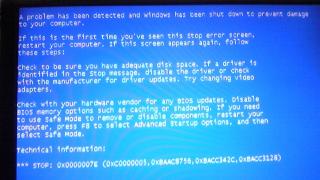
My PC are having this blue screen recently before it start windows.. (See below)
just in case u all lazy to read it, i'd retype it here:
" A problem has been detected and windows has been shut down to prevent damage to your computer.
If this is the first time you've seen this stop error screen, restart your computer. If this screen appear again, follow these steps:
Check to be sure you have adequate disk space. If a driver is identified in the stop message, disable the driver or check with the manufacturer for driver updates. Try changing video adapters.
Check with your hardware vendor for any BIOS updates. Disable BIOS memory options suck as caching or shadowing. If you need to use Safe Mode to remove or disable components, restart your computer, press F8 to select Advanced Startup Options, and then select Safe Mode.
Technical Information:
*** STOP: 0x0000007E (0xC0000005, 0xBAAC8756, 0xBACC342C, 0xBACC3128) "
I've done all the suggestion above (Change grapic card, update BIOS).
I've tried remove all my drive and USB card, just leave processor, RAM, Video Card, and my harddisk.
but it doesnt work as well. I got 2 RAM and tried remove 1 by one still no luck.
Format of harddisk was done. Re-installed Windows still have the same error.
But the weird thing is, i can go into the safe mode. does it kind of meaning that it was "some" driver which crash it? (since safe mode load less driver and services)
hope u guys can suggest me what to do...
Thanks in advance

here is the screen shot..
 Quote
Quote



 0.0181sec
 0.38
0.38
 7 queries
 GZIP Disabled