

 Nov 9 2013, 04:58 PM


QUOTE(AsenDURE @ Sep 27 2006, 06:05 PM)
All questions for PC/Laptop automatically restarting goes here.
First step on PC restart/restart loop diagnostics is to turn off auto restart when an error occurs.
- right click My Computer | Properties | Advanced | Startup and Recovery | Settings | untick Automatically Restart
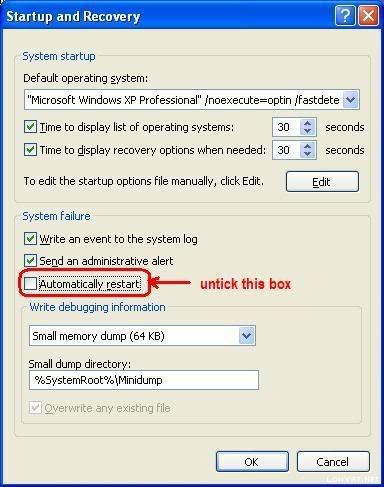
for BSOD errors please go here for self-diagnostic or post up your minidump files here. If it's not BSOD errors go here.
- Scour the internet to find out. your friend to find out what those errors in mean is:
1. http://support.microsoft.com/search/?adv=1
2. http://www.google.com
3. zip the minidump files and upload it to this thread.
- Demystifying the 'Blue Screen of Death' from Microsoft Technet
- Windows Debuggers: Part 1: A WinDbg Tutorial from The Code Project
- Generate a memory dump file by using the keyboard
- Overview of memory dump file options
- Windows does not save memory dump file after a crash

 Quote
Quote
 0.0663sec
 0.67
0.67
 7 queries
 GZIP Disabled