Welcome Guest ( Log In | Register )

123 Pages « < 57 58 59 60 61 > » Bottom

Outline · [ Standard ] · Linear+

 [FAQ] PC auto restart/Blue Screen (BSOD), All questions go here please.

views
     
francischuahcw
post Dec 2 2008, 11:42 AM

Retired. Do Not Disturb
*******
Senior Member
2,152 posts

Joined: Feb 2006
QUOTE(sk3pt|c @ Dec 1 2008, 10:32 AM)
NEED HELP!!
I jus got my desktop, 2 days old..the specs :
>>Q8200 2.33Ghz
>>Gigabyte Intel GA-EP45-UD3L mobo
>>Kingston 2Gb PC800 x 02
>>Seagate HHD 500Gb
>>Sapphire PCX ATI 4870 512Mb DDR5
>>Cooler master 520W real power
>>Window Vista Ultimate x64

The issue start when i play crysis warhead everything was great in game...whenever i quit the game..it bluescreen and showin the file-->atikmdag.sys...the rest i dunno wat it meant jor! Then when i play wc3...it will hang in game..need to force restart!!i check the GC temp. idling 50-60 celcius...in game 70-80 celcius...ITS very frustrating...SIFUs...wat is the possibilities of this happen...btw..the OS is genuiene..Any possibilites of the OS causing the trouble?or ram?OR DRIVER?...and i update the ATI driver to ver.8.11 jor!..HELP!!!!!!!!!!!!!!
*
Temperature 70-80Celcius is too high.
I would suggest you to send your GC for RMA as normal temperature for GC is 40 over while gaming should not over 60.
Thanks
warlove3
post Dec 3 2008, 10:16 AM

On my way
****
Senior Member
537 posts

Joined: Nov 2006


erm i have a core 2 duo e6300 and it auto-shutdown itself before even entering to windows, i checked the bios and the temp reported about 110"C, is my thermal paste went out or the motherboard temp detector went something wrong?
Kuhan
post Dec 3 2008, 12:02 PM

New Member
*
Junior Member
30 posts

Joined: Aug 2008
HELP,

My computer keeps giving me BSoD's such as,

IRQL_NOT_LESS_OR_EQUAL
PAGE_FAULT_IN_NON-PAGED_AREA

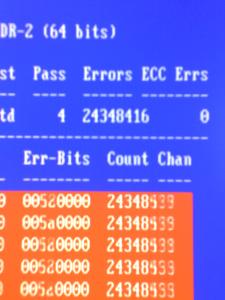
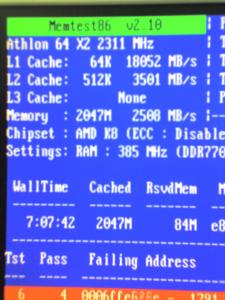
I did a bit of research, and everything points to faulty RAM. So i ran a memtest86+, now i need professional opinion on the results before i conclude it is my RAM.

Attached Image Attached Image


Any help or advice will be greatly appreciated. Thank you. notworthy.gif notworthy.gif
francischuahcw
post Dec 3 2008, 03:46 PM

Retired. Do Not Disturb
*******
Senior Member
2,152 posts

Joined: Feb 2006
QUOTE(warlove3 @ Dec 3 2008, 10:16 AM)
erm i have a core 2 duo e6300 and it auto-shutdown itself before even entering to windows, i checked the bios and the temp reported about 110"C, is my thermal paste went out or the motherboard temp detector went something wrong?
*
Check the physical problem 1st. Check thermal paste. make sure your system airflow is smooth. Clean all the dust around
francischuahcw
post Dec 3 2008, 03:47 PM

Retired. Do Not Disturb
*******
Senior Member
2,152 posts

Joined: Feb 2006
QUOTE(Kuhan @ Dec 3 2008, 12:02 PM)
HELP,

My computer keeps giving me BSoD's such as,

IRQL_NOT_LESS_OR_EQUAL
PAGE_FAULT_IN_NON-PAGED_AREA

I did a bit of research, and everything points to faulty RAM. So i ran a memtest86+, now i need professional opinion on the results before i conclude it is my RAM.

Attached Image Attached Image
Any help or advice will be greatly appreciated. Thank you.  notworthy.gif  notworthy.gif
*
You might correct it by playing at the voltage. But i dont encourage you to do it as it may spoilt mobo if its not done correctly.
RAM is cheap now, buy a new one wont cost you much.
Thanks
Grajindo
post Dec 4 2008, 09:14 AM

Look at all my stars!!
*******
Senior Member
2,171 posts

Joined: Jun 2006
From: With the Geordies
This problem actually happend quite a long time ago already. But only these few days, it keeps on happening. The computer will suddenly become black, then this blue thingy will appear, and then reboot automatically after few 1-3 seconds. Sometimes after this happen, there's something like check for solution. but after follow all the steps, it says currently no solution.. so what can i do?

Attached File  Mini120308_01.zip ( 20.59k ) Number of downloads: 8
Attached File  Mini120308_02.zip ( 20.83k ) Number of downloads: 7
Attached File  Mini120308_03.zip ( 21.43k ) Number of downloads: 7

francischuahcw
post Dec 4 2008, 01:41 PM

Retired. Do Not Disturb
*******
Senior Member
2,152 posts

Joined: Feb 2006
QUOTE(Grajindo @ Dec 4 2008, 09:14 AM)
This problem actually happend quite a long time ago already. But only these few days, it keeps on happening. The computer will suddenly become black, then this blue thingy will appear, and then reboot automatically after few 1-3 seconds. Sometimes after this happen, there's something like check for solution. but after follow all the steps, it says currently no solution.. so what can i do?

Attached File  Mini120308_01.zip ( 20.59k ) Number of downloads: 8
Attached File  Mini120308_02.zip ( 20.83k ) Number of downloads: 7
Attached File  Mini120308_03.zip ( 21.43k ) Number of downloads: 7

*
Hi, refer below


QUOTE
BugCheck D1, {8, 2, 1, 82c2b85f}

Unable to load image \SystemRoot\system32\DRIVERS\Rtlh86.sys, Win32 error 0n2
*** WARNING: Unable to verify timestamp for Rtlh86.sys
*** ERROR: Module load completed but symbols could not be loaded for Rtlh86.sys
Unable to load image \SystemRoot\system32\DRIVERS\ndisrd.sys, Win32 error 0n2
*** WARNING: Unable to verify timestamp for ndisrd.sys
*** ERROR: Module load completed but symbols could not be loaded for ndisrd.sys


Probably caused by : Rtlh86.sys ( Rtlh86+6175 )

Followup: MachineOwner
---------
Please uninstall your current RealTek Network Driver. Go to the below link and hit line no 2 for Vista64/32 driver.
http://www.realtek.com.tw/downloads/downlo...3&GetDown=false

Thanks
Grajindo
post Dec 4 2008, 03:37 PM

Look at all my stars!!
*******
Senior Member
2,171 posts

Joined: Jun 2006
From: With the Geordies
QUOTE(francischuahcw @ Dec 4 2008, 01:41 PM)
Hi, refer below
Please uninstall your current RealTek Network Driver. Go to the below link and hit line no 2 for Vista64/32 driver.
http://www.realtek.com.tw/downloads/downlo...3&GetDown=false

Thanks
*
erm, when i uninstalled my realtek network driver right, i can't online anymore. so i dl the driver you called me first, and then uninstall and install the new one. but, i still can't online. so i restart my pc. and when it comes to window, it installs the driver again and only now i can online. so, what to do?

thanks smile.gif
francischuahcw
post Dec 4 2008, 08:22 PM

Retired. Do Not Disturb
*******
Senior Member
2,152 posts

Joined: Feb 2006
QUOTE(Grajindo @ Dec 4 2008, 03:37 PM)
erm, when i uninstalled my realtek network driver right, i can't online anymore. so i dl the driver you called me first, and then uninstall and install the new one. but, i still can't online. so i restart my pc. and when it comes to window, it installs the driver again and only now i can online. so, what to do?

thanks smile.gif
*
Check the driver version. Is it the latest?
It might be the driver not match. You can look at device manager.
Find the exact driver and install.

Thanks
Grajindo
post Dec 4 2008, 10:10 PM

Look at all my stars!!
*******
Senior Member
2,171 posts

Joined: Jun 2006
From: With the Geordies
QUOTE(francischuahcw @ Dec 4 2008, 08:22 PM)
Check the driver version. Is it the latest?
It might be the driver not match. You can look at device manager.
Find the exact driver and install.

Thanks
*
okay..i think it's okay now.. no more restart... thanks bro..
Kuhan
post Dec 5 2008, 06:42 PM

New Member
*
Junior Member
30 posts

Joined: Aug 2008
QUOTE(francischuahcw @ Dec 3 2008, 03:47 PM)
You might correct it by playing at the voltage. But i dont encourage you to do it as it may spoilt mobo if its not done correctly.
RAM is cheap now, buy a new one wont cost you much.
Thanks
*
Thank you notworthy.gif , i will be getting a new RAM soon.
freyastyle
post Dec 9 2008, 03:19 PM

Casual
***
Junior Member
303 posts

Joined: Apr 2008
Guys, need help here. One of my friend pc went auto restart and show BSOD since last week, now is worst can't even get into Windows.
The message show were:

STOP: 0x0000000A
IRQL_NOT_LESS_OR_EQUAL
and
STOP: 0x00000050
PAGE_FAULT_IN_NONPAGED_AREA

and also it say may be cause by this file: port135sik.sys

Now i can't load into Windows both normal and safe mode. I check with the RAM d but it seem that's not the main reason. So i assume is the HDD failure.

Wish to get some help from here, thanks in advance.


Grajindo
post Dec 9 2008, 05:50 PM

Look at all my stars!!
*******
Senior Member
2,171 posts

Joined: Jun 2006
From: With the Geordies
QUOTE(francischuahcw @ Dec 4 2008, 08:22 PM)
Check the driver version. Is it the latest?
It might be the driver not match. You can look at device manager.
Find the exact driver and install.

Thanks
*
erm, the same thing occurs again.. i had dl the driver, but when i want o install, it says it cannot find the network adapter.. something like this sweat.gif when i go to the device manager and update right, it says my device is already the best one

This post has been edited by Grajindo: Dec 9 2008, 05:52 PM
francischuahcw
post Dec 9 2008, 07:22 PM

Retired. Do Not Disturb
*******
Senior Member
2,152 posts

Joined: Feb 2006
QUOTE(Grajindo @ Dec 9 2008, 05:50 PM)
erm, the same thing occurs again.. i had dl the driver, but when i want o install, it says it cannot find the network adapter.. something like this sweat.gif when i go to the device manager and update right, it says my device is already the best one
*
Post the latest minidump file here.
I suspect you have some problem with your system32 file.

Gyokumen_Koushu
post Dec 10 2008, 01:51 AM

To hell with circumstances; I create opportunities!
******
Senior Member
1,217 posts

Joined: Sep 2004
From: 127.0.0.1


Spec:
Running on XPS M1530
Got dual-boot: Windows XP SP3 and Vista Premium

Problem:
Play Dota crash. Error prompt saying graphics driver got a lil problem. Then things changed to VGA. Had to restart. From then, BSOD.

CODE
STOP: 0x00000050
PAGE_FAULT_IN_NONPAGED_AREA
STOP 0xACC03B9F, 0x00000001, 0x063EB40, 0x00000000


Hit F8 to try different options, none worked including safe mode. Safe mode also BSOD.

I tried to get the minidump file. But to no avail. Cant get them from C:/windows/minidump
I can access my other boot: vista though. Just XP got BSOD, which most likely being cost by the nvidia graphic driver.

Please advice.

This post has been edited by Gyokumen_Koushu: Dec 10 2008, 03:22 AM


Attached File(s)
Attached File  Minidump.zip ( 246.12k ) Number of downloads: 9
Prince of Andalus
post Dec 10 2008, 07:48 AM

Casual
***
Junior Member
365 posts

Joined: Dec 2006
hi guys

check my dump.zip

notworthy.gif


Attached File(s)
Attached File  Mini121008_01.zip ( 19.9k ) Number of downloads: 7
Grajindo
post Dec 10 2008, 09:44 AM

Look at all my stars!!
*******
Senior Member
2,171 posts

Joined: Jun 2006
From: With the Geordies
here is it.. thank you..


Attached File(s)
Attached File  Mini120908_02.zip ( 21.37k ) Number of downloads: 7
francischuahcw
post Dec 10 2008, 11:25 AM

Retired. Do Not Disturb
*******
Senior Member
2,152 posts

Joined: Feb 2006
QUOTE(Gyokumen_Koushu @ Dec 10 2008, 01:51 AM)
Spec:
Running on XPS M1530
Got dual-boot: Windows XP SP3 and Vista Premium

Problem:
Play Dota crash. Error prompt saying graphics driver got a lil problem. Then things changed to VGA. Had to restart. From then, BSOD.

CODE
STOP: 0x00000050
PAGE_FAULT_IN_NONPAGED_AREA
STOP 0xACC03B9F, 0x00000001, 0x063EB40, 0x00000000


Hit F8 to try different options, none worked including safe mode. Safe mode also BSOD.

I tried to get the minidump file. But to no avail. Cant get them from C:/windows/minidump
I can access my other boot: vista though. Just XP got BSOD, which most likely being cost by the nvidia graphic driver.

Please advice.
*
Do you have Kaspersky running on your XP?
It seems to me that you have application crash for kaspersky and speedfan.
And your XP ntoskernel.exe is not able to load.

QUOTE
Unable to load image ntoskrnl.exe, Win32 error 0n2
*** WARNING: Unable to verify timestamp for ntoskrnl.exe
*** ERROR: Module load completed but symbols could not be loaded for ntoskrnl.exe
Probably caused by : klif.sys ( klif+f90a )

Followup: MachineOwner


Basically 0X50 is all about RAM but in this case i i will refer it as a faulty service.
Please do a system repair (not format) for your XP and see how it goes.

Thanks

francischuahcw
post Dec 10 2008, 11:35 AM

Retired. Do Not Disturb
*******
Senior Member
2,152 posts

Joined: Feb 2006
QUOTE(Grajindo @ Dec 10 2008, 09:44 AM)
here is it.. thank you..
*
Grajindo,
Are you using QVOD player?
Please uninstall this player as it has conflict with your Realtek LAN driver.
Then see if BSOD still happens.

http://forum.lowyat.net/topic/715369

Thanks
francischuahcw
post Dec 10 2008, 11:42 AM

Retired. Do Not Disturb
*******
Senior Member
2,152 posts

Joined: Feb 2006
QUOTE(Prince of Andalus @ Dec 10 2008, 07:48 AM)
hi guys

check my dump.zip

notworthy.gif
*
QUOTE
Bug Check 0x12: TRAP_CAUSE_UNKNOWN
The TRAP_CAUSE_UNKNOWN bug check has a value of 0x00000012. This indicates that an unknown exception has occurred.


Reason for the crash is unknown.
Is that happens when you use Vodafone application. VMC.exe?
Please check if the application is compatible with your Window

There are many outdated driver in your system. Some are NT driver and some are back to 1999.
Please update your driver if possible.
Thanks

123 Pages « < 57 58 59 60 61 > » Top
 

Change to:
| Lo-Fi Version
0.4372sec    0.25    6 queries    GZIP Disabled
Time is now: 7th December 2025 - 01:10 PM