

Here the minidump file, pls let me know wat i the prob with this laptop, thanks
Attached File(s)
 Mini111508_01.zip ( 29.91k )
Number of downloads: 58
Mini111508_01.zip ( 29.91k )
Number of downloads: 58[FAQ] PC auto restart/Blue Screen (BSOD), All questions go here please.
|
|
 Nov 15 2008, 03:50 PM Nov 15 2008, 03:50 PM
|
 
Junior Member
372 posts Joined: Sep 2008 From: Klang  
|
Ok, I have a laptop when I run media player classic & play a movie it suddenly makes the laptop get hang & BSOD will appear later on for a while then it auto restart
Here the minidump file, pls let me know wat i the prob with this laptop, thanks Attached File(s)
Mini111508_01.zip ( 29.91k )
Number of downloads: 58 |
|
|
|
|
|
Nov 15 2008, 03:52 PM
|

Junior Member
16 posts Joined: Jun 2008
|
had 2x blue screen..
first one, was watching heroes in MPC.. then blue screen, restarted, and i ran "error-checking" in C: tools no error shown then restart, ran chkdsk in cmd.exe, at stage 2 95%, blue screen attached minidump files Attached File(s)
minidump2.zip ( 40.74k )
Number of downloads: 16 |
|
|
Nov 15 2008, 06:29 PM
|

Newbie
2 posts Joined: Jul 2007 From: KL---PJ---
|
it seems this is the direct information forum for the auto restart pc..ok
i just bought seagate HDD (ST380811AS) from local shop. coz my previous sata 1 is having a trouble with loading windows due to hard disk corrupt... then i install windows xp in the new HD. a few weeks later my pc suddenly restart and then i just wondering why it happens. then i restart the pc and i found out when i insert cd into cdrom drive..by the time cdrom load the content from the cd...my pc restart...and again..and again... when i told this matter to my frenz he told me becoz of the HDD i just bought..it could not be because if im not using cdrom at any purpose it wont restart...it goes smoothly...loading windows as usual. i thought it might happen due to changes in bios configuration. please computer genius help me !!!! This post has been edited by Warlock666: Nov 15 2008, 06:30 PM |
|
|
Nov 15 2008, 07:22 PM
|

Senior Member
2,152 posts Joined: Feb 2006
|
QUOTE(7up7up @ Nov 15 2008, 03:52 PM) had 2x blue screen.. Hi there 7upfirst one, was watching heroes in MPC.. then blue screen, restarted, and i ran "error-checking" in C: tools no error shown then restart, ran chkdsk in cmd.exe, at stage 2 95%, blue screen attached minidump files  My last advice for you based on your current situation. Backup every important file in your HDD and prepare for a new harddisk. This harddisk wont stay long. I mean, using this harddisk for OS drive is not advisable. However, you might use it as data storage until the life span ends. Thanks francis |
|
|
Nov 15 2008, 07:25 PM
|
|
Senior Member
2,152 posts Joined: Feb 2006
|
QUOTE(doom89757 @ Nov 15 2008, 03:50 PM) Ok, I have a laptop when I run media player classic & play a movie it suddenly makes the laptop get hang & BSOD will appear later on for a while then it auto restart Hi there doom89757,Here the minidump file, pls let me know wat i the prob with this laptop, thanks QUOTE BugCheck 1000008E, {80000004, 806d6935, 9d618d80, 0} It seems like you are having trouble with your IGP/Video driver.Unable to load image igxpmp32.sys, Win32 error 0n2 *** WARNING: Unable to verify timestamp for igxpmp32.sys *** ERROR: Module load completed but symbols could not be loaded for igxpmp32.sys Unable to load image igxpgd32.dll, Win32 error 0n2 *** WARNING: Unable to verify timestamp for igxpgd32.dll *** ERROR: Module load completed but symbols could not be loaded for igxpgd32.dll *** WARNING: Unable to verify timestamp for igxprd32.dll *** ERROR: Module load completed but symbols could not be loaded for igxprd32.dll Probably caused by : pci.sys ( pci!PciReadWriteConfigSpace+38 ) Followup: MachineOwner Possible for you to update your driver? Then we will see if problem happens again. Thanks francis |
|
|
Nov 15 2008, 10:24 PM
|
|
Junior Member
372 posts Joined: Sep 2008 From: Klang
|
Ok, Francis I have install new drivers but problem still persist
Here the minidump: Attached File(s)
Mini111508_02.zip ( 23.82k )
Number of downloads: 20 |
|
|
|
|
|
Nov 15 2008, 11:01 PM
|
|
Senior Member
2,152 posts Joined: Feb 2006
|
Hi doom89757
This is not looking good to me QUOTE BugCheck 100000EA, {88d7baf0, 88f2c140, ba4efcb4, 1} Unable to load image igxpdv32.DLL, Win32 error 0n2 *** WARNING: Unable to verify timestamp for igxpdv32.DLL *** ERROR: Module load completed but symbols could not be loaded for igxpdv32.DLL *** WARNING: Unable to verify timestamp for igxpgd32.dll *** ERROR: Module load completed but symbols could not be loaded for igxpgd32.dll *** WARNING: Unable to verify timestamp for igxprd32.dll *** ERROR: Module load completed but symbols could not be loaded for igxprd32.dll ERROR - could not read driver name for bugcheck parameter 3 Probably caused by : igxprd32.dll ( igxprd32+746f ) Followup: MachineOwner Refer below interpretation of your checkcode QUOTE Cause Which one you prefer? Driver or Hardware?1.A device driver is spinning in an infinite loop, most likely waiting for hardware to become idle. 2.This usually indicates problem with the hardware itself, or with the device driver programming the hardware incorrectly. Frequently, this is the result of a bad video card or a bad display driver. Can you revert your driver to the original driver that comes with the laptop? Either one of both mentioned does not look good to your laptop i think. |
|
|
Nov 15 2008, 11:21 PM
|
|
Senior Member
2,750 posts Joined: Dec 2004 From: Malaysia
|
Hi there. My laptop has BSOD since a long time ago. I send to shop and technician said that no problem with hardware and they suspect software problem, and help me reformat, but that doesnt help much.
Im using COMPAQ laptop and Nvidia Geforce Go 6150 with a vista business x86. I had BSOD during watching movies, playing games and even do nothing. Usually will have it within a few days. Below is attachment for the recent BSOD, which happen during im playing dota. Please advise what should i do. Thanks. Attached File(s)
Mini111508_02.zip ( 10.47k )
Number of downloads: 10 |
|
|
Nov 15 2008, 11:28 PM
|
|
Senior Member
2,152 posts Joined: Feb 2006
|
QUOTE(~~5ive~~ @ Nov 15 2008, 11:21 PM) Hi there. My laptop has BSOD since a long time ago. I send to shop and technician said that no problem with hardware and they suspect software problem, and help me reformat, but that doesnt help much. Hi there,Im using COMPAQ laptop and Nvidia Geforce Go 6150 with a vista business x86. I had BSOD during watching movies, playing games and even do nothing. Usually will have it within a few days. Below is attachment for the recent BSOD, which happen during im playing dota. Please advise what should i do. Thanks. your minidump file could not be read. Can you please check your setting for me? Or at least upload another file for me. Please check your setting accordingly to below. 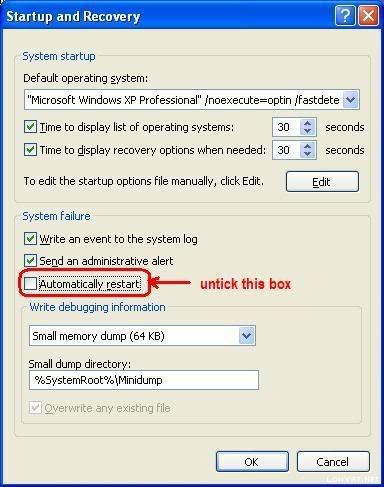 Make sure that write debugging information is Small Memory Dump (64kb) and not others. Thanks francis P/S: the file you upload is corrupted. Can you upload another one? |
|
|
Nov 16 2008, 04:16 AM
|
|
Junior Member
372 posts Joined: Sep 2008 From: Klang
|
QUOTE(francischuahcw @ Nov 15 2008, 11:01 PM) Hi doom89757 Wowser, loks like mayb the laptop graphic card maybe a problem, could it be overheat?? Man Mayb I try reformatting the laptop OS coz it got other problem too that does not cause BSOD, very weird this laptop is actingThis is not looking good to me Refer below interpretation of your checkcode Which one you prefer? Driver or Hardware? Can you revert your driver to the original driver that comes with the laptop? Either one of both mentioned does not look good to your laptop i think. Anyway thx a lot Francis for the report, man this is a deep sh** if hardware problem |
|
|
Nov 16 2008, 10:27 PM
|
|
Senior Member
2,750 posts Joined: Dec 2004 From: Malaysia
|
QUOTE(francischuahcw @ Nov 15 2008, 11:28 PM) Hi there, Ok...this should be able to read.your minidump file could not be read. Can you please check your setting for me? Or at least upload another file for me. Please check your setting accordingly to below. Make sure that write debugging information is Small Memory Dump (64kb) and not others. Thanks francis P/S: the file you upload is corrupted. Can you upload another one? Attached File(s)
Mini111608_01.zip ( 28.42k )
Number of downloads: 10 |
|
|
Nov 17 2008, 12:21 AM
|
|
Senior Member
2,152 posts Joined: Feb 2006
|
QUOTE(~~5ive~~ @ Nov 16 2008, 10:27 PM) Ok...this should be able to read. Yes it is. And it is your NVIDIA MCP Networking Function Driver. (NVIDIA Networking Driver - NVIDIA Corporation) that creates the problem.You might need to have a look at your LAN driver or your chipset driver. QUOTE BugCheck 1000000A, {43444c70, 2, 1, 827c2ede} Bug Check 0xA: IRQL_NOT_LESS_OR_EQUALProbably caused by : nvmfdx32.sys ( nvmfdx32+103f3 ) Followup: MachineOwner --------- The IRQL_NOT_LESS_OR_EQUAL bug check has a value of 0x0000000A. This indicates that Microsoft Windows or a kernel-mode driver accessed paged memory at DISPATCH_LEVEL or above. QUOTE Cause This bug check is issued if paged memory (or invalid memory) is accessed when the IRQL is too high. The error that generates this bug check usually occurs after the installation of a faulty device driver, system service, or BIOS. If you encounter bug check 0xA while upgrading to a later version of Windows, this error might be caused by a device driver, a system service, a virus scanner, or a backup tool that is incompatible with the new version. Check your driver. I don't think you are installing a Vista driver or it might not actually the exact driver that suits your laptop model. Please clarified that and update the driver or change the driver if possible. Thanks francis This post has been edited by francischuahcw: Nov 17 2008, 12:23 AM |
|
|
Nov 17 2008, 03:30 AM
|
|
Senior Member
2,750 posts Joined: Dec 2004 From: Malaysia
|
QUOTE(francischuahcw @ Nov 17 2008, 12:21 AM) Yes it is. And it is your NVIDIA MCP Networking Function Driver. (NVIDIA Networking Driver - NVIDIA Corporation) that creates the problem. Thanks for the superb fast reply.....You might need to have a look at your LAN driver or your chipset driver. Bug Check 0xA: IRQL_NOT_LESS_OR_EQUAL The IRQL_NOT_LESS_OR_EQUAL bug check has a value of 0x0000000A. This indicates that Microsoft Windows or a kernel-mode driver accessed paged memory at DISPATCH_LEVEL or above. Check your driver. I don't think you are installing a Vista driver or it might not actually the exact driver that suits your laptop model. Please clarified that and update the driver or change the driver if possible. Thanks francis I try to find the drivers 1st....although not really know which one.... Thanks.... |
|
|
|
|
|
Nov 17 2008, 05:10 AM
|
|
Junior Member
16 posts Joined: Nov 2008
|
Minidump.zip ( 510.9k )
Number of downloads: 10 heres my files.. can u guys help me pls... i would really apriciate ur help.. and my problem was.. when i am playing warcraft 3 or sum other 3D games... suddenly the screen turns blue and say beggining to dump physical memory by atapi or ativag.. if not den it mus be the directx problem.. help pls..!! thx alot.. |
|
|
Nov 17 2008, 01:05 PM
|
|
Senior Member
2,750 posts Joined: Dec 2004 From: Malaysia
|
QUOTE(~~5ive~~ @ Nov 17 2008, 03:30 AM) Thanks for the superb fast reply..... Still BSOD today....I try to find the drivers 1st....although not really know which one.... Thanks.... yesterday i install nVIDIA ForceWare X 176.68 for Windows Vista 32bit Operating System: Windows Vista 32bit Driver Version: 176.68 Driver Date: 2008-10-06 (YYYY-MM-DD) Driver Size: 33.68 MB Driver Released by: MS Catalogue MS WHQL Certificate: Setup Files Included: International Files: Original INF only supports: [DEV_0244] NVIDIA GeForce Go 6150 Still the same problem? May you guys tell me what should i looking for? Or which driver specifically? Im totally noob with all this..... Thanks.... Attached File(s)
Mini111708_01.zip ( 41.89k )
Number of downloads: 7 |
|
|
Nov 17 2008, 01:21 PM
|
|
Senior Member
2,152 posts Joined: Feb 2006
|
QUOTE(noobaxx123 @ Nov 17 2008, 05:10 AM)
Minidump.zip ( 510.9k )
Number of downloads: 10heres my files.. can u guys help me pls... i would really apriciate ur help.. and my problem was.. when i am playing warcraft 3 or sum other 3D games... suddenly the screen turns blue and say beggining to dump physical memory by atapi or ativag.. if not den it mus be the directx problem.. help pls..!! thx alot.. Your problem is not good to me. BugCheck 0XEA THREAD_STUCK_IN_DEVICE_DRIVER The THREAD_STUCK_IN_DEVICE_DRIVER bug check has a value of 0x000000EA. This indicates that a thread in a device driver is endlessly spinning. Please refer below information QUOTE BugCheck 0XEA THREAD_STUCK_IN_DEVICE_DRIVE Cause A device driver is spinning in an infinite loop, most likely waiting for hardware to become idle. This usually indicates problem with the hardware itself, or with the device driver programming the hardware incorrectly. Frequently, this is the result of a bad video card or a bad display driver. Try update your driver. If driver update still fails you. You might be having problem with your graphic cards. Thanks francis |
|
|
Nov 17 2008, 01:22 PM
|

Junior Member
42 posts Joined: Nov 2007
|
|
|
|
Nov 17 2008, 01:31 PM
|
|
Senior Member
2,152 posts Joined: Feb 2006
|
QUOTE(~~5ive~~ @ Nov 17 2008, 01:05 PM) Still BSOD today.... Hi there ~~5ive~~yesterday i install nVIDIA ForceWare X 176.68 for Windows Vista 32bit Operating System: Windows Vista 32bit Driver Version: 176.68 Driver Date: 2008-10-06 (YYYY-MM-DD) Driver Size: 33.68 MB Driver Released by: MS Catalogue MS WHQL Certificate: Setup Files Included: International Files: Original INF only supports: [DEV_0244] NVIDIA GeForce Go 6150 Still the same problem? May you guys tell me what should i looking for? Or which driver specifically? Im totally noob with all this..... Thanks.... BugCheck Code: Bug Check 0x124: WHEA_UNCORRECTABLE_ERROR The WHEA_UNCORRECTABLE_ERROR bug check has a value of 0x00000124. This bug check indicates that a fatal hardware error has occurred. This bug check uses the error data that is provided by the Windows Hardware Error Architecture (WHEA). You have a fatal hardware error that crash your whole system but i could not detect which hardware that fails you. It could be your processor. Is it AMD processor? This is what i got from the debugger. QUOTE Debugging Details: Does your laptop still under warranty? If possible, please send to service center for details checkup. Thanks.------------------ WHEA_ERROR_RECORD: !errrec ffffffff8737d028 BUGCHECK_STR: 0x124_AuthenticAMD CUSTOMER_CRASH_COUNT: 1 DEFAULT_BUCKET_ID: VISTA_DRIVER_FAULT PROCESS_NAME: mpcstar.exe CURRENT_IRQL: 0 STACK_TEXT: 824fff38 827cc8b5 00000124 00000000 8737d028 nt!KeBugCheckEx+0x1e 824fff8c 824cd928 8737d028 84f43208 84f43208 hal!HalBugCheckSystem+0xe1 824fffb8 827cc7c9 84f43208 00000000 824ffff4 nt!WheaReportHwError+0x1d0 824fffc8 827ccea7 00000003 84f43208 00000000 hal!HalpReportMachineCheck+0x31 824ffff4 827c899f 80151000 00000000 00000000 hal!HalpMcaExceptionHandler+0xf7 824ffff4 00000000 80151000 00000000 00000000 hal!HalpMcaExceptionHandlerWrapper+0x77 STACK_COMMAND: kb FOLLOWUP_NAME: MachineOwner MODULE_NAME: hardware IMAGE_NAME: hardware DEBUG_FLR_IMAGE_TIMESTAMP: 0 FAILURE_BUCKET_ID: 0x124_AuthenticAMD BUCKET_ID: 0x124_AuthenticAMD Followup: MachineOwner --------- Sorry to you that not much i can help here. Regards. francis This post has been edited by francischuahcw: Nov 17 2008, 01:54 PM |
|
|
Nov 17 2008, 01:55 PM
|
|
Senior Member
2,152 posts Joined: Feb 2006
|
QUOTE(j3ffrey @ Nov 17 2008, 01:22 PM) Hi there j3ffreyPlease refer below information QUOTE BugCheck 1000008E, {c0000005, f7ba80e3, f7c1cadc, 0} Do you use product from this vendor? Bytemobile Kernel Network Provider - Bytemobile Optimization Client - Bytemobile, Inc. Probably caused by : tcpipBM.SYS ( tcpipBM+30e3 ) Followup: MachineOwner --------- It seems like this driver cannot load. If possible, please update the driver. Or does you use Microsoft Groove http://www.digitalsupporttech.com/mskb/943...ion_Manager.htm QUOTE Unable to load image tcpipBM.SYS, Win32 error 0n2 *** WARNING: Unable to verify timestamp for tcpipBM.SYS *** ERROR: Module load completed but symbols could not be loaded for tcpipBM.SYS Next, Displaying Event Viewer
CODE Eventvwr In Event Viewer look at both System Log and Application Log. You can save a copy of your log and upload it here. Use the Action toolbar and choose Save Log As Then, save the log as .txt file and upload it here. Thanks |
|
|
Nov 17 2008, 02:35 PM
|
|
Junior Member
16 posts Joined: Nov 2008
|
okay but..how am i gonna update it??? just go to the drivers website and update it or ??
i am not kinda good in it sorry.. |
| Change to: |  0.0315sec 0.0315sec
 0.25 0.25
 6 queries 6 queries
 GZIP Disabled GZIP Disabled
Time is now: 7th December 2025 - 11:37 AM |
 Quote
Quote