Welcome Guest ( Log In | Register )

Bump Topic Topic Closed RSS Feed

Outline · [ Standard ] · Linear+

 Acer Switch 12, RM2,399

views
     
TSBeouwulf
post Jan 2 2015, 10:13 AM, updated 11y ago

Laptop or Notebook ?
******
Senior Member
1,035 posts

Joined: Mar 2007
From: JB to KL
SW5-271-69SE


user posted image

Intel M-5Y10a / 4 GB / 128GB / BT 4.0 / HD Webcam / 12.5" IPS FHD Multi Touch / W8.1
Genuine Windows® 8.1 64-bit
Intel® Core M-5Y10a processor (4 MB L3 cache, 0.8 GHz with Turbo Boost up to 2.0 GHz, DDR3L 1600 MHz, 4.5 W TDP), supporting Intel® 64 architecture, Intel® Smart Cache
Intel® HD Graphics 5300, supporting OpenGL® 4.2, OpenCL 1.2, Microsoft® DirectX® 11.1
12.5" IPS display, FHD 1920 x 1080 resolution, high-brightness, LED-backlit TFT LCD, supporting 10-finger touch
4 GB of DDR3L memory
128 GB SSD
Acer HD Webcam, 1280 x 720 resolution
Acer InviLink™ Nplify™ 802.11 a/b/g/n Wireless, supporting 2.4GHz & 5 GHz
Bluetooth® 4.0
36 Wh 3220 mAh 11.4 V 3-cell Li-ion battery pack
Estimated battery life: Up to 8 hours
Micro SD card reader
Micro USB 3.0 port, USB 2.0 port
HDMI™ Micro port with HDCP support
1.4kg with Keyboard
317 (W) x 220.6 (D) x 9.5/16.5 (H) mm

This post has been edited by Beouwulf: Feb 15 2015, 07:54 PM
Fab52
post Jan 19 2015, 12:17 PM

New Member
*
Junior Member
21 posts

Joined: Feb 2005
From: Butterworth


QUOTE(Beouwulf @ Jan 2 2015, 10:13 AM)
SW5-271-69SE
user posted image

Intel M-5Y10a / 4 GB / 128GB / BT 4.0 / HD Webcam / 12.5" IPS FHD Multi Touch / W8.1
Genuine Windows® 8.1 64-bit
Intel® Core M-5Y10a processor (4 MB L3 cache, 0.8 GHz with Turbo Boost up to 2.0 GHz, DDR3L 1600 MHz, 4.5 W TDP), supporting Intel® 64 architecture, Intel® Smart Cache
Intel® HD Graphics 5300, supporting OpenGL® 4.2, OpenCL 1.2, Microsoft® DirectX® 11.1
12.5" IPS display, FHD 1920 x 1080 resolution, high-brightness, LED-backlit TFT LCD, supporting 10-finger touch
4 GB of DDR3L memory
128 GB SSD
Acer HD Webcam, 1280 x 720 resolution
Acer InviLink™ Nplify™ 802.11 a/b/g/n Wireless, supporting 2.4GHz & 5 GHz
Bluetooth® 4.0
36 Wh 3220 mAh 11.4 V 3-cell Li-ion battery pack
Estimated battery life: Up to 8 hours
Micro SD card reader
Micro USB 3.0 port, USB 2.0 port
HDMI™ Micro port with HDCP support
1.4kg with Keyboard
317 (W) x 220.6 (D) x 9.5/16.5 (H) mm
*
Looking to have a closer look to this item, do you know where I can get to do that?
jsflim
post Jan 26 2015, 05:57 PM

Casual
***
Junior Member
460 posts

Joined: Dec 2004


does this comes with 8gb ram instead of fixed 4gb ram only
babyk
post Jan 27 2015, 08:31 AM

BANNED 101/100(tm) : Your avatar too sexy
********
All Stars
10,052 posts

Joined: Jan 2003
From: House of Wax
I am getting my unit today, stay tuned~
riku2replica
post Jan 27 2015, 08:50 AM

Mugi-chan!! 可愛い!!
*******
Senior Member
3,304 posts

Joined: Mar 2006
From: Chicago(Port25)
QUOTE(Beouwulf @ Jan 2 2015, 10:13 AM)
SW5-271-69SE
user posted image

Intel M-5Y10a / 4 GB / 128GB / BT 4.0 / HD Webcam / 12.5" IPS FHD Multi Touch / W8.1
Genuine Windows® 8.1 64-bit
Intel® Core M-5Y10a processor (4 MB L3 cache, 0.8 GHz with Turbo Boost up to 2.0 GHz, DDR3L 1600 MHz, 4.5 W TDP), supporting Intel® 64 architecture, Intel® Smart Cache
Intel® HD Graphics 5300, supporting OpenGL® 4.2, OpenCL 1.2, Microsoft® DirectX® 11.1
12.5" IPS display, FHD 1920 x 1080 resolution, high-brightness, LED-backlit TFT LCD, supporting 10-finger touch
4 GB of DDR3L memory
128 GB SSD
Acer HD Webcam, 1280 x 720 resolution
Acer InviLink™ Nplify™ 802.11 a/b/g/n Wireless, supporting 2.4GHz & 5 GHz
Bluetooth® 4.0
36 Wh 3220 mAh 11.4 V 3-cell Li-ion battery pack
Estimated battery life: Up to 8 hours
Micro SD card reader
Micro USB 3.0 port, USB 2.0 port
HDMI™ Micro port with HDCP support
1.4kg with Keyboard
317 (W) x 220.6 (D) x 9.5/16.5 (H) mm
*
what's the point of this thread? A show off?
willgan
post Jan 27 2015, 02:05 PM

Casual
***
Junior Member
302 posts

Joined: Jan 2003
i'm interested in this as well.
Can give some comment about the active pen? i think its from synaptics and doesn't seem to be better than n-trig and wacom..

QUOTE(babyk @ Jan 27 2015, 08:31 AM)
I am getting my unit today, stay tuned~
*
babyk
post Jan 27 2015, 06:27 PM

BANNED 101/100(tm) : Your avatar too sexy
********
All Stars
10,052 posts

Joined: Jan 2003
From: House of Wax
Arrived today
user posted image


Unboxing in progress
user posted image


More pictures coming...stay tuned

This post has been edited by babyk: Jan 27 2015, 06:28 PM
babyk
post Jan 27 2015, 07:09 PM

BANNED 101/100(tm) : Your avatar too sexy
********
All Stars
10,052 posts

Joined: Jan 2003
From: House of Wax
Acer Switch 12 Review
After using it for 1 week, here’s my verdict.

Display
Positive: The screen is nice, it is powered by 1920x1080 resolution and the screen is sharp. Brightness wise is very good. It has 10 fingers sensors for touch screen, pinch to zoom and double tap to click works fine. It has accelerometer and it can rotate any direction you want. It comes with Acer Pen and it works perfectly fine. Drawing on the screen is not an issue and it can recognize your palm touching on the screen and will not take that into your touch.
Negative: It is glossy type and if you are typing under the sun, it will be very reflective. The touch screen is not as intelligent as Apple iPad or iPhone, there is no predictive touch, if you point to a small text, you need to point it precisely or else it will not click on that text. If you are coming from Apple iPad or iPhone users, you will see this immediately.

Processor

Battery
Keyboard / Pointing Stick
USB Port / Micro SD Slot
SSD
Memory/RAM


***************work in progress**********************

This post has been edited by babyk: Feb 4 2015, 01:48 AM
babyk
post Jan 27 2015, 07:48 PM

BANNED 101/100(tm) : Your avatar too sexy
********
All Stars
10,052 posts

Joined: Jan 2003
From: House of Wax
I just disect my new laptop rclxm9.gif rclxm9.gif rclxm9.gif

user posted image
willgan
post Jan 27 2015, 08:04 PM

Casual
***
Junior Member
302 posts

Joined: Jan 2003
looks great..

i'm wondering whether the ram and the ssd are soldered to the board..

This post has been edited by willgan: Jan 27 2015, 08:04 PM
babyk
post Jan 27 2015, 08:06 PM

BANNED 101/100(tm) : Your avatar too sexy
********
All Stars
10,052 posts

Joined: Jan 2003
From: House of Wax
QUOTE(willgan @ Jan 27 2015, 08:04 PM)
looks great..

i'm wondering whether the ram and the ssd are soldered to the board..
*
I am trying to figure out as well. As I know the SSD can be upgraded, RAM is not sure yet.

Will update you guys soon
Flying off to Kimchi land now
willgan
post Jan 29 2015, 07:41 PM

Casual
***
Junior Member
302 posts

Joined: Jan 2003
just got my unit, looks great so far. Here are some of my comments..

The digitizer works pretty well in scribbling and note taking, but not superb.
Haven't really tested the battery life, but i think should be around 8-9 hours browsing internet with wifi and average brightness.
Will try gaming this weekend and see how long it can last..

The keyboard works good since its a wireless , bluetooth keyboard.
I'm ok with the missing touchpad since i'm familiar with the pointing stick. If you're not use to pointing stick, you might have problem using the mouse pointer.
babyk
post Jan 29 2015, 08:07 PM

BANNED 101/100(tm) : Your avatar too sexy
********
All Stars
10,052 posts

Joined: Jan 2003
From: House of Wax
QUOTE(willgan @ Jan 29 2015, 07:41 PM)
just got my unit, looks great so far. Here are some of my comments..

The digitizer works pretty well in scribbling and note taking, but not superb.
Haven't really tested the battery life, but i think should be around 8-9 hours browsing internet with wifi and average brightness.
Will try gaming this weekend and see how long it can last..

The keyboard works good since its a wireless , bluetooth keyboard.
I'm ok with the missing touchpad since i'm familiar with the pointing stick. If you're not use to pointing stick, you might have problem using the mouse pointer.
*
The keyboard is not Bluetooth, it's running on RF. The default Bluetooth is not switched on.
babyk
post Jan 30 2015, 11:35 PM

BANNED 101/100(tm) : Your avatar too sexy
********
All Stars
10,052 posts

Joined: Jan 2003
From: House of Wax
Attached Image

drool.gif drool.gif drool.gif

Just dissect my Switch 12 again! SSD can be upgraded
SonnyCooL
post Feb 1 2015, 12:59 AM

Web Bastard
*******
Senior Member
5,957 posts

Joined: Sep 2004
From: www.bitching.asia


QUOTE(babyk @ Jan 30 2015, 11:35 PM)
Attached Image

drool.gif  drool.gif  drool.gif

Just dissect my Switch 12 again! SSD can be upgraded
*
review on performance, size and bla bla ....
ram can update ?
hkh m43
post Feb 1 2015, 09:34 AM

Getting Started
**
Junior Member
265 posts

Joined: Aug 2010
QUOTE(SonnyCooL @ Feb 1 2015, 12:59 AM)
review on performance, size and bla bla ....
ram can update ?
*
And battery life!

Also, isn't it annoying that the screen faces out when closed so it's not protected in-bag?
SonnyCooL
post Feb 1 2015, 11:06 AM

Web Bastard
*******
Senior Member
5,957 posts

Joined: Sep 2004
From: www.bitching.asia


QUOTE(hkh m43 @ Feb 1 2015, 09:34 AM)
And battery life!

Also, isn't it annoying that the screen faces out when closed so it's not protected in-bag?
*
yah true .....
how performance compare with i3 on surface pro ?
willgan
post Feb 2 2015, 12:09 AM

Casual
***
Junior Member
302 posts

Joined: Jan 2003
it comes with a sleeve..

the screen is gorilla glass 3 therefore won't get scratches easily..

just need some extra careful when taking out and keeping it.. don't think it has much issue..

QUOTE(hkh m43 @ Feb 1 2015, 09:34 AM)
And battery life!

Also, isn't it annoying that the screen faces out when closed so it's not protected in-bag?
*
willgan
post Feb 2 2015, 12:14 AM

Casual
***
Junior Member
302 posts

Joined: Jan 2003
great to hear that...

can give some pointer's how u manage to open the main portion, don't see any screw..
don't want to risk breaking any parts

thanks

QUOTE(babyk @ Jan 30 2015, 11:35 PM)
Attached Image

drool.gif  drool.gif  drool.gif

Just dissect my Switch 12 again! SSD can be upgraded
*
SonnyCooL
post Feb 4 2015, 12:13 AM

Web Bastard
*******
Senior Member
5,957 posts

Joined: Sep 2004
From: www.bitching.asia


btw any shop have display unit ????
try digital mall they don't have and cost 2349
babyk
post Feb 4 2015, 02:00 AM

BANNED 101/100(tm) : Your avatar too sexy
********
All Stars
10,052 posts

Joined: Jan 2003
From: House of Wax
QUOTE(SonnyCooL @ Feb 4 2015, 12:13 AM)
btw any shop have display unit ????
try digital mall they don't have and cost 2349
*
RRP is RM2299, don't buy anything above RRP and remember it comes with free sleeve and touch pen
zack9999
post Feb 4 2015, 10:40 AM

Getting Started
**
Junior Member
290 posts

Joined: Jun 2012
I saw this at Paradigm Mall. Salivating to buy. Those who bought it how is the pen? It is a digitizer pen or just a normal capacitive one?

babyk
post Feb 4 2015, 11:41 AM

BANNED 101/100(tm) : Your avatar too sexy
********
All Stars
10,052 posts

Joined: Jan 2003
From: House of Wax
QUOTE(zack9999 @ Feb 4 2015, 10:40 AM)
I saw this at Paradigm Mall. Salivating to buy. Those who bought it how is the pen? It is a digitizer pen or just a normal capacitive one?
*
Digitizer, like the Samsung Note 4
KenSX
post Feb 4 2015, 01:54 PM

Getting Started
**
Junior Member
59 posts

Joined: Oct 2014
QUOTE(zack9999 @ Feb 4 2015, 10:40 AM)
I saw this at Paradigm Mall. Salivating to buy. Those who bought it how is the pen? It is a digitizer pen or just a normal capacitive one?
*
Can I know which shop in Paradigm? Want to take a look before buying. Thanks
zack9999
post Feb 4 2015, 02:14 PM

Getting Started
**
Junior Member
290 posts

Joined: Jun 2012
The big IT shop there. I think Harvey Norman or something. Went there last Saturday to collect my racekit for this Sunday run. I am not a frequent visitor to the mall.

QUOTE(KenSX @ Feb 4 2015, 01:54 PM)
Can I know which shop in Paradigm? Want to take a look before buying. Thanks
*
KenSX
post Feb 4 2015, 02:23 PM

Getting Started
**
Junior Member
59 posts

Joined: Oct 2014
QUOTE(zack9999 @ Feb 4 2015, 02:14 PM)
The big IT shop there. I think Harvey Norman or something. Went there last Saturday to collect my racekit for this Sunday run. I am not a frequent visitor to the mall.
*
Thanks. . Will look around
willgan
post Feb 4 2015, 05:33 PM

Casual
***
Junior Member
302 posts

Joined: Jan 2003
if you're desperate, check out the acer shop at ground floor, lowyat plaze, it has display unit there, try it until u like it..

QUOTE(KenSX @ Feb 4 2015, 02:23 PM)
Thanks. . Will look around
*
This post has been edited by willgan: Feb 4 2015, 05:33 PM
willgan
post Feb 4 2015, 05:37 PM

Casual
***
Junior Member
302 posts

Joined: Jan 2003
its a synaptics digitizer..NKOTB (new kid on the block)
its close to n-trig in surface pro 3..

is it good? it works ok from my point of view (as a normal user).. its actually a bonus for that price of the switch which is a 5-in-1 convertible ..

QUOTE(zack9999 @ Feb 4 2015, 10:40 AM)
I saw this at Paradigm Mall. Salivating to buy. Those who bought it how is the pen? It is a digitizer pen or just a normal capacitive one?
*
Fab52
post Feb 4 2015, 05:44 PM

New Member
*
Junior Member
21 posts

Joined: Feb 2005
From: Butterworth


I am having one complaint with the stylus, the battery worn out just after 3-4 days of usage. after replacing the battery (bought the AAAA battery from radioshack) it works good until the third day then it does not register on the screen. I need to take out the battery and put it back to have it registered. Can you guys share if there is specific instruction on handling the stylus or is it mine is broken?

PS: I really love using Switch 12
willgan
post Feb 4 2015, 05:55 PM

Casual
***
Junior Member
302 posts

Joined: Jan 2003
i don't seem to have this problem yet but i don't constantly use it for a long period..

i don't keep the pen near the tab though..

QUOTE(Fab52 @ Feb 4 2015, 05:44 PM)
I am having one complaint with the stylus, the battery worn out just after 3-4 days of usage. after replacing the battery (bought the AAAA battery from radioshack) it works good until the third day then it does not register on the screen. I need to take out the battery and put it back to have it registered. Can you guys share if there is specific instruction on handling the stylus or is it mine is broken?

PS: I really love using Switch 12
*
Fab52
post Feb 4 2015, 06:00 PM

New Member
*
Junior Member
21 posts

Joined: Feb 2005
From: Butterworth


QUOTE(willgan @ Feb 4 2015, 05:55 PM)
i don't seem to have this problem yet but i don't constantly use it for a long period..

i don't keep the pen near the tab though..
*
I put the pen at the side of the sleeve, normally I just use it for 20 minutes each session. I haven't charge it since friday now smile.gif does the magnetic of the tab/laptop drains the battery?
KenSX
post Feb 4 2015, 08:02 PM

Getting Started
**
Junior Member
59 posts

Joined: Oct 2014
QUOTE(willgan @ Feb 4 2015, 05:33 PM)
if you're desperate, check out the acer shop at ground floor, lowyat plaze, it has display unit there, try it until u like it..
*
Lol.. not so desperate la.

But looking something around 2000. I just worry it's performance is not good enough. Of course I am not looking for heavy gaming with this. I prefer desktop with that. But still hope that can play not so graphic intensive game like football manager 2015. Need mobility and prefer a tablet laptop rather than a typcial laptop for now.
SonnyCooL
post Feb 5 2015, 12:14 AM

Web Bastard
*******
Senior Member
5,957 posts

Joined: Sep 2004
From: www.bitching.asia


how the performance compare with i3 ???
upgradable ram ???
thanks i think i need ram more than proc smile.gif
babyk
post Feb 5 2015, 01:11 AM

BANNED 101/100(tm) : Your avatar too sexy
********
All Stars
10,052 posts

Joined: Jan 2003
From: House of Wax
QUOTE(SonnyCooL @ Feb 5 2015, 12:14 AM)
how the performance compare with i3 ???
upgradable ram ???
thanks i think i need ram more than proc smile.gif
*
Broadwell Core M processor is supposed to be better than i3 and less than i5 or on par with i5

RAM is soldered, SSD upgradeable, I am getting my 256GB soon and will do a clone on my 128GB
tr|n|ty
post Feb 6 2015, 10:30 AM

kuukuukuu
*****
Senior Member
787 posts

Joined: Jan 2003


any idea the weight of it without keyboard?
zack9999
post Feb 6 2015, 10:51 AM

Getting Started
**
Junior Member
290 posts

Joined: Jun 2012
How is the performance when playing games like The Sims 4 etc.


QUOTE(babyk @ Feb 5 2015, 01:11 AM)
Broadwell Core M processor is supposed to be better than i3 and less than i5 or on par with i5

RAM is soldered, SSD upgradeable, I am getting my 256GB soon and will do a clone on my 128GB
*
babyk
post Feb 6 2015, 05:56 PM

BANNED 101/100(tm) : Your avatar too sexy
********
All Stars
10,052 posts

Joined: Jan 2003
From: House of Wax
QUOTE(zack9999 @ Feb 6 2015, 10:51 AM)
How is the performance when playing games like The Sims 4 etc.
*
I am sorry, I am not a gamer, I don't install any games on my laptop, I only play games via consoles laugh.gif

So I can't give you any comment on that
evanttc
post Feb 6 2015, 06:59 PM

Enthusiast
*****
Senior Member
858 posts

Joined: May 2005
From: MARS


Guys, what's the best pice for getting new one currently u guys know?

Harvey Norman? Lowyat plaza? Digital mall?
babyk
post Feb 6 2015, 08:52 PM

BANNED 101/100(tm) : Your avatar too sexy
********
All Stars
10,052 posts

Joined: Jan 2003
From: House of Wax
QUOTE(tr|n|ty @ Feb 6 2015, 10:30 AM)
any idea the weight of it without keyboard?
*
Without keyboard around 1.2kg
SonnyCooL
post Feb 7 2015, 03:07 PM

Web Bastard
*******
Senior Member
5,957 posts

Joined: Sep 2004
From: www.bitching.asia


QUOTE(evanttc @ Feb 6 2015, 06:59 PM)
Guys, what's the best pice for getting new one currently u guys know?

Harvey Norman? Lowyat plaza? Digital mall?
*
my pg seller quote me rm 2199 ...
evanttc
post Feb 7 2015, 06:15 PM

Enthusiast
*****
Senior Member
858 posts

Joined: May 2005
From: MARS


Is the keyboard Got backlight?
babyk
post Feb 8 2015, 04:28 AM

BANNED 101/100(tm) : Your avatar too sexy
********
All Stars
10,052 posts

Joined: Jan 2003
From: House of Wax
QUOTE(evanttc @ Feb 7 2015, 06:15 PM)
Is the keyboard Got backlight?
*
No backlight, go for MacBook air 11" if you are looking for one
hkh m43
post Feb 8 2015, 08:02 AM

Getting Started
**
Junior Member
265 posts

Joined: Aug 2010
QUOTE(SonnyCooL @ Feb 7 2015, 03:07 PM)
my pg seller quote me rm 2199 ...
*
Please share details!
evanttc
post Feb 8 2015, 09:33 AM

Enthusiast
*****
Senior Member
858 posts

Joined: May 2005
From: MARS


QUOTE(babyk @ Feb 8 2015, 04:28 AM)
No backlight, go for MacBook air 11" if you are looking for one
*
No la... buy mac i rather go higher spec or surface pro 3.
My friend looking for this too, he asking me. Anyway thx for the reply
KenSX
post Feb 9 2015, 01:20 AM

Getting Started
**
Junior Member
59 posts

Joined: Oct 2014
How's the 128gb SSD? good enough?

May I know roughly how much space is available when new?
babyk
post Feb 9 2015, 01:59 AM

BANNED 101/100(tm) : Your avatar too sexy
********
All Stars
10,052 posts

Joined: Jan 2003
From: House of Wax
QUOTE(KenSX @ Feb 9 2015, 01:20 AM)
How's the 128gb SSD? good enough?

May I know roughly how much space is available when new?
*
Nearly 105GB when new

The capacity depends on your usage, for me it's ok, I added on 64GB microSD for my documents
KenSX
post Feb 9 2015, 02:24 AM

Getting Started
**
Junior Member
59 posts

Joined: Oct 2014
QUOTE(babyk @ Feb 9 2015, 01:59 AM)
Nearly 105GB when new

The capacity depends on your usage, for me it's ok, I added on 64GB microSD for my documents
*
Ok. Thanks. I went to pavillion to take a look. Unfortunately, harvey norman only until is kept inside a cabinet and they dont allowed me to test. I will go other place to test first before buying. But it seems to big slightly bigger den I expect. Is it fine bringing around to use as a tablet in your opinion?
evanttc
post Feb 9 2015, 10:17 AM

Enthusiast
*****
Senior Member
858 posts

Joined: May 2005
From: MARS


QUOTE(KenSX @ Feb 9 2015, 02:24 AM)
Ok. Thanks. I went to pavillion to take a look. Unfortunately,  harvey norman only until is kept inside a cabinet and they dont allowed me to test.  I will go other place to test first before buying. But it seems to big slightly bigger den I expect. Is it fine bringing around to use as a tablet in your opinion?
*
i went to paradigm mall ,pj. the Harvey norman have display unit, and the sales person willing to take out the stylus for me to try.
however, the price stays RM2299 no nego. only will discount RM100 if u extend the warranty by paying extar RM3xx.
willgan
post Feb 9 2015, 07:35 PM

Casual
***
Junior Member
302 posts

Joined: Jan 2003
u might want to check the acer super care 1 which include warranty up to 3 years, its RRP is RM198, i believe u can nego with them..

QUOTE(evanttc @ Feb 9 2015, 10:17 AM)
i went to paradigm mall ,pj. the Harvey norman have display unit, and the sales person willing to take out the stylus for me to try.
however, the price stays RM2299 no nego. only will discount RM100 if u extend the warranty by paying extar RM3xx.
*
This post has been edited by willgan: Feb 9 2015, 07:36 PM
willgan
post Feb 9 2015, 07:52 PM

Casual
***
Junior Member
302 posts

Joined: Jan 2003
from my opinion, if u want to use it as a casual tablet, its slightly bigger but i don't see a problem as its not so heavy (1.1-1.2kg) if u take off the keyboard and leave it in the bag.
i prefer to put it as a stand on the table as its easier to just use the finger and flip ebooks or websites.
It only takes a small space to put it in a stand mode and u can use the wireless keyboard to surf the website while sitting.

i think its best to check out the demo before deciding..

QUOTE(KenSX @ Feb 9 2015, 02:24 AM)
Ok. Thanks. I went to pavillion to take a look. Unfortunately,  harvey norman only until is kept inside a cabinet and they dont allowed me to test.  I will go other place to test first before buying. But it seems to big slightly bigger den I expect. Is it fine bringing around to use as a tablet in your opinion?
*
hkh m43
post Feb 10 2015, 01:22 AM

Getting Started
**
Junior Member
265 posts

Joined: Aug 2010
How is it to use on the lap?
As good as a normal laptop or compromised like the Surface?
willgan
post Feb 10 2015, 01:00 PM

Casual
***
Junior Member
302 posts

Joined: Jan 2003
can u elaborate what's the issue with surface ?

u can take a look at the 5 different layouts and imagine how it will feels like on your lap.

i think it should be pretty steady if its in a laptop mode and rest on your lap because the keyboard will be in-front and the tablet is in the middle if you're in a sitting position.
If u flatten it like a tab, the keyboard will be attached to the back, and this means , the back of the tablet is protected by another layer of protection below, therefore the back of the tablet won't get scratch so easily on a rough surface if u flatten it.

As for the second question of whether its good as a normal laptop, it depends on your definition of a normal laptop.
Its slightly better than i3 (haswell) and it has sufficient ram to run casual applications. It will be better of with 256GB storage (i wonder why they only have 128gb, its clearly not enough, because this machine can run 2010-2013 games at reasonable speed and some of them are like in 10-20gb)..

Oh.. one more thing.. it boots latest UBUNTU from USB thumbdrive very well.. WIFI and gfx is working..

just some comments.

QUOTE(hkh m43 @ Feb 10 2015, 01:22 AM)
How is it to use on the lap?
As good as a normal laptop or compromised like the Surface?
*
This post has been edited by willgan: Feb 10 2015, 01:05 PM
hkh m43
post Feb 10 2015, 02:01 PM

Getting Started
**
Junior Member
265 posts

Joined: Aug 2010
QUOTE(willgan @ Feb 10 2015, 01:00 PM)
can u elaborate what's the issue with surface ?

u can take a look at the 5 different layouts and imagine how it will feels like on your lap.

i think it should be pretty steady if its in a laptop mode and rest on your lap because the keyboard will be in-front and the tablet is in the middle if you're in a sitting position.
If u flatten it like a tab, the keyboard will be attached to the back, and this means , the back of the tablet is protected by another layer of protection below, therefore the back of the tablet won't get scratch so easily on a rough surface if u flatten it.

As for the second question of whether its good as a normal laptop, it depends on your definition of a normal laptop.
Its slightly better than i3 (haswell) and it has sufficient ram to run casual applications. It will be better of with 256GB storage (i wonder why they only have 128gb, its clearly not enough, because this machine can run 2010-2013 games at reasonable speed and some of them are like in 10-20gb)..

Oh.. one more thing.. it boots latest UBUNTU from USB thumbdrive very well.. WIFI and gfx is working..

just some comments.
*
Both my questions relate to the same thing 'lapability' ie typing with the device on your lap, sitting down with your legs down or up on a stool.
KenSX
post Feb 10 2015, 02:25 PM

Getting Started
**
Junior Member
59 posts

Joined: Oct 2014
QUOTE(willgan @ Feb 10 2015, 01:00 PM)
can u elaborate what's the issue with surface ?

u can take a look at the 5 different layouts and imagine how it will feels like on your lap.

i think it should be pretty steady if its in a laptop mode and rest on your lap because the keyboard will be in-front and the tablet is in the middle if you're in a sitting position.
If u flatten it like a tab, the keyboard will be attached to the back, and this means , the back of the tablet is protected by another layer of protection below, therefore the back of the tablet won't get scratch so easily on a rough surface if u flatten it.

As for the second question of whether its good as a normal laptop, it depends on your definition of a normal laptop.
Its slightly better than i3 (haswell) and it has sufficient ram to run casual applications. It will be better of with 256GB storage (i wonder why they only have 128gb, its clearly not enough, because this machine can run 2010-2013 games at reasonable speed and some of them are like in 10-20gb)..

Oh.. one more thing.. it boots latest UBUNTU from USB thumbdrive very well.. WIFI and gfx is working..

just some comments.
*
u can use a micro sd card (64gb) with switch 12 right? Can certain program be installed in it

willgan
post Feb 10 2015, 03:09 PM

Casual
***
Junior Member
302 posts

Joined: Jan 2003
after u insert the card, it will show as removable drive.. make sure u format it to ntfs instead of fat32 ... not sure about exfat..
u can install steam games in it .. i don't see why u can't install program in it..

QUOTE(KenSX @ Feb 10 2015, 02:25 PM)
u can use a micro sd card (64gb) with switch 12 right?  Can certain program be installed in it
*
ZzZzz...
post Feb 10 2015, 06:23 PM

Art of Sleeping
******
Senior Member
1,785 posts

Joined: Nov 2008


looks more like a portable desktop for me
SonnyCooL
post Feb 10 2015, 07:08 PM

Web Bastard
*******
Senior Member
5,957 posts

Joined: Sep 2004
From: www.bitching.asia


QUOTE(KenSX @ Feb 9 2015, 02:24 AM)
Ok. Thanks. I went to pavillion to take a look. Unfortunately,  harvey norman only until is kept inside a cabinet and they dont allowed me to test.  I will go other place to test first before buying. But it seems to big slightly bigger den I expect. Is it fine bringing around to use as a tablet in your opinion?
*
that bad their service ????
for me impossible to buy without test
KenSX
post Feb 10 2015, 07:24 PM

Getting Started
**
Junior Member
59 posts

Joined: Oct 2014
QUOTE(SonnyCooL @ Feb 10 2015, 07:08 PM)
that bad their service ????
for me impossible to buy without test
*
Exactly!
I am busy this week. I will go somewhere else that d forumers mention can test before deciding.

Kaka23
post Feb 10 2015, 08:09 PM

Look at all my stars!!
*******
Senior Member
8,259 posts

Joined: Sep 2009


QUOTE(babyk @ Feb 9 2015, 02:59 AM)
Nearly 105GB when new

The capacity depends on your usage, for me it's ok, I added on 64GB microSD for my documents
*
Can we use dropbox and sync to the microSD?
babyk
post Feb 10 2015, 10:46 PM

BANNED 101/100(tm) : Your avatar too sexy
********
All Stars
10,052 posts

Joined: Jan 2003
From: House of Wax
QUOTE(KenSX @ Feb 10 2015, 07:24 PM)
Exactly!
I am busy this week. I will go somewhere else that d forumers mention can test before deciding.
*
Go Lowyat level 3 acer you can test it there
willgan
post Feb 11 2015, 12:27 AM

Casual
***
Junior Member
302 posts

Joined: Jan 2003
finally upgraded my ssd to 240gb crucial m.2 ...
working great....
KenSX
post Feb 11 2015, 01:02 AM

Getting Started
**
Junior Member
59 posts

Joined: Oct 2014
QUOTE(willgan @ Feb 11 2015, 12:27 AM)
finally upgraded my ssd to 240gb crucial m.2 ...
working great....
*
You replace it yourself or shop? How much Is it? How about d OS?

Sorry for asking too many questions. Just interested if not too expensive or troublesome
hkh m43
post Feb 11 2015, 03:32 PM

Getting Started
**
Junior Member
265 posts

Joined: Aug 2010
Just saw it in Digital Mall PJ.

Good design and can easily be used on the lap while sitting (easier than SP3).

However, screen was quite dim at full brightness - any owners find the screen to dim?
willgan
post Feb 11 2015, 05:14 PM

Casual
***
Junior Member
302 posts

Joined: Jan 2003
don't use the auto brightness..

QUOTE(hkh m43 @ Feb 11 2015, 03:32 PM)
Just saw it in Digital Mall PJ.

Good design and can easily be used on the lap while sitting (easier than SP3).

However, screen was quite dim at full brightness - any owners find the screen to dim?
*
willgan
post Feb 11 2015, 06:23 PM

Casual
***
Junior Member
302 posts

Joined: Jan 2003
SSD = RM440, others = 0

check with acer whether can upgrade it or diy if you're brave enough..

QUOTE(KenSX @ Feb 11 2015, 01:02 AM)
You replace it yourself or shop? How much Is it? How about d OS?

Sorry for asking too many questions.  Just interested if not too expensive or troublesome
*
KenSX
post Feb 12 2015, 07:05 PM

Getting Started
**
Junior Member
59 posts

Joined: Oct 2014
Looking to buy it this few days if I am satisfied after testing it. Anyone got recommendations of trustable place to purchase it?
hkh m43
post Feb 12 2015, 07:57 PM

Getting Started
**
Junior Member
265 posts

Joined: Aug 2010
I saw a display model on the 2nd floor of Digital Mall and Senq in Plaza Damas, but haven't bought yet.

Once the auto brightness is switched off the screen is bright as willgan said.

Also, stable on lap and table and keyboard good as well as the nipple-mouse but mouse buttons a bit hard.

Nice to type without a palm rest as the screen is close enough to touch easily. The keyboard works from over 2 metres away...it's not bluetooth but rf technology.

Only 1 USB and 1 mini USB 3, which I guess can only be used with an adapter.

The box also has a stylus pen and a nice fitting sleeve.

Would any owner comment on battery life?

2 models available: Core M-5Y10a and Core M-5Y10c.
I wonder if there's a significant difference?


This post has been edited by hkh m43: Feb 12 2015, 08:00 PM
willgan
post Feb 13 2015, 03:00 PM

Casual
***
Junior Member
302 posts

Joined: Jan 2003
haven't fully tested it.. but my rough estimate are

Without wifi, reading ebooks - 9-10 hours
with wifi, browsing website - 7-8 hours
gaming - 3-4 hours

i have 2 laptop power bank at 15000 mAh and 18000 mAh, mili and enerpad, both can charge it.. probably double or triple the usage..

the a and c.. i don't think got much different as the c has higher gpu base frequency.. not sure about the battery life differences

http://en.wikipedia.org/wiki/List_of_Intel...microprocessors

QUOTE(hkh m43 @ Feb 12 2015, 07:57 PM)
I saw a display model on the 2nd floor of Digital Mall and Senq in Plaza Damas, but haven't bought yet.

Once the auto brightness is switched off the screen is bright as willgan said.

Also, stable on lap and table and keyboard good as well as the nipple-mouse but mouse buttons a bit hard.

Nice to type without a palm rest as the screen is close enough to touch easily. The keyboard works from over 2 metres away...it's not bluetooth but rf technology.

Only 1 USB and 1 mini USB 3, which I guess can only be used with an adapter.

The box also has a stylus pen and a nice fitting sleeve.

Would any owner comment on battery life?

2 models available: Core M-5Y10a and Core M-5Y10c.
I wonder if there's a significant difference?
*
This post has been edited by willgan: Feb 13 2015, 03:01 PM
dcorperation
post Feb 14 2015, 02:54 PM

Getting Started
**
Junior Member
233 posts

Joined: Oct 2007


Intel Broadwell benchmark

according to this, the new intel chip is surprising well beating some part of sp3 specs...
KenSX
post Feb 14 2015, 03:41 PM

Getting Started
**
Junior Member
59 posts

Joined: Oct 2014
QUOTE(dcorperation @ Feb 14 2015, 02:54 PM)
Intel Broadwell benchmark

according to this, the new intel chip is surprising well beating some part of sp3 specs...
*
Thats 5y70 .. not acer switch 12 5y10 right?
dcorperation
post Feb 14 2015, 04:14 PM

Getting Started
**
Junior Member
233 posts

Joined: Oct 2007


QUOTE(KenSX @ Feb 14 2015, 03:41 PM)
Thats 5y70 ..  not acer switch 12 5y10 right?
*
yes but basically show the power and the future of core M abilities.
willgan
post Feb 14 2015, 04:54 PM

Casual
***
Junior Member
302 posts

Joined: Jan 2003
from most the benchmark, the core m-5y10 should able to beat the SP3 i3 version but not the i5 version..
Other than beating the i3, it has 2x longer battery because of the lower TDP.
the more interesting one is m-5y71 , where it should be near i5 performance but don't think the graphics is better than i5 with HD 4400..
Maybe with better graphic drivers.. the HD5300 should be able to match the HD4400 in the future..
hkh m43
post Feb 15 2015, 08:06 PM

Getting Started
**
Junior Member
265 posts

Joined: Aug 2010
QUOTE(willgan @ Feb 14 2015, 04:54 PM)
from most the benchmark, the core m-5y10 should able to beat the SP3 i3 version but not the i5 version..
Other than beating the i3, it has 2x longer battery because of the lower TDP.
the more interesting one is m-5y71 , where it should be near i5 performance but don't think the graphics is better than i5 with HD 4400..
Maybe with better graphic drivers.. the HD5300 should be able to match the HD4400 in the future..
*
Helix 2 has m-5y71, but I'm not sure real-world performance is significantly better than m-5y10.

This review is for specs which has a fast ssd and 8gb ram:
http://www.notebookcheck.net/Lenovo-ThinkP...w.136241.0.html


KenSX
post Feb 16 2015, 01:26 PM

Getting Started
**
Junior Member
59 posts

Joined: Oct 2014
I check out a few places on lowyat plaza. All sellin at 2399. I thought rrp 2299?
willgan
post Feb 16 2015, 03:32 PM

Casual
***
Junior Member
302 posts

Joined: Jan 2003
RM2399 is for m-5y10c
RM2299 is for m-5y10a

QUOTE(KenSX @ Feb 16 2015, 01:26 PM)
I check out a few places on lowyat plaza. All sellin at 2399. I thought rrp 2299?
*
KenSX
post Feb 16 2015, 03:41 PM

Getting Started
**
Junior Member
59 posts

Joined: Oct 2014
QUOTE(willgan @ Feb 16 2015, 03:32 PM)
RM2399 is for m-5y10c
RM2299 is for m-5y10a
*
Ok. Make any difference c and a? Unlikely to have major difference I think
willgan
post Feb 16 2015, 03:55 PM

Casual
***
Junior Member
302 posts

Joined: Jan 2003
don't think there are much different ..
from the specs , i know that the base gpu for c is higher than a (300 vs 100)
not sure whether it will make any different if you're playing games which most probably will need the gpu to run at max speed..
probably it make different in less gpu intensive stuff like watching movie or flash.. just a guess..

QUOTE(KenSX @ Feb 16 2015, 03:41 PM)
Ok. Make any difference c and a? Unlikely to have major difference I think
*
KenSX
post Feb 17 2015, 12:47 PM

Getting Started
**
Junior Member
59 posts

Joined: Oct 2014
Finally got the Acer Switch 12.

Bought a 32gb MicroSD as extra storage temporarily.

It seems like i cant watch/dl drama using program like xigua. Is it windows 8 problem?(first time using window 8) or the program itself got problem? any program recommendation?

So far used it for a few hours so fasr so good. bought a bluetooth mouse for it. Havent fully tested everything.
babyk
post Feb 17 2015, 06:05 PM

BANNED 101/100(tm) : Your avatar too sexy
********
All Stars
10,052 posts

Joined: Jan 2003
From: House of Wax
Just cloned my 128GB SSD to 256GB SSDAttached Image
willgan
post Feb 17 2015, 06:12 PM

Casual
***
Junior Member
302 posts

Joined: Jan 2003
great...
i'm enjoying my 240GB SSD as well.. definitely worth upgrading..

others.. do take note the ssd is m.2 sata 2280 (22mm x 80mm)

QUOTE(babyk @ Feb 17 2015, 06:05 PM)
Just cloned my 128GB SSD to 256GB SSDAttached Image
*
willgan
post Feb 17 2015, 06:18 PM

Casual
***
Junior Member
302 posts

Joined: Jan 2003
great to hear that you have decided on the switch..

not sure about that program that you're referring to... what's the problem? error? did u check the firewall settings..
make sure u install an anti-virus if u use any of these player...

i would also suggest to remove all bloatwares...

QUOTE(KenSX @ Feb 17 2015, 12:47 PM)
Finally got the Acer Switch 12.

Bought a 32gb MicroSD as extra storage temporarily.

It seems like i cant watch/dl drama using program like xigua. Is it windows 8 problem?(first time using window 8) or the program itself got problem? any program recommendation?

So far used it for a few hours so fasr so good. bought a bluetooth mouse for it. Havent fully tested everything.
*
babyk
post Feb 17 2015, 06:30 PM

BANNED 101/100(tm) : Your avatar too sexy
********
All Stars
10,052 posts

Joined: Jan 2003
From: House of Wax
QUOTE(willgan @ Feb 17 2015, 06:12 PM)
great...
i'm enjoying my 240GB SSD as well.. definitely worth upgrading..

others.. do take note the ssd is m.2 sata 2280 (22mm x 80mm)
*
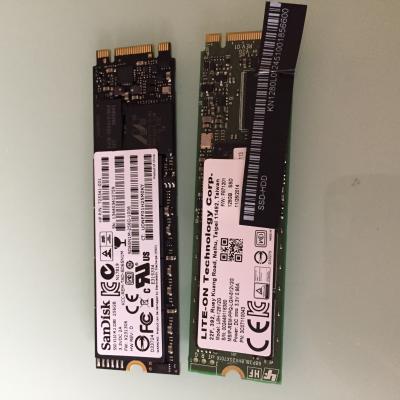
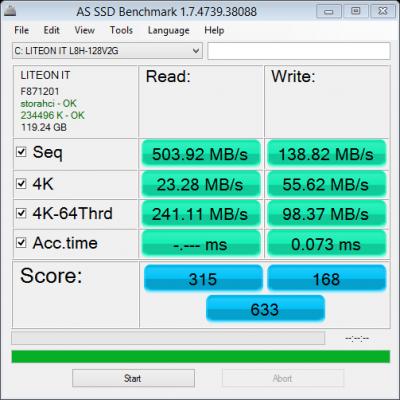
Yes, LiteOn write speed is too slow!

I am used to 600MB/s Read, 550MB/s Write SSD drool.gif drool.gif drool.gif
evanttc
post Feb 17 2015, 06:51 PM

Enthusiast
*****
Senior Member
858 posts

Joined: May 2005
From: MARS


QUOTE(babyk @ Feb 17 2015, 06:05 PM)
Just cloned my 128GB SSD to 256GB SSDAttached Image
*
How u did that? Where can do this service?
babyk
post Feb 17 2015, 07:03 PM

BANNED 101/100(tm) : Your avatar too sexy
********
All Stars
10,052 posts

Joined: Jan 2003
From: House of Wax
QUOTE(evanttc @ Feb 17 2015, 06:51 PM)
How u did that?  Where can do this service?
*
I can do this, just pass me your old SSD and new SSD

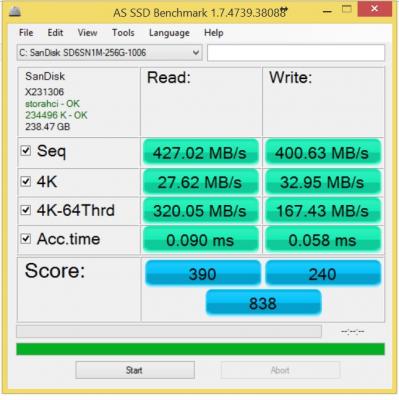
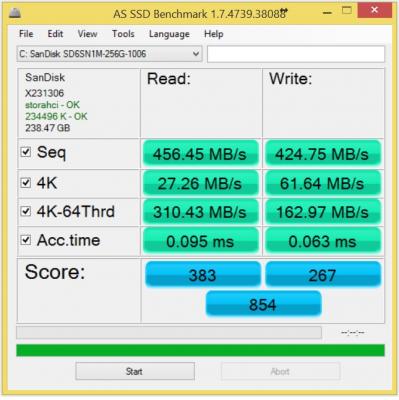
Btw, Sandisk drool.gif drool.gif drool.gif
Attached Image Attached Image

Although it's slower than my OCZ Vertex 4 but I am more than happy than the LiteOn

This post has been edited by babyk: Feb 17 2015, 07:07 PM
KenSX
post Feb 17 2015, 10:20 PM

Getting Started
**
Junior Member
59 posts

Joined: Oct 2014
QUOTE(willgan @ Feb 17 2015, 06:18 PM)
great to hear that you have decided on the switch..

not sure about that program that you're referring to... what's the problem? error? did u check the firewall settings..
make sure u install an anti-virus if u use any of these player...

i would also suggest to remove all bloatwares...
*
I found out is my school wifi blocked many programs. everything is fine biggrin.gif
hkh m43
post Feb 20 2015, 09:26 PM

Getting Started
**
Junior Member
265 posts

Joined: Aug 2010
Hi,

Some more questions:

- How is the pen performance for (a) writing and (b) drawing?

- Where's the best place in KL to get a new SSD?

- What do you do with your old SSD?

Thanks!


ipporek
post Feb 22 2015, 01:33 AM

Getting Started
**
Junior Member
99 posts

Joined: Sep 2007


Can it run Photoshop smoothly? But only simple image editing la. That's my main concern. Plan to use it to replace my Zenbook UX21 cos thought I can also use it to give one-to-one presentations. Don't do any gaming so that's not a source of concern.

Edit:
By the way, just realized that the stand cannot be flipped to the front so the keyboard cannots to the bottom of the screen direct. It won't feel too loose if placed on the lap? And not too "close" to the screen, given the keyboard's kinda short.

This post has been edited by ipporek: Feb 22 2015, 10:05 AM
willgan
post Feb 23 2015, 11:41 AM

Casual
***
Junior Member
302 posts

Joined: Jan 2003
u can check the cpu specs .. if the zenbook is i5 one.. .m-5y10 probably performed better..

I don't have photoshop.. so can't really test it.. gimp runs fine..
as well as visual studio ..

the keyboard has magnet that stick to the stand..
i don't have any problem typing while its in laptop mode.. or browsing in the stand mode..
its best to try out yourself ..

QUOTE(ipporek @ Feb 22 2015, 01:33 AM)
Can it run Photoshop smoothly? But only simple image editing la. That's my main concern. Plan to use it to replace my Zenbook UX21 cos thought I can also use it to give one-to-one presentations. Don't do any gaming so that's not a source of concern.

Edit:
By the way, just realized that the stand cannot be flipped to the front so the keyboard cannots to the bottom of the screen direct. It won't feel too loose if placed on the lap? And not too "close" to the screen, given the keyboard's kinda short.
*
This post has been edited by willgan: Feb 23 2015, 11:41 AM
ipporek
post Feb 24 2015, 11:57 AM

Getting Started
**
Junior Member
99 posts

Joined: Sep 2007


I don't suppose there's anywhere really recommended to go to buy this, but anywhere NOT recommended to go?
ipporek
post Feb 25 2015, 08:08 AM

Getting Started
**
Junior Member
99 posts

Joined: Sep 2007


Is the default SSD really that bad? Cos if its about space I also don't mind getting an additional SD card. If replace the SSD then the old one wasted?
KenSX
post Feb 25 2015, 01:53 PM

Getting Started
**
Junior Member
59 posts

Joined: Oct 2014
QUOTE(ipporek @ Feb 25 2015, 08:08 AM)
Is the default SSD really that bad? Cos if its about space I also don't mind getting an additional SD card. If replace the SSD then the old one wasted?
*
I am using it for simple work. I find d space so far ok. Not like I will install a lot program on it. I use a 32gb microsd card as additional memory.

Anyway I used it to play dota 2. So far so good. No lag and it's enjoyable
babyk
post Feb 25 2015, 11:33 PM

BANNED 101/100(tm) : Your avatar too sexy
********
All Stars
10,052 posts

Joined: Jan 2003
From: House of Wax
QUOTE(ipporek @ Feb 25 2015, 08:08 AM)
Is the default SSD really that bad? Cos if its about space I also don't mind getting an additional SD card. If replace the SSD then the old one wasted?
*
You can use the old SSD as USB drive boot and it will give you additional 100GB with additional OS
ipporek
post Feb 26 2015, 06:52 AM

Getting Started
**
Junior Member
99 posts

Joined: Sep 2007


Bought the Switch 12 yday from Lowyat. 2249.

Realize one thing I'm gonna miss (as compared to my Zenbook) is the ability to charge my phone with the laptop closed (but plugged in). And speaking of plug, the power brick is more of a brick than that of the Zenbook.

Anyway, gotta start getting familiar with it. The power switch seems a little sensitive though. Kinda easy to accidentally turn on.
hkh m43
post Feb 26 2015, 08:38 AM

Getting Started
**
Junior Member
265 posts

Joined: Aug 2010
QUOTE(babyk @ Feb 25 2015, 11:33 PM)
You can use the old SSD as USB drive boot and it will give you additional 100GB with additional OS
*
Sounds interesting. I looked for instructions on the web but couldn't find any, do you have a link on how to do this?

Where's a good place to buy a new ssd and approximate prices?

This post has been edited by hkh m43: Feb 26 2015, 08:39 AM
babyk
post Feb 26 2015, 10:44 AM

BANNED 101/100(tm) : Your avatar too sexy
********
All Stars
10,052 posts

Joined: Jan 2003
From: House of Wax
QUOTE(hkh m43 @ Feb 26 2015, 08:38 AM)
Sounds interesting. I looked for instructions on the web but couldn't find any, do you have a link on how to do this?

Where's a good place to buy a new ssd and approximate prices?
*
Before you boot, go into Boot menu and select boot from USB.
hkh m43
post Feb 26 2015, 03:51 PM

Getting Started
**
Junior Member
265 posts

Joined: Aug 2010
how to make the ssd in to a usb drive...need to insert in an adapter?
ipporek
post Feb 26 2015, 05:32 PM

Getting Started
**
Junior Member
99 posts

Joined: Sep 2007


QUOTE(willgan @ Feb 10 2015, 03:09 PM)
after u insert the card, it will show as removable drive.. make sure u format it to ntfs instead of fat32 ... not sure about exfat..
u can install steam games in it .. i don't see why u can't install program in it..
*
Gotta format as NTFS? I realized it being formatted as NTFS (bought a 64GB SanDisk Ultra), when inserted into my other laptop using a card reader/adapter (whatever you call it), it's somehow not recognized properly.

Or is it some prob with my card reader/adapter (as in that it only recognizes FAT32 or till a certain size)? Just read online that Android doesn't support NTFS so I shouldn't even bother inserting my Note 3 to try there.

Btw, sorry for the noob questions.

This post has been edited by ipporek: Feb 26 2015, 05:40 PM
babyk
post Feb 26 2015, 11:07 PM

BANNED 101/100(tm) : Your avatar too sexy
********
All Stars
10,052 posts

Joined: Jan 2003
From: House of Wax
QUOTE(hkh m43 @ Feb 26 2015, 03:51 PM)
how to make the ssd in to a usb drive...need to insert in an adapter?
*
Yes, there is an enclosure for M.2
shar attack
post Mar 2 2015, 02:21 PM

New Member
*
Newbie
2 posts

Joined: Mar 2015
Just got mine..switch 12,5Y10C order online-lazada with 10% discount. Total damage RM2069.10

cheers
hkh m43
post Mar 6 2015, 09:28 PM

Getting Started
**
Junior Member
265 posts

Joined: Aug 2010
Any owners regret their purchase, esp over form factor or build quality?


babyk
post Mar 7 2015, 02:20 AM

BANNED 101/100(tm) : Your avatar too sexy
********
All Stars
10,052 posts

Joined: Jan 2003
From: House of Wax
QUOTE(hkh m43 @ Mar 6 2015, 09:28 PM)
Any owners regret their purchase, esp over form factor or build quality?
*
Loving it more and more day by day!

Love the screen so much
hkh m43
post Mar 7 2015, 05:11 AM

Getting Started
**
Junior Member
265 posts

Joined: Aug 2010
QUOTE(babyk @ Mar 7 2015, 02:20 AM)
Loving it more and more day by day!

Love the screen so much
*
...and keyboard (no backlight and no touchpad)...find it ok?
babyk
post Mar 7 2015, 07:21 AM

BANNED 101/100(tm) : Your avatar too sexy
********
All Stars
10,052 posts

Joined: Jan 2003
From: House of Wax
QUOTE(hkh m43 @ Mar 7 2015, 05:11 AM)
...and keyboard (no backlight and no touchpad)...find it ok?
*
Sure, why not?
hkh m43
post Mar 7 2015, 08:31 AM

Getting Started
**
Junior Member
265 posts

Joined: Aug 2010
QUOTE(babyk @ Mar 7 2015, 07:21 AM)
Sure, why not?
*
Good to hear...I hope to join the owner's club. ..

Thanks
babyk
post Mar 7 2015, 09:08 AM

BANNED 101/100(tm) : Your avatar too sexy
********
All Stars
10,052 posts

Joined: Jan 2003
From: House of Wax
QUOTE(hkh m43 @ Mar 7 2015, 08:31 AM)
Good to hear...I hope to join the owner's club. ..

Thanks
*
I'm loving the pointing stick as most of the business laptop from IBM has the pointing stick

If you used some business laptop before, you will love the pointing stick

Too bad the price has increased to RM2399 from RM2299 due to the stupid 200MHz bump of the base frequency graphic card
hkh m43
post Mar 7 2015, 04:59 PM

Getting Started
**
Junior Member
265 posts

Joined: Aug 2010
QUOTE(babyk @ Mar 7 2015, 09:08 AM)
I'm loving the pointing stick as most of the business laptop from IBM has the pointing stick

If you used some business laptop before, you will love the pointing stick

Too bad the price has increased to RM2399 from RM2299 due to the stupid 200MHz bump of the base frequency graphic card
*
Thanks to all those that contributed to the forum.

Just got it, the 'a' processor as I agree with you on the base frequency...I didn't see the need.

Loving the form factor, so much nicer to use than a clamshell and more flexible too. I'm used to a nipple-mouse too and I like the keyboard layout.

I didn't think an SP3 would work for me as it's not very stable on the lap etc, but this design just works everywhere. Handheld tablets should be maximum ipad size, otherwise they need a built in stand and this probably has the best designed stand.

The pen is really good for writing, great bonus.

I think they could've made the case more attractive though.

Why the micro-usb 3.0 port? Is anyone using it, how?

babyk
post Mar 7 2015, 05:15 PM

BANNED 101/100(tm) : Your avatar too sexy
********
All Stars
10,052 posts

Joined: Jan 2003
From: House of Wax
QUOTE(hkh m43 @ Mar 7 2015, 04:59 PM)
Thanks to all those that contributed to the forum.

Just got it, the 'a' processor as I agree with you on the base frequency...I didn't see the need.

Loving the form factor, so much nicer to use than a clamshell and more flexible too. I'm used to a nipple-mouse too and I like the keyboard layout.

I didn't think an SP3 would work for me as it's not very stable on the lap etc, but this design just works everywhere. Handheld tablets should be maximum ipad size, otherwise they need a built in stand and this probably has the best designed stand.

The pen is really good for writing, great bonus.

I think they could've made the case more attractive though.

Why the micro-usb 3.0 port? Is anyone using it, how?
*
i use the USB 3.0 port, you need to have the micro-USB to Female-USB, or it is called USB3.0 OTG cable
user posted image


Regarding the case, I love it so much as it has professional look and it looks like you are holding some documents file.

I am getting the similar case for my rMBP as well!

This post has been edited by babyk: Mar 7 2015, 05:18 PM
hkh m43
post Mar 7 2015, 05:51 PM

Getting Started
**
Junior Member
265 posts

Joined: Aug 2010
QUOTE(babyk @ Mar 7 2015, 05:15 PM)
i use the USB 3.0 port, you need to have the micro-USB to Female-USB, or it is called USB3.0 OTG cable
user posted image
Regarding the case, I love it so much as it has professional look and it looks like you are holding some documents file.

I am getting the similar case for my rMBP as well!
*
Yes, the fake leather case is very nice, I meant the case of the computer...I like black and I don't mind plastic but the edges are sharp...contrast with the new Dell Inspiron 11 3147 or 13inch version, they're much nicer (though shiny silver).

Is the dongle the only thing you can do with the micro-usb 3.0 port?

Interesting you need the rMBP as well as this...power user!
babyk
post Mar 7 2015, 07:34 PM

BANNED 101/100(tm) : Your avatar too sexy
********
All Stars
10,052 posts

Joined: Jan 2003
From: House of Wax
QUOTE(hkh m43 @ Mar 7 2015, 05:51 PM)
Yes, the fake leather case is very nice, I meant the case of the computer...I like black and I don't mind plastic but the edges are sharp...contrast with the new Dell Inspiron 11 3147 or 13inch version, they're much nicer (though shiny silver).

Is the dongle the only thing you can do with the micro-usb 3.0 port?

Interesting you need the rMBP as well as this...power user!
*
ah~ You mean the housing of the laptop. I like the matte black coz it won't have fingerprints!

It is not a dongle, it is a converter, you can put your USB devices with the OTG, such as pendrives, sensors, printers and all USB devices

I have a few laptops and I use the Switch 12 now for business presentation, it looks cool yet professional rclxm9.gif
KenSX
post Mar 8 2015, 03:03 PM

Getting Started
**
Junior Member
59 posts

Joined: Oct 2014
QUOTE(babyk @ Mar 7 2015, 02:20 AM)
Loving it more and more day by day!

Love the screen so much
*
Agree! But when there is sunlight it can get a bit reflective. Any solutions?
ipporek
post Mar 10 2015, 12:52 AM

Getting Started
**
Junior Member
99 posts

Joined: Sep 2007


QUOTE(hkh m43 @ Mar 7 2015, 05:11 AM)
...and keyboard (no backlight and no touchpad)...find it ok?
*
No backlight to me no issue. But no touchpad... I'm still trying to get used to the 'rubber'. Find it a little hard to move around.

By the way... uh... I suppose the orange light on the keyboard means low batt? Are we supposed to charge it or replace the batt (but given I only just bought it not long, a bit fast to be changing batt rite)? If charge the batt, how to charge? I been charging the laptop with the keyboard plugged in ah.

This post has been edited by ipporek: Mar 10 2015, 01:05 AM
hkh m43
post Mar 11 2015, 08:15 AM

Getting Started
**
Junior Member
265 posts

Joined: Aug 2010
QUOTE(babyk @ Mar 7 2015, 05:15 PM)
i use the USB 3.0 port, you need to have the micro-USB to Female-USB, or it is called USB3.0 OTG cable
user posted image
Regarding the case, I love it so much as it has professional look and it looks like you are holding some documents file.

I am getting the similar case for my rMBP as well!
*
...With Apple's release, it would've been good if the micro usb 3.0 was usb c.

Anyone see something like this for micro usb 3.0?

http://www.juicedsystems.com/microsoft-sur...3-4-in1-adapter

http://www.amazon.com/Juiced-Systems-Micro...r/dp/B00C7AQXQQ

(Not regretting the switch 12 though, so much more than the new macbook, even if it was the same price)

This post has been edited by hkh m43: Mar 11 2015, 08:23 AM
babyk
post Mar 11 2015, 09:38 AM

BANNED 101/100(tm) : Your avatar too sexy
********
All Stars
10,052 posts

Joined: Jan 2003
From: House of Wax
QUOTE(hkh m43 @ Mar 11 2015, 08:15 AM)
...With Apple's release, it would've been good if the micro usb 3.0 was usb c.

Anyone see something like this for micro usb 3.0?

http://www.juicedsystems.com/microsoft-sur...3-4-in1-adapter

http://www.amazon.com/Juiced-Systems-Micro...r/dp/B00C7AQXQQ

(Not regretting the switch 12 though, so much more than the new macbook, even if it was the same price)
*
here
user posted image
ALeUNe
post Mar 11 2015, 10:41 AM

I'm the purebred with aristocratic pedigree
Group Icon
VIP
9,692 posts

Joined: Jan 2003
From: Mongrel Isle
QUOTE(babyk @ Mar 7 2015, 09:08 AM)
I'm loving the pointing stick as most of the business laptop from IBM has the pointing stick

If you used some business laptop before, you will love the pointing stick

Too bad the price has increased to RM2399 from RM2299 due to the stupid 200MHz bump of the base frequency graphic card
*
You mean new Switch 12's IGP runs at higher speed?
What is the read/writ speed of factory shipped Lite-On SSD?
zack9999
post Mar 11 2015, 10:54 AM

Getting Started
**
Junior Member
290 posts

Joined: Jun 2012
To all,

How good is the pen? Is it very precise or a normal pen for capacitive screen?

Am quite frustrated with my current windows tablet because when using desktop app very difficult with small icon and slides etc.
babyk
post Mar 11 2015, 12:22 PM

BANNED 101/100(tm) : Your avatar too sexy
********
All Stars
10,052 posts

Joined: Jan 2003
From: House of Wax
QUOTE(ALeUNe @ Mar 11 2015, 10:41 AM)
You mean new Switch 12's IGP  runs at higher speed?
What is the read/writ speed of factory shipped Lite-On SSD?
*
Yes, the first batch of Switch 12 at RM2299 is running on M-5Y10a and the second batch of Switch at RM2399 running on M-5Y10c

Both M-5Y10a and M-5Y10c has the base frequency of processor of 0.8GHz with Turbo Boost up to 2.0GHz

GPU Core frequency of M-5Y10a is 100MHz and M-5Y10c is 300MHz and both up to 800MHz

More
http://cpuboss.com/cpus/Intel-Core-M-5Y10c...el-Core-M-5Y10a
ALeUNe
post Mar 11 2015, 12:24 PM

I'm the purebred with aristocratic pedigree
Group Icon
VIP
9,692 posts

Joined: Jan 2003
From: Mongrel Isle
QUOTE(babyk @ Mar 11 2015, 12:22 PM)
Yes, the first batch of Switch 12 at RM2299 is running on M-5Y10a and the second batch of Switch at RM2399 running on M-5Y10c

Both M-5Y10a and M-5Y10c has the base frequency of processor of 0.8GHz with Turbo Boost up to 2.0GHz

GPU Core frequency of M-5Y10a is 100MHz and M-5Y10c is 300MHz and both up to 800MHz

More
http://cpuboss.com/cpus/Intel-Core-M-5Y10c...el-Core-M-5Y10a
*
May I know the read/write speed of Lite-On SSD?
babyk
post Mar 11 2015, 12:36 PM

BANNED 101/100(tm) : Your avatar too sexy
********
All Stars
10,052 posts

Joined: Jan 2003
From: House of Wax
QUOTE(ALeUNe @ Mar 11 2015, 12:24 PM)
May I know the read/write speed of Lite-On SSD?
*
On paper, the 128GB is up to 520MB/s read and up to 150MB/s write for sequential
ALeUNe
post Mar 11 2015, 12:36 PM

I'm the purebred with aristocratic pedigree
Group Icon
VIP
9,692 posts

Joined: Jan 2003
From: Mongrel Isle
QUOTE(babyk @ Mar 11 2015, 12:36 PM)
On paper, the 128GB is up to 520MB/s read and up to 150MB/s write for sequential
*
Ok, thanks. laugh.gif
babyk
post Mar 11 2015, 12:44 PM

BANNED 101/100(tm) : Your avatar too sexy
********
All Stars
10,052 posts

Joined: Jan 2003
From: House of Wax
QUOTE(ALeUNe @ Mar 11 2015, 12:36 PM)
Ok, thanks.  laugh.gif
*
On real world
Attached Image
ALeUNe
post Mar 11 2015, 12:45 PM

I'm the purebred with aristocratic pedigree
Group Icon
VIP
9,692 posts

Joined: Jan 2003
From: Mongrel Isle
QUOTE(babyk @ Mar 11 2015, 12:44 PM)
On real world
Attached Image
*
Many thanks. It comes in handy. notworthy.gif
hkh m43
post Mar 11 2015, 03:54 PM

Getting Started
**
Junior Member
265 posts

Joined: Aug 2010
QUOTE(zack9999 @ Mar 11 2015, 10:54 AM)
To all,

How good is the pen? Is it very precise or a normal pen for capacitive screen?

Am quite frustrated with my current windows tablet because when using desktop app very difficult with small icon and slides etc.
*
Pen is surprisingly good.

Try this program with your tablet...it's very useful:

http://www.lovesummertrue.com/touchmousepointer/en-us/

There may be other similar programs out there..Acer has something called touch tools which is pre-installed, not sure if it's available for download.
Edit: here's a link, not sure it'll work ( http://us.acer.com/ac/en/US/content/software-windowstools )

This post has been edited by hkh m43: Mar 11 2015, 03:57 PM
hkh m43
post Mar 11 2015, 05:27 PM

Getting Started
**
Junior Member
265 posts

Joined: Aug 2010
QUOTE(babyk @ Mar 11 2015, 09:38 AM)
here
user posted image
*
Wanted something without a cable just plug in like the surface ones [but those use usb 3.0, not micro usb]
athur
post Mar 11 2015, 10:55 PM

Getting Started
**
Junior Member
85 posts

Joined: May 2006
hi . i just gt my switch yesterday, was a sp user before. I connected my switch to my tv using the micro hdmi cabe, and m using an optical mouse. But when i in the project only second screen, seems like the mouse is a bit lagging, not smooth at all, and it become very noticeable especially when i try to use my optical mouse with the touch keyboard (so i only need my mouse when watching movies). But when i switch to duplicate mode, then evrything seems great. Any idea why this is happening? feels very annoying ...thank you
ipporek
post Mar 12 2015, 05:24 PM

Getting Started
**
Junior Member
99 posts

Joined: Sep 2007


Crap, not sure what happened, but my keyboard, SD card slot, and USB port all suddenly not working... and I don't recall doing anything... except restarting cos of a windows update (of which I didn't touch it after that)... sad.gif
babyk
post Mar 12 2015, 06:02 PM

BANNED 101/100(tm) : Your avatar too sexy
********
All Stars
10,052 posts

Joined: Jan 2003
From: House of Wax
QUOTE(ipporek @ Mar 12 2015, 05:24 PM)
Crap, not sure what happened, but my keyboard, SD card slot, and USB port all suddenly not working... and I don't recall doing anything... except restarting cos of a windows update (of which I didn't touch it after that)...  sad.gif
*
I had the same issue, I didn't do anything, all keyboard, MicroSD all not working, luckily i got backup, so i restore and it works again.
ipporek
post Mar 12 2015, 06:12 PM

Getting Started
**
Junior Member
99 posts

Joined: Sep 2007


QUOTE(babyk @ Mar 12 2015, 06:02 PM)
I had the same issue, I didn't do anything, all keyboard, MicroSD all not working, luckily i got backup, so i restore and it works again.
*
Restore? Its a software issue? Wah crap sia... I don't have backup. Though I won't lose anything as I can always backup the impt stuff online first, but I really hate the hassle of re-doing everything again.
babyk
post Mar 12 2015, 06:52 PM

BANNED 101/100(tm) : Your avatar too sexy
********
All Stars
10,052 posts

Joined: Jan 2003
From: House of Wax
QUOTE(ipporek @ Mar 12 2015, 06:12 PM)
Restore? Its a software issue? Wah crap sia... I don't have backup. Though I won't lose anything as I can always backup the impt stuff online first, but I really hate the hassle of re-doing everything again.
*
I am still figuring out which thing causing everything to not functioning
ipporek
post Mar 12 2015, 09:21 PM

Getting Started
**
Junior Member
99 posts

Joined: Sep 2007


Found a solution! One of the USB Controller in the Device Manager was disabled, along with some other stuff under the Universal Serial Bus controllers. Basically just enabled everything and seems ok le.
hkh m43
post Mar 12 2015, 11:43 PM

Getting Started
**
Junior Member
265 posts

Joined: Aug 2010
QUOTE(ipporek @ Mar 12 2015, 09:21 PM)
Found a solution! One of the USB Controller in the Device Manager was disabled, along with some other stuff under the Universal Serial Bus controllers. Basically just enabled everything and seems ok le.
*
Scary!

hkh m43
post Mar 13 2015, 06:51 AM

Getting Started
**
Junior Member
265 posts

Joined: Aug 2010
Any tips to improve wifi reception, esp from those that have opened up the case and had a look inside?

Do you all have the Atheros AR5BWB222 adapter (no ac wireless)?

Also, what are the steps to open up and upgrade the ssd?

This post has been edited by hkh m43: Mar 13 2015, 09:54 AM
zack9999
post Mar 13 2015, 08:48 AM

Getting Started
**
Junior Member
290 posts

Joined: Jun 2012
Thanks for the linke to touchmouse. Save my money.

QUOTE(hkh m43 @ Mar 11 2015, 03:54 PM)
Pen is surprisingly good.

Try this program with your tablet...it's very useful:

http://www.lovesummertrue.com/touchmousepointer/en-us/

There may be other similar programs out there..Acer has something called touch tools which is pre-installed, not sure if it's available for download.
Edit: here's a link, not sure it'll work ( http://us.acer.com/ac/en/US/content/software-windowstools )
*
babyk
post Mar 13 2015, 10:06 PM

BANNED 101/100(tm) : Your avatar too sexy
********
All Stars
10,052 posts

Joined: Jan 2003
From: House of Wax
Today I just got another Switch 12 with 5Y10c laugh.gif below RM2300 rclxm9.gif
Kaka23
post Mar 13 2015, 10:11 PM

Look at all my stars!!
*******
Senior Member
8,259 posts

Joined: Sep 2009


QUOTE(babyk @ Mar 13 2015, 11:06 PM)
Today I just got another Switch 12 with 5Y10c laugh.gif below RM2300 rclxm9.gif
*
Why you buy another?

babyk
post Mar 13 2015, 10:36 PM

BANNED 101/100(tm) : Your avatar too sexy
********
All Stars
10,052 posts

Joined: Jan 2003
From: House of Wax
QUOTE(Kaka23 @ Mar 13 2015, 10:11 PM)
Why you buy another?
*
Bought it for my cousin laugh.gif

although the first one i got it for below RM2200
hkh m43
post Mar 13 2015, 11:08 PM

Getting Started
**
Junior Member
265 posts

Joined: Aug 2010
Does 5Y10c have a different wireless adapter?
babyk
post Mar 14 2015, 01:29 AM

BANNED 101/100(tm) : Your avatar too sexy
********
All Stars
10,052 posts

Joined: Jan 2003
From: House of Wax
QUOTE(hkh m43 @ Mar 13 2015, 11:08 PM)
Does 5Y10c have a different wireless adapter?
*
no
Wireless LAN: Acer Nplify 802.11a/b/g/n
Kaka23
post Mar 14 2015, 07:24 AM

Look at all my stars!!
*******
Senior Member
8,259 posts

Joined: Sep 2009


QUOTE(babyk @ Mar 13 2015, 11:36 PM)
Bought it for my cousin laugh.gif

although the first one i got it for below RM2200
*
Bought at Lowyat?

hkh m43
post Mar 14 2015, 09:23 AM

Getting Started
**
Junior Member
265 posts

Joined: Aug 2010
QUOTE(babyk @ Mar 14 2015, 01:29 AM)
no
Wireless LAN: Acer Nplify 802.11a/b/g/n
*
The one I have is a Qualcomm Atheros AR5BWB222...it's a bit erratic in it's connectivity and I ws wondering whether it'll be possible to switch out the card for another one, assuming it's not soldered on.

What do you think?
babyk
post Mar 14 2015, 11:16 AM

BANNED 101/100(tm) : Your avatar too sexy
********
All Stars
10,052 posts

Joined: Jan 2003
From: House of Wax
QUOTE(Kaka23 @ Mar 14 2015, 07:24 AM)
Bought at Lowyat?
*
No

Bought it from supplier
babyk
post Mar 14 2015, 11:18 AM

BANNED 101/100(tm) : Your avatar too sexy
********
All Stars
10,052 posts

Joined: Jan 2003
From: House of Wax
QUOTE(hkh m43 @ Mar 14 2015, 09:23 AM)
The one I have is a Qualcomm Atheros AR5BWB222...it's a bit erratic in it's connectivity and I ws wondering whether it'll be possible to switch out the card for another one, assuming it's not soldered on.

What do you think?
*
Yes, you can change the wifi Bluetooth card, it's the mini PCIe but make sure the profile is correct as there is not much free space in terms of height
hkh m43
post Mar 14 2015, 11:24 AM

Getting Started
**
Junior Member
265 posts

Joined: Aug 2010
QUOTE(babyk @ Mar 14 2015, 11:18 AM)
Yes, you can change the wifi Bluetooth card, it's the mini PCIe but make sure the profile is correct as there is not much free space in terms of height
*
Thanks, how does one open the Switch?

It'd be great if you could pen down a simple and short step-by-step guide.

Kaka23
post Mar 14 2015, 12:16 PM

Look at all my stars!!
*******
Senior Member
8,259 posts

Joined: Sep 2009


QUOTE(babyk @ Mar 14 2015, 12:16 PM)
No

Bought it from supplier
*
oh... dealer pricing?
babyk
post Mar 14 2015, 12:24 PM

BANNED 101/100(tm) : Your avatar too sexy
********
All Stars
10,052 posts

Joined: Jan 2003
From: House of Wax
QUOTE(Kaka23 @ Mar 14 2015, 12:16 PM)
oh... dealer pricing?
*
rclxm9.gif rclxm9.gif rclxm9.gif
Kaka23
post Mar 14 2015, 12:25 PM

Look at all my stars!!
*******
Senior Member
8,259 posts

Joined: Sep 2009


QUOTE(babyk @ Mar 14 2015, 01:24 PM)
rclxm9.gif  rclxm9.gif  rclxm9.gif
*
Wah... know someone working as dealer ya. Good for u!
SonnyCooL
post Mar 16 2015, 02:53 AM

Web Bastard
*******
Senior Member
5,957 posts

Joined: Sep 2004
From: www.bitching.asia


QUOTE(babyk @ Mar 13 2015, 10:36 PM)
Bought it for my cousin laugh.gif

although the first one i got it for below RM2200
*
my friend offer me samething jst below 2200 ..... still thinking should i go for it ....
babyk
post Mar 16 2015, 11:12 AM

BANNED 101/100(tm) : Your avatar too sexy
********
All Stars
10,052 posts

Joined: Jan 2003
From: House of Wax
QUOTE(SonnyCooL @ Mar 16 2015, 02:53 AM)
my friend offer me samething jst below 2200 ..... still thinking should i go for it ....
*
Grab it while GST is ahead
ipporek
post Mar 19 2015, 12:29 PM

Getting Started
**
Junior Member
99 posts

Joined: Sep 2007


Kenna the ports disabled issue again suddenly. And not cos of any updates this time. Seem to be after I was trying repeatedly to connect to a wifi network but had issues connecting.
hkh m43
post Mar 19 2015, 03:22 PM

Getting Started
**
Junior Member
265 posts

Joined: Aug 2010
QUOTE(ipporek @ Mar 19 2015, 12:29 PM)
Kenna the ports disabled issue again suddenly. And not cos of any updates this time. Seem to be after I was trying repeatedly to connect to a wifi network but had issues connecting.
*
I shared before my wifi issues...this Switch 12 drops connection more than other devices I have, and has less range.

I haven't opened it up but some have and said the pci-based wifi card can potentially be changed.

If anyone sees some opening-up guide then please share. Also, any opinions on improving wifi stability by changing the QUALCOMM Atheros AR5BWB222 card to something more stable.
babyk
post Mar 20 2015, 08:35 AM

BANNED 101/100(tm) : Your avatar too sexy
********
All Stars
10,052 posts

Joined: Jan 2003
From: House of Wax
QUOTE(hkh m43 @ Mar 19 2015, 03:22 PM)
I shared before my wifi issues...this Switch 12 drops connection more than other devices I have, and has less range.

I haven't opened it up but some have and said the pci-based wifi card can potentially be changed.

If anyone sees some opening-up guide then please share. Also, any opinions on improving wifi stability by changing the QUALCOMM Atheros AR5BWB222 card to something more stable.
*
You can adjust the power adjustment to avoid the WiFi drop issues.

I don't have any issues on the Switch 12 until today for the WiFi.

Are you on battery or on power adapter?
hkh m43
post Mar 20 2015, 08:53 AM

Getting Started
**
Junior Member
265 posts

Joined: Aug 2010
Thanks.

I did adjust all power options so no power saving on adapter or battery.

Problem is the wifi drops more than other devices in one particular location, home office. The office is a little far from the router and it's a condo with lots of neighbourly wifi interference. Other places in the condo are fine, as well as outside.


ipporek
post Mar 20 2015, 01:31 PM

Getting Started
**
Junior Member
99 posts

Joined: Sep 2007


QUOTE(babyk @ Mar 20 2015, 08:35 AM)
You can adjust the power adjustment to avoid the WiFi drop issues.

I don't have any issues on the Switch 12 until today for the WiFi.

Are you on battery or on power adapter?
*
Adjust the power to avoid wifi drop? In what sense?
hkh m43
post Mar 20 2015, 03:11 PM

Getting Started
**
Junior Member
265 posts

Joined: Aug 2010
QUOTE(ipporek @ Mar 20 2015, 01:31 PM)
Adjust the power to avoid wifi drop? In what sense?
*
1. Advanced power settings (battery and plugged in)
2. Wireless Network Adapter advanced settings for power management

hkh m43
post Mar 21 2015, 10:04 AM

Getting Started
**
Junior Member
265 posts

Joined: Aug 2010
QUOTE(babyk @ Jan 30 2015, 11:35 PM)
Attached Image

drool.gif  drool.gif  drool.gif

Just dissect my Switch 12 again! SSD can be upgraded
*
How did you open the case?
Bottom stand by unscrewing the screws, how about the screen section?

Thanks!
babyk
post Mar 21 2015, 11:54 AM

BANNED 101/100(tm) : Your avatar too sexy
********
All Stars
10,052 posts

Joined: Jan 2003
From: House of Wax
QUOTE(hkh m43 @ Mar 21 2015, 10:04 AM)
How did you open the case?
Bottom stand by unscrewing the screws, how about the screen section?

Thanks!
*
Bottom case is only battery and keyboard charging/controller extention connector from the mainboard
hkh m43
post Mar 21 2015, 01:02 PM

Getting Started
**
Junior Member
265 posts

Joined: Aug 2010
QUOTE(babyk @ Mar 21 2015, 11:54 AM)
Bottom case is only battery and keyboard charging/controller extention connector from the mainboard
*
Thanks, helpful.

How did you open the top part - any screws, do you just try and pry open along the seam?


SonnyCooL
post Mar 25 2015, 01:47 PM

Web Bastard
*******
Senior Member
5,957 posts

Joined: Sep 2004
From: www.bitching.asia


ok ... t300 launch but i go for switch 12 ....
cause is not worth paying extra 700 for slim design n better procs.
thought they bring in t300 higher spec with QHD, 8g ram n 5y71.
hkh m43
post Mar 25 2015, 02:11 PM

Getting Started
**
Junior Member
265 posts

Joined: Aug 2010
QUOTE(SonnyCooL @ Mar 25 2015, 01:47 PM)
ok ... t300 launch but i go for switch 12 ....
cause is not worth paying extra 700 for slim design n better procs.
thought they bring in t300 higher spec with QHD, 8g ram n 5y71.
*
Hope it serves you well.
Tips - you may want to turn off auto brightness and also increase the sensitivity of the trackpoint in the mouse settings.

Did you get the a or c processor model?

Do you have a qualcomm Atheros wireless network adapter?

If you manage to open up and change the ssd, let us know how you open and close please.

Thanks
hkh m43
post Apr 8 2015, 01:52 PM

Getting Started
**
Junior Member
265 posts

Joined: Aug 2010
You all probably know that one of the first things to do is turn off adaptive brightness - I find it too aggressive and it didn't give me the brightness levels I wanted.

I recently turned off Lumiflex which apparently adjusts colour saturation to optimise readability according to ambient brightness.

The effect of Lumiflex has been minimal for me - I can't see the difference with it on or off.

However, battery life is a little better, as I guess the system no longer needs to check ambient conditions.
SonnyCooL
post Apr 15 2015, 11:06 PM

Web Bastard
*******
Senior Member
5,957 posts

Joined: Sep 2004
From: www.bitching.asia


any one have connection to buy this cheaper ???
i need three unit, my friend seem like doesn't offer me good prices sad.gif
SonnyCooL
post Apr 20 2015, 11:14 PM

Web Bastard
*******
Senior Member
5,957 posts

Joined: Sep 2004
From: www.bitching.asia


QUOTE(hkh m43 @ Apr 8 2015, 01:52 PM)
You all probably know that one of the first things to do is turn off adaptive brightness - I find it too aggressive and it didn't give me the brightness levels I wanted.

I recently turned off Lumiflex which apparently adjusts colour saturation to optimise readability according to ambient brightness.

The effect of Lumiflex has been minimal for me - I can't see the difference with it on or off.

However, battery life is a little better, as I guess the system no longer needs to check ambient conditions.
*
guy, any find switch 12 wifi a bit poor ?
SonnyCooL
post Apr 20 2015, 11:25 PM

Web Bastard
*******
Senior Member
5,957 posts

Joined: Sep 2004
From: www.bitching.asia


QUOTE(hkh m43 @ Mar 20 2015, 08:53 AM)
Thanks.

I did adjust all power options so no power saving on adapter or battery.

Problem is the wifi drops more than other devices in one particular location, home office. The office is a little far from the router and it's a condo with lots of neighbourly wifi interference. Other places in the condo are fine, as well as outside.
*
Yah this i agree with u, my switch 12 cant detect my wifi, but my other laptop, win tablet, andoridtblet, phone all can detect ....
hkh m43
post Apr 21 2015, 07:41 AM

Getting Started
**
Junior Member
265 posts

Joined: Aug 2010
QUOTE(SonnyCooL @ Apr 20 2015, 11:25 PM)
Yah this i agree with u, my switch 12 cant detect my wifi, but my other laptop, win tablet, andoridtblet, phone all can detect ....
*
It's fine at close distance but suddenly drops off.

I suspect it's poor quality or poor placement of the internal wifi attenna.

I might take to Acer to investigate.
SonnyCooL
post Apr 21 2015, 11:15 AM

Web Bastard
*******
Senior Member
5,957 posts

Joined: Sep 2004
From: www.bitching.asia


QUOTE(hkh m43 @ Apr 21 2015, 07:41 AM)
It's fine at close distance but suddenly drops off.

I suspect it's poor quality or poor placement of the internal wifi attenna.

I might take to Acer to investigate.
*
it cause a lot funny issue .....
desktop mode : connected with internet and able to browse. (pinging google response is good)
metro mode : when click store to install app, it show i'm not connected with internet or show installing but never move, need to restart pc.
SonnyCooL
post Apr 24 2015, 01:13 PM

Web Bastard
*******
Senior Member
5,957 posts

Joined: Sep 2004
From: www.bitching.asia


anyone having this funny issue .....
my screen (screen, Proc or HD) will sudden die, before die it freeze (nothing working) than turn to black screen for 1-2 second than back to live .....
hkh m43
post Apr 24 2015, 04:25 PM

Getting Started
**
Junior Member
265 posts

Joined: Aug 2010
QUOTE(SonnyCooL @ Apr 24 2015, 01:13 PM)
anyone having this funny issue .....
my screen (screen, Proc or HD) will sudden die, before die it freeze (nothing working) than turn to black screen for 1-2 second than back to live .....
*
I've suffered this, but very rarely.

Using DriverMax I've seen the display driver is out of date, so maybe that'll fix it - I haven't updated myself, yet.
SonnyCooL
post Apr 24 2015, 04:42 PM

Web Bastard
*******
Senior Member
5,957 posts

Joined: Sep 2004
From: www.bitching.asia


QUOTE(hkh m43 @ Apr 24 2015, 04:25 PM)
I've suffered this, but very rarely.

Using DriverMax I've seen the display driver is out of date, so maybe that'll fix it - I haven't updated myself, yet.
*
ok ok thanks ........ look like software not optimize yet ....
figure8
post Apr 26 2015, 03:53 PM

...dear future, come get me
*******
Senior Member
3,174 posts

Joined: Jan 2003
QUOTE(babyk @ Feb 17 2015, 06:05 PM)
Just cloned my 128GB SSD to 256GB SSDAttached Image
*
bro/sis, how much u bought 256GB ssd?.
babyk
post Apr 26 2015, 05:07 PM

BANNED 101/100(tm) : Your avatar too sexy
********
All Stars
10,052 posts

Joined: Jan 2003
From: House of Wax
QUOTE(SonnyCooL @ Apr 15 2015, 11:06 PM)
any one have connection to buy this cheaper ???
i need three unit, my friend seem like doesn't offer me good prices sad.gif
*
PM me
babyk
post Apr 26 2015, 05:09 PM

BANNED 101/100(tm) : Your avatar too sexy
********
All Stars
10,052 posts

Joined: Jan 2003
From: House of Wax
QUOTE(figure8 @ Apr 26 2015, 03:53 PM)
bro/sis, how much u bought 256GB ssd?.
*
Forgot, I think around RM200
figure8
post Apr 26 2015, 05:55 PM

...dear future, come get me
*******
Senior Member
3,174 posts

Joined: Jan 2003
QUOTE(babyk @ Apr 26 2015, 05:09 PM)
Forgot, I think around RM200
*
m2 256GB ssd i search around rm500 average price sweat.gif
babyk
post Apr 26 2015, 06:09 PM

BANNED 101/100(tm) : Your avatar too sexy
********
All Stars
10,052 posts

Joined: Jan 2003
From: House of Wax
QUOTE(figure8 @ Apr 26 2015, 05:55 PM)
m2 256GB ssd i search around rm500 average price sweat.gif
*
keep on searching biggrin.gif

You can get it cheaper
SonnyCooL
post Apr 27 2015, 02:11 AM

Web Bastard
*******
Senior Member
5,957 posts

Joined: Sep 2004
From: www.bitching.asia


Btw any one use lenova n 700 mouse withur switch 12 ???
figure8
post Apr 27 2015, 10:33 AM

...dear future, come get me
*******
Senior Member
3,174 posts

Joined: Jan 2003
QUOTE(SonnyCooL @ Apr 27 2015, 02:11 AM)
Btw any one use lenova n 700 mouse withur switch 12 ???
*
any problem?
SonnyCooL
post Apr 27 2015, 01:35 PM

Web Bastard
*******
Senior Member
5,957 posts

Joined: Sep 2004
From: www.bitching.asia


QUOTE(figure8 @ Apr 27 2015, 10:33 AM)
any problem?
*
want to buy .... need others user review smile.gif
hkh m43
post Apr 27 2015, 04:24 PM

Getting Started
**
Junior Member
265 posts

Joined: Aug 2010
If anyone has instructions on how to open and close the case to upgrade the ssd, please share.

Thanks
figure8
post Apr 27 2015, 05:44 PM

...dear future, come get me
*******
Senior Member
3,174 posts

Joined: Jan 2003
im searching for digital stylus pen.plz share which stylus is compatible. i know we can use acer active original stylus but unfortunately i cant it anywhere
willgan
post Apr 27 2015, 07:28 PM

Casual
***
Junior Member
302 posts

Joined: Jan 2003

QUOTE(figure8 @ Apr 27 2015, 05:44 PM)
im searching for digital stylus pen.plz share which stylus is compatible. i know we can use acer active original stylus but unfortunately i cant it anywhere
*
its best to check with the vendor or acer service centre..
SonnyCooL
post Apr 29 2015, 10:46 PM

Web Bastard
*******
Senior Member
5,957 posts

Joined: Sep 2004
From: www.bitching.asia


guy i have one stupid question ..........
how to use that pen ? and that two button for ??
thanks
hkh m43
post Apr 30 2015, 08:18 AM

Getting Started
**
Junior Member
265 posts

Joined: Aug 2010
QUOTE(SonnyCooL @ Apr 29 2015, 10:46 PM)
guy i have one stupid question ..........
how to use that pen ? and that two button for ??
thanks
*
Lots of pen programs to try like Onenote or Journal or drawing programs. Can also markup office and pdf documents with the pen.

The pen has palm rejection so when the tip is near the screen you can rest your palm on it and only the pen is registered.
Also, the harder you press the thicker the line.
The buttons change the function, eg eraser or right click I think there are settings for this.
figure8
post Apr 30 2015, 07:00 PM

...dear future, come get me
*******
Senior Member
3,174 posts

Joined: Jan 2003
QUOTE(hkh m43 @ Apr 30 2015, 08:18 AM)
Lots of pen programs to try like Onenote or Journal or drawing programs. Can also markup office and pdf documents with the pen.

The pen has palm rejection so when the tip is near the screen you can rest your palm on it and only the pen is registered.
Also, the harder you press the thicker the line.
The buttons change the function, eg eraser or right click I think there are settings for this.
*
kindly share where you buy stylus pen compatible with this laptop. tq
hkh m43
post Apr 30 2015, 07:25 PM

Getting Started
**
Junior Member
265 posts

Joined: Aug 2010
QUOTE(figure8 @ Apr 30 2015, 07:00 PM)
kindly share where you buy stylus pen compatible with this laptop. tq
*
The pen came free with the device when I bought it so I don't know where to buy it, but check the service centres as they may sell them:

http://www.acer.com.my/ac/en/MY/content/hi...enters-location


figure8
post Apr 30 2015, 08:04 PM

...dear future, come get me
*******
Senior Member
3,174 posts

Joined: Jan 2003
QUOTE(hkh m43 @ Apr 30 2015, 07:25 PM)
The pen came free with the device when I bought it so I don't know where to buy it, but check the service centres as they may sell them:

http://www.acer.com.my/ac/en/MY/content/hi...enters-location
*
thanks, mine still sealed. i haven't have a time to do the unboxing. hope pen is in the package. tq
hkh m43
post May 2 2015, 08:07 PM

Getting Started
**
Junior Member
265 posts

Joined: Aug 2010
Anyone who has changed their ssd, please share simple instructions on how to open and close the case.

Is it just held together by clips that snap open and shut easily or are there some things need care to look out for?

Do we need to open the stand section as well as the main section, or can you just open the main section?

Thanks in advance
SonnyCooL
post May 8 2015, 07:14 PM

Web Bastard
*******
Senior Member
5,957 posts

Joined: Sep 2004
From: www.bitching.asia


yeah just bought lenova n700 mouse ... not bad, only issue is the pc driver seem like a lot problem smile.gif
hkh m43
post May 9 2015, 03:49 PM

Getting Started
**
Junior Member
265 posts

Joined: Aug 2010
QUOTE(hkh m43 @ May 2 2015, 08:07 PM)
Anyone who has changed their ssd, please share simple instructions on how to open and close the case.

Is it just held together by clips that snap open and shut easily or are there some things need care to look out for?

Do we need to open the stand section as well as the main section, or can you just open the main section?

Thanks in advance
*
Took the plunge and opened myself. It's surprisingly easy.

For the screen part (which contains the motherboard) there are no screws. Just insert a fingernail and pry open at the seam, but be careful as the plastic fasteners are not the strongest. Easy to snap open and close, but be careful as there are 2 insulated wires connecting the display section to the stand.

For the stand/battery part, first need to unscrew the 6 exposed screws and then follow the same procedure above (insert a fingernail in the seam etc).

I don't think there's any comparison to the horror stories you hear of opening Apple and Microsoft devices.


zack9999
post May 13 2015, 11:45 AM

Getting Started
**
Junior Member
290 posts

Joined: Jun 2012
How is this model so far for those who have been using it? I am looking forward to hear your review. Right now I am considering this or Surface 3.
ALeUNe
post May 13 2015, 11:56 AM

I'm the purebred with aristocratic pedigree
Group Icon
VIP
9,692 posts

Joined: Jan 2003
From: Mongrel Isle
QUOTE(zack9999 @ May 13 2015, 11:45 AM)
How is this model so far for those who have been using it? I am looking forward to hear your review. Right now I am considering this or Surface 3.
*
Surface 3 is a tablet.
Acer Switch 12 is more like a hybrid. And of course, more bulky (see the picture, it looks fugly to me).

user posted image

Either you go for Surface 3 (for battery life) or Asus T300 (Chi or non-Chi, for performance).

I highly recommend Windows tablet.
There is no way you will go back to conventional notebook, ultrabook once you use Windows Tablet.
Just like using SSD, there is no way you will go back to HDD.

This post has been edited by ALeUNe: May 13 2015, 11:59 AM
zack9999
post May 13 2015, 01:29 PM

Getting Started
**
Junior Member
290 posts

Joined: Jun 2012
Switch 12 looks bulky but it has far more ports than Asus T300, which lacks USB port.
I think I will go for Surface 3 because I like the ability to change using a Micro USB port and it has a full USB port.


QUOTE(ALeUNe @ May 13 2015, 11:56 AM)
Surface 3 is a tablet.
Acer Switch 12 is more like a hybrid. And of course, more bulky (see the picture, it looks fugly to me).

user posted image

Either you go for Surface 3 (for battery life) or Asus T300 (Chi or non-Chi, for performance).

I highly recommend Windows tablet.
There is no way you will go back to conventional notebook, ultrabook once you use Windows Tablet.
Just like using SSD, there is no way you will go back to HDD.
*
hkh m43
post May 13 2015, 01:47 PM

Getting Started
**
Junior Member
265 posts

Joined: Aug 2010
QUOTE(zack9999 @ May 13 2015, 01:29 PM)
Switch 12 looks bulky but it has far more ports than Asus T300, which lacks USB port.
I think I will go for Surface 3 because I like the ability to change using a Micro USB port and it has a full USB port.
*
I would view it in store (and make sure auto brightness is off) before you make up your mind.
What I found is that the size is the right balance between productivity and convenience.
It gives more room than an 11.6 inch or S3 or SP3 screen but is still portable.

Depending on your use case, S3 may be too small to be productive.

See this review, one of the better ones:

http://www.ultrabookreview.com/7177-acer-switch-12-review/

What the reviewer doesn't say is that it's very stable on the lap (more than a normal laptop and definitely more than a Surface) and the advantage of the wireless keyboard is that you can put the screen on some books so it's eye-level and still use the keyboard.
Also the keyboard is probably better than Surface. Being closer to the screen means you actually touch it more...something people don't do with laptops as the screen is quite far from your fingers.
The size may be big, but users don't hold tablets larger than 8 inches - they're normally on a lap or propped up with a stand, so the integrated stand of this and Surface makes more sense than a tablet without a stand.

On the negative side, it looks like a Thinkpad being black plastic and not as sleek as a Surface.
Also, it's a niche product, very few people know about, but everyone knows the Surface and Apple and that has its advantages.


zack9999
post May 13 2015, 02:07 PM

Getting Started
**
Junior Member
290 posts

Joined: Jun 2012
Yes, I would say it is more lapable than a Surface 3. It really cheaper too if you compare the features (ie. Switch comes with 128GB, keyboard and a better processor for less than RM2400 where a Surface 3 will be more than RM2800 if you want to add a keyboard, and pen).
Most reviewers say one of the flaw is the way the keyboard is charged ie you have to put the keyboard at the back to charge and it can't be charged while using the keyboard. Do you find it an annoyance?
I have seen a working unit in a shop and the screen looked a bit dim. Is this because of the auto brightness setting?

QUOTE(hkh m43 @ May 13 2015, 01:47 PM)
I would view it in store (and make sure auto brightness is off) before you make up your mind.
What I found is that the size is the right balance between productivity and convenience.
It gives more room than an 11.6 inch or S3 or SP3 screen but is still portable.

Depending on your use case, S3 may be too small to be productive.

See this review, one of the better ones:

http://www.ultrabookreview.com/7177-acer-switch-12-review/

What the reviewer doesn't say is that it's very stable on the lap (more than a normal laptop and definitely more than a Surface) and the advantage of the wireless keyboard is that you can put the screen on some books so it's eye-level and still use the keyboard.
Also the keyboard is probably better than Surface. Being closer to the screen means you actually touch it more...something people don't do with laptops as the screen is quite far from your fingers.
The size may be big, but users don't hold tablets larger than 8 inches - they're normally on a lap or propped up with a stand, so the integrated stand of this and Surface makes more sense than a tablet without a stand.

On the negative side, it looks like a Thinkpad being black plastic and not as sleek as a Surface.
Also, it's a niche product, very few people know about, but everyone knows the Surface and Apple and that has its advantages.
*
hkh m43
post May 13 2015, 02:36 PM

Getting Started
**
Junior Member
265 posts

Joined: Aug 2010
QUOTE(zack9999 @ May 13 2015, 02:07 PM)
Yes, I would say it is more lapable than a Surface 3. It really cheaper too if you compare the features (ie. Switch comes with 128GB, keyboard and a better processor for less than RM2400 where a Surface 3 will be more than RM2800 if you want to add a keyboard, and pen).
Most reviewers say one of the flaw is the way the keyboard is charged ie you have to put the keyboard at the back to charge and it can't be charged while using the keyboard. Do you find it an annoyance?
I have seen a working unit in a shop and the screen looked a bit dim. Is this because of the auto brightness setting?
*
On price, look for used models.

I've never had the keyboard run out of battery. It's not Bluetooth more like the dongle-type wireless, so it's long range and low battery usage. I don't see this as a problem at all.

The design is actually unique and fantastic, and the biggest flaw which could've been fixed is the hinge not allowing the screen to be covered when it's closed, meaning you have to use the case or a sleeve. Normal laptops and Surface are thus simpler.

Yes, the screen is actually very bright - need to turn the auto brightness off.


pandera999
post May 13 2015, 04:34 PM

모든 것​에는 정해진 때​가 있으니
*******
Senior Member
6,214 posts

Joined: Sep 2010
From: Busan, Kr | Kuching, Swk


this thread resurrected.. laugh.gif this acer switch 12 is so damn good... impressive so far
SonnyCooL
post May 13 2015, 07:06 PM

Web Bastard
*******
Senior Member
5,957 posts

Joined: Sep 2004
From: www.bitching.asia


QUOTE(ALeUNe @ May 13 2015, 11:56 AM)
Surface 3 is a tablet.
Acer Switch 12 is more like a hybrid. And of course, more bulky (see the picture, it looks fugly to me).

user posted image

Either you go for Surface 3 (for battery life) or Asus T300 (Chi or non-Chi, for performance).

I highly recommend Windows tablet.
There is no way you will go back to conventional notebook, ultrabook once you use Windows Tablet.
Just like using SSD, there is no way you will go back to HDD.
*
hahhahaha i believe u dont own any of it.
i have sfp3, switch 12, acer 8" n 10‘ none brand atom tablet, to be honest, i use switch 12 most, every presentation, business meeting i use it, chia ? for extra 700 with bad bttery n better performance (hello malaysia is mid ranga version but high end prices).


btw 10 inch for window 8? there will be no no no, try it out first ...
ALeUNe
post May 13 2015, 09:03 PM

I'm the purebred with aristocratic pedigree
Group Icon
VIP
9,692 posts

Joined: Jan 2003
From: Mongrel Isle
QUOTE(SonnyCooL @ May 13 2015, 07:06 PM)
hahhahaha i believe u dont own any of it.
i have sfp3, switch 12, acer 8" n 10‘ none brand atom tablet, to be honest, i use  switch 12 most, every presentation, business meeting i use it, chia ? for extra 700 with bad bttery n better performance (hello malaysia is mid ranga version but high end prices).
btw 10 inch for window 8? there will be no no no, try it out first ...
*
Why jumped your gun?

I have china brand 8", Lenovo Miix-3 830 and Surface 3 (non-pro).
I use Lenovo Miix-3 830 the most.
I use my Lenovo Miix-3 830 (with a bluetooth mouse) to do powerpoint presentations (via usb video adapter).
All my other business partners used notebook, ultrabook, Macbook Air. They looked at me in awe.

8-10" is the best for tablet.
Hold it with a hand while I wait for my flight @ airport.
I can surf net & watch youtubes for hours before I fall asleep on my bed.
It is more practical to me.

For 12", either Surface 3 pro or Asus T300 chi.
Try hold your 12" Acer switch with one hand for 30 mins-1 hour.
It is too bulky and heavy. The design could be good a year ago.
But it is not good as we have more and more Windows tablets with more compact and portable design.

I don't use my laptop and android tablet for my business trip since I bought the windows tablet.
hkh m43
post May 13 2015, 09:53 PM

Getting Started
**
Junior Member
265 posts

Joined: Aug 2010
QUOTE(ALeUNe @ May 13 2015, 09:03 PM)
Why jumped your gun?

I have china brand 8", Lenovo Miix-3 830 and Surface 3 (non-pro).
I use Lenovo Miix-3 830 the most.
I use my Lenovo Miix-3 830 (with a bluetooth mouse) to do powerpoint presentations (via usb video adapter).
All my other business partners used notebook, ultrabook, Macbook Air. They looked at me in awe. 

8-10" is the best for tablet.
Hold it with a hand while I wait for my flight @ airport.
I can surf net & watch youtubes for hours before I fall asleep on my bed. 
It is more practical to me.

For 12", either Surface 3 pro or Asus T300 chi.
Try hold your 12" Acer switch with one hand for 30 mins-1 hour.
It is too bulky and heavy. The design could be good a year ago.
But it is not good as we have more and more Windows tablets with more compact and portable design.

I don't use my laptop and android tablet for my business trip since I bought the windows tablet.
*
Agree the 8 inch is a sweet spot to consume content (or output), but many prefer 12 inches to produce (and consume) content.

Holding anything over 500 grams for over 30 mins will be a strain, that's why many people have stands for their larger tablets.
Also, a pen can be useful.

I don't think the T300 is worth buying compared to Surface or Switch (easy to upgrade the ssd in the Switch btw).


hkh m43
post May 13 2015, 10:00 PM

Getting Started
**
Junior Member
265 posts

Joined: Aug 2010
oops

This post has been edited by hkh m43: May 13 2015, 10:01 PM
SonnyCooL
post May 13 2015, 11:19 PM

Web Bastard
*******
Senior Member
5,957 posts

Joined: Sep 2004
From: www.bitching.asia


QUOTE(hkh m43 @ May 13 2015, 09:53 PM)
Agree the 8 inch is a sweet spot to consume content (or output), but many prefer 12 inches to produce (and consume) content.

Holding anything over 500 grams for over 30 mins will be a strain, that's why many people have stands for their larger tablets.
Also, a pen can be useful.

I don't think the T300 is worth buying compared to Surface or Switch (easy to upgrade the ssd in the Switch btw).
*
just ignore it ......
1000 reason to hate and defend, for me i sold 8" after three time using it on win 8.1, for personal and entertainment i use android ........
chi, anyone want ? i have unopen one up for sales ...... as my friend bring it in for me, but when i find out low spec, worst battery life and high prices ..... i leave it at friend shop for sales with discount ....

taqu
post May 15 2015, 05:06 PM

Enthusiast
*****
Junior Member
864 posts

Joined: May 2005
IMO Windows 8 on 8" tablets, as a consumption device, is OK. Modern apps have far less ads (I hate ads on Android), NTFS/EXFAT-formatted MicroSD is allowed meaning large movies are OK (most Android tablets only support FAT32 yikes), and if necessary / emergency, it can run desktop apps albeit small. Hopefully Windows 10 will see tons of Android apps ported to Windows.
SonnyCooL
post May 18 2015, 01:30 AM

Web Bastard
*******
Senior Member
5,957 posts

Joined: Sep 2004
From: www.bitching.asia


guy anyone solve switch 12 wifi issue ????
i setup three acer aspire laptop, sfp3, ipad and switch 12 but switch can't get connection and connected with 4 bar ....
ping response return XXXXms compare with others xxMS...

after upload and complete this post, my switch still can't load lowyat forum ...


Attached thumbnail(s)
Attached Image
hkh m43
post May 18 2015, 09:56 AM

Getting Started
**
Junior Member
265 posts

Joined: Aug 2010
QUOTE(SonnyCooL @ May 18 2015, 01:30 AM)
guy anyone solve switch 12 wifi issue ????
i setup three acer aspire laptop, sfp3, ipad and switch 12 but switch can't get connection and connected with 4 bar ....
ping response return XXXXms compare with others xxMS...

after upload and complete this post, my switch still can't load lowyat forum ...
*
After opening it up I suspect it's the wifi card antenna...I'm no expert at all but the 2 antenna don't look very impressive, especially after seeing this:
https://www.youtube.com/watch?v=961GWH1TNHQ
I'm not good at electronics diy, but I'm tempted to buy new wifi antennas and install or if anyone know someone who's good with a soldering iron, please share details.

There was a wifi driver update a few days ago, new driver is 10.0.0.315, through windows update.

Also, try different router settings as some gadgets are more sensitive than others of course. I found 40mhz works well.


SUSleonhart88
post May 20 2015, 09:33 AM

Regular
******
Senior Member
1,686 posts

Joined: May 2012
I hate the intel hd graphic card one.lousy when watching hd movies compared my ati radeon one
SonnyCooL
post May 24 2015, 12:29 AM

Web Bastard
*******
Senior Member
5,957 posts

Joined: Sep 2004
From: www.bitching.asia


selling off my 3 month old switch 12, come with extra two year warranty from seng heng ...
any one interested ? reason for sale : i seriously hate the wifi ...
myway1985
post May 24 2015, 11:17 AM

10k Club
********
All Stars
12,089 posts

Joined: Jun 2014
From: Kuchai Lama


Wan buy Acer dun complaint quality issue la

This post has been edited by myway1985: May 24 2015, 11:18 AM
hkh m43
post May 25 2015, 07:23 AM

Getting Started
**
Junior Member
265 posts

Joined: Aug 2010
QUOTE(SonnyCooL @ May 24 2015, 12:29 AM)
selling off my 3 month old switch 12, come with extra two year warranty from seng heng ...
any one interested ? reason for sale : i seriously hate the wifi ...
*
Try the Acer Service Centre, they may be able to fix the wifi, could be a defect
SonnyCooL
post May 25 2015, 10:28 PM

Web Bastard
*******
Senior Member
5,957 posts

Joined: Sep 2004
From: www.bitching.asia


QUOTE(myway1985 @ May 24 2015, 11:17 AM)
Wan buy Acer dun complaint quality issue la
*
Glad To See some one have no complaint

QUOTE(hkh m43 @ May 25 2015, 07:23 AM)
Try the Acer Service Centre, they may be able to fix the wifi, could be a defect
*
Today Do live presentation And switch fail me due to wifi, lucky sfp3 work
myway1985
post May 25 2015, 11:37 PM

10k Club
********
All Stars
12,089 posts

Joined: Jun 2014
From: Kuchai Lama


QUOTE(SonnyCooL @ May 25 2015, 10:28 PM)
Glad To See some one have no complaint
Today Do live presentation And switch fail me due to wifi, lucky sfp3 work
*
I did use Acer twice. Laptop.. rosak after warranty straight sell off de... I know the price I pay giv me wat I deserve... if errors within warranty just send to claim warranty...

Tbh Acer not OP n I always respect Acer to be able to sell so low... but I know shit after sales n quality... wat to do.. no money back then..
sonicbull
post Jul 16 2015, 02:21 PM

On my way
****
Junior Member
503 posts

Joined: Dec 2011
looking for a 2 in 1 laptop, between these two any opinions?

Acer Switch 12:
http://www.techhypermart.com/notebooks/ace...intel-w8-1.html

Lenovo Yoga 500:
http://www.techhypermart.com/notebooks/len...6v-gm-w8-1.html
SonnyCooL
post Jul 19 2015, 04:21 PM

Web Bastard
*******
Senior Member
5,957 posts

Joined: Sep 2004
From: www.bitching.asia


guy, any one facing this issue ?
after windows updatd, keyboard cannot use n bt disappear ...
hkh m43
post Jul 20 2015, 09:55 AM

Getting Started
**
Junior Member
265 posts

Joined: Aug 2010
QUOTE(SonnyCooL @ Jul 19 2015, 04:21 PM)
guy, any one facing this issue ?
after windows updatd, keyboard cannot use n bt disappear ...
*
I'm facing similar problems.
I think there are some driver stability issues.
Try and run the Windows Troubleshooter to fix issues.
There's some discussion in the official Acer support forums, but no solution.
SonnyCooL
post Jul 20 2015, 12:51 PM

Web Bastard
*******
Senior Member
5,957 posts

Joined: Sep 2004
From: www.bitching.asia


QUOTE(hkh m43 @ Jul 20 2015, 09:55 AM)
I'm facing similar problems.
I think there are some driver stability issues.
Try and run the Windows Troubleshooter to fix issues.
There's some discussion in the official Acer support forums, but no solution.
*
i have to revert back to original .... shit, i hate acer firmware
SonnyCooL
post Jul 24 2015, 02:09 AM

Web Bastard
*******
Senior Member
5,957 posts

Joined: Sep 2004
From: www.bitching.asia


now another issue, seem like acer is really bad on device.

after i revert back to old firmware/win8, everything work but i can't off my device cause once i off it update again and keyboard n bt missing .....
but accidentally teroff and update -> revert back to ori again ....

ter off again and now stuck and updating (19/22 for 6 hour already), i plugin in wall plug now and tomorrow some one from acer will kena kau kau ...
SonnyCooL
post Jul 30 2015, 04:44 PM

Web Bastard
*******
Senior Member
5,957 posts

Joined: Sep 2004
From: www.bitching.asia


QUOTE(hkh m43 @ May 25 2015, 07:23 AM)
Try the Acer Service Centre, they may be able to fix the wifi, could be a defect
*
bro i recall a fix for screen flip or blind .... but i can't seem like find the solution now ...
hkh m43
post Jul 30 2015, 10:45 PM

Getting Started
**
Junior Member
265 posts

Joined: Aug 2010
QUOTE(SonnyCooL @ Jul 30 2015, 04:44 PM)
bro i recall a fix for screen flip or blind .... but i can't seem like find the solution now ...
*
Sorry, I don't recall.
Try searching here:
http://community.acer.com/t5/Windows-Table...d-p/tablets-win
MadKat
post Aug 24 2015, 05:47 PM

Getting Started
**
Junior Member
276 posts

Joined: Oct 2011
From: Penang Island


is this acer switch 12 a recommended hybrid for under RM2k budget?
willgan
post Aug 24 2015, 08:30 PM

Casual
***
Junior Member
302 posts

Joined: Jan 2003

QUOTE(MadKat @ Aug 24 2015, 05:47 PM)
is this acer switch 12 a recommended hybrid for under RM2k budget?
*
It depends on what you use it for. Light gaming , movies and normal work should be ok.. Light programming also ok..
I notice there are some users having drivers issues but i doesn't seems to have those mentioned issues
(lucky kua).
I'm on Windows 10, everything works ok except the privacy issues that most people are talking about.

Its a reasonable hybrid, but you should consider SP3 or SP3 pro as well..
Go to the shop.. and try it yourself.. see which one u comfortable with.


MadKat
post Aug 24 2015, 09:47 PM

Getting Started
**
Junior Member
276 posts

Joined: Oct 2011
From: Penang Island


QUOTE(willgan @ Aug 24 2015, 08:30 PM)
It depends on what you use it for. Light gaming , movies and normal work should be ok.. Light programming also ok..
I notice there are some users having drivers issues but i doesn't seems to have those mentioned issues
(lucky kua).
I'm on Windows 10, everything works ok except the privacy issues that most people are talking about.

Its a reasonable hybrid, but you should consider SP3 or SP3 pro as well..
Go to the shop.. and try it yourself.. see which one u comfortable with.
*
yeah, the main purpose is for ms office (researching and assignments), internet surfing, movie and light gaming.
Surface 3 the specs doesn't look good and pro 3 is over budget. My other options is Asus Transformer T00 Chi but I kinda like the unique Switch 12 design.

Tried before connect to TV via the HDMI? How's the picture?
hkh m43
post Aug 25 2015, 09:45 AM

Getting Started
**
Junior Member
265 posts

Joined: Aug 2010
It's good advice to go to a shop and try.
If you want a review, this is a good one:
http://www.ultrabookreview.com/7177-acer-switch-12-review/

It's an unusual design which suits me (I wished others copied the design).

It's very stable on the lap (and cool as the heat is behind the screen) and I like the keyboard and nipple after making it more sensitive. Acer actually replaced a keyboard I had as there was an issue and I'm scared if this happens out of warranty.

It's nice to put the screen on some books so that it is eye-level when working on a desk as the keyboard is detachable.

I have a similar use case as you and find performance to be fine.
Considerations for your use case could be screen size - you may prefer a bigger full hd screen?

Easy to open the case and update the ssd (but 128gb is enough). I didn't try updating the wifi card and/or antenna yet, but should be easy for someone familiar with these things.

Pen quality is good if you use it.

abu.shofwan
post Nov 18 2015, 08:30 PM

Regular
******
Senior Member
1,455 posts

Joined: Jan 2015
From: Qatar


Can anyone update how the switch 12 is holding up after win 10 (and it's Nov update)? Has the above issues been resolved?
I'm tempted to buy this to replace my 6 yr old laptop. Primary use will be MS Office, browsing n media consumption only. I like that it can be a tablet and it's quite light, with support for active stylus.
Yeah, surface looks good... But, as someone already said before, SP3 is just too expensive.
mohaa
post Aug 27 2016, 10:26 PM

New Member
*
Newbie
1 posts

Joined: Aug 2016
Hi everyone,

I just bought an Acer Aspire Switch 12 in May. It was working nice, the notebooks discharged and then i plug it to charge, but i have no light indicator (âmbar light) and the tablet is not Power on, even connected to the charger.
I sent it to Acer here in Brazil and they told me that the problem is the motherboard, which needs to replace. It's very expensive to replace (around USD 600).
Since the tablet was working, the problem seems that, the Power is not entering in the tablet. Is there any way to try to charge the battery to test it? The charger is working fine.
Fab52
post Sep 6 2016, 05:24 PM

New Member
*
Junior Member
21 posts

Joined: Feb 2005
From: Butterworth


Hi, if anyone like to have a spare power adapter for Acer Switch 12, I have one. I am thinking of giving it out for free. Delivering at Midvalley.
tenorsaxophone
post Nov 2 2016, 06:19 PM

New Member
*
Newbie
1 posts

Joined: Nov 2016


Hello.
had Someone done a "clean" installation of Windows 10? I'm trying to make it, but just after the choice of the language, I receive a request for a driver and I can not proceed. Can you tell me which driver is it and where can I find it?
Many thanks. Best regards.
Davide

This post has been edited by tenorsaxophone: Nov 2 2016, 06:25 PM

Topic ClosedOptions
 

Change to:
| Lo-Fi Version
0.1174sec    0.08    6 queries    GZIP Disabled
Time is now: 6th December 2025 - 04:52 PM