
Welcome Guest ( Log In | Register )

Bump Topic Topic Closed RSS Feed
12 Pages « < 8 9 10 11 12 >Bottom

Outline · [ Standard ] · Linear+

 Acer Switch 12, RM2,399

views
     
figure8
post Apr 30 2015, 07:00 PM

...dear future, come get me
*******
Senior Member
3,174 posts

Joined: Jan 2003
QUOTE(hkh m43 @ Apr 30 2015, 08:18 AM)
Lots of pen programs to try like Onenote or Journal or drawing programs. Can also markup office and pdf documents with the pen.

The pen has palm rejection so when the tip is near the screen you can rest your palm on it and only the pen is registered.
Also, the harder you press the thicker the line.
The buttons change the function, eg eraser or right click I think there are settings for this.
*
kindly share where you buy stylus pen compatible with this laptop. tq
hkh m43
post Apr 30 2015, 07:25 PM

Getting Started
**
Junior Member
265 posts

Joined: Aug 2010
QUOTE(figure8 @ Apr 30 2015, 07:00 PM)
kindly share where you buy stylus pen compatible with this laptop. tq
*
The pen came free with the device when I bought it so I don't know where to buy it, but check the service centres as they may sell them:

http://www.acer.com.my/ac/en/MY/content/hi...enters-location


figure8
post Apr 30 2015, 08:04 PM

...dear future, come get me
*******
Senior Member
3,174 posts

Joined: Jan 2003
QUOTE(hkh m43 @ Apr 30 2015, 07:25 PM)
The pen came free with the device when I bought it so I don't know where to buy it, but check the service centres as they may sell them:

http://www.acer.com.my/ac/en/MY/content/hi...enters-location
*
thanks, mine still sealed. i haven't have a time to do the unboxing. hope pen is in the package. tq
hkh m43
post May 2 2015, 08:07 PM

Getting Started
**
Junior Member
265 posts

Joined: Aug 2010
Anyone who has changed their ssd, please share simple instructions on how to open and close the case.

Is it just held together by clips that snap open and shut easily or are there some things need care to look out for?

Do we need to open the stand section as well as the main section, or can you just open the main section?

Thanks in advance
SonnyCooL
post May 8 2015, 07:14 PM

Web Bastard
*******
Senior Member
5,957 posts

Joined: Sep 2004
From: www.bitching.asia


yeah just bought lenova n700 mouse ... not bad, only issue is the pc driver seem like a lot problem smile.gif
hkh m43
post May 9 2015, 03:49 PM

Getting Started
**
Junior Member
265 posts

Joined: Aug 2010
QUOTE(hkh m43 @ May 2 2015, 08:07 PM)
Anyone who has changed their ssd, please share simple instructions on how to open and close the case.

Is it just held together by clips that snap open and shut easily or are there some things need care to look out for?

Do we need to open the stand section as well as the main section, or can you just open the main section?

Thanks in advance
*
Took the plunge and opened myself. It's surprisingly easy.

For the screen part (which contains the motherboard) there are no screws. Just insert a fingernail and pry open at the seam, but be careful as the plastic fasteners are not the strongest. Easy to snap open and close, but be careful as there are 2 insulated wires connecting the display section to the stand.

For the stand/battery part, first need to unscrew the 6 exposed screws and then follow the same procedure above (insert a fingernail in the seam etc).

I don't think there's any comparison to the horror stories you hear of opening Apple and Microsoft devices.


zack9999
post May 13 2015, 11:45 AM

Getting Started
**
Junior Member
290 posts

Joined: Jun 2012
How is this model so far for those who have been using it? I am looking forward to hear your review. Right now I am considering this or Surface 3.
ALeUNe
post May 13 2015, 11:56 AM

I'm the purebred with aristocratic pedigree
Group Icon
VIP
9,692 posts

Joined: Jan 2003
From: Mongrel Isle
QUOTE(zack9999 @ May 13 2015, 11:45 AM)
How is this model so far for those who have been using it? I am looking forward to hear your review. Right now I am considering this or Surface 3.
*
Surface 3 is a tablet.
Acer Switch 12 is more like a hybrid. And of course, more bulky (see the picture, it looks fugly to me).

user posted image

Either you go for Surface 3 (for battery life) or Asus T300 (Chi or non-Chi, for performance).

I highly recommend Windows tablet.
There is no way you will go back to conventional notebook, ultrabook once you use Windows Tablet.
Just like using SSD, there is no way you will go back to HDD.

This post has been edited by ALeUNe: May 13 2015, 11:59 AM
zack9999
post May 13 2015, 01:29 PM

Getting Started
**
Junior Member
290 posts

Joined: Jun 2012
Switch 12 looks bulky but it has far more ports than Asus T300, which lacks USB port.
I think I will go for Surface 3 because I like the ability to change using a Micro USB port and it has a full USB port.


QUOTE(ALeUNe @ May 13 2015, 11:56 AM)
Surface 3 is a tablet.
Acer Switch 12 is more like a hybrid. And of course, more bulky (see the picture, it looks fugly to me).

user posted image

Either you go for Surface 3 (for battery life) or Asus T300 (Chi or non-Chi, for performance).

I highly recommend Windows tablet.
There is no way you will go back to conventional notebook, ultrabook once you use Windows Tablet.
Just like using SSD, there is no way you will go back to HDD.
*
hkh m43
post May 13 2015, 01:47 PM

Getting Started
**
Junior Member
265 posts

Joined: Aug 2010
QUOTE(zack9999 @ May 13 2015, 01:29 PM)
Switch 12 looks bulky but it has far more ports than Asus T300, which lacks USB port.
I think I will go for Surface 3 because I like the ability to change using a Micro USB port and it has a full USB port.
*
I would view it in store (and make sure auto brightness is off) before you make up your mind.
What I found is that the size is the right balance between productivity and convenience.
It gives more room than an 11.6 inch or S3 or SP3 screen but is still portable.

Depending on your use case, S3 may be too small to be productive.

See this review, one of the better ones:

http://www.ultrabookreview.com/7177-acer-switch-12-review/

What the reviewer doesn't say is that it's very stable on the lap (more than a normal laptop and definitely more than a Surface) and the advantage of the wireless keyboard is that you can put the screen on some books so it's eye-level and still use the keyboard.
Also the keyboard is probably better than Surface. Being closer to the screen means you actually touch it more...something people don't do with laptops as the screen is quite far from your fingers.
The size may be big, but users don't hold tablets larger than 8 inches - they're normally on a lap or propped up with a stand, so the integrated stand of this and Surface makes more sense than a tablet without a stand.

On the negative side, it looks like a Thinkpad being black plastic and not as sleek as a Surface.
Also, it's a niche product, very few people know about, but everyone knows the Surface and Apple and that has its advantages.


zack9999
post May 13 2015, 02:07 PM

Getting Started
**
Junior Member
290 posts

Joined: Jun 2012
Yes, I would say it is more lapable than a Surface 3. It really cheaper too if you compare the features (ie. Switch comes with 128GB, keyboard and a better processor for less than RM2400 where a Surface 3 will be more than RM2800 if you want to add a keyboard, and pen).
Most reviewers say one of the flaw is the way the keyboard is charged ie you have to put the keyboard at the back to charge and it can't be charged while using the keyboard. Do you find it an annoyance?
I have seen a working unit in a shop and the screen looked a bit dim. Is this because of the auto brightness setting?

QUOTE(hkh m43 @ May 13 2015, 01:47 PM)
I would view it in store (and make sure auto brightness is off) before you make up your mind.
What I found is that the size is the right balance between productivity and convenience.
It gives more room than an 11.6 inch or S3 or SP3 screen but is still portable.

Depending on your use case, S3 may be too small to be productive.

See this review, one of the better ones:

http://www.ultrabookreview.com/7177-acer-switch-12-review/

What the reviewer doesn't say is that it's very stable on the lap (more than a normal laptop and definitely more than a Surface) and the advantage of the wireless keyboard is that you can put the screen on some books so it's eye-level and still use the keyboard.
Also the keyboard is probably better than Surface. Being closer to the screen means you actually touch it more...something people don't do with laptops as the screen is quite far from your fingers.
The size may be big, but users don't hold tablets larger than 8 inches - they're normally on a lap or propped up with a stand, so the integrated stand of this and Surface makes more sense than a tablet without a stand.

On the negative side, it looks like a Thinkpad being black plastic and not as sleek as a Surface.
Also, it's a niche product, very few people know about, but everyone knows the Surface and Apple and that has its advantages.
*
hkh m43
post May 13 2015, 02:36 PM

Getting Started
**
Junior Member
265 posts

Joined: Aug 2010
QUOTE(zack9999 @ May 13 2015, 02:07 PM)
Yes, I would say it is more lapable than a Surface 3. It really cheaper too if you compare the features (ie. Switch comes with 128GB, keyboard and a better processor for less than RM2400 where a Surface 3 will be more than RM2800 if you want to add a keyboard, and pen).
Most reviewers say one of the flaw is the way the keyboard is charged ie you have to put the keyboard at the back to charge and it can't be charged while using the keyboard. Do you find it an annoyance?
I have seen a working unit in a shop and the screen looked a bit dim. Is this because of the auto brightness setting?
*
On price, look for used models.

I've never had the keyboard run out of battery. It's not Bluetooth more like the dongle-type wireless, so it's long range and low battery usage. I don't see this as a problem at all.

The design is actually unique and fantastic, and the biggest flaw which could've been fixed is the hinge not allowing the screen to be covered when it's closed, meaning you have to use the case or a sleeve. Normal laptops and Surface are thus simpler.

Yes, the screen is actually very bright - need to turn the auto brightness off.


pandera999
post May 13 2015, 04:34 PM

모든 것​에는 정해진 때​가 있으니
*******
Senior Member
6,214 posts

Joined: Sep 2010
From: Busan, Kr | Kuching, Swk


this thread resurrected.. laugh.gif this acer switch 12 is so damn good... impressive so far
SonnyCooL
post May 13 2015, 07:06 PM

Web Bastard
*******
Senior Member
5,957 posts

Joined: Sep 2004
From: www.bitching.asia


QUOTE(ALeUNe @ May 13 2015, 11:56 AM)
Surface 3 is a tablet.
Acer Switch 12 is more like a hybrid. And of course, more bulky (see the picture, it looks fugly to me).

user posted image

Either you go for Surface 3 (for battery life) or Asus T300 (Chi or non-Chi, for performance).

I highly recommend Windows tablet.
There is no way you will go back to conventional notebook, ultrabook once you use Windows Tablet.
Just like using SSD, there is no way you will go back to HDD.
*
hahhahaha i believe u dont own any of it.
i have sfp3, switch 12, acer 8" n 10‘ none brand atom tablet, to be honest, i use switch 12 most, every presentation, business meeting i use it, chia ? for extra 700 with bad bttery n better performance (hello malaysia is mid ranga version but high end prices).


btw 10 inch for window 8? there will be no no no, try it out first ...
ALeUNe
post May 13 2015, 09:03 PM

I'm the purebred with aristocratic pedigree
Group Icon
VIP
9,692 posts

Joined: Jan 2003
From: Mongrel Isle
QUOTE(SonnyCooL @ May 13 2015, 07:06 PM)
hahhahaha i believe u dont own any of it.
i have sfp3, switch 12, acer 8" n 10‘ none brand atom tablet, to be honest, i use  switch 12 most, every presentation, business meeting i use it, chia ? for extra 700 with bad bttery n better performance (hello malaysia is mid ranga version but high end prices).
btw 10 inch for window 8? there will be no no no, try it out first ...
*
Why jumped your gun?

I have china brand 8", Lenovo Miix-3 830 and Surface 3 (non-pro).
I use Lenovo Miix-3 830 the most.
I use my Lenovo Miix-3 830 (with a bluetooth mouse) to do powerpoint presentations (via usb video adapter).
All my other business partners used notebook, ultrabook, Macbook Air. They looked at me in awe.

8-10" is the best for tablet.
Hold it with a hand while I wait for my flight @ airport.
I can surf net & watch youtubes for hours before I fall asleep on my bed.
It is more practical to me.

For 12", either Surface 3 pro or Asus T300 chi.
Try hold your 12" Acer switch with one hand for 30 mins-1 hour.
It is too bulky and heavy. The design could be good a year ago.
But it is not good as we have more and more Windows tablets with more compact and portable design.

I don't use my laptop and android tablet for my business trip since I bought the windows tablet.
hkh m43
post May 13 2015, 09:53 PM

Getting Started
**
Junior Member
265 posts

Joined: Aug 2010
QUOTE(ALeUNe @ May 13 2015, 09:03 PM)
Why jumped your gun?

I have china brand 8", Lenovo Miix-3 830 and Surface 3 (non-pro).
I use Lenovo Miix-3 830 the most.
I use my Lenovo Miix-3 830 (with a bluetooth mouse) to do powerpoint presentations (via usb video adapter).
All my other business partners used notebook, ultrabook, Macbook Air. They looked at me in awe. 

8-10" is the best for tablet.
Hold it with a hand while I wait for my flight @ airport.
I can surf net & watch youtubes for hours before I fall asleep on my bed. 
It is more practical to me.

For 12", either Surface 3 pro or Asus T300 chi.
Try hold your 12" Acer switch with one hand for 30 mins-1 hour.
It is too bulky and heavy. The design could be good a year ago.
But it is not good as we have more and more Windows tablets with more compact and portable design.

I don't use my laptop and android tablet for my business trip since I bought the windows tablet.
*
Agree the 8 inch is a sweet spot to consume content (or output), but many prefer 12 inches to produce (and consume) content.

Holding anything over 500 grams for over 30 mins will be a strain, that's why many people have stands for their larger tablets.
Also, a pen can be useful.

I don't think the T300 is worth buying compared to Surface or Switch (easy to upgrade the ssd in the Switch btw).


hkh m43
post May 13 2015, 10:00 PM

Getting Started
**
Junior Member
265 posts

Joined: Aug 2010
oops

This post has been edited by hkh m43: May 13 2015, 10:01 PM
SonnyCooL
post May 13 2015, 11:19 PM

Web Bastard
*******
Senior Member
5,957 posts

Joined: Sep 2004
From: www.bitching.asia


QUOTE(hkh m43 @ May 13 2015, 09:53 PM)
Agree the 8 inch is a sweet spot to consume content (or output), but many prefer 12 inches to produce (and consume) content.

Holding anything over 500 grams for over 30 mins will be a strain, that's why many people have stands for their larger tablets.
Also, a pen can be useful.

I don't think the T300 is worth buying compared to Surface or Switch (easy to upgrade the ssd in the Switch btw).
*
just ignore it ......
1000 reason to hate and defend, for me i sold 8" after three time using it on win 8.1, for personal and entertainment i use android ........
chi, anyone want ? i have unopen one up for sales ...... as my friend bring it in for me, but when i find out low spec, worst battery life and high prices ..... i leave it at friend shop for sales with discount ....

taqu
post May 15 2015, 05:06 PM

Enthusiast
*****
Junior Member
864 posts

Joined: May 2005
IMO Windows 8 on 8" tablets, as a consumption device, is OK. Modern apps have far less ads (I hate ads on Android), NTFS/EXFAT-formatted MicroSD is allowed meaning large movies are OK (most Android tablets only support FAT32 yikes), and if necessary / emergency, it can run desktop apps albeit small. Hopefully Windows 10 will see tons of Android apps ported to Windows.
SonnyCooL
post May 18 2015, 01:30 AM

Web Bastard
*******
Senior Member
5,957 posts

Joined: Sep 2004
From: www.bitching.asia


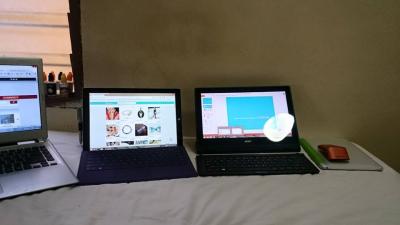
guy anyone solve switch 12 wifi issue ????
i setup three acer aspire laptop, sfp3, ipad and switch 12 but switch can't get connection and connected with 4 bar ....
ping response return XXXXms compare with others xxMS...

after upload and complete this post, my switch still can't load lowyat forum ...


Attached thumbnail(s)
Attached Image

12 Pages « < 8 9 10 11 12 >Top
Topic ClosedOptions
 

Change to:
| Lo-Fi Version
0.1817sec    0.64    6 queries    GZIP Disabled
Time is now: 10th December 2025 - 12:36 AM
