

Hi,
Just got my Blue V Spec last week, any recommendation where to get good quality brake lock? Thanks.
New Honda City 2014 v04, *ID/Grade/Color/Location@State
New Honda City 2014 v04, *ID/Grade/Color/Location@State
|
|
 Dec 23 2014, 10:58 AM Dec 23 2014, 10:58 AM
Return to original view | IPv6 | Post
#1
|
 
Junior Member
39 posts Joined: Jul 2005  
|
Hi,
Just got my Blue V Spec last week, any recommendation where to get good quality brake lock? Thanks. |
|
|
|
|
|
Dec 23 2014, 11:04 AM
Return to original view | IPv6 | Post
#2
|
|
Junior Member
39 posts Joined: Jul 2005
|
QUOTE(Timberwolf83 @ Dec 18 2014, 02:20 PM) Owned a V Spec, and was using Waze while driving by choosing the "APP" option not the "Mirror Link". Displaying Waze thru the multi function screen was not an issue, but I couldn't type the address using the Honda Screen, it will automatically exit from Waze when I want to type the address. I have to type the address from my Iphone than link up again with the Honda Screen. Hi, can you share how do you mirror your phone to the screen? Thanks.So question is, any of you guys can type the address directly on the Honda Screen?  |
|
|
Dec 31 2014, 09:18 AM
Return to original view | IPv6 | Post
#3
|
|
Junior Member
39 posts Joined: Jul 2005
|
Hi Guys,
Just want to share with you, i successfully mirror my Nexus 5 phone to my Honda City V head unit and can mirror Waze & all other apps while driving without the need to bypass (wire cut) Here is my setup: 1) Nexus 5 - Lollipop 2) Slimport adapter 3) HDMI Cable To mirror just open Audio --> change source to HDMI and that all. It works while driving. It's maybe my setup or i'm just lucky enough to make it work without bypass.    This post has been edited by sonofsam: Dec 31 2014, 11:01 AM |
|
|
Dec 31 2014, 10:51 AM
Return to original view | IPv6 | Post
#4
|
|
Junior Member
39 posts Joined: Jul 2005
|
QUOTE(cheewui @ Dec 31 2014, 10:31 AM) Hi sonofsam, I bought MHL cable before but Nexus 5 does not support MHL and the mini USB is different. I dont have other device that support Slimport at the moment.I never try using slimport adapter. I'm using Note 3 & MHL cable. MHL & Slimport is 2 different technologies. Below is the list of devices that supported Slimport http://www.slimportconnect.com/slimport-supported-devices/ I suspect it works maybe because you use Slimport. Have you try using other slimport supported devices? Actually i just realized that i installed AppRadio app in my Nexus 5. Maybe this is the reason it works without bypass. I will try to experiment by uninstall it later. I will update after lunch. |
|
|
Dec 31 2014, 02:40 PM
Return to original view | IPv6 | Post
#5
|
|
Junior Member
39 posts Joined: Jul 2005
|
QUOTE(cheewui @ Dec 31 2014, 11:08 AM) Actually I got install AppRadio into my mobile phone as well. But somehow it doesn't works. I still need to pull the handbrake. I'm not sure whether I use Appradio correctly or not. You are right, its not the AppRadio, after i uninstall it, i still can mirror it while driving. Maybe it's the cable. |
|
|
Dec 31 2014, 02:45 PM
Return to original view | IPv6 | Post
#6
|
|
Junior Member
39 posts Joined: Jul 2005
|
QUOTE(tachlio @ Dec 31 2014, 11:11 AM) I using Note 2 & S3 both need bypass in order show during release handbrake. I bought it here : SlimportMaybe you could show the actual MHL cable that work for you so other can had a reference? » Click to show Spoiler - click again to hide... « Please note that slimport can only work on certain smartphone. |
|
|
|
|
|
Jan 5 2015, 02:09 PM
Return to original view | IPv6 | Post
#7
|
|
Junior Member
39 posts Joined: Jul 2005
|
QUOTE(shinichi88 @ Jan 2 2015, 05:34 PM) Really?? I see, sorry to hear that. I guess it's just me getting lucky... Gonna test again tonight/weekend.. Last time I tested with Nexus 5 - KitKat, after put down handbrake, screen is gone.. not working.. Same setup as yours but is KitKat la that time.. Now Lollipop didnt test yet.. *** Tested jz now.. doesn't seem to work without bypass.. |
|
|
Jan 7 2015, 03:32 PM
Return to original view | IPv6 | Post
#8
|
|
Junior Member
39 posts Joined: Jul 2005
|
QUOTE(voleman @ Jan 5 2015, 11:02 PM) Hi guys. My wife has a City 2014 V spec and am planning to get her a new Android phone. Main criteria is that Waze should display on the V-spec HU Sorry just read your post, yup i'm using LG Nexus 5. But there are other user already test with the same setup with me but it doesn't work without bypass. Besides solutions mentioned on the front page, all of which requires tinkering with the car, I am wondering if the slimport + Nexus setup actually works for other people too? Also (question to sonofsam), do the bluetooth audio and steering phone controls work when you are mirroring using slimport? I assume you are using LG Nexus 5? Thanks guys for your suggestions. |
|
|
Jan 7 2015, 03:35 PM
Return to original view | Post
#9
|
|
Junior Member
39 posts Joined: Jul 2005
|
QUOTE(max_lcy @ Jan 6 2015, 08:15 AM) If is KL, i can intro my SA to u, she very helpful & honest. Me also get from New Era Kajang  Location at Honda New Era Kajang. If u ok then i will pm u my SA.  . My SA is a malay guy, quite helpfull. . My SA is a malay guy, quite helpfull. |
|
|
Jan 7 2015, 03:37 PM
Return to original view | Post
#10
|
|
Junior Member
39 posts Joined: Jul 2005
|
QUOTE(shinichi88 @ Jan 6 2015, 11:43 AM) Hello voleman, if you really really love your wife, pls get her an iOS phone, either iP5, iP5s, iP6 also can.. Good Info. Thumbs Up don't bother about getting Android.. Seriously is useless now~~. OR better change the noob HU. To answer a lot of ppl confusion, Android CAN mirror with V-spec HU, however DO mind the word "MIRROR", so basically all your touch has to be on the PHONE, not the HU.. And for Android user, u need to bypass the handbrake*. *Not sure why "sonofsam" car can mirror the phone without bypass. For iOS (iphone/ipad/ipod) user, you will be very lucky because your phone can "CONNECT" to HU instead of "MIRROR". And doesn't require bypass. Let's take WAZE for example, Android user need to bypass handbrake (some cable), and then to search location, type, tap, click, EVERYTHING on the PHONE! iOS user no need bypass handbrake, you can tap/scroll/search/type on the HU SCREEN. Hope you guys able to see the different. *iOS user also can bypass if you want to play video/youtube/etc. Waze by default doesn't need bypass. |
|
Topic ClosedOptions
|
| Change to: |  0.0570sec 0.0570sec
 0.58 0.58
 7 queries 7 queries
 GZIP Disabled GZIP Disabled
Time is now: 11th December 2025 - 03:41 AM |
 Quote
Quote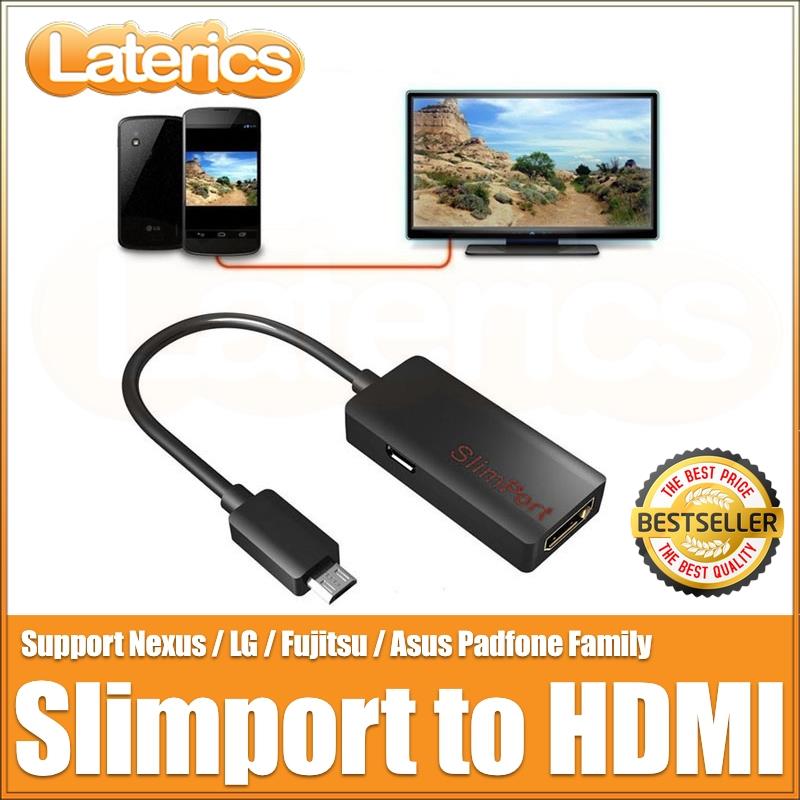 jpg[/IMG]