

Latest Odin
Samsung Galaxy S III I9300 Official Thread V36, Unofficial 4.4.4 is here :D
Samsung Galaxy S III I9300 Official Thread V36, Unofficial 4.4.4 is here :D
|
|
 Jul 8 2015, 11:02 PM Jul 8 2015, 11:02 PM
|
 
Senior Member
4,349 posts Joined: Sep 2005 
|
|
|
|
|
|
|
Jul 8 2015, 11:08 PM
|
|
Senior Member
4,349 posts Joined: Sep 2005
|
B4 you root - please ensure you get the latest stock Samsung ROM for your device.
|
|
|
Jul 8 2015, 11:09 PM
|
|
Senior Member
4,349 posts Joined: Sep 2005
|
Get your cf auto root for your device HERE
|
|
|
Jul 8 2015, 11:12 PM
|
|
Senior Member
4,349 posts Joined: Sep 2005
|
Get the twrp image file (.img) HERE
|
|
|
Jul 8 2015, 11:15 PM
|

Junior Member
55 posts Joined: Jul 2015
|
QUOTE(surefire v LED @ Jul 8 2015, 11:02 PM) <ID:0/003> Added!!<OSM> Enter CS for MD5.. <OSM> Check MD5.. Do not unplug the cable.. <OSM> Please wait.. <OSM> philz_touch_5.00.5-i9300.tar.md5 is valid. <OSM> Checking MD5 finished Sucessfully.. <OSM> Leave CS.. <ID:0/003> Odin engine v(ID:3.1005).. <ID:0/003> File analysis.. <ID:0/003> SetupConnection.. <ID:0/003> Initialzation.. <ID:0/003> Get PIT for mapping.. <ID:0/003> Firmware update start.. <ID:0/003> SingleDownload. <ID:0/003> recovery.img <ID:0/003> NAND Write Start!! <ID:0/003> RQT_CLOSE !! <ID:0/003> RES OK !! <ID:0/003> Removed!! <ID:0/003> Remain Port .... 0 <OSM> All threads completed. (succeed 1 / failed 0) Tried it on the latest version of Odin. Not successful as well. I am gonna try out the rest that you suggested! |
|
|
Jul 8 2015, 11:15 PM
|
|
Senior Member
4,349 posts Joined: Sep 2005
|
Follow THIS on how to install the twrp image file without Odin.
|
|
|
|
|
|
Jul 8 2015, 11:18 PM
|
|
Senior Member
4,349 posts Joined: Sep 2005
|
Once you successfully rooted and install the TWRP - PLEASEEEEE make a nandroid backup via TWRP and EFS backup using Samsung Tools(search in xda)
Good night - I'm not feeling well - terrible cough during this Ramadhan is painful to me. |
|
|
Jul 8 2015, 11:59 PM
|

Junior Member
253 posts Joined: Mar 2014 
|
Try not to tick reboot/reset(not sure what the option name) and try it again. After that reboot/enter the recovery manually.
And make sure u root first. Check if your device is rooted properly with any root checker from playstore |
|
|
Jul 9 2015, 08:46 AM
|
|
Junior Member
55 posts Joined: Jul 2015
|
Thank you guys @normek @surefire v LED @buukarim, I guess i've finally flashed the rom.
So not used to the new interface! Is it normal for the batter to drain from 38% at 2.30am to 3% at 7.30am? |
|
|
Jul 9 2015, 10:03 AM
|
|
Junior Member
253 posts Joined: Mar 2014
|
QUOTE(XJShinoda @ Jul 9 2015, 08:46 AM) Thank you guys @normek @surefire v LED @buukarim, I guess i've finally flashed the rom. Not normal. Check wakelock first. So not used to the new interface! Is it normal for the batter to drain from 38% at 2.30am to 3% at 7.30am?   |
|
|
Jul 9 2015, 10:18 AM
|
|
Junior Member
55 posts Joined: Jul 2015
|
orz, wifi not working, and all the apps i dl-ed last night vanished without a trace....
So i went to recovery mode, trying to wipe the data off and thinking of reinstalling the rom. While in the process of wiping data, it reboots halfway, the last message i saw was something like failed to wipe "data/misc" it keeps on restarts and stuck on the boot page.... |
|
|
Jul 9 2015, 10:37 AM
|
|
Junior Member
253 posts Joined: Mar 2014
|
QUOTE(XJShinoda @ Jul 9 2015, 10:18 AM) orz, wifi not working, and all the apps i dl-ed last night vanished without a trace.... Sounds like your there's prob with your internal. You might want to consider changing device. It is getting old So i went to recovery mode, trying to wipe the data off and thinking of reinstalling the rom. While in the process of wiping data, it reboots halfway, the last message i saw was something like failed to wipe "data/misc" it keeps on restarts and stuck on the boot page....  |
|
|
Jul 9 2015, 12:19 PM
|
|
Senior Member
4,349 posts Joined: Sep 2005
|
Which rom you're using now?
|
|
|
|
|
|
Jul 9 2015, 02:09 PM
|
|
Junior Member
55 posts Joined: Jul 2015
|
Preparing to change phone in case anything failed. I flashed the rom again, hopefully it can sustain this time. Hmm...
Using Blisspop v3.2 5.1.1 This post has been edited by XJShinoda: Jul 9 2015, 02:10 PM Attached thumbnail(s) 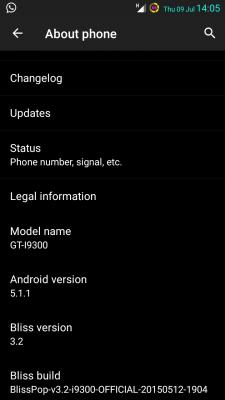
|
|
|
Jul 9 2015, 02:28 PM
|
|
Senior Member
4,349 posts Joined: Sep 2005
|
Ok - not bad.
|
|
|
Jul 10 2015, 11:19 AM
|

Senior Member
3,158 posts Joined: Dec 2006
|
what happen actually that you cant flash recovery?
now using archi experimental... not having any issue... cuma macam kene tekan slow slow,nant takut kalau tekan laju laju...ada glitch la...jammed la... Attached thumbnail(s) 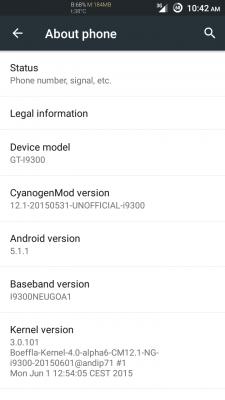
|
|
|
Jul 10 2015, 08:48 PM
|
|
Junior Member
55 posts Joined: Jul 2015
|
I am wondering if were to update a new version of rom, does that mean that you have to reinstall all the apps again after flashing the new rom?
|
|
|
Jul 10 2015, 08:56 PM
|
|
Senior Member
3,158 posts Joined: Dec 2006
|
QUOTE(XJShinoda @ Jul 10 2015, 08:48 PM) I am wondering if were to update a new version of rom, does that mean that you have to reinstall all the apps again after flashing the new rom? yep,and im using titanium backup to restore apps |
|
|
Jul 10 2015, 09:16 PM
|
|
Junior Member
55 posts Joined: Jul 2015
|
QUOTE(normeck @ Jul 10 2015, 08:56 PM) yep,and im using titanium backup to restore apps oh, I just went dl this app. Gonna backup those apps, just in case i had to flash a rom again. |
|
|
Jul 11 2015, 02:18 AM
|
|
Senior Member
3,158 posts Joined: Dec 2006
|
QUOTE(XJShinoda @ Jul 10 2015, 09:16 PM) oh, I just went dl this app. Gonna backup those apps, just in case i had to flash a rom again. nandroid backup is a must |
| Change to: |  0.0266sec 0.0266sec
 0.62 0.62
 6 queries 6 queries
 GZIP Disabled GZIP Disabled
Time is now: 8th December 2025 - 05:05 AM |
 Quote
Quote