Outline ·
[ Standard ] ·
Linear+
CM Silencio - connect internal speaker
|
TSKravo
|
 Nov 3 2014, 10:00 AM, updated 12y ago Nov 3 2014, 10:00 AM, updated 12y ago
|

|
I have this casing http://apac.coolermaster.com/en/product/De...lencio-550.html recently changed a mobo, the tech guy probably didn't connect mobo to the casing internal speaker, i did some testing, didn't hear any bios beep code i refer the doc, but it didn't stated anything about internal speaker connection or this casing has no such feature? mobo Gigabyte H97 Gaming 3 http://www.gigabyte.my/products/product-pa...spx?pid=4997#spThis post has been edited by Kravo: Nov 4 2014, 11:45 AM |
|
|
|
|
|
kherel77
|
Nov 3 2014, 11:48 AM
|
|
|
Yes, this casing included that speaker as accessories. http://www.silentpcreview.com/cm-silencio550http://archive.benchmarkreviews.com/index....=1&limitstart=3You have to ask your PC builder to install it to your mobo. |
|
|
|
|
|
nidzamputra
|
Nov 3 2014, 12:41 PM
|
|
|
Refer on your mobo manual instructions..there are some info for speaker connection..the speaker should be on your casing accessories
|
|
|
|
|
|
TSKravo
|
Nov 4 2014, 11:48 AM
|
|
|
i chked the doc, it only show the buzzer wire, but no details where to connect it
|
|
|
|
|
|
kherel77
|
Nov 4 2014, 01:49 PM
|
|
|
QUOTE(Kravo @ Nov 4 2014, 11:48 AM) i chked the doc, it only show the buzzer wire, but no details where to connect it Refer your mobo manual page 26 note#9 
|
|
|
|
|
|
TSKravo
|
Nov 4 2014, 02:02 PM
|
|
|
but connect to which part of the casing? the casing doc has no details, only listing the buzzer wire
|
|
|
|
|
|
kherel77
|
Nov 4 2014, 02:28 PM
|
|
|
QUOTE(Kravo @ Nov 4 2014, 02:02 PM) but connect to which part of the casing? the casing doc has no details, only listing the buzzer wire Casing internal speaker is like below. It's should come as accessories with the casing. 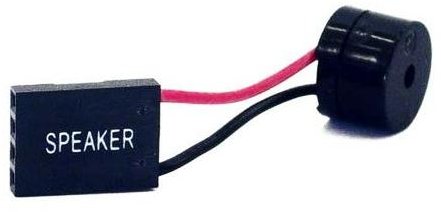 |
|
|
|
|
|
kherel77
|
Nov 4 2014, 02:34 PM
|
|
|
QUOTE(kherel77 @ Nov 4 2014, 02:28 PM) Casing internal speaker is like below. It's should come as accessories with the casing. Actually, it's only hanging from mobo not stick to the casing. Below speaker type is for older generation computer casing which stick to the casing.  |
|
|
|
|



 Quote
Quote


 0.0236sec
 0.39
0.39
 6 queries
 GZIP Disabled