

Attached thumbnail(s)
illegear z5 discussion thread, anything and everything about the beast
|
|
  Jan 25 2015, 07:04 PM Jan 25 2015, 07:04 PM
Return to original view | Post
#21
|
 
Junior Member
101 posts Joined: Dec 2014 
|
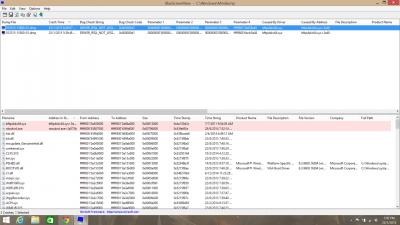
@princej how to fix this?? second time facing bsod
Attached thumbnail(s)
|
|
|
|
|
|
Jan 25 2015, 07:21 PM
Return to original view | Post
#22
|
|
Junior Member
101 posts Joined: Dec 2014
|
QUOTE(Arvinaaaaa @ Jan 25 2015, 07:12 PM) I dont understand..this shit never happen with windows 7..my z5 has been working perfectly since i bought it the first day when it was released on the first day..suspecting its driver issue already post above the screenshot for bsod analyzer. Well this happen when im playing Assassin's Creed Unity. Was suspecting the buffalo external hdd when it say the error. But second time there is no external hdd involvement at all. Not sure why getting this heck in the 6th day from purchase.Bro..please post the result of the bsod analyser.. http://www.solvusoft.com/en/files/bsod-blu...bftpdskc64-sys/  |
|
|
Jan 25 2015, 07:25 PM
Return to original view | Post
#23
|
|
Junior Member
101 posts Joined: Dec 2014
|
QUOTE(Arvinaaaaa @ Jan 25 2015, 07:12 PM) I dont understand..this shit never happen with windows 7..my z5 has been working perfectly since i bought it the first day when it was released on the first day..suspecting its driver issue But the part where you have to focus more is where the bsod analyzer showing the crashed drivers list. Where one is the Bftpdskc64.sys but the second is the same driver as the Xarive the Ntoskrnl.exe.Bro..please post the result of the bsod analyser.. http://www.solvusoft.com/en/files/bsod-blu...bftpdskc64-sys/ Im using the genuine original windows 8.1 with license keys. But facing this problem not sure why. |
|
|
Jan 25 2015, 07:26 PM
Return to original view | Post
#24
|
|
Junior Member
101 posts Joined: Dec 2014
|
QUOTE(Arvinaaaaa @ Jan 25 2015, 07:12 PM) I dont understand..this shit never happen with windows 7..my z5 has been working perfectly since i bought it the first day when it was released on the first day..suspecting its driver issue But the part where you have to focus more is where the bsod analyzer showing the crashed drivers list. Where one is the Bftpdskc64.sys but the second is the same driver as the Xarive the Ntoskrnl.exe.Bro..please post the result of the bsod analyser.. http://www.solvusoft.com/en/files/bsod-blu...bftpdskc64-sys/ Im using the genuine original windows 8.1 with license keys. But facing this problem not sure why. |
|
|
Jan 25 2015, 07:43 PM
Return to original view | Post
#25
|
|
Junior Member
101 posts Joined: Dec 2014
|
QUOTE(Arvinaaaaa @ Jan 25 2015, 07:29 PM) Yeah the second is related to windows kernel. .most probably cause by the hard drive But this problem is also seems like the AC wireless chip driver like most of the people in microsoft forum reported. |
|
|
Jan 25 2015, 07:45 PM
Return to original view | Post
#26
|
|
Junior Member
101 posts Joined: Dec 2014
|
QUOTE(Arvinaaaaa @ Jan 25 2015, 07:29 PM) Yeah the second is related to windows kernel. .most probably cause by the hard drive right now im trying to update my intel hd drivers. Saw some fix on youtube is by updating intel |
|
|
|
|
|
 Jan 25 2015, 10:39 PM Jan 25 2015, 10:39 PM
Return to original view | Post
#27
|
|
Junior Member
101 posts Joined: Dec 2014
|
Played assassins creed unity for an hour after updating the intel hd graphics driver from device management and some windows update so far no bsod yet.
And about playing assassins creed unity in z5. Well the Nvidia Experience Program said that it's not compatible with current graphic card gtx860m but it provide the lowest graphic settings for that game but i tied to make it high and played. The game works fine with no glitch and im not sure about fps. The keyboard gets warm and the heat pipe air flow sound gets higher and hot air. So far so good. Played NFS Rivals in ultra settings. Damn awesome. Minimum air flow sound little warm on keyboard and sometime no sound. Graphics are stunning awesome. Installing Far Cry 4 sooner. |
|
|
Jan 26 2015, 03:32 PM
Return to original view | Post
#28
|
|
Junior Member
101 posts Joined: Dec 2014
|
QUOTE(Prince J @ Jan 26 2015, 01:53 AM) It looks like Nvidia/Intel driver issues. May I know what versions did you install? The version that in the driver installation disk that illegear given to me. The orange disk. |
|
|
Jan 26 2015, 03:36 PM
Return to original view | Post
#29
|
|
Junior Member
101 posts Joined: Dec 2014
|
So far what new games are you guys playing on z5 other than assassins creed and far cry 4.
|
|
|
Jan 26 2015, 04:16 PM
Return to original view | Post
#30
|
|
Junior Member
101 posts Joined: Dec 2014
|
QUOTE(Prince J @ Jan 26 2015, 04:06 PM) Thank you for your suggestion. I Installed Avast free anti-virus right after encounter the 2 BSOD. Before that there was no anti-virus at all when the BSOD occur.Did you install any sort of anti-virus program? For e.g. Avira? |
|
|
Jan 26 2015, 04:36 PM
Return to original view | Post
#31
|
|
Junior Member
101 posts Joined: Dec 2014
|
QUOTE(Prince J @ Jan 26 2015, 04:20 PM) Hi MgrSagaaboyz, I installed the genuine original OS windows 8.1 pro with license key but not sure why error. Did u tried running furmark test on my unit? was it good when you testing it.This's really weird, we did test your laptop for total of 5 days when you postponed your pickup in store, but we never seen a single BSOD happened in your machine. Please bring it back to us, we will test it and we will check the 3rd party program installed in your laptop. Thank you. |
|
|
Jan 27 2015, 12:53 PM
Return to original view | Post
#32
|
|
Junior Member
101 posts Joined: Dec 2014
|
QUOTE(miong93 @ Jan 26 2015, 06:37 PM) Try giving Prince J your Nvidia driver version, you can find it in GeForce Experience application. Cause recently Nvidia just have a driver update.. It maybe have something to do with the Nvidia/Intel error.. So far I haven't update the Nvidia latest driver yet. Ya I did update my Nvidia Experience. To the latest version 2.2.2.0And for your question, before the recent update of Nvidia driver, I did played BF4, COD AW and light Dota 2. All three are running fine except Dota 2 Local Lobby match (it's not smooth in local lobby match, normal pub or MMR is fine) |
|
|
 Feb 1 2015, 12:53 PM Feb 1 2015, 12:53 PM
Return to original view | Post
#33
|
|
Junior Member
101 posts Joined: Dec 2014
|
Guys those who facing BSOD problems on Z5 try updating your Intel HD Graphics driver. Since I update my Nvidia driver then I got 2 BSOD. Then tried update intel hd graphics, nvidia, and os. Then so far no bsod yet. After that no BSOD yet. I guess that's the solution.
 . Will be playing some more games today to check BSOD. . Will be playing some more games today to check BSOD. |
|
|
|
|
|
Feb 1 2015, 08:06 PM
Return to original view | Post
#34
|
|
Junior Member
101 posts Joined: Dec 2014
|
Faced again another BOSD when playing assassins creed unity. same error
|
|
|
Feb 2 2015, 05:30 PM
Return to original view | Post
#35
|
|
Junior Member
101 posts Joined: Dec 2014
|
QUOTE(Prince J @ Feb 2 2015, 05:12 PM) Hi Mgr, Occur when playing games. First was when playing assassins creed unity and then when playing assetto corsa. Yesterday was third time facing. Same error. The driver ntoskrnl and bftpdskc64.sysDid the BSOD occur only in game? |
|
|
Feb 2 2015, 09:52 PM
Return to original view | Post
#36
|
|
Junior Member
101 posts Joined: Dec 2014
|
QUOTE(miong93 @ Feb 2 2015, 05:37 PM) I think it's probably due to driver issue.. not hardware issue.. Will try soon.Do you try reverting your nvidia driver to an older version ? Cause normally what I did is I only update the nvidia driver when the update provides me a fix or improvement on the game I'm playing. Nvidia driver always cause problem 1.. dono why  |
|
|
Feb 2 2015, 09:53 PM
Return to original view | Post
#37
|
|
Junior Member
101 posts Joined: Dec 2014
|
QUOTE(miong93 @ Feb 2 2015, 05:37 PM) I think it's probably due to driver issue.. not hardware issue.. Will try soon.Do you try reverting your nvidia driver to an older version ? Cause normally what I did is I only update the nvidia driver when the update provides me a fix or improvement on the game I'm playing. Nvidia driver always cause problem 1.. dono why |
|
|
 Feb 2 2015, 09:55 PM Feb 2 2015, 09:55 PM
Return to original view | Post
#38
|
|
Junior Member
101 posts Joined: Dec 2014
|
Anyone doing Z5 gameplay and benchmark youtube video???
 |
|
|
Feb 4 2015, 02:16 PM
Return to original view | Post
#39
|
|
Junior Member
101 posts Joined: Dec 2014
|
QUOTE(hyperyouth_firepower @ Feb 3 2015, 10:16 AM) go google Fangbook III. its the same one, IIRC. wow same model. But 100% similar model i saw on Ibuypower Chimera CX 9 (http://www.ibuypower.com/Store/Chimera-CX-9-Gaming-Laptop)but they dont have any videos. thankx  This post has been edited by MgrSagaaboyz: Feb 4 2015, 02:18 PM |
|
|
Feb 4 2015, 02:20 PM
Return to original view | Post
#40
|
|
Junior Member
101 posts Joined: Dec 2014
|
QUOTE(hyperyouth_firepower @ Feb 3 2015, 10:16 AM) go google Fangbook III. its the same one, IIRC. Found this on same sellers page. https://www.cyberpowerpc.com/system/RAVEN_X6_-_RUSH100% same model as Z5 but they calling it as Raven x6 |
|
Topic ClosedOptions
|
| Change to: |  0.0432sec 0.0432sec
 0.75 0.75
 7 queries 7 queries
 GZIP Disabled GZIP Disabled
Time is now: 3rd December 2025 - 05:15 AM |
 Quote
Quote