Outline ·
[ Standard ] ·
Linear+
illegear z5 discussion thread, anything and everything about the beast
|
cstkl1
|
 Jun 1 2015, 10:12 AM Jun 1 2015, 10:12 AM
|
Look at all my stars!!


|
QUOTE(Prince J @ May 30 2015, 06:49 PM) Just a little heads up, for those who have The Witcher 3 on ILLEGEAR, There is an Nvidia graphics card driver update that you will need to install to enjoy smooth gaming. Driver: http://www.geforce.com/drivers/results/85053Use 353 hot fix 352.86 installation tip Do not install geforce experience Download geforce experience seperately Disable hardware accelaration in chrome |
|
|
|
|
|
cstkl1
|
Jun 1 2015, 10:14 AM
|
Look at all my stars!!
|
QUOTE(kennykong85 @ May 31 2015, 01:05 PM) Any z5 user using any laptop cooling pad (worth to get 1?) currently downloading gta v from steam! Waiting eagerly on my 1st gam3. Unless ure placing the notebook on couches/bed etc There is no point in getting a cooling pad |
|
|
|
|
|
kennykong85
|
Jun 1 2015, 10:35 AM
|
Getting Started

|
lol I must be outdated, my old laptop I owned must apply the cooling pad, if not I can boil eggs on top of it. coz it get real hot after few hrs of using it non stop.
|
|
|
|
|
|
cstkl1
|
Jun 1 2015, 12:03 PM
|
Look at all my stars!!
|
QUOTE(kennykong85 @ Jun 1 2015, 10:35 AM) lol I must be outdated, my old laptop I owned must apply the cooling pad, if not I can boil eggs on top of it. coz it get real hot after few hrs of using it non stop. you can see the clearance at the bottom. There is no need wont make a difference. edit new nvidia driver is out. This post has been edited by cstkl1: Jun 1 2015, 12:03 PM |
|
|
|
|
|
kennykong85
|
Jun 1 2015, 04:29 PM
|
Getting Started
|
sorry ya hehe as I am from the stone age.
1 more stupid qs as I believe some1 asked this previously but I cant trace it back,
my Z5 when I plug in the charger it will continue to charge till 100%. how do I make it to stop charging at 90% or 95%. as I am downloading the GTA from steam it might take the a day or 2 to complete, I dun wanna leave the battery at 100% . I guess it will reduce the life span right?
|
|
|
|
|
|
christ14
|
Jun 1 2015, 04:37 PM
|
|
|
QUOTE(kennykong85 @ Jun 1 2015, 04:29 PM) sorry ya hehe as I am from the stone age. 1 more stupid qs as I believe some1 asked this previously but I cant trace it back, my Z5 when I plug in the charger it will continue to charge till 100%. how do I make it to stop charging at 90% or 95%. as I am downloading the GTA from steam it might take the a day or 2 to complete, I dun wanna leave the battery at 100% . I guess it will reduce the life span right? previous got sifu said at 90+% unplug it or off it. then charge it again or something like that, i did tried what they mentioned but to no avail  can search again the forum |
|
|
|
|
|
MgrSagaaboyz
|
Jun 2 2015, 07:22 AM
|
Getting Started
|
QUOTE(kennykong85 @ Jun 1 2015, 04:29 PM) sorry ya hehe as I am from the stone age. 1 more stupid qs as I believe some1 asked this previously but I cant trace it back, my Z5 when I plug in the charger it will continue to charge till 100%. how do I make it to stop charging at 90% or 95%. as I am downloading the GTA from steam it might take the a day or 2 to complete, I dun wanna leave the battery at 100% . I guess it will reduce the life span right? You need to unplug your z5 after fully charge for about the battery percentage reduce to 98 or 99 and then plug back to power then you will the message plugged, not charging. If its starts to continue charge after awhile then you need to restart your z5 and then try the same method. Most of the time when I power my Z5 I will connect it to power before turning windows on, so automatically it will show plugged but not charging. |
|
|
|
|
|
kennykong85
|
Jun 2 2015, 09:50 AM
|
Getting Started
|
ok got it thanks a lot.! yesterday I leave it on for whole night to dl the GTA v. I have change the setting to "never go to sleep" this morning I wake up and when I check on it, it has actually fall as sleep lol. seems like I am not doing the correct setting.
|
|
|
|
|
|
MgrSagaaboyz
|
Jun 2 2015, 11:35 AM
|
Getting Started
|
QUOTE(kennykong85 @ Jun 2 2015, 09:50 AM) ok got it thanks a lot.! yesterday I leave it on for whole night to dl the GTA v. I have change the setting to "never go to sleep" this morning I wake up and when I check on it, it has actually fall as sleep lol. seems like I am not doing the correct setting. Usually if your battery is more than 90-95% then when plugging power cable by default it will show the "not charging" message which means its not using or charging your battery power but using the power directly from the plugged in cable. If your battery has lower than 90% of battery then it will starts to charge until it become full (100%). So once it reach 95% and more, you can unplug the cable and wait for a while till your battery indicator shows you the estimation remaining hours of your laptop battery power and now you have to plugged it back. Now by default it will not charge. 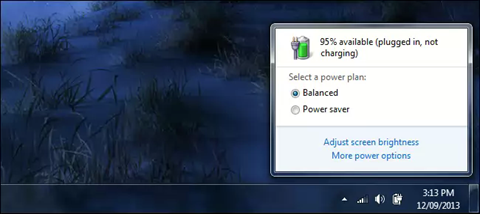 This post has been edited by MgrSagaaboyz: Jun 2 2015, 11:41 AM This post has been edited by MgrSagaaboyz: Jun 2 2015, 11:41 AM |
|
|
|
|
|
MgrSagaaboyz
|
Jun 2 2015, 11:39 AM
|
Getting Started
|
QUOTE(kennykong85 @ Jun 2 2015, 09:50 AM) ok got it thanks a lot.! yesterday I leave it on for whole night to dl the GTA v. I have change the setting to "never go to sleep" this morning I wake up and when I check on it, it has actually fall as sleep lol. seems like I am not doing the correct setting.  Change it to never sleep under plugged in This post has been edited by MgrSagaaboyz: Jun 2 2015, 11:42 AM |
|
|
|
|
|
MgrSagaaboyz
|
 Jun 2 2015, 11:55 AM Jun 2 2015, 11:55 AM
|
Getting Started
|
QUOTE(kennykong85 @ May 31 2015, 01:05 PM) Any z5 user using any laptop cooling pad (worth to get 1?) currently downloading gta v from steam! Waiting eagerly on my 1st gam3. Playing GTA V on gtx860m getting 75-85 °C temp without using turbo fan mode. But its fine no problem so far. |
|
|
|
|
|
kennykong85
|
Jun 2 2015, 12:47 PM
|
Getting Started
|
QUOTE(MgrSagaaboyz @ Jun 2 2015, 11:39 AM) Change it to never sleep under plugged in actually I changed both. I will take a look at the setting again when I m home tonight. if it don't fall as sleep today I suppose by the time I get home my GTA v will be complete. |
|
|
|
|
|
christ14
|
Jun 2 2015, 02:11 PM
|
|
|
QUOTE(MgrSagaaboyz @ Jun 2 2015, 11:35 AM) Usually if your battery is more than 90-95% then when plugging power cable by default it will show the "not charging" message which means its not using or charging your battery power but using the power directly from the plugged in cable. If your battery has lower than 90% of battery then it will starts to charge until it become full (100%). So once it reach 95% and more, you can unplug the cable and wait for a while till your battery indicator shows you the estimation remaining hours of your laptop battery power and now you have to plugged it back. Now by default it will not charge. wait..now that im seeing the pic. i never get that message. i mean i dont get the "not charging part", is it something wrong? or have driver or something |
|
|
|
|
|
kennykong85
|
Jun 2 2015, 03:17 PM
|
Getting Started
|
QUOTE(christ14 @ Jun 2 2015, 02:11 PM) wait..now that im seeing the pic. i never get that message. i mean i dont get the "not charging part", is it something wrong? or have driver or something u got it! that's what I meant to maintain power plug in without charging. good to preserve your battery. |
|
|
|
|
|
christ14
|
Jun 2 2015, 03:46 PM
|
|
|
QUOTE(kennykong85 @ Jun 2 2015, 03:17 PM) u got it! that's what I meant to maintain power plug in without charging. good to preserve your battery. like my previous post i did mention i followed some pointers given but it still charged to full even after restart etc. nothing works like what they said and it still went to 100%  i was so frustrated that i dont really care and just let it run lah cuz i cant pinpoint the problem as to why most of the guys here can and i cant lol  |
|
|
|
|
|
kennykong85
|
Jun 2 2015, 04:53 PM
|
Getting Started
|
try to punch ur GF -> Z5 and demand her to be nice with you If not you will double screw her lol. test a couple of times and u might get it.  chill bro juz kidding. |
|
|
|
|
|
MgrSagaaboyz
|
Jun 2 2015, 06:42 PM
|
Getting Started
|
QUOTE(christ14 @ Jun 2 2015, 03:46 PM) like my previous post i did mention i followed some pointers given but it still charged to full even after restart etc. nothing works like what they said and it still went to 100% i was so frustrated that i dont really care and just let it run lah cuz i cant pinpoint the problem as to why most of the guys here can and i cant lol If thats the case and then I will try to make a video on how to do like that tutorial today. |
|
|
|
|
|
killerl
|
Jun 2 2015, 09:56 PM
|
New Member
|
QUOTE(Adil@ILLEGEAR @ Jun 1 2015, 10:10 AM) Hi goldfish, Kindly check your facebook message. Mr. Adil, how to fix the GTA V shutter lag ? I get lag when something i driving fast ~ |
|
|
|
|
|
christ14
|
Jun 2 2015, 10:19 PM
|
|
|
finally, after persistently trial and error, restarts, pluggings, offs and ons, i got it!  steps i remembered, it was 100%, i unplugged it, play music (so i could drop it to 97% ish faster), plug it in, and switch on the adapter Attached thumbnail(s)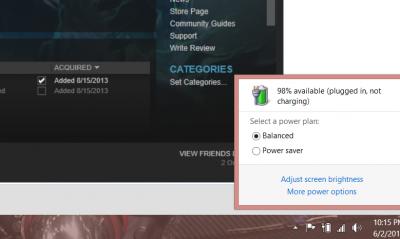
|
|
|
|
|
|
YangWeiLim85
|
Jun 2 2015, 10:22 PM
|
New Member
|
Should use High Power/Balanced?
Any different?
|
|
|
|
|



 Quote
Quote


 0.0306sec
 0.43
0.43
 6 queries
 GZIP Disabled