Welcome Guest ( Log In | Register )

7 Pages < 1 2 3 4 5 > » Bottom

Outline · [ Standard ] · Linear+

 Asus G-Series Notebook Thread V10, Intel 8th Gen Strikes

views
     
xyz_cityhunter
post Dec 30 2014, 12:38 PM

Getting Started
**
Junior Member
238 posts

Joined: Dec 2010
From: Kedah


QUOTE(riku2replica @ Dec 30 2014, 10:00 AM)
I took the risk to dissect my G53 for repasting just refering to GenTechPC disassembly guide and I survived.  icon_idea.gif
*
QUOTE(horns @ Dec 30 2014, 10:07 AM)
right. in my case, it's kind of a frustration when a 2k laptop could go for 150mbps for wifi, while my 4k laptop could only manage to get 90mbps at its best. (when things boil down to physical limitations, there is really nothing you can do :/)

patience, carefulness, and gentleness are keys to tear-downs of laptops. just use mild force during the process and you will be fine. previously i did mine the same way i treated desktop computers so i screwed up a little lol!
*
Well, will use it for the moment. If really having issue with it then guess I will have to get a better card to replace it... Time to hunt on eBay... rclxub.gif
xyz_cityhunter
post Dec 31 2014, 01:48 PM

Getting Started
**
Junior Member
238 posts

Joined: Dec 2010
From: Kedah


QUOTE(horns @ Dec 31 2014, 10:12 AM)
if it can cope with the needs it's fine i guess, since you don't do file copy over network.
*
Normal times it works great but I observed some intermittent Wifi drop issue, which kind of went away after I tweak the Router transmit power to 25% and reboot router. Didn't use much of it this few days due to work but will be on holiday tomoro onward so will check if the Wifi drop issue will persist... hmm.gif
xyz_cityhunter
post Jan 5 2015, 11:11 AM

Getting Started
**
Junior Member
238 posts

Joined: Dec 2010
From: Kedah


Anyone have suggestion for backpack which the G751 can fit in? sweat.gif
The free backpack given by Asus is kind of slim so can't put too much stuff inside... cry.gif
xyz_cityhunter
post Jan 5 2015, 02:43 PM

Getting Started
**
Junior Member
238 posts

Joined: Dec 2010
From: Kedah


QUOTE(horns @ Jan 5 2015, 01:23 PM)
The same went to aw17 stock backpack haha (the compartment for laptop is too fit, and the space for other stuff are quite limited)

For more space, i got those 18" instead. (Everki titan, aw vindicator 18")
*
Where and how much did you get that?
xyz_cityhunter
post Jan 5 2015, 05:00 PM

Getting Started
**
Junior Member
238 posts

Joined: Dec 2010
From: Kedah


QUOTE(elichow747 @ Jan 5 2015, 03:24 PM)
This is why i kinda hate those free stuff. I will say "most" of the free stuff given is really got no quality.

You should get an ASUS Normad backpack! Thats cool and nice!
*
It's nice but DAT PRICE.... shocking.gif

QUOTE(horns @ Jan 5 2015, 04:24 PM)
both about MYR 250+ each. everki titan was from harwey.norman; aw.vindicator was from a shop at midvalley.

i think there are better choices (more expensive also) but i am lazy to look for them hehe
*
Hm, guess I will have to try hunt some at the Harvey Norman in PG which is the nearest... Thanks for the info... notworthy.gif
xyz_cityhunter
post Jan 6 2015, 09:03 AM

Getting Started
**
Junior Member
238 posts

Joined: Dec 2010
From: Kedah


QUOTE(horns @ Jan 5 2015, 05:51 PM)
yeah harvey.norman sometimes sells stuff with very nice price. they have some choices there for everki.
*
Searching around the Lowyat gave me results that the Everki Titan priced around 369 while Rakuten selling at 329 and the AW Vindicator at 259... Can give some insights into the quality and comfort of both of the brand? I only used Targus b4 so not familiar with this 2... hmm.gif

This post has been edited by xyz_cityhunter: Jan 6 2015, 09:23 AM
xyz_cityhunter
post Jan 6 2015, 10:17 AM

Getting Started
**
Junior Member
238 posts

Joined: Dec 2010
From: Kedah


QUOTE(horns @ Jan 6 2015, 09:57 AM)
the price for everki.titan at harvey.norman is like 250+. (iinm it's like MYR269.00)

they are spacious for 17". both have quite a number of compartments for stuff. between the two, if you looked for more spacious compartments, go for everki titan. vindicator is kind of slim, while titan is fat. this is personal preference, i like a lot of compartments. helps me organize stuff.

for weight, i think titan is slightly heavier. the zips on both are good. (imo the ones on vindicator are better; very smooth when you open and close the bag/compartments)

for build quality, i think everki is better. it's built for practical use, i think that's why everki decided to throw the looks away lol
*
Yeah, the Titan seems much more thicker compare with the Vindicator but I think it's a bit too big (Judging from the photos online...) Can you provide some details on how thick (in cm or inch) both the backpack is when stuffed? I don't really care about the design or looks of it, the only thing that I will avoid is bright colors which is easy to stain...

This post has been edited by xyz_cityhunter: Jan 6 2015, 10:19 AM
xyz_cityhunter
post Jan 6 2015, 12:30 PM

Getting Started
**
Junior Member
238 posts

Joined: Dec 2010
From: Kedah


QUOTE(horns @ Jan 6 2015, 11:01 AM)
er.. i don't have titan with me now. i have aw.m17x.r4, 2x backup batteries, 1x 240W power brick in it, and it still looks empty. literally. yeah it's a big backpack.
*
You're describing the Titan or the Vindicator?
xyz_cityhunter
post Jan 6 2015, 01:12 PM

Getting Started
**
Junior Member
238 posts

Joined: Dec 2010
From: Kedah


QUOTE(horns @ Jan 6 2015, 12:56 PM)
titan. vindicator can hold those stuff as well but it's not as bulky (hence space) as titan.
*
Ah, ok... Guess i need to go Harvey Norman to check the Titan out first if there's any... For the moment, the Vindicator which i saw on Youtube seems large enough for my use... hmm.gif
xyz_cityhunter
post Jan 6 2015, 01:40 PM

Getting Started
**
Junior Member
238 posts

Joined: Dec 2010
From: Kedah


QUOTE(horns @ Jan 6 2015, 01:20 PM)
yeah it's better to check it out smile.gif both are big backpacks anyway.

now the wish list in my next laptop/desktop is almost completed. finally, all the stuff that i want are here (i mean in a year or two biggrin.gif)

1. desktop cpu in a laptop (well, only clevo has it);
2. pcie-based m.2 slot in a laptop (many choices now);
3. usb 3.1 ports in a laptop (msi has already implemented it in new revisions of gt72 that should be shipped in april 2015 onwards. i hope clevo will follow too)

as for desktops, what's missing in brands i wanna use later is usb 3.1 ports. if there is one i will grab it right away and the old mobo will be used for file serving purpose biggrin.gif (have to find some jobs for my 4770k hehe)
*
Might have to wait for some time b4 seeing any USB3.1 devices/cables on the market... tongue.gif
Maybe you should get one with DDR4 RAM along with that...

This post has been edited by xyz_cityhunter: Jan 6 2015, 01:41 PM
xyz_cityhunter
post Jan 8 2015, 08:48 AM

Getting Started
**
Junior Member
238 posts

Joined: Dec 2010
From: Kedah


Getting a caddy to put my 1TB 7200RPM HDD and my old Intel 520 SSD into the 2nd HDD bay, hopefully won't have any problem with the HDD using the caddy...
xyz_cityhunter
post Jan 8 2015, 09:34 AM

Getting Started
**
Junior Member
238 posts

Joined: Dec 2010
From: Kedah


QUOTE(horns @ Jan 8 2015, 09:23 AM)
there should not be any issue. i installed the hdd in caddy, did a fresh install, and everything is fine.
*
Hopefully, last time when i use the HDD using caddy, it was having intermittent issue where the HDD is not responding... maybe due to insufficient power issue, hope this G751 won't have such problem... And the HDD is 7200RPM so I also hope that the SATA1 for the ODD can cope with the throughput, tested the speed is like max out around 120MB/s Read/Write when it's on the 2nd HDD bay with SATA2... hmm.gif

This post has been edited by xyz_cityhunter: Jan 8 2015, 09:35 AM
xyz_cityhunter
post Jan 8 2015, 12:43 PM

Getting Started
**
Junior Member
238 posts

Joined: Dec 2010
From: Kedah


QUOTE(horns @ Jan 8 2015, 09:54 AM)
oh. asus.g55 is fine here with w8.1. i'm running it 24/7 lol

uh? for g751 with a haswell cpu, all sata ports should run at sata3, including the ODD port.
*
I think the G751 primary bay is SATA3, secondary is SATA2 and ODD is SATA only...
xyz_cityhunter
post Jan 8 2015, 01:07 PM

Getting Started
**
Junior Member
238 posts

Joined: Dec 2010
From: Kedah


QUOTE(horns @ Jan 8 2015, 12:55 PM)
uh? seriously? haswell machines run all ports at sata3 usually (in aw, the sata, msata and odd ports are all sata3).

for asus machiens, at least the primary and secondary hdd bays are sata3. i am not sure about the odd port.
*
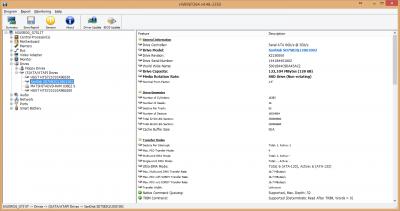
Well, here's what i got from HWinfo...
Primary: SSD
Attached Image
Secondary: HDD
Attached Image
ODD
Attached Image
Just hope that the secondary bay can be tweak to SATA3 with custom/updated BIOS, else if the physical routing is using SATA2 channels then pretty much hopeless... cry.gif
xyz_cityhunter
post Jan 8 2015, 02:11 PM

Getting Started
**
Junior Member
238 posts

Joined: Dec 2010
From: Kedah


QUOTE(horns @ Jan 8 2015, 01:53 PM)
uh? you don't need to do anything. the secondary bay is sata3 (sata 6gb/s) but it's running at sata2 speed because of the hdd.
*
Will go try swap the HDD out with my SSD to see if will see SATA3 speed there, the 7200RPM HDD is the Travelstar 7K1000 and should be able to comply with SATA3 as it's listed in its' datasheet: http://www.hgst.com/tech/techlib.nsf/techd...TS7K1000_ds.pdf
xyz_cityhunter
post Jan 8 2015, 03:51 PM

Getting Started
**
Junior Member
238 posts

Joined: Dec 2010
From: Kedah


QUOTE(horns @ Jan 8 2015, 03:21 PM)
oh this drive. i have 2x of those too. (as external storage) yeah swapping is the easiest way to confirm hehe

have you tried crystal diskinfo? in the transfer mode field you should be able to check the current and supported speeds also.

[attachmentid=4292765]
*
Will try when i get home, the one doubt that I'm having is that the Current Mode|Supported Mode, the Current Mode pretty much tells us that which SATA version that it is currently running, but the Supported Mode means the device (HDD/SSD) can support OR that particular port can support? rclxub.gif
xyz_cityhunter
post Jan 8 2015, 10:57 PM

Getting Started
**
Junior Member
238 posts

Joined: Dec 2010
From: Kedah


QUOTE(horns @ Jan 8 2015, 05:19 PM)
it refers to the disk, not port. the software name is crystal diskinfo ma lol!

http://crystalmark.info/software/CrystalDiskInfo/manual-en/

as for the port speeds, i think hwinfo has the information. run the hwinfo and navigate to bus > pci bus > sata ahci controller. if you must really confirm, run disk benchmark tools like crystal diskmark on your ssd with it connected to port/bay that you wanna test. (the max speed of sata2 is like 250MB/s, while sata3 is double of sata2)
*
Well, this pretty much confirmed the 2nd bay is only SATA2...
Primary: HDD
Attached Image
Secondary: SSD
Attached Image

And one nerve wracking moment when i was swapping the SSD and HDD, the screw fell into the side hole shocking.gif and into the inside of the laptop which I was not able to shake it out... cry.gif
End up need to remove all the bottom screws, take the ODD off as there were hidden screws there to take the top keyboard off to get that screw out... sweat.gif
Lucky that I manage to did that with just bare minimum tools... sweat.gif

And the Everki Titan, Harvey Norman is selling at RM369, guess you able to grab it during promo period... sad.gif
xyz_cityhunter
post Jan 8 2015, 11:20 PM

Getting Started
**
Junior Member
238 posts

Joined: Dec 2010
From: Kedah


QUOTE(horns @ Jan 8 2015, 11:07 PM)
wtf?! how can the hdd bays be sata3 for primary and sata2 for secondary?! there must be something wrong! maybe you should goto rog.asus.com/forum and create a thread there.

it's not that hard to dismantle the laptop. it just need patience and cautions.

oh the price for everki.titan has increased? maybe just wait for the next promotion. they do that a lot i guess.

edit: found something similar. maybe you need to check with the seller about the source of your laptop. is it a local unit? if it's a local unit, you might need to check if asus service center can help you with this.

http://rog.asus.com/forum/showthread.php?3...ata-ports-6GB-s
*
It was mentioned somewhere in the ROG forum when one user is using a caddy to use 3 2.5 drives on G751, I found that out when i was trying to find out the caddy thickness for the G751...
And the Everki Titan RSP should be the RM369 as it is sold online around that price...
xyz_cityhunter
post Jan 9 2015, 08:01 AM

Getting Started
**
Junior Member
238 posts

Joined: Dec 2010
From: Kedah


QUOTE(horns @ Jan 9 2015, 12:49 AM)
oh :/ i am really not sure about the configurations thing. around the world where asus g-series are shipped, asus is famous to provide many configurations based on local needs. sometimes the differences are quite apparent.

however i still think it makes no sense to cripple the sata ports. haswell has a lot of them.

there is one thing that you might need to try. a fresh install or refresh. i really cannot believe there is this kind of configurations in asus g-series.
*
This is pretty much acknowledged flaws of the G751 in ROG forum, I think will either need to wait for Asus to update the BIOS for this or someone go customized the BIOS... But if the physical routing is via the SATA2 channel of the on-board SATA controller then it's pretty much stucked with SATA2. Nowadays laptop maker intended all this as they don't want you to over customize the laptop, that 2.5" bay was intended for the original 7200RPM HDD so it's enough to support the throughput of it. And like the m.2 port too, if you didn't get the original specs that came with the PCIE SSD then you will be missing a bracket if you're thinking of an upgrade from 3rd party... unless you go CNC and custom made one... sweat.gif

Even Lenovo go down this path, my previous Y580 got options to upgrade with mSATA SSD as the connector is available. But then came the next generation of Y500/510 which a lot of report of missing mSATA connector, which is only available for those who bought the unit with the original specs which includes original mSATA SSD. Some even resort to buying their own mSATA connector to solder it onto the board with heatgun... sweat.gif
xyz_cityhunter
post Jan 9 2015, 08:21 AM

Getting Started
**
Junior Member
238 posts

Joined: Dec 2010
From: Kedah


QUOTE(redeyeskev @ Jan 9 2015, 08:16 AM)
I just bought g551jm yesterday. Everything is fine except wireless connection . somehow dam slow.. Why ah? Any 551 user experience this? I've tried everything. Even my 6 year old laptop, phones all very good connection but this brand new lappie?? Please help!
*
What brand and model of wifi adapter?

7 Pages < 1 2 3 4 5 > » Top
 

Change to:
| Lo-Fi Version
0.0216sec    0.51    7 queries    GZIP Disabled
Time is now: 10th December 2025 - 12:56 AM