Outline ·
[ Standard ] ·
Linear+
The Official iPhone 6/6+ Discussion Thread | V3, Bigger than bigger
|
Lynixx
|
 Oct 21 2014, 02:31 PM Oct 21 2014, 02:31 PM
|

|
QUOTE(simmarjit @ Oct 21 2014, 02:23 PM) Its using wifi if i am not mistaken, as long as both devices on the same network, you can use continuity and handoff i've watched those tutorial of continuity on youtube. they just mentioned to turn bluetooth and never mention about network thingny. anyone else can confirm this? |
|
|
|
|
|
slickz
|
Oct 21 2014, 02:59 PM
|
|
|
QUOTE(ejoeflizzow @ Oct 21 2014, 02:52 PM) i got problem with my camera where it cant focus to close object like my iphone 5 did. I'm shooting a minifigures but my 6 cant get a clear shot when i put it around 10cm from my phone. have anybody having the same problem here? i cant even get a clear shot of text when i get AE/AF Lock. 
This picture of cili padi kicap taken with my 6 answers your question   |
|
|
|
|
|
Connect2USales
|
Oct 21 2014, 03:00 PM
|
|
|
QUOTE(Lynixx @ Oct 21 2014, 02:31 PM) i've watched those tutorial of continuity on youtube. they just mentioned to turn bluetooth and never mention about network thingny. anyone else can confirm this? what do u want to know? to use continuity, make sure u are signed in with the same iCloud account. |
|
|
|
|
|
lazybump_nonsense
|
Oct 21 2014, 03:01 PM
|
|
|
|
|
|
|
|
|
Boykidz93
|
Oct 21 2014, 03:18 PM
|
|
|
QUOTE(melonlicious @ Oct 21 2014, 03:04 PM) my early 2011 MBP cannot support too, but can receive called and sms  |
|
|
|
|
|
ejoeflizzow
|
Oct 21 2014, 03:27 PM
|
Getting Started

|
QUOTE(slickz @ Oct 21 2014, 02:59 PM) This picture of cili padi kicap taken with my 6 answers your question details on your right handside of plate didnt seem focused and blur abit. 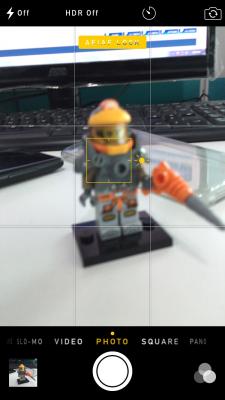 This post has been edited by ejoeflizzow: Oct 21 2014, 03:31 PM
 |
|
|
|
|
|
lazybump_nonsense
|
Oct 21 2014, 03:31 PM
|
|
|
QUOTE(ejoeflizzow @ Oct 21 2014, 03:27 PM) details on your right handside of plate didnt seem focused and blur abit. because the photo is focusing on the kicap i guess?  |
|
|
|
|
|
ejoeflizzow
|
Oct 21 2014, 03:33 PM
|
Getting Started
|
QUOTE(lazybump_nonsense @ Oct 21 2014, 03:31 PM) because the photo is focusing on the kicap i guess? ok now see my focus point and still blur aite? i've adjusted the range back and front to take a clearer image if the distance to zoom is too close but still get the same result. still blur.. i've tried to turn on and off the HDR and still same. This post has been edited by ejoeflizzow: Oct 21 2014, 03:33 PM |
|
|
|
|
|
hensky
|
Oct 21 2014, 03:36 PM
|
|
|
QUOTE(ejoeflizzow @ Oct 21 2014, 03:27 PM) details on your right handside of plate didnt seem focused and blur abit.
just remove your AF lock. |
|
|
|
|
|
ejoeflizzow
|
Oct 21 2014, 03:41 PM
|
Getting Started
|
QUOTE(hensky @ Oct 21 2014, 03:36 PM) just remove your AF lock. Still same. 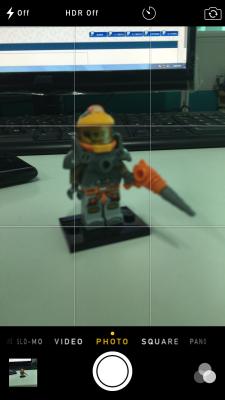
|
|
|
|
|
|
lazybump_nonsense
|
Oct 21 2014, 03:43 PM
|
|
|
QUOTE(ejoeflizzow @ Oct 21 2014, 03:41 PM) Still same.
the focus is on the thing behind.... backward a bit ... your pc is so clear... move backward a bit and try again..probably you are too close to the toys.. |
|
|
|
|
|
zwanvedder
|
Oct 21 2014, 03:51 PM
|
|
|
continuity can work between ipad n iphone? especially receive n make a call?
|
|
|
|
|
|
ejoeflizzow
|
Oct 21 2014, 03:53 PM
|
Getting Started
|
QUOTE(lazybump_nonsense @ Oct 21 2014, 03:43 PM) the focus is on the thing behind.... backward a bit ... your pc is so clear... move backward a bit and try again..probably you are too close to the toys.. Seems not clear enough for me 
And here is sample from my iphone5 with some touch up on snapseed 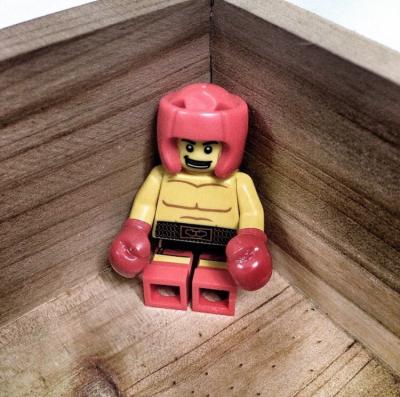
|
|
|
|
|
|
hensky
|
Oct 21 2014, 03:54 PM
|
|
|
QUOTE(ejoeflizzow @ Oct 21 2014, 03:41 PM) Still same.
LOL, u will have hand shaking / move your device when you are doing screenshot, so end up with blur subject. just touch on which subject you want to focus and capture it. |
|
|
|
|
|
lazybump_nonsense
|
Oct 21 2014, 03:56 PM
|
|
|
QUOTE(ejoeflizzow @ Oct 21 2014, 03:53 PM) Seems not clear enough for me
And here is sample from my iphone5 with some touch up on snapseed
can u try take the same photo with different phone ? take 1 just like what you did to your 5 and compare... o.O |
|
|
|
|
|
ejoeflizzow
|
Oct 21 2014, 03:58 PM
|
Getting Started
|
QUOTE(hensky @ Oct 21 2014, 03:54 PM) LOL, u will have hand shaking / move your device when you are doing screenshot, so end up with blur subject. just touch on which subject you want to focus and capture it. trust me, its not hand shaking issue at all cuz i press the button slowly to get a steady shot btw its iphone 6 bro with the fastest autofocus on iphone gen ever |
|
|
|
|
|
ejoeflizzow
|
Oct 21 2014, 04:02 PM
|
Getting Started
|
QUOTE(lazybump_nonsense @ Oct 21 2014, 03:56 PM) can u try take the same photo with different phone ? take 1 just like what you did to your 5 and compare... o.O from lumia 720 
you can still see the sharpness on the plate where the lego guy stand on. its not totally blur This post has been edited by ejoeflizzow: Oct 21 2014, 04:03 PM |
|
|
|
|
|
Hawaiiii
|
Oct 21 2014, 04:04 PM
|
|
|
QUOTE(ejoeflizzow @ Oct 21 2014, 03:41 PM) Still same.
No problem ar?! Btw why the potrait photo auto rotate 90 degree when i upload the forum, and landscape photo will rotate 180 degree zzz. How to fix this? This post has been edited by Hawaiiii: Oct 21 2014, 04:06 PM Attached thumbnail(s)
|
|
|
|
|
|
nickelkadmium
|
Oct 21 2014, 04:05 PM
|
Getting Started
|
QUOTE(ejoeflizzow @ Oct 21 2014, 04:02 PM) from lumia 720
you can still see the sharpness on the plate where the lego guy stand on. its not totally blur All i can see when u shot with ur iphone its focusing on your keyboard, not the lego. |
|
|
|
|



 Quote
Quote






 0.0284sec
 0.85
0.85
 6 queries
 GZIP Disabled