Outline ·
[ Standard ] ·
Linear+
OnePlus One Official Thread v8, Coming soon officially
|
evanrue
|
 Oct 13 2014, 06:39 PM Oct 13 2014, 06:39 PM
|
Getting Started


|
hi guys, need help.. i received the 38R OTA notification this morning and proceed with the OTA.. upon restarting, and after the package has been verified, a status 7 error appears and update was aborted.. previously, i've always successfully go through 25R, 30O and 33R via OTA, no problem..
then, i tried to manual update using the stock CM recovery, the same error Status 7 appear..
then just now another 38R oTA notification appears.. proceeded with the download and suddenly the status says my system has no update, but my OPO didnt even restart, and the version stays at 33R.. not sure what happen here..
i was thinking of doing this:
1. download stock 33R
2. flash 33R via stock CM recovery tool
3. try search again for 38R OTA
4. if not available, try manual update to 38R..
would this work? thank you.
|
|
|
|
|
|
evanrue
|
Oct 13 2014, 06:48 PM
|
Getting Started
|
QUOTE(Haters_Gonna_H8 @ Oct 13 2014, 06:43 PM) pls provide the full error message [ assert failed: apply_patch_check("/system/priv-app/Velvet.apk", "c569f2dc452a0ea86dfe726e5e6ef03c5a71b3e7","d50cddf21ab02e168ddfee409ec0bdfc58412530") E:Error in /tmp/sideload/package.zip (Status 7) Installation aborted. ] |
|
|
|
|
|
evanrue
|
Oct 13 2014, 06:58 PM
|
Getting Started
|
QUOTE(xxdesire @ Oct 13 2014, 06:55 PM) Like it said, it failed to verified the "Velvek.apk" file. Are you rooted? Go find the stock apk and/or go download the zip and manual sideload. hi, im not rooted though.. i tried manual sideload 38r using stock recovery, same error.. i thought velvet.apk has somehting to do with google play store app.. but i've never manual update google play.. is there any way for me to update to 38r without using custom recovery? for me to install a custom recovery, i must root my OPO right? means lose all data? |
|
|
|
|
|
evanrue
|
Oct 13 2014, 07:26 PM
|
Getting Started
|
QUOTE(Haters_Gonna_H8 @ Oct 13 2014, 06:56 PM) u deleted or disabled google search? nope bro.. google search is enabled.. |
|
|
|
|
|
evanrue
|
Oct 14 2014, 06:54 AM
|
Getting Started
|
hi, regarding my failed OTA 38R update due to Status 7 earlier.. is it possible for me to flash the stock 33R full ROM (from http://forum.xda-developers.com/oneplus-on...image-t2857110) using the stock CM recovery to get back stock 33R over my current 33R without data loss? Thank you  |
|
|
|
|
|
evanrue
|
Oct 14 2014, 08:29 AM
|
Getting Started
|
QUOTE(xxdesire @ Oct 14 2014, 08:26 AM) As long as you don't wipe your data, data should be alright. And yes, you can try to reflash 33R.zip over your current 33R. this can be done by just using the stock CM recovery right? |
|
|
|
|
|
evanrue
|
Oct 14 2014, 08:44 AM
|
Getting Started
|
QUOTE(xxdesire @ Oct 14 2014, 08:35 AM) thanks so much for the help.. will try and update soon.. |
|
|
|
|
|
evanrue
|
Oct 14 2014, 10:23 AM
|
Getting Started
|
QUOTE(harizdesu @ Oct 14 2014, 10:20 AM) if flash 'stock CM', i'm afraid u'll get 25r.. meaning, with my current 33r (which caused the failed ota 38r update), if i were to proceed with flashing the complete 33R ROM using stock recovery, it won't work? |
|
|
|
|
|
evanrue
|
Oct 14 2014, 11:35 AM
|
Getting Started
|
QUOTE(Haters_Gonna_H8 @ Oct 14 2014, 10:25 AM) it will work. did u try to install google app from playstore? velvet.apk was your only problem i have it and uninstalled and reinstalled.. still same update error..  QUOTE(harizdesu @ Oct 14 2014, 10:26 AM) are u gonna flash using zip file?.. if yes, u'll get 33r la.. hehe i thought u gonna use a tool to flash stock cm yupe, the zip file.. wil give it a try and report the outcome tonight thanks |
|
|
|
|
|
evanrue
|
Oct 15 2014, 02:40 PM
|
Getting Started
|
Report on my OPO XNPH38R update: Successful History: - OTA notification appear to upgrade to 38R - OTA update failed due to Velvet.apk (Status 7) - Tried manual update 38R using stock CM recovery: failed, same Status 7 as before - Download complete XNPH33R ROM and manual flash using stock CM recovery: success, no data loss - OTA notification appear to upgrade to 38R again - OTA update failed, cannot find update file. So i just point it to the cygn/fota folder. - Update successful Thank you to all sifus here!  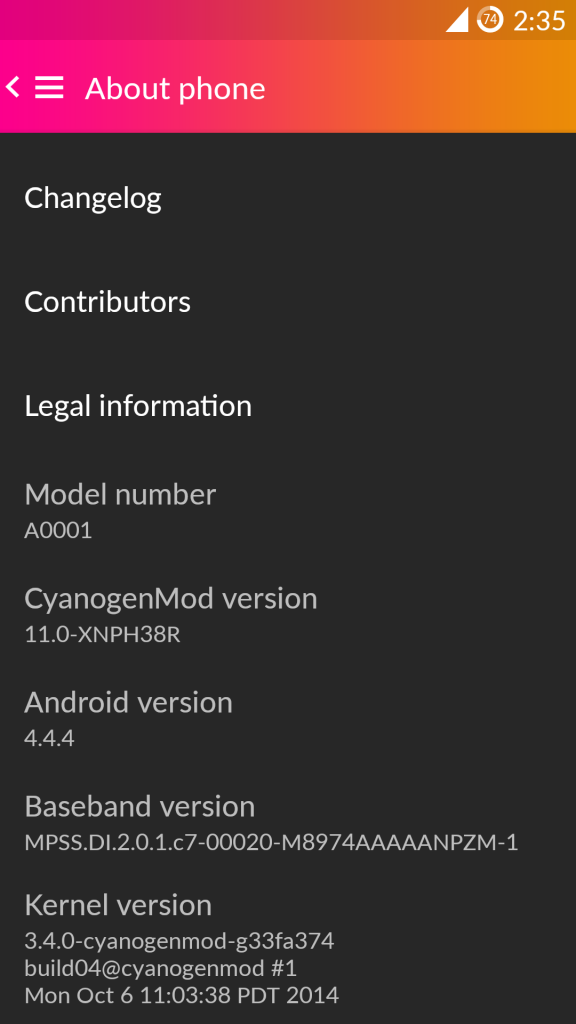 |
|
|
|
|
|
evanrue
|
Oct 15 2014, 03:04 PM
|
Getting Started
|
QUOTE(IazHes @ Oct 15 2014, 02:58 PM) just notice my int. version does has little yellow tint ant lower right corner & lower left corner. Wont very clear if not under full white back ground. Work around - on screen button may cover them up. my device from original > 38R, no problem at all. no root. regarding the yellow tint.. when i first got my phone back in July, the tint is there but barely noticable unless over white background.. now it's totally gone.. no tint.. give it time, i guess This post has been edited by evanrue: Oct 15 2014, 03:05 PM |
|
|
|
|
|
evanrue
|
Oct 23 2014, 11:10 AM
|
Getting Started
|
QUOTE(moshimaruu @ Oct 23 2014, 11:07 AM) Can i know where to get stock CM11s camera apps? at Playstore call wat name? or who have the link for the APK file? this one rite? Cyanogen camera |
|
|
|
|



 Quote
Quote

 0.0540sec
 0.74
0.74
 7 queries
 GZIP Disabled