Welcome Guest ( Log In | Register )

87 Pages « < 25 26 27 28 29 > » Bottom

Outline · [ Standard ] · Linear+

 MSI Gaming Notebook Thread V3

views
     
Kivaa
post Aug 5 2015, 06:45 PM

Getting Started
**
Junior Member
235 posts

Joined: Apr 2010

QUOTE(MSI-NB @ Aug 5 2015, 06:00 PM)
Hi Kivaa, GT60 2OC is upgradable to Windows 10, for more information, please refer to the list here: http://event.msi.com/2015/windows10/en/upgrade.html
*
Alrighty thanks, updated without a problem, but i had to reinstall some drivers but it worked with win 7 64bit drivers
NEbulaSurfer
post Aug 6 2015, 09:11 AM

New Member
*
Junior Member
29 posts

Joined: Jan 2008


heyo,

Owner of a GT60 2QD 4K here. Still waiting for the drivers to be released by MSI for Win10 before taking the plunge smile.gif

Neb
TSMSI-NB
post Aug 6 2015, 03:15 PM

Getting Started
**
Junior Member
120 posts

Joined: Apr 2011
QUOTE(laptopfans @ Aug 5 2015, 06:32 PM)
Hi MSI. Im currently using GE72 2QL notebook.

I would like to ask about the price of additional 8GB RAM.
*
Hi there!

Please send your queries to our authorized resellers (http://bit.ly/mymsinb_wheretobuy) or service centre hotline 1300-88-2273 (operating from Mon-Fri, 9am-6pm, except public holiday).

This post has been edited by MSI-NB: Aug 6 2015, 03:15 PM
TSMSI-NB
post Aug 6 2015, 03:38 PM

Getting Started
**
Junior Member
120 posts

Joined: Apr 2011
Broadwell vs. Haswell – part 1: Cinebench

As we’ve previously mentioned, we are rapidly phasing in 5th Gen Intel Core i7 Broadwell CPUs across our range instead of the previously used 4th Gen Haswell CPU – as seen below.

user posted image

On paper, the differences between the CPUs mainly used aren’t very large – they’re of similar specifications, same power levels (47W TDP), and support the same kind of things. In fact, the biggest differences comes down to the i7-5700HQ Broadwell chip having a 100MHz higher base frequency, as well as a 100MHz lower boost frequency than its predecessor, the i7-4720HQ, as well as support for 1866MHz RAM, as opposed to 1600MHz. For casual users, Intel are steadily improving its graphics solutions, so Broadwell comes with Intel HD Graphics 5600, whereas the Haswell offering comes with HD 4600.
With everything looking very similar specification-wise, we decided to take the CPUs for a head to head spin in a few benchmark applications, the first of which was the CPU test Cinebench R15. The benchmark utilizes all CPU threads, and both our CPUs have 4 cores and 8 threads.

user posted image

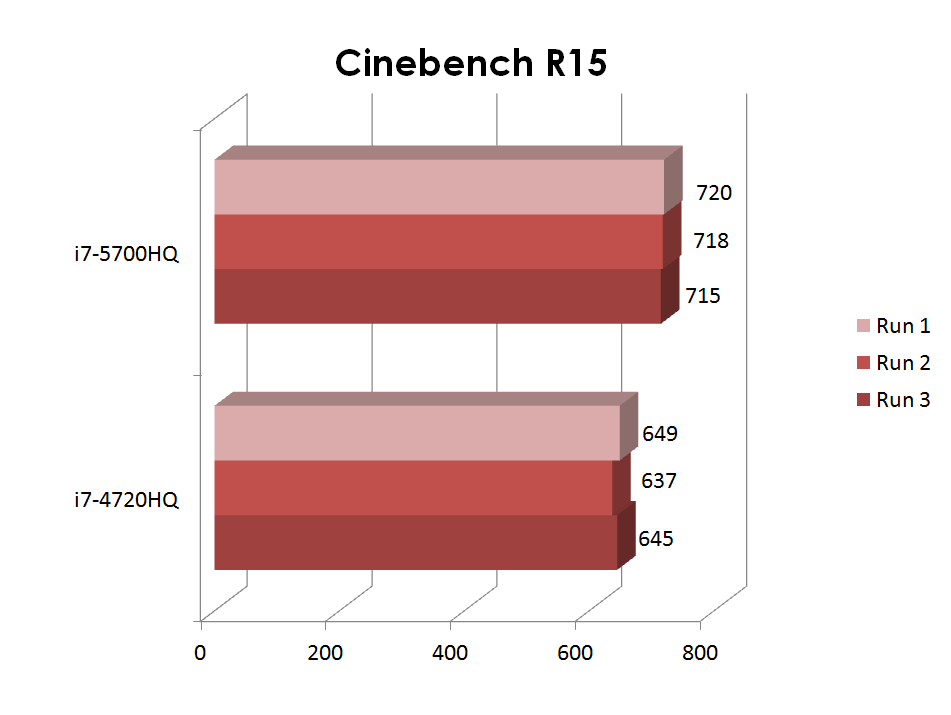
We ran the benchmark three times on each CPU, both with dual channel memory, and recorded the results as seen above. Clearly, the newcomer is a big step up, with a consistent performance over 10% higher than that of the older i7-4720HQ. This is fairly impressive, considering the fact that the i7-4720HQ is actually able to perform at a 100MHz higher boost frequency than the i7-5700HQ.
The Broadwell CPU absolutely walks away with the victory in Cinebench, the first of our benchmarks we’re looking at over the upcoming few weeks.


TSMSI-NB
post Aug 6 2015, 03:57 PM

Getting Started
**
Junior Member
120 posts

Joined: Apr 2011
MSI Design Blend 2015

user posted image

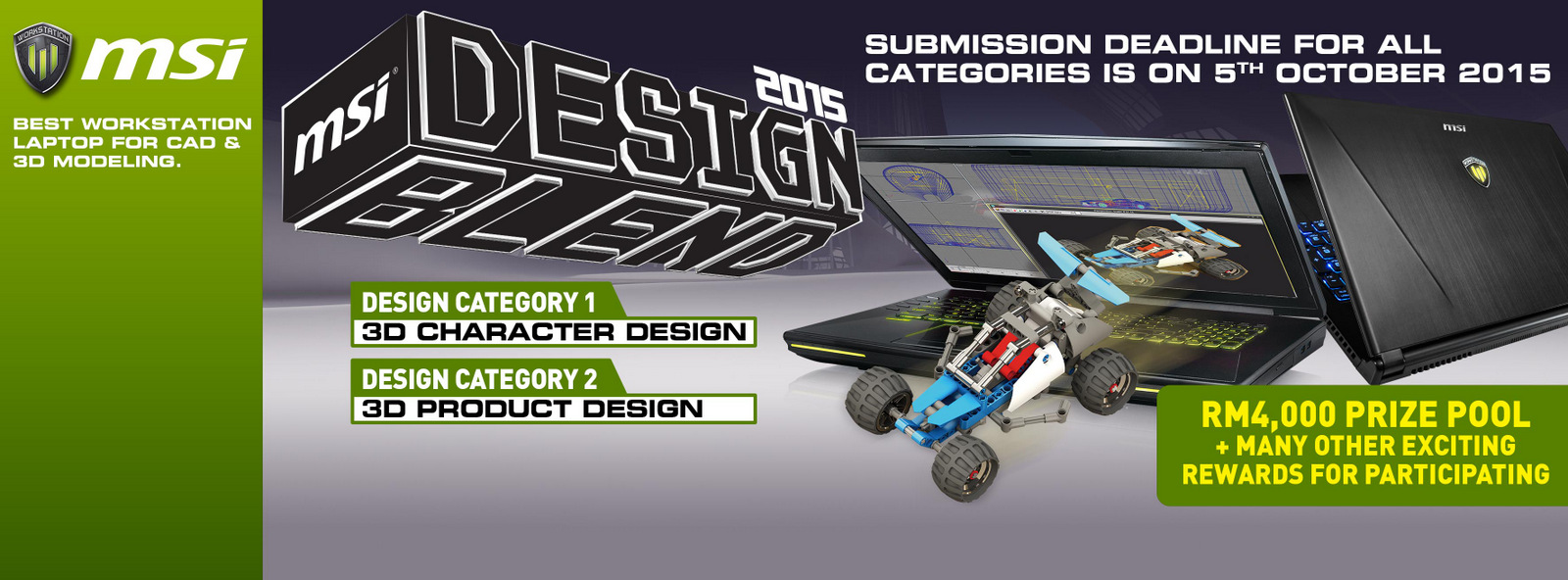
MSI Malaysia is proud to announce the launch of our inaugural design competition, MSI DESIGN BLEND 2015.

The MSI Design Competition is the start of an annual engagement with the creative community in Malaysia. Our intention is to reach out to students and professionals and start a conversation whereby design challenges are used to stir up creative collaborations and showcase the endless possibilities in design.

Our hope is that the MSI design competition will serve as a talking space for students and professional to come together, share ideas and present their talent and ingenuity to the whole country.

For MSI DESIGN BLEND 2015 the creative community can choose from 2 Categories, Character Design and Product Design. Each carries their own unique challenges and we want to attract as wide a range of designers and artist as possible. We are hoping to achieve this by opening up the submission criteria and allow more creative expression.

user posted image

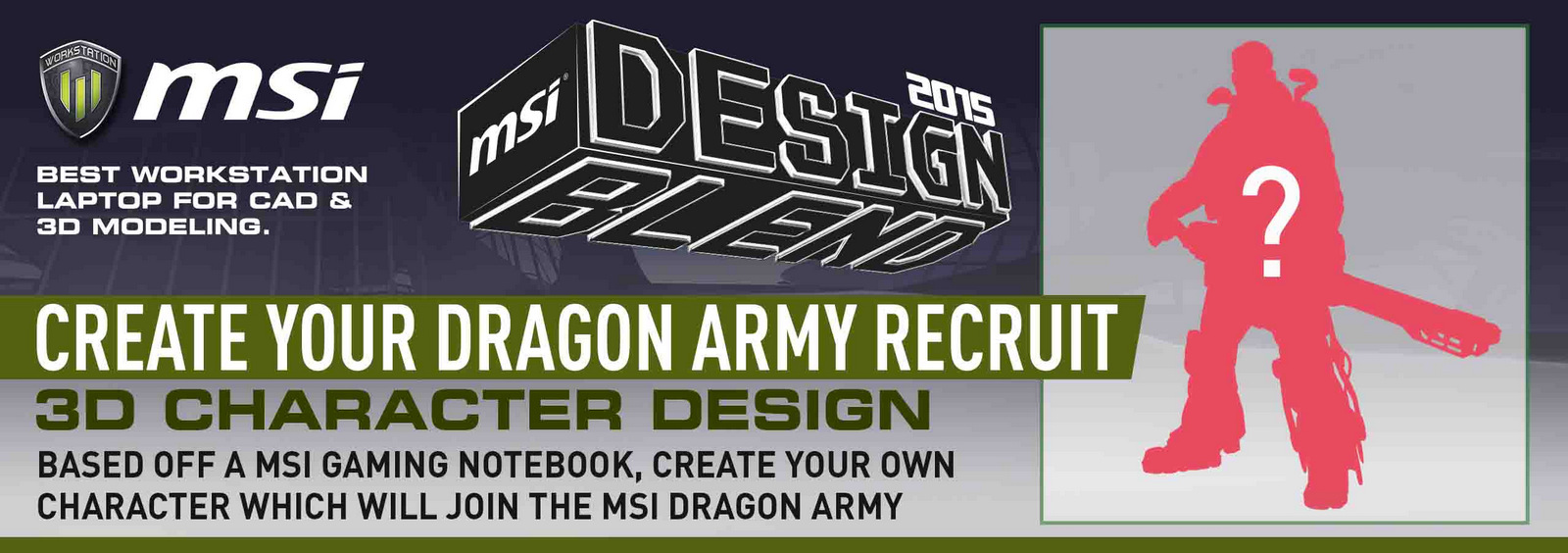
Category 1 - Dragon Army Recruit: Character Design
If you had to design a soldier to join the MSI Dragon Army, how would this character look like?

In this challenge the artist must choose a MSI Notebook to serve as the inspiration for their character. Choose either the GT80 Titan SLI, GS60 Ghost or the GE62 Apache and interpret their physical design and gaming features into your character. You may use the logos or names of MSI Gaming Features like SuperRAID, KillerLAN, SteelSeries Engine, Cooler Boost 3 etc and don't forget to include the MSI Shield logo into your design.

Our judges are looking for the best creative representation of our MSI notebook in a character and will award points for originality, creative interpretation, quality of execution and overall connection with the MSI Gaming brand.
More information about the submission guidelines can be found here

user posted image

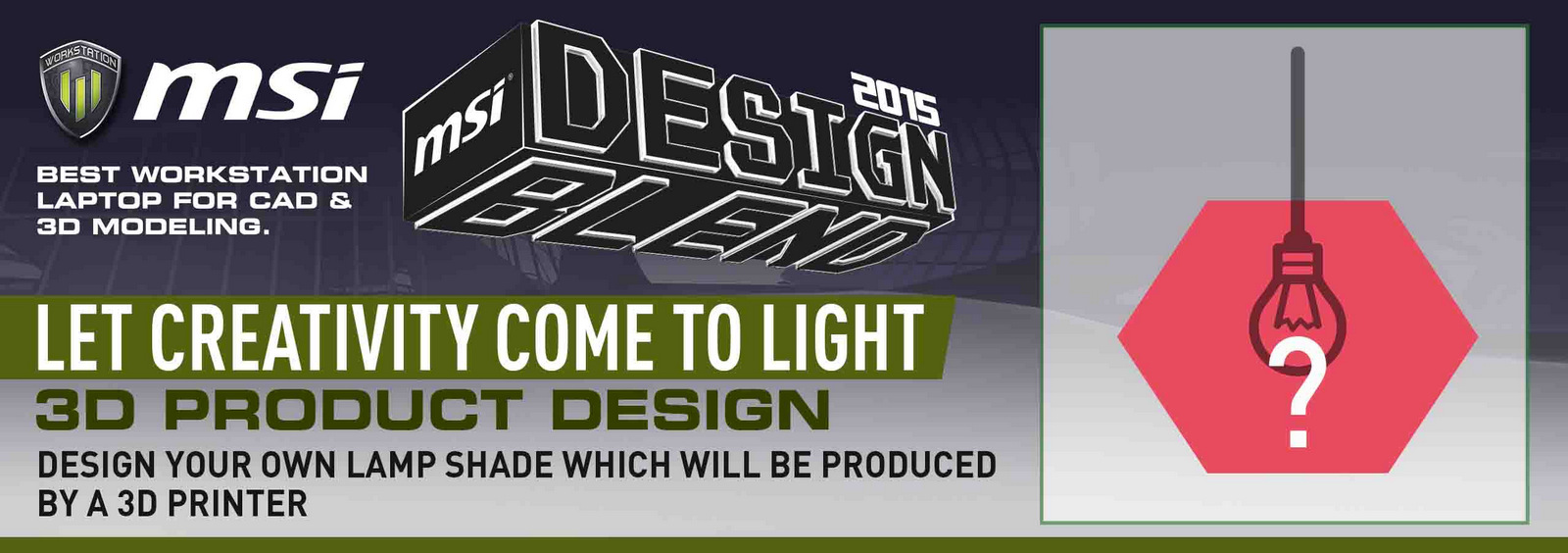
Category 2 - Geometry vs Nature: Product Design
3D printers are at the forefront of an industrial revolution in production and we want to explore that with a simple household item. The lampshade.

Based on the theme, 'Geometry vs Nature', product designers must come up with a lampshade that represents both sides or one side only. We're excited to see how this plays out and how the designers will choose to represent the theme in their lampshade design.
Submissions must include a rendering of their final design as the winning designs must be able to be produced by a 3D printer. Our chosen technology partner for this is Vagler which is a Swedish company producing 3D printers with precision engineering. You can find out more about them by clicking on this link (insert http://www.vagler.com/)

The lampshade can consist of one solid 3D printed piece or made up of several pieces combined together. However, the challenge is that no other material can be included in the design and all parts of the lampshade must be produced by the Vagler 3D printer.
For more information about the submission guidelines, please click here


TSMSI-NB
post Aug 6 2015, 04:01 PM

Getting Started
**
Junior Member
120 posts

Joined: Apr 2011
Metal Gear Solid V: The Phantom Pain bundle

Metal Gear Solid V: The Phantom Pain is a game surely no one wants to miss this fall, and its launch date is set for September 1. However, with the help of NVIDIA and the Game Like A Boss campaign, you will be able to get your hands on the game with a purchase of any MSI Gaming notebook with GTX 970M or GTX 980M graphics card from an eligible reseller.

The Kojima stealth-adventure epic is set to be more than a little bit dark, judging from the trailer we’ve handily placed below for you to watch:


With a qualifying purchase made from said eligible resellers between July 23rd and September 1st , you will get a free game code, valid until October 1st, 2015. The game itself will be made available on launch, which is currently set to September 15th for PC.


ZRong223
post Aug 6 2015, 05:36 PM

Enthusiast
*****
Senior Member
864 posts

Joined: Dec 2009
From: Selangor


Any MSI GE60 2PE Nvidia GTX860m user?
Looks like Sound Blaster Cinema doesn't work on Windows 10.

Any solution?

The problem is exactly like this:
https://forum-en.msi.com/index.php?topic=258956.0

This post has been edited by ZRong223: Aug 6 2015, 08:52 PM
TSMSI-NB
post Aug 13 2015, 09:32 AM

Getting Started
**
Junior Member
120 posts

Joined: Apr 2011
QUOTE(ZRong223 @ Aug 6 2015, 05:36 PM)
Any MSI GE60 2PE Nvidia GTX860m user?
Looks like Sound Blaster Cinema doesn't work on Windows 10.

Any solution?

The problem is exactly like this:
https://forum-en.msi.com/index.php?topic=258956.0
*
Hi ZRong, have you try reinstall the driver?

Otherwise, try submit a ticket through Online Customer Service System (OCSS)
http://register.msi.com/
*Please register an account to proceed.
TSMSI-NB
post Aug 13 2015, 09:36 AM

Getting Started
**
Junior Member
120 posts

Joined: Apr 2011
Use the latest Afterburner to boost up MSI notebooks’ GPU 3D performance!

Caution: All of the overclock actions is not under warranty protection, so please use this freely but carefully. You can only overclock with this Afterburner tool on systems with GTX800M series or GTX900M series graphics. Users can’t use this tool to adjust AMD graphics or UMA graphics. Furthermore, due to limitations of the graphics driver, clocks of some notebooks can’t be adjusted.


Some power users may have already known that MSI VGA bundles with the best GPU overclock software, called “Afterburner”. This application has existed for years on MSI VGA. It’s a very good tool to overclock the core clock and memory clock of the VGA’s GPU. For some special designs, Afterburner can even add more Core Voltage and extend Power Limit %. Moreover, it’s a good tool to monitor your GPU status in detail. Users can define over 20 items for real-time monitoring.
user posted image

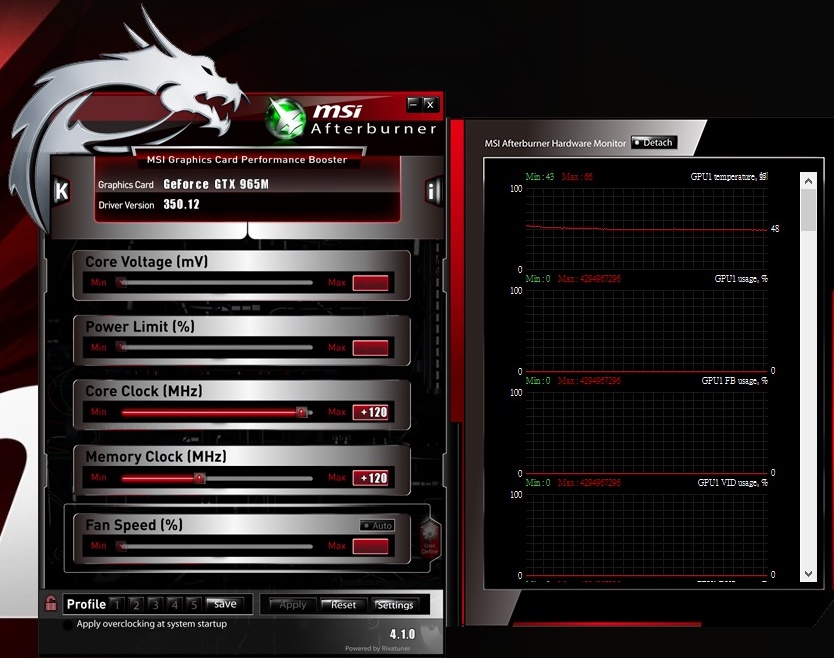
Afterburner V4.1.0 for GTX900M series mobile GPU
Afterburner works fine on mobile platform, yet, not 100% on all GPUs.
Afterburner works smoothly on most of the MSI Gaming series notebooks (with GTX900M series and GTX800M series graphics). The suitable software version for users to overclock with is V4.1.0 with which users may adjust settings on GTX980M, GTX970M, GTX865M, GTX950M graphics easily.
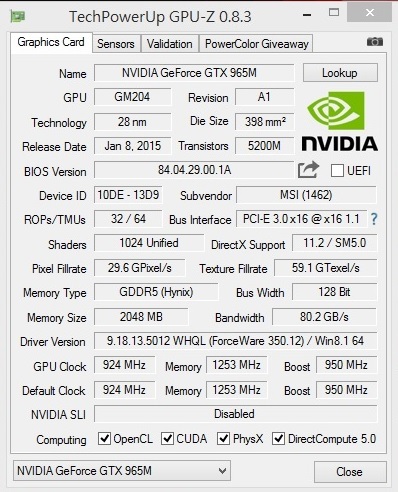
Let’s now take a look at the example of GE62 which has Intel Core i7 4710HQ and GTX965M graphics. The default clock is 924MHz and the GPU Boost can rise to 950MHz when playing games.
With GPU-Z, we can see the GPU details easily. GTX965M comes with 5000MHz GDDR5, which is further divided into 1250MHz x4 base clock. The memory clock of GDDR5 is x4. Yet if it’s a DDR3, there will be only x2 multiple.
Take a look at the bottom side of GPU clock column. The default clock is the standard clock and the GPU clock is the current clock. When we adjust the GPU clock, it will change to the new number we set.
user posted image


How to overclock the GPU and Memory clock
Afterburner is very simple to perform overclocking. Just follow what we show you in this article and you can try to do this yourself.
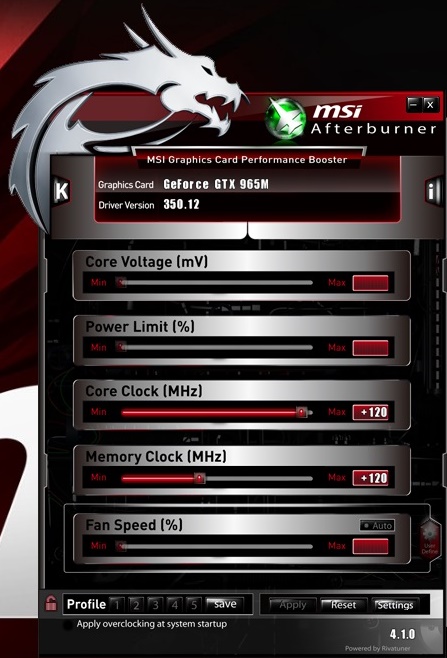
Once you turn on the Afterburner, you shall see a window pop-up as below picture. You shall see there are only two columns available for overclocking, the GPU clock and the Memory clock. This limitation is due to the mobile GPU design which locks up Core Voltage, Power limit and Fan Speed and only permits users to adjust these two variables.
GPU clock’s add on range is only up to 135MHz. Memory clock can be adjusted to over 1000MHz (but it will be impossible to work safely if the system is pushed to its limits). Here we just make an example and slightly overclock both variables to 120MHz. Don’t forget to press “Apply‘’ to confirm the settings.
user posted image

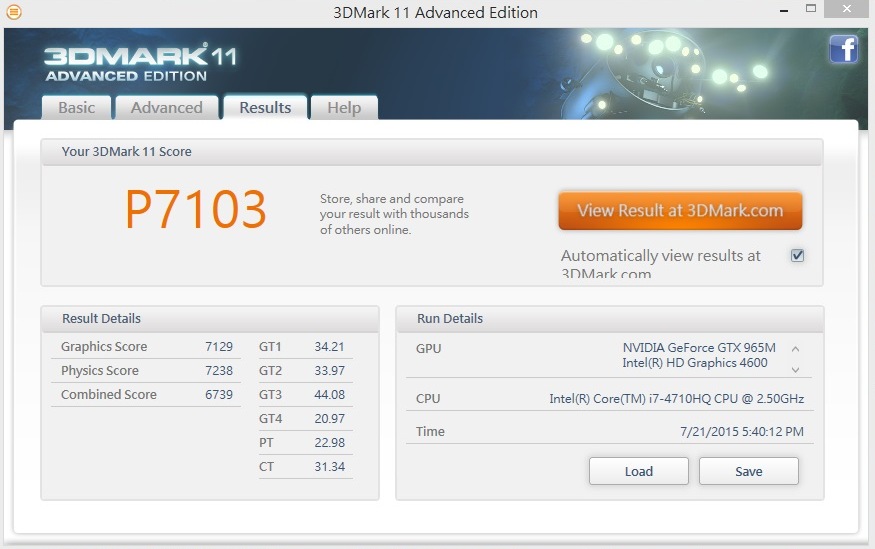
We then need to check real performance to see if this overclocking setup works or not. We use here 3D Mark 11 to test the result. It’s the easiest way to see the difference before and after overclocking.

Under standard clock settings, we get the result, P7103 score, in 5 minutes.
user posted image

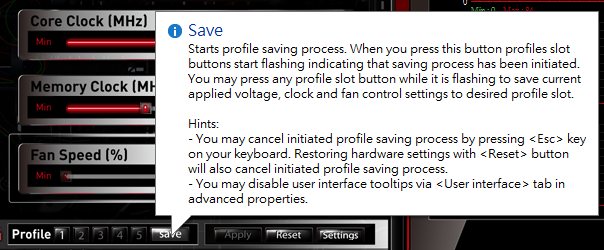
Before starting the 3D Mark 11 performance test, here is a trick to save your overclocking settings. You need to first change the variables you want to overclock the system with. Here we adjust both GPU clock and Memory clock to 120MHz and apply the settings. Next, choose profile 1 and press “safe” to save the settings. As you may see in the below picture, four profiles can be saved in the software. Next time when you want to use the same settings to overclock your system, just select one of the profiles.
user posted image

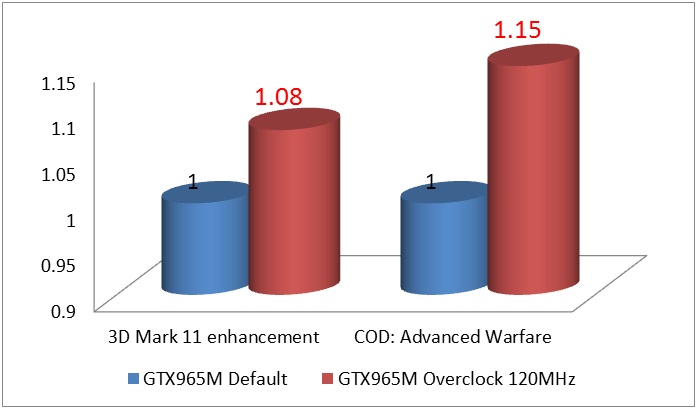
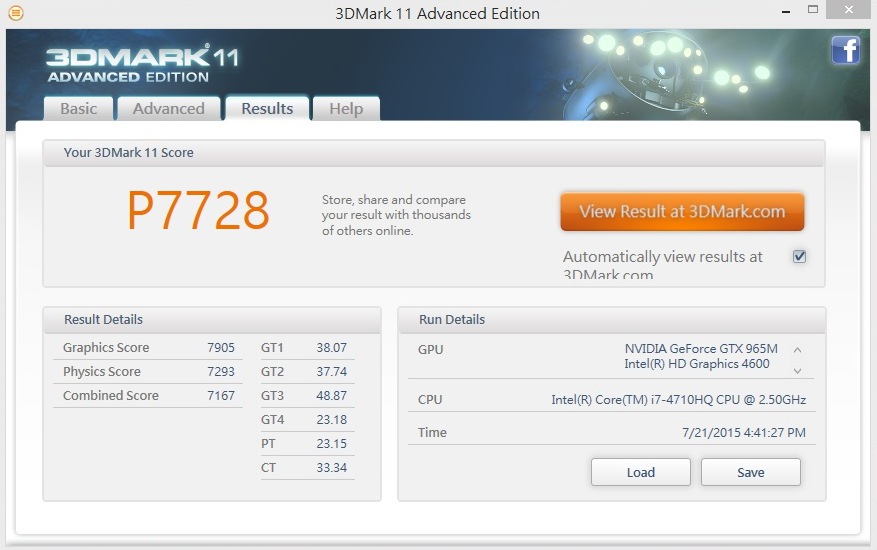
Now, let’s take a look at the result. Under 3D Mark 11 Performance test, the system runs smoother, scoring P7728 when both GPU clock and Memory clock are tuned to 120MHz. On the DirectX11 3D benchmarks, the 3D performance boosts up over 8% at P mode.
user posted image

Overclocking also works for gaming experience improvement
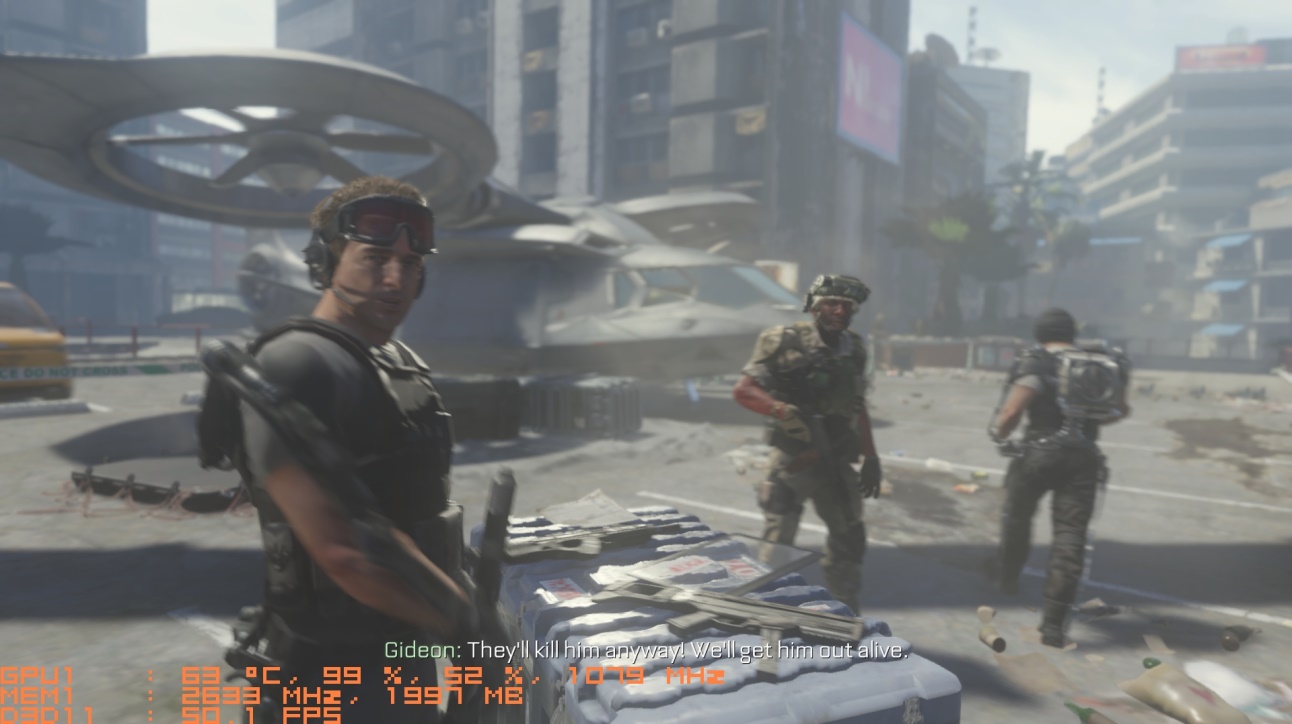
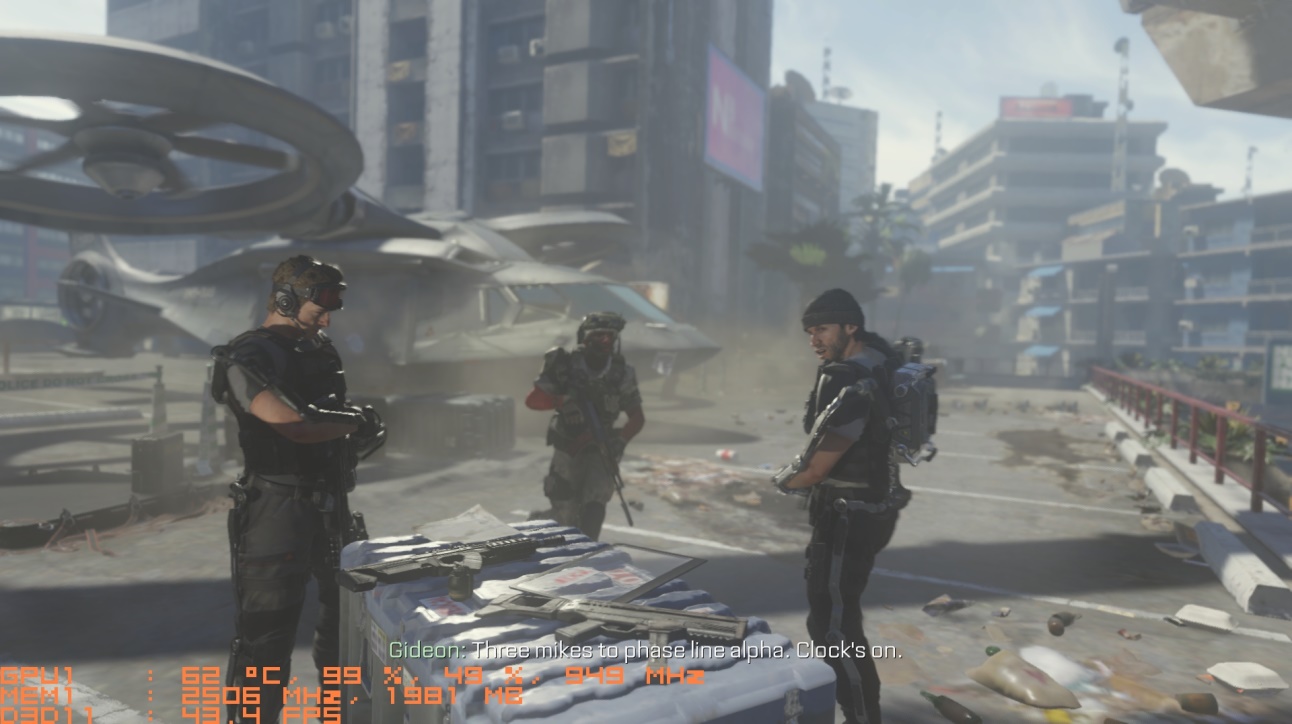
We then take a look at the heavy loading game title, Call of Duty: Advanced Warfare. It’s a very popular, has more advanced weapons and is selected as the best of 2014 FPS game. In the beginning, we can see the FPS rate is around 43.4 FPS, a FPS rate smooth enough for combat battle.

user posted image

user posted image


TSMSI-NB
post Aug 13 2015, 09:37 AM

Getting Started
**
Junior Member
120 posts

Joined: Apr 2011
Now we use the Afterburner to overclock the system’s GPU and Memory clock to 120MHz. After doing so, we come back to check the FPS rate of the same theme. We can see that the FPS rate now boosts up to 50.1 FPS, 15% faster than standard clock setting.
As obvious as it is shown, overclocking does benefit and boost the system performance. If you are an advanced user, you can not only try and use Afterburner to tweak the system a little bit, but also monitor GPU, memory and FPS status during gameplay and make screen shots easily.

user posted image

user posted image

Conclusion of overclock with Afterburner
The overclock range may differ on different combinations and regions of the gaming notebooks. However, it is workable for most of the gaming notebooks to overclock over 100MHz on both GPU and memory, let along MSI notebooks. Compared with other brands, overclocking is going to be easier of cake on MSI notebooks thanks to the better thermal cooling design.

Anyway, it’s a simple way to boost up your graphics performance with a 8%~15% improvement on different 3D usage. It’s a really good benefit for gamers and power users without causing any problem on the notebook stability.
Time to overclock your GPU for faster gaming experience now!

user posted image

TSMSI-NB
post Aug 13 2015, 09:38 AM

Getting Started
**
Junior Member
120 posts

Joined: Apr 2011
Cortana in Windows 10

Windows 10 is launched, and free upgrades have been rolled out across the globe. A bunch of new, cool features included in the latest iteration of Microsoft’s classic operating system, but one that really sticks out, apart from DirectX 12, is Cortana – your personal AI-assistant of sorts.


Marcus Ash, Group Program Manager for Cortana and Search on Windows outlines a few things worth knowing about Cortana in the video above. Among other things, you will be able to use Cortana for both work (such as setting reminders, rescheduling your calendar events) and leisure (ask Cortana to tell you jokes, looking up nearby events) – basically, it is a voice-controlled search that will over time learn your interaction patterns and become a personalized assistant, rather than just a search function.
Cortana is available on Windows 10, shipped with all our new notebooks, and is easily activated through a few simple steps. Once activated, you will be able to issue commands (and hurl abuse) at your computer by starting off with the phrase “Hey Cortana.”

hellfire8888
post Aug 13 2015, 11:56 AM

Look at all my stars!!
*******
Senior Member
3,196 posts

Joined: Feb 2006
upgraded mine to windows 10..loving it
xNinGx
post Aug 13 2015, 01:07 PM

Getting Started
**
Junior Member
159 posts

Joined: Apr 2011
From: Miri, Sarawak


https://forum.lowyat.net/index.php?showtopic=3678927

MSI kaki-kaki icon_question.gif icon_question.gif
peterG
post Aug 14 2015, 02:52 PM

Casual
***
Junior Member
303 posts

Joined: Jun 2008
From: KayEl - Kiasuland


guys, anyone upgraded your GS70 to windows 10?

any driver compatible issues?
mental007
post Aug 14 2015, 03:17 PM

Getting Started
**
Junior Member
248 posts

Joined: Oct 2013
Using MSI GE60 2PE, uninstalled audio and Sound blaster cinema and tried to reinstall it. Sound blaster cinema shows there is no supported audio device.

Anyone know the solution? Windows 10.
TSMSI-NB
post Aug 14 2015, 03:42 PM

Getting Started
**
Junior Member
120 posts

Joined: Apr 2011
Gamescom announcements

The world’s largest gaming expo Gamescom was held in Cologne, Germany last weekend – and as is tradition, a lot of big announcements were made. As is often the case, some titles were announced for 2016, such as Mafia III, Mirror’s Edge Catalyst and Dark Souls III, but big titles that are in the pipeline due to launch before the holiday season got their finalized launch dates as well.

Our favorite pick of the bunch is bound to be Rainbow Six Siege – set to launch on October 13, focusing on counter-terrorist tactical combat.


If you’re into sneaking around in a more old-fashioned way, Assassin’s Creed Syndicate – The Twins might be for you, launch date is set to October 23.


Fans of racing games are set to get their fix in November, with EA launching its latest Need For Speed on November 3rd, promising lots of sideways action and spoiler kits.


Ubisoft don’t want to be outdone, and are countering this with an add-on to The Crew, called The Crew Wild Run, two weeks later on November 17th. It adds motorcycles and stuff such as monster trucks and drag racing to the open-world racing sandbox.


Of course these are just a few of the announcements made at Gamescom, and we chose to focus on what we can look forward to before the end of the year.

TSMSI-NB
post Aug 14 2015, 03:43 PM

Getting Started
**
Junior Member
120 posts

Joined: Apr 2011
Broadwell vs. Haswell – part 2: WinRAR

Part 2 of our Broadwell vs. Haswell series brings us to more real-life performance increases. This time, we’re looking at compression, and the WinRAR benchmark. Now, as a reminder, the table below is to give you an overview of the transition to the 5th Generation Broadwell chips, the i7-5000 series, and which CPU replaces which.

user posted image

Just like with last week’s Cinebench test, the WinRAR benchmark supports multi-threading, and will therefore be using all 8 threads of both our i7-4720HQ as well as the i7-5700HQ.

user posted image

Just like last time, we put both systems, both with dual-channel RAM at the same frequencies and timings through their paces in three runs. The result is clear to see, with the Broadwell CPU edging ahead with a reasonable margin, adding another comfortable win over Haswell in real-life performance.

Cimo
post Aug 14 2015, 08:56 PM

Casual
***
Junior Member
324 posts

Joined: Jul 2005
From: Kuala Lumpur


QUOTE(peterG @ Aug 14 2015, 02:52 PM)
guys, anyone upgraded your GS70 to windows 10?

any driver compatible issues?
*
Mine still showing waiting status. Don't know until when can I install Win10.
peterG
post Aug 15 2015, 09:45 AM

Casual
***
Junior Member
303 posts

Joined: Jun 2008
From: KayEl - Kiasuland


QUOTE(Cimo @ Aug 14 2015, 08:56 PM)
Mine still showing waiting status. Don't know until when can I install Win10.
*
may i know when u reserve the upgrade?

This post has been edited by peterG: Aug 15 2015, 03:17 PM
mental007
post Aug 16 2015, 12:11 AM

Getting Started
**
Junior Member
248 posts

Joined: Oct 2013
hello guys, my MSI GE60 2PE mic seems got problem. People keep complaining my voice too soft they can't hear it through skype. But the fact is i already shouting they said its too soft.

Drivers issue or hardware? Its been the same since day 1.

Thanks.

87 Pages « < 25 26 27 28 29 > » Top
 

Change to:
| Lo-Fi Version
0.0285sec    0.14    6 queries    GZIP Disabled
Time is now: 2nd December 2025 - 09:13 AM