Welcome Guest ( Log In | Register )

Outline · [ Standard ] · Linear+

 Recording Video Conversation In Noisy Environment, Possible to record video conversation?

views
     
TSCyberTroop
post Sep 16 2014, 07:26 PM, updated 12y ago

Enthusiast
*****
Senior Member
743 posts

Joined: Feb 2006


Hi all,

I am planning to make a short video using iphone and android phones. Would it be possible to record clear conversations in noisy places such as bars or pubs? Would I require additional external mic devices for this to get clear recorded convsations. If so, is there any recommended devices I can use for this, or would normal Bluetooth devices work?

Thank you very much.
dkk
post Sep 17 2014, 12:27 PM

10k Club
Group Icon
Elite
11,400 posts

Joined: Jan 2003
Yes, that is correct. Due to the inverse square law, high quality recordings like those made by TV / radio are done by placing the mic close to the source of the sound (the speaker's mouth).

For example, if you place the mic 2cm away from the speaker's mouth, and at the same time, somebody else 2m away is talking, the speaker will sound 10,000 times louder!

Of course if the mic is poor quality, recording awful sound even in a quiet environment like your bed room at 2am, then you have different problems.

Another option is to record the sound and video separately (using different phones) and then mux them back into a single a-v stream on your computer.
LegendLee
post Sep 17 2014, 05:51 PM

><3LG3|\|D
Group Icon
Elite
2,725 posts

Joined: Mar 2006


QUOTE(CyberTroop @ Sep 16 2014, 07:26 PM)
Hi all,

I am planning to make a short video using iphone and android phones. Would it be possible to record clear conversations in noisy places such as bars or pubs? Would I require additional external mic devices for this to get clear recorded convsations. If so, is there any recommended devices I can use for this, or would normal Bluetooth devices work?

Thank you very much.
*
Use a lavalier microphone
Rodelav is one such example.
Use that with a phone.


TSCyberTroop
post Sep 18 2014, 08:20 PM

Enthusiast
*****
Senior Member
743 posts

Joined: Feb 2006


Are there any lavalier microphone bluetooth version?

Also, what would be a good video editing program for beginners
dkk
post Sep 18 2014, 10:12 PM

10k Club
Group Icon
Elite
11,400 posts

Joined: Jan 2003
Lavelier actually produce lower quality recordings than mics that you hold right in front of your mouth. Because they're usually further away from the mouth. Unless you meant something like this

user posted image

The advantage of a head mounted mic is that they keep the same relative position and distance to the speaker's mouth. If you put someone inexperienced on a podium with a stationary mic in front of him, he might turn his head this way and that as he speak, causing changes in volume. Worse still, unless you have assistants to help adjust the
mic before he starts speaking, sometimes, they don't adjust the mic, so it ends up too high or too low.

If you're interviewing somebody, the best solution is to have 2 mics. One for the interviewer, another for the interviewee.

If you already have a recording with volume that goes up and down (but little background noise) (because the speaker sometimes shouts and sometimes mumbles softly, or because he turns and/or moves away from the mic), the best solution is a program called The Levelator from The Conversations Network (a now defunct non-profit that recorded a ton of IT related events and distributed them for free as podcasts). Originally made by Bruce and Malcolm Sharpe, The Levelator is free. If you ever tried to fix levels manually, it is like MAGIC! smile.gif

This post has been edited by dkk: Sep 18 2014, 10:27 PM

LegendLee
post Sep 19 2014, 10:20 AM

><3LG3|\|D
Group Icon
Elite
2,725 posts

Joined: Mar 2006


QUOTE(CyberTroop @ Sep 18 2014, 08:20 PM)
Are there any lavalier microphone bluetooth version?

Also, what would be a good video editing program for beginners
*
1. Rode smartlav. Not Bluetooth. But why would you need Bluetooth? Most Bluetooth headset would probably suck at recording sound. Also, 2 people wearing Bluetooth headset in a pub doesnt seem normal.
2. connects to your phone which acts as a recording device.
3. Unless you're willing to spend a whole lot more on a better microphone + field mixer + recorder + boom stand + someone to hold it, this is the best option for you. It's also really really portable.
4. Paste lav mic behind clothes/collar. It will be discrete.
5. You may need 2 lav if you're recording 2 person.
6. Record sound on your main camera as well. This is to sync audio.
7. iMovie for basic usage and FCPX for professional use. For Windows, you can try Sony Vegas. If you prefer something more advanced you can try adobe premier pro or the industry standard, avid.
benccckl
post Sep 23 2014, 10:57 AM

Getting Started
**
Junior Member
118 posts

Joined: Oct 2008


you can try Zoom mic, Portable Digital Audio Sound Recorder.
its records stereo sound. You will be recording the audio separately, later have to sync it in editing process.
ProotechStore
post Oct 2 2014, 04:05 PM

Getting Started
**
Junior Member
80 posts

Joined: Jul 2012
From: Taman Bayu Tinggi,Klang Selangor

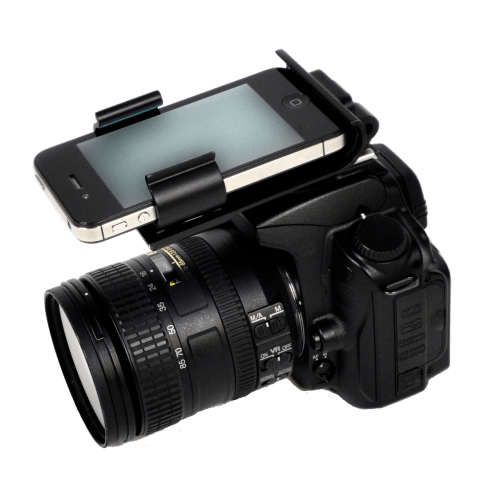
i wonder if anyone here have ever tried to record a sound using an iPhone/mobile apps? I mean dslr and iPhone together.see following image
user posted image
LegendLee
post Oct 2 2014, 04:53 PM

><3LG3|\|D
Group Icon
Elite
2,725 posts

Joined: Mar 2006


QUOTE(ProotechStore @ Oct 2 2014, 04:05 PM)
i wonder if anyone here have ever tried to record a sound using an iPhone/mobile apps? I mean dslr and iPhone together.see following image
user posted image
*
iPhone microphone by itself is not that much better than the camera.
However, you can use certain microphone on it like
http://www.zoom.co.jp/products/iq5

However... if you do so, might as well just get a mic for your camera directly.


Change to:
| Lo-Fi Version
0.0165sec    0.52    5 queries    GZIP Disabled
Time is now: 22nd December 2025 - 12:53 AM