Welcome Guest ( Log In | Register )

Outline · [ Standard ] · Linear+

Streamyx Streamyx 4Mbps Club V6

views
     
vanellope
post Feb 23 2015, 05:58 PM

New Member
*
Newbie
0 posts

Joined: Feb 2015


I dunno if its okay to post it here (or should I open up a new forum?)

I've been using streamyx 4mbps for around 2 years and suddenly started from last month, the average speed drop from normal 4000++kbps to less than 500kbps (result from TM speedtest)
I've had the technician to check and what he told me was 'parallel phone line problem'.
As I've have been using streamyx for 2 years therefore I don't think it has something to do with my phone lines. Also, the speed slow seems to happens very regularly, for a fixed period of time, like 6pm to 8pm etc. and never happens during the midnight.
Is there any diagnostics I can do to identify the real main problem?

HELP NEEDED! THANKS!

This post has been edited by vanellope: Feb 23 2015, 05:59 PM
vanellope
post Feb 23 2015, 06:54 PM

New Member
*
Newbie
0 posts

Joined: Feb 2015


QUOTE(blacktubi @ Feb 23 2015, 06:38 PM)
Show your ADSL stats
*
Line Rate - Upstream (Kbps): 511
Line Rate - Downstream (Kbps): 5120
SNR Margin - Upstream (0.1 dB): 273
SNR Margin - Downstream (0.1 dB): 283
Attenuation - Upstream (0.1 dB): 64
Attenuation - Downstream (0.1 dB): 245
LAN IPv4 Address: 192.168.1.1
Default Gateway: 210.186.24.254
Primary DNS Server: 8.8.8.8
Secondary DNS Server: 8.8.4.4
LAN IPv6 Address: fe80::1
Default IPv6 Gateway:
Primary IPv6 DNS Server: 2001:4860:4860::8888
Secondary IPv6 DNS Server: 2001:4860:4860::8844
Date/Time: Mon Feb 23 18:53:09 2015

You mean this? 0.0
vanellope
post Feb 23 2015, 07:14 PM

New Member
*
Newbie
0 posts

Joined: Feb 2015


And this is what I get too sad.gif
Attached Image
vanellope
post Feb 23 2015, 07:16 PM

New Member
*
Newbie
0 posts

Joined: Feb 2015


QUOTE(Dennos @ Feb 23 2015, 07:09 PM)
dns use 1919
*
Tried, still same.
vanellope
post Feb 23 2015, 07:46 PM

New Member
*
Newbie
0 posts

Joined: Feb 2015


QUOTE(blacktubi @ Feb 23 2015, 07:29 PM)
Disable IPV6.

Use speedtest.net Maxis Server.
*
Line Rate - Upstream (Kbps): 511
Line Rate - Downstream (Kbps): 5120
SNR Margin - Upstream (0.1 dB): 273
SNR Margin - Downstream (0.1 dB): 283
Attenuation - Upstream (0.1 dB): 64
Attenuation - Downstream (0.1 dB): 245
LAN IPv4 Address: 192.168.1.1
Default Gateway: 210.186.24.254
Primary DNS Server: 8.8.8.8
Secondary DNS Server: 8.8.4.4
LAN IPv6 Address: fe80::1
Default IPv6 Gateway:
Primary IPv6 DNS Server: 0.0.0.0
Secondary IPv6 DNS Server: 0.0.0.0
Date/Time: Mon Feb 23 19:38:34 2015

Attached Image
vanellope
post Feb 23 2015, 08:24 PM

New Member
*
Newbie
0 posts

Joined: Feb 2015


QUOTE(blacktubi @ Feb 23 2015, 08:22 PM)
This is weird. Your stats looks alright though.

Possibly someone leeching the connection?
*
By leeching you mean someone connecting to my WiFi right? Checked, no suspicious mac addresses.
Could it really be that parallel line problem? What does it mean exactly?
vanellope
post Feb 23 2015, 08:37 PM

New Member
*
Newbie
0 posts

Joined: Feb 2015


QUOTE(blacktubi @ Feb 23 2015, 08:27 PM)
I not really sure, I guess it means your telephone wire are connected in parallel.

But that's unlikely to cause any performance issue and your ADSL stats looks good.
*
Do you think streamyx is capping my speed?
vanellope
post Feb 23 2015, 09:47 PM

New Member
*
Newbie
0 posts

Joined: Feb 2015


QUOTE(blacktubi @ Feb 23 2015, 09:37 PM)
Unlikely, I suggest you get TM to fix the issue.

Proceed to SKMM if they are not handling it well.
*
So you think this problem has nothing to do with my own home setup?
vanellope
post Feb 23 2015, 10:01 PM

New Member
*
Newbie
0 posts

Joined: Feb 2015


QUOTE(blacktubi @ Feb 23 2015, 09:57 PM)
Unlikely, unless there's malware in your PC leeching the connection.

But the possibility is there. wink.gif
*
The speed seems to be okay now, 4000++ kbps again, and if you notice the clock, it's 10.00pm
Always 10pm and the speed will return
vanellope
post Feb 23 2015, 10:17 PM

New Member
*
Newbie
0 posts

Joined: Feb 2015


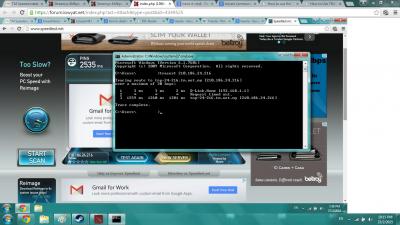
QUOTE(Everdying @ Feb 23 2015, 10:08 PM)
wtf ping of 2.5sec?
try doing a tracert to the same ip in the speedtest, see where it goes.
thats probably the source of your speed drop.
*
Attached Image
vanellope
post Feb 23 2015, 11:07 PM

New Member
*
Newbie
0 posts

Joined: Feb 2015


QUOTE(Everdying @ Feb 23 2015, 10:32 PM)
actually i just remembered streamyx block users from doing tracert cmd as evident in other threads here.
have to use freeware to do it.

anyway, my ping to that ip is 42ms.
very weird that you're getting in the thousands.
*
Based on your experience, what could be the problem?
vanellope
post Feb 24 2015, 11:27 AM

New Member
*
Newbie
0 posts

Joined: Feb 2015


QUOTE(Everdying @ Feb 23 2015, 11:14 PM)
major packet loss.
anything from bad routing, to noisy line which in ur case tm has claimed is the cause.
*
But as I said, the problem happens very regularly and periodically. flex.gif
And how can I identify if it is the noise problem?
vanellope
post Feb 24 2015, 02:46 PM

New Member
*
Newbie
0 posts

Joined: Feb 2015


QUOTE(andyng38 @ Feb 24 2015, 01:50 PM)
Maybe I can shed some light onto your problem...or maybe not.

I've been using streamyx for about 10 years (9 yrs on 1meg package, now on 4meg). Almost every midnight till 12.40AM or 1AM, the net slows down, and most times at 4.30 to 5.30 PM too. I've long grown accustomed to that and accepted it as "one of things". It happened when I was on 1 meg and still happens now on the 4meg package. Same thing happens when using Streamyx DNS, Google, or Open DNS. Other than those times, when my cabinet and line are working properly, I have decent speeds.

I can only postulate that at those times, Streamyx is shaping traffic in my area. Am no networking expert, but I suspect that they MAY BE allocating more bandwidth to commercial customers (banks, post offices, govt departments) at those times for data transfers of the daily transactions, backups to remote storage etc. It could be that they have insufficient bandwidth in certain areas and the normal home user is throttled in favor of those other customers during those peak times. I say this because Maybank2u shuts down at midnight for maintenance...other banks may do the same, and the 4.30-5.30PM slowdown occurs after banking hours too.
*
But it's really damn annoying, like when I was playing games and suddenly the ping goes wild. Usually when I restart the modem, the speed seems to come back for a couple of minutes, but not long, and then it will drop back to ~50kbps.
If what you are saying is true, then there is nothing I can do about it, right?
vanellope
post Feb 26 2015, 02:55 PM

New Member
*
Newbie
0 posts

Joined: Feb 2015


QUOTE(khainiz94 @ Feb 24 2015, 05:34 PM)
I thought I am the only experiencing this. Been using Streamyx for 2 years and there is some slowdowns during that time which affects the internet browsing and streaming quite a bit. But I just take it as a temporary slowdowns and it returns back to normal after that.  biggrin.gif
*
In my case it's not temporary bro, the speedcap happens in the middle of a day and last no shorter than 2 hours.
Being fed up alrdy


Change to:
| Lo-Fi Version
0.0881sec    0.58    7 queries    GZIP Disabled
Time is now: 2nd December 2025 - 06:26 AM