Welcome Guest ( Log In | Register )

Outline · [ Standard ] · Linear+

Review Bitfenix Neos Computer Case Unboxing + Review, Nice Design Budget Computer Casing :)

views
     
TSasunakirito
post Sep 3 2014, 11:20 PM, updated 11y ago

Regular
******
Senior Member
1,068 posts

Joined: Oct 2012
Hi guys, today I bring you another computer case review and this time its from Bitfenix, in particular the Neos series all-white version.
This is a budget-entry computer casing priced at RM169 (non-window side panel) or RM175 (windowed-side panel) at this point of time.
If you were to purchase Bitfenix Neos windowed-version, you get an additional 120mm L.E.D. fan placed in front! So it would be quite worth the money nod.gif

user posted image

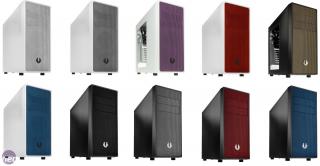
The color design for Bitfenix Neos is flexible compared to other computer cases in the market as you can choose either black/white for the metal casing.
For the front panel, you can choose either 1 of the 5 different color choices.
The black casing has color option of (gold, black, silver, red, blue) while white casing has color option of (green, black, white, red, blue)

Attached Image

Bitfenix Neos Specifications
Materials: Steel, Plastic
Color (Int/Ext): Black/Black, White/White
Dimensions (WxHxD): 185 x 429 x 470
Motherboard Sizes: Mini-ITX, mATX, ATX
5.25" Drive Bays: 2
3.5" Drive Bays: 3
2.5" Drive Bays: 3
Cooling Front: 2 x 120mm (optional)
Cooling Rear: 1 x 120mm (included)
PCI Slots: 7
I/O: 1 x USB3.0, 1 x USB2.0, HD Audio
Power Supply: PS2 ATX (bottom, multi direction)
Extras / Features: Front Dust Filter, PSU Dust Filter, Tool-Free Drive Locking


Bitfenix Neos Unboxing

Below is a picture of the Bitfenix Neos, has brief information about the chassis structure.
user posted image

Foam and Plastic
Bitfenix Neos computer case is protected with hard foams measuring 28mm on the thickest and 16mm on the thinnest part of the foam.
It is also wrapped with thin transparent plastic to prevent any unwanted scratches.
Attached Image Attached Image


Bitfenix Neos Exterior

Top
Attached Image
The Bitfenix Neos has a complete overall minimalist appearance. The top does not have any fan mounts except for the revealing I/O (input-output) area. .
It has 1 round Power Button (15mm in diameter), 1 rectangular reset button (8mm x 17mm), 1 x USB 3.0 (blue), 1 x USB 2.0 (black), 1 microphone jack and 1 audio jack (for headphone/speaker).
The reset button is made small to prevent users from accidentally pressing it, it will require some pinpoint pressure to activate it.

Front Panel
Attached Image
The front panel is fully mesh which is very rare in most computer cases. This design makes Neos looks sophisticated, but this cosmetic isn't just design for looks but it allows unrestricted airflow through the large circular mesh for front air intake to cool your hard disk as well as other PC components in the case. This front panel has several color to choose from white, black, blue, red and green! The Bitfenix logo is found sticking on the front bottom of the mesh. The front has 2 x 5.25 inch slots for either optical drives, fan controller and hard disk hot-swappable bay.

Attached Image
Removing the front panel reveals 2 x 120mm fan mount for air intake. The 5.25 inch bays has these breakable metal plates. You will need to remove them before you can install your ODD (optical disk drives) or your hot swappable bay in the 5.25" bays.

Attached Image
To mount the fans, they are to be screwed into the removable dust filter. The filter has fine holes, excellent in stopping small-medium-large dust particles without restricting much of the air flow.

The entire front panel is covered with non-removable anti-dust foam. This particular foam is much better in stopping the tinniest dust, but it is very difficult to clean with water/vacuum/air-pressure. Therefore, using a high pressure fan as air intake would lead to pulling air from the through this foam, as a result, the dust are accumulated on the foam first before reaching the removable dust filter.

To remove meshed-foam cover to reveal these 5.25 inch drives, you have to remove the entire front panel, then remove it from inside out. It would be a little hassle since you can't install it from outside in as how you insert the optical drives.


Rear
Attached Image
The rear of Bitfenix Neos supports 1 x 120mm fan for exhausting hot air from the chassis. It has 7 x PCI-e slots, ample for dual graphic cards, or perhaps 1 graphic card combo-ed with a dedicated sound card. It has 2 holes equipped with rubber grommets for installing watercooling tubing. Looking at the PCI-e slots, these are removable metal-plates. Once removed, they can't be reinstall back with normal screws. Bitfenix Neos side panels are secured with thumbscrews, which is very convenient and does not require screw driver to remove them!

Side Panel
The non-windowed side panel weight 750 grams while the windowed side panel weight approximately 725 grams, which is quite light in my opinion and it help reduced the overall weight of the chassis. Do note that lighter side panels are more prone to flex a lot. In addition, I encountered some issues sliding the side panel back onto the chassis as its not smooth and requires some accuracy and effort when the chassis is on its feet. Placing Bitfenix Neos flat on its side to install the side panel back into place does not help much too.

Bottom
Attached Image
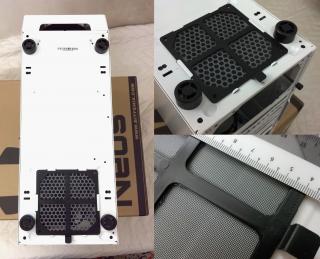
The bottom has air intake for power supply equipped with a fine dust filter which is excellent to prevent dust from entering the power supply while it can intake as much cool air from the bottom. The chassis is supported with 4 plastic feet with height of 15mm. With this short height, it is not recommended to place on carpets as it chokes the power supply air intake. The feet does not have any rubber padding to avoid it from slipping on smooth surface.

Bitfenix Neos Interior
Attached Image

Motherboard
Attached Image
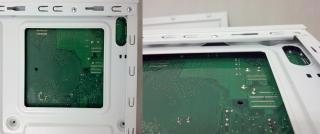
The motherboard has a cutout width and height of 108mm x 108mm, useful for installing 3rd-party custom air cooler. The motherboard panel supports ITX, mATX and ATX motherboard. One innovative design I found in this particular Bitfenix Neos case is the elevated motherboard standoff which is punched into coned-shape of the motherboard panel itself, therefore is no need to install the motherboard standoff as how you would normally do for regular computer cases. The cable holes are not equipped with rubber grommets as it helps to reduce the cost of the chassis.

ODD Drive Compartment
The optical drive installation is a breeze to work with as its tooless. Remove the plastic holder, slide in the optical drive and lock it with the plastic holder by having the plastic pin fitted into the 2 mini holes at the right side of the drive. Do note there would be some slight flex if you press hardly on the right side of the optical drive if its not screwed but dependent on the plastic holder alone.

SSD/HDD Drive Compartment
user posted image
Bitfenix Neos supports 3 x SSD (Solid State Drive) and 3 x HDD (Hard Disk Drive). Most budget and mainstream PC build would likely to install 1-2 HDD for storage and 1 SSD for OS (Operating System) with other gaming/work applications. It should be sufficient for most users.

The SSD and HDD trays are removable, allowing you to remove them from the chassis, install either SSD/HDD into the tray before sliding them back into the case to connect them to the motherboard and power supply. The HDD trays are tooless, that means you just need to expand open the tray, fit in the HDD, and contract the tray back so its plastic pins can hold the HDD in place. For SSD, you will need to use screws to secure it to the SSD tray.

Both SSD and HDD compartment does not have removable drive cages, therefore, you will not be able to remove them for direct air flow access. The structure of the drive compartment is well-thought. By having the SSD slots above the HDD slots, it provides ample space for one graphic cards up to 30cm (11.8 inch) in length to be installed without any obstacles.

Power Supply Compartment
Any PSU (Power Supply) length can fit into this case easily. Just that the PSU pillar support is 140mm x 140mm. As there are no fan mounts at the bottom, it will not restrict any components below. I would recommend users to install either a fully modular PSU or semi-modular PSU (Power Supply) to avoid issues with having to route all the unused cables behind the motherboard because it would lead to more difficult time in cable management as there isn't sufficient clearance to have them fitted behind.


Bitfenix Neos Fan
user posted image
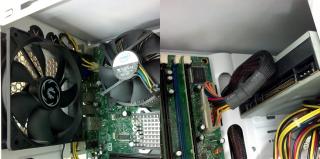
Bitfenix Neos includes 1 x 120mm fan which is used to exhaust hot air out of the chassis. The fan does not push much air. To imagine the air pressure would be somewhat similar to the air flowing through your hands when you are driving at 30km/h (e.g. gentle breeze). I would recommend to get another pair of fans for the front intake to bring in more cool fresh air if you are intending to overclock your CPU or having a hot GPU running for a long period of time. This fan uses 3-pin connector, and has a cable length of 19 inches (48.26 cm).


Bitfenix Neos Clearance

Cable Clearance
I faced some issues with routing the power cables to be hook up to the motherboard. The first was the 24 pin power supply cable which was a little difficult to pull in the cable through the hole. I wished it was at least a little bigger. Another was the additional power supply cable, which isn't routed from behind due to there isn't a cable cutout at the top of the motherboard tray at the left side.
user posted image

CPU Clearance
Bitfenix Neos is capable of installing a 3rd party low profile CPU cooler or mini tower cooler that uses 120mm fans. The interior width from the motherboard tray to the right-side panel is 169mm. Hyper 212 Evo cooler with height of 159mm could fit in very tightly with the extra 10mm used for the motherboard in-built standoff as well as the thickness of the motherboard with the CPU socket.

Graphic Card Clearance
Bitfenix Neos is capable of supporting 2 x graphic cards up to 30 cm with additional 2 cm for cable or space to easily fit in the graphic cards.


Bitfenix Neos Accessories and User Manual

user posted image

Accessories
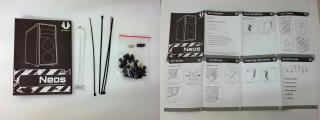
The accessories are packaged in a single air-sealed plastic bag which is a hassle when it comes to separating the screws from the others. I wished each of the different screws are packed in its own independent sealed air bag for user's convenience.

Below is a list of items it comes with:
1. 4 x cable ties
2. 1 x PCI Slot Blank
3. 9 x Motherboard Screws (BM6 * 5mm)
4. 20 x SSD Screws (M3 * 5mm Round)
4. 4 x ODD Screws (#6-32 * 6mm)
5. 6 x HDD Tray Screw (TA3x6)
6. 3 x Motherboard Standoffs

user posted image

User Manual
The user manual is 1 large paper folded into many pages. It describes the accessory contents, basic installation, installing 5.25" drives, 3.5" drives, 2.5" drives, replacing side panels, control panel (Front I/O), Fan Installation for front and rear. Each has a simple picture format to guide you.


Bitfenix Neos Finish Build

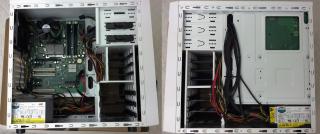
Below is an image of the finish build (front and back of the motherboard).
user posted image

Here is a look at the windowed side panel of Bitfenix Neos.
user posted image

With this, you can showcase your computer components with blink-blink LED lights or it can be quite convenient to check the motherboard debug card LED without having to remove the side panel to inspect for any issues if PC does not start up properly.

user posted image
If you were to install the older CD-ROM which uses ATA cable instead of the SATA cable, you might run into issue where the Optical Disk Drive does not flush nicely into the front panel, because it has longer depth. This wouldn't be an issue for most people as they would be using the newer type of CD-ROM. Regarding the older CD-ROM, it couldn't be much inner as it would obstruct the 24 pin power supply connector.


Bitfenix Neos Final Thoughts and Conclusion
Bitfenix Neos is an elegant minimalist box-type computer casing. For those users who aren't fancy with bulges on the side panel, top or front, this is the case for you! It is suitable to be used as an office case as it does not stand out much with eccentric gaming design, but more towards a classy professional look. Another plus side is you can get this case to match with your computer components as well as your furniture/room design. Although Bitfenix Neos does not have much cooling potential with only 3 fan mounts, this benefits in a way where it helps reduce the noise generated by moving parts (e.g. PWM fans/PSU-whine/fans-bump up in speed during overclock). Last but not least, Bitfenix Neos is fully-dust-proof, which is kinda rare to see in most computer cases at this price range, making it easier to maintain and clean.

Pros:
1. Best minimalist design with flexible color choice computer case within this price range (RM150-RM200).
2. Small and light casing for portability. Easier to fit in tight areas.
3. Removable drive caddies for easier installation of SSD (Solid State Drive) and HDD (Hard Disk Drive)
4. Tooless design that does not require any screws to fit in a HDD and ODD.
5. Innovative design of making use the motherboard tray as standoff for motherboard.
6. Innovative design of punched holes in the drive compartment to hold the drive caddies.
7. Cleverly design drive compartment to avoid obstructing length graphic card to be installed (up to 30cm graphic card)
8. Front I/O isn't attached to the front panel cover, making it easier to remove front panel without pulling the cables.
9. Fully dust-filtered computer casing.
10. Removable dust filter for easier cleaning.
11. Very silent fan.
12. Supports 3rd party CPU cooler installation.

Cons:
1. Difficult to open and close side panels. Not smooth.
2. Lack of cable clearance behind the motherboard.
3. Small cable holes in motherboard. Difficult to route large cables especially 24 pin power supply connector.
4. Lack of cables holes near the top left corner of motherboard to install the additional power supply connector.
5. Case feet not padded with rubber to prevent sliding.
6. Fan does not push much air.
7. The front fans required to be unscrewed from the dust filter before it can be cleaned through running water.
8. Metal shell required to be removed before you can install the ODD (Optical Disk Drives).
9. Metal shell for the PCIe slots can't be re-install back with screws.
10. Installing an CD-ROM which relies on ATA cable has larger depth compared to the one using SATA cable, therefore, it would not be flushed into the front panel casing.

P.S. If you do have any questions regarding the Bitfenix Neos series computer case, feel free to post below and I'll try my best to answer them smile.gif

This post has been edited by asunakirito: Jun 14 2015, 09:34 PM
Clem1982
post Sep 5 2014, 02:18 PM

Just Helping Out ^^
*******
Senior Member
8,746 posts

Joined: Jul 2010
From: S.A.B.A.H


Nicely Done! very detailed review, looking forward to more wink.gif
SUSTheHitman47
post Sep 5 2014, 02:52 PM

Nuke
******
Senior Member
1,053 posts

Joined: Sep 2009
From: In Your Mind


people with simplicity will surely love this case.
it got simple look yet attractive with the coloring mash.

minecrafter, im suprise didnt see u in this thread..haha.


Minecrafter
post Sep 5 2014, 02:59 PM

ROCK N ROLL STAR
*******
Senior Member
5,043 posts

Joined: Aug 2013
From: Putrajaya


QUOTE(asunakirito @ Sep 3 2014, 11:20 PM)
Hi guys, today I bring you another computer case review and this time its from Bitfenix, in particular the Neos series all-white version.
This is a budget-entry computer casing priced at RM169 (non-window side panel) or RM175 (windowed-side panel) at this point of time.
If you were to purchase Bitfenix Neos windowed-version, you get an additional 120mm L.E.D. fan placed in front! So it would be quite worth the money  nod.gif

Attached Image

The color design for Bitfenix Neos is flexible compared to other computer cases in the market as you can choose either black/white for the metal casing.
For the front panel, you can choose either 1 of the 5 different color choices.
The black casing has color option of (white, black, purple, red, gold) while white casing has color option of (blue, black, silver, red, blue)

Attached Image

Bitfenix Neos Specifications
Materials: Steel, Plastic
Color (Int/Ext): Black/Black, White/White
Dimensions (WxHxD): 185 x 429 x 470
Motherboard Sizes: Mini-ITX, mATX, ATX
5.25" Drive Bays: 2
3.5" Drive Bays: 3
2.5" Drive Bays: 3
Cooling Front: 2 x 120mm (optional)
Cooling Rear: 1 x 120mm (included)
PCI Slots: 7
I/O: 1 x USB3.0, 1 x USB2.0, HD Audio
Power Supply: PS2 ATX (bottom, multi direction)
Extras / Features: Front Dust Filter, PSU Dust Filter, Tool-Free Drive Locking
Bitfenix Neos Unboxing

Below is a picture of the Bitfenix Neos, has brief information about the chassis structure.
Attached Image

Foam and Plastic
Bitfenix Neos computer case is protected with hard foams measuring 28mm on the thickest and 16mm on the thinnest part of the foam.
It is also wrapped with thin transparent plastic to prevent any unwanted scratches.
Attached Image Attached Image
Bitfenix Neos Exterior

Top
Attached Image
The Bitfenix Neos has a complete overall minimalist appearance. The top does not have any fan mounts except for the revealing I/O (input-output) area. .
It has 1 round Power Button (15mm in diameter), 1 rectangular reset button (8mm x 17mm), 1 x USB 3.0 (blue), 1 x USB 2.0 (black), 1 microphone jack and 1 audio jack (for headphone/speaker).
The reset button is made small to prevent users from accidentally pressing it, it will require some pinpoint pressure to activate it.

Front Panel
Attached Image
The front panel is fully mesh which is very rare in most computer cases. This design makes Neos looks sophisticated, but this cosmetic isn't just design for looks but it allows unrestricted airflow through the large circular mesh for front air intake to cool your hard disk as well as other PC components in the case. This front panel has several color to choose from white, black, blue, red and purple! The Bitfenix logo is found sticking on the front bottom of the mesh. The front has 2 x 5.25 inch slots for either optical drives, fan controller and hard disk hot-swappable bay.

Attached Image
Removing the front panel reveals 2 x 120mm fan mount for air intake. The 5.25 inch bays has these breakable metal plates. You will need to remove them before you can install your ODD (optical disk drives) or your hot swappable bay in the 5.25" bays.
Attached Image
To mount the fans, they are to be screwed into the removable dust filter. The filter has fine holes, excellent in stopping small-medium-large dust particles without restricting much of the air flow.

The entire front panel is covered with non-removable anti-dust foam. This particular foam is much better in stopping the tinniest dust, but it is very difficult to clean with water/vacuum/air-pressure. Therefore, using a high pressure fan as air intake would lead to pulling air from the through this foam, as a result, the dust are accumulated on the foam first before reaching the removable dust filter.

To remove meshed-foam cover to reveal these 5.25 inch drives, you have to remove the entire front panel, then remove it from inside out. It would be a little hassle since you can't install it from outside in as how you insert the optical drives.
Rear
Attached Image
The rear of Bitfenix Neos supports 1 x 120mm fan for exhausting hot air from the chassis. It has 7 x PCI-e slots, ample for dual graphic cards, or perhaps 1 graphic card combo-ed with a dedicated sound card. It has 2 holes equipped with rubber grommets for installing watercooling tubing. Looking at the PCI-e slots, these are removable metal-plates. Once removed, they can't be reinstall back with normal screws. Bitfenix Neos side panels are secured with thumbscrews, which is very convenient and does not require screw driver to remove them!

Side Panel
The non-windowed side panel weight 750 grams while the windowed side panel weight approximately 725 grams, which is quite light in my opinion and it help reduced the overall weight of the chassis. Do note that lighter side panels are more prone to flex a lot. In addition, I encountered some issues sliding the side panel back onto the chassis as its not smooth and requires some accuracy and effort when the chassis is on its feet. Placing Bitfenix Neos flat on its side to install the side panel back into place does not help much too.

Bottom
Attached Image
The bottom has air intake for power supply equipped with a fine dust filter which is excellent to prevent dust from entering the power supply while it can intake as much cool air from the bottom. The chassis is supported with 4 plastic feet with height of 15mm. With this short height, it is not recommended to place on carpets as it chokes the power supply air intake. The feet does not have any rubber padding to avoid it from slipping on smooth surface.

Bitfenix Neos Interior
Attached Image

Motherboard
Attached Image
The motherboard has a cutout width and height of 108mm x 108mm, useful for installing 3rd-party custom air cooler. The motherboard panel supports ITX, mATX and ATX motherboard. One innovative design I found in this particular Bitfenix Neos case is the elevated motherboard standoff which is punched into coned-shape of the motherboard panel itself, therefore is no need to install the motherboard standoff as how you would normally do for regular computer cases. The cable holes are not equipped with rubber grommets as it helps to reduce the cost of the chassis.

ODD Drive Compartment
The optical drive installation is a breeze to work with as its tooless. Remove the plastic holder, slide in the optical drive and lock it with the plastic holder by having the plastic pin fitted into the 2 mini holes at the right side of the drive. Do note there would be some slight flex if you press hardly on the right side of the optical drive if its not screwed but dependent on the plastic holder alone.

SSD/HDD Drive Compartment
Attached Image
Bitfenix Neos supports 3 x SSD (Solid State Drive) and 3 x HDD (Hard Disk Drive). Most budget and mainstream PC build would likely to install 1-2 HDD for storage and 1 SSD for OS (Operating System) with other gaming/work applications. It should be sufficient for most users.

The SSD and HDD trays are removable, allowing you to remove them from the chassis, install either SSD/HDD into the tray before sliding them back into the case to connect them to the motherboard and power supply. The HDD trays are tooless, that means  you just need to expand open the tray, fit in the HDD, and contract the tray back so its plastic pins can hold the HDD in place. For SSD, you will need to use screws to secure it to the SSD tray.

Both SSD and HDD compartment does not have removable drive cages, therefore, you will not be able to remove them for direct air flow access. The structure of the drive compartment is well-thought. By having the SSD slots above the HDD slots, it provides ample space for one graphic cards up to 30cm (11.8 inch) in length to be installed without any obstacles.

Power Supply Compartment
Any PSU (Power Supply) length can fit into this case easily. Just that the PSU pillar support is 140mm x 140mm. As there are no fan mounts at the bottom, it will not restrict any components below. I would recommend users to install either a fully modular PSU or semi-modular PSU (Power Supply) to avoid issues with having to route all the unused cables behind the motherboard because it would lead to more difficult time in cable management as there isn't sufficient clearance to have them fitted behind.
Bitfenix Neos Fan
Attached Image
Bitfenix Neos includes 1 x 120mm fan which is used to exhaust hot air out of the chassis. The fan does not push much air. To imagine the air pressure would be somewhat similar to the air flowing through your hands when you are driving at 30km/h (e.g. gentle breeze). I would recommend to get another pair of fans for the front intake to bring in more cool fresh air if you are intending to overclock your CPU or having a hot GPU running for a long period of time. This fan uses 3-pin connector, and has a cable length of 19 inches (48.26 cm).
Bitfenix Neos Clearance

Cable Clearance
I faced some issues with routing the power cables to be hook up to the motherboard. The first was the 24 pin power supply cable which was a little difficult to pull in the cable through the hole. I wished it was at least a little bigger. Another was the additional power supply cable, which isn't routed from behind due to there isn't a cable cutout at the top of the motherboard tray at the left side.
Attached Image

CPU Clearance
Bitfenix Neos is capable of installing a 3rd party low profile CPU cooler or mini tower cooler that uses 120mm fans. The interior width from the motherboard tray to the right-side panel is 169mm. Hyper 212 Evo cooler with height of 159mm could fit in very tightly with the extra 10mm used for the motherboard in-built standoff as well as the thickness of the  motherboard with the CPU socket.

Graphic Card Clearance
Bitfenix Neos is capable of supporting 2 x graphic cards up to 30 cm with additional 2 cm for cable or space to easily fit in the graphic cards.
Bitfenix Neos Accessories and User Manual

Attached Image

Accessories
The accessories are packaged in a single air-sealed plastic bag which is a hassle when it comes to separating the screws from the others. I wished each of the different screws are packed in its own independent sealed air bag for user's convenience.

Below is a list of items it comes with:
1. 4 x cable ties
2. 1 x PCI Slot Blank
3. 9 x Motherboard Screws (BM6 * 5mm)
4. 20 x SSD Screws (M3 * 5mm Round)
4. 4 x ODD Screws (#6-32 * 6mm)
5. 6 x HDD Tray Screw (TA3x6)
6. 3 x Motherboard Standoffs
Attached Image

User Manual
The user manual is 1 large paper folded into many pages. It describes the accessory contents, basic installation, installing 5.25" drives, 3.5" drives, 2.5" drives, replacing side panels, control panel (Front I/O), Fan Installation for front and rear. Each has a simple picture format to guide you.
Bitfenix Neos Finish Build

Below is an image of the finish build (front and back of the motherboard).
Attached Image

Here is a look at the windowed side panel of Bitfenix Neos.
Attached Image

With this, you can showcase your computer components with blink-blink LED lights or it can be quite convenient to check the motherboard debug card LED without having to remove the side panel to inspect for any issues if PC does not start up properly.

Attached Image
If you were to install the older CD-ROM which uses ATA cable instead of the SATA cable, you might run into issue where the Optical Disk Drive does not flush nicely into the front panel, because it has longer depth. This wouldn't be an issue for most people as they would be using the newer type of CD-ROM. Regarding the older CD-ROM, it couldn't be much inner as it would obstruct the 24 pin power supply connector.
Bitfenix Neos Final Thoughts and Conclusion
Bitfenix Neos is an elegant minimalist box-type computer casing. For those users who aren't fancy with bulges on the side panel, top or front, this is the case for you! It is suitable to be used as an office case as it does not stand out much with eccentric gaming design, but more towards a classy professional look. Another plus side is you can get this case to match with your computer components as well as your furniture/room design. Although Bitfenix Neos does not have much cooling potential with only 3 fan mounts, this benefits in a way where it helps reduce the noise generated by moving parts (e.g. PWM fans/PSU-whine/fans-bump up in speed during overclock). Last but not least, Bitfenix Neos is fully-dust-proof, which is kinda rare to see in most computer cases at this price range, making it easier to maintain and clean.

Pros:
1. Best minimalist design with flexible color choice computer case within this price range (RM150-RM200).
2. Small and light casing for portability. Easier to fit in tight areas.
3. Removable drive caddies for easier installation of SSD (Solid State Drive) and HDD (Hard Disk Drive)
4. Tooless design that does not require any screws to fit in a HDD and ODD.
5. Innovative design of making use the motherboard tray as standoff for motherboard.
6. Innovative design of punched holes in the drive compartment to hold the drive caddies.
7. Cleverly design drive compartment to avoid obstructing length graphic card to be installed (up to 30cm graphic card)
8. Front I/O isn't attached to the front panel cover, making it easier to remove front panel without pulling the cables.
9. Fully dust-filtered computer casing.
10. Removable dust filter for easier cleaning.
11. Very silent fan.
12. Supports 3rd party CPU cooler installation.

Cons:
1. Difficult to open and close side panels. Not smooth.
2. Lack of cable clearance behind the motherboard.
3. Small cable holes in motherboard. Difficult to route large cables especially 24 pin power supply connector.
4. Lack of cables holes near the top left corner of motherboard to install the additional power supply connector.
5. Case feet not padded with rubber to prevent sliding.
6. Fan does not push much air.
7. The front fans required to be unscrewed from the dust filter before it can be cleaned through running water.
8. Metal shell required to be removed before you can install the ODD (Optical Disk Drives).
9. Metal shell for the PCIe slots can't be re-install back with screws.
10. Installing an CD-ROM which relies on ATA cable has larger depth compared to the one using SATA cable, therefore, it would not be flushed into the front panel casing.

P.S. If you do have any questions regarding the Bitfenix Neos series computer case, feel free to post below and I'll try my best to answer them  smile.gif
*
Cool review,keep them coming! wink.gif

QUOTE(TheHitman47 @ Sep 5 2014, 02:52 PM)
people with simplicity will surely love this case.
it got simple look yet attractive with the coloring mash.

minecrafter, im suprise didnt see u in this thread..haha.
*
Need to lurk more in the Reviews section.. sweat.gif
Clem1982
post Sep 5 2014, 04:24 PM

Just Helping Out ^^
*******
Senior Member
8,746 posts

Joined: Jul 2010
From: S.A.B.A.H


Heh? Bro Minecrafter interested in BitFenix products in particular? ^-^;
alle-lkw
post Sep 5 2014, 06:47 PM

New Member
*
Newbie
1 posts

Joined: Sep 2014
Very detailed review! Nice job!
TSasunakirito
post Sep 5 2014, 08:32 PM

Regular
******
Senior Member
1,068 posts

Joined: Oct 2012
QUOTE(TheHitman47 @ Sep 5 2014, 02:52 PM)
people with simplicity will surely love this case.
it got simple look yet attractive with the coloring mash.

minecrafter, im suprise didnt see u in this thread..haha.
*
It reminds me of Fractal Design cases, simple yet elegant, just that it only has fully black or fully white sweat.gif


QUOTE(Clem1982 @ Sep 5 2014, 02:18 PM)
Nicely Done! very detailed review, looking forward to more wink.gif
*
Thanks for stopping by smile.gif

QUOTE(alle-lkw @ Sep 5 2014, 06:47 PM)
Very detailed review! Nice job!
*
Thanks for reading! laugh.gif

This post has been edited by asunakirito: Sep 5 2014, 08:35 PM
Zgames
post Sep 5 2014, 11:47 PM

- A Tree Loving Lizard -
******
Senior Member
1,446 posts

Joined: Apr 2013
From: Home


Suuuppperrrr review, but I'm still thinking...Windowed Neos or Shadow. Dang flab nab it.
Clem1982
post Sep 6 2014, 09:50 AM

Just Helping Out ^^
*******
Senior Member
8,746 posts

Joined: Jul 2010
From: S.A.B.A.H


QUOTE(Zgames @ Sep 5 2014, 11:47 PM)
Suuuppperrrr review, but I'm still thinking...Windowed Neos or Shadow. Dang flab nab it.
*
Well.. the longet you wait, the more headaches you're gonna get as BitFenix still has some prototypes to roll out wink.gif
justordinary
post Sep 8 2014, 08:01 PM

Getting Started
**
Junior Member
233 posts

Joined: Aug 2010


Great review. Gotten my pc with bitfenix neos a week ago. Immediately realize the back exhaust fan is really weak. What fan would you recommend to get to replace the back exhaust?
TSasunakirito
post Sep 8 2014, 09:38 PM

Regular
******
Senior Member
1,068 posts

Joined: Oct 2012
QUOTE(justordinary @ Sep 8 2014, 08:01 PM)
Great review. Gotten my pc with bitfenix neos a week ago. Immediately realize the back exhaust fan is really weak. What fan would you recommend to get to replace the back exhaust?
*
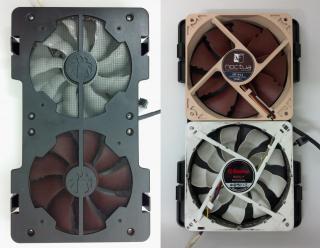
I'm using Enermax and Noctua's fan (as you can see from the photo).
Noctua's NF-P12 (120mm fan) blow a lot more air (similar to having your hand out of the car window blowing at 40km/h) at 10cm distance. brows.gif
The air is a lot and "thick" (that's what it means by P - pressure fans), its great as air intake fan for heatsink, hard disk. Great for exhaust too.
Previously, there was a guy selling NF-P12 fans for RM50 a pair, which is a good bargain as the fan comes with a 6 years warranty (used for 2 years+).
This fan originally cost RM75 which is alot sweat.gif

I must warn that Noctua fan blade are brown in color (would be an issue if you want to color match your components)
There is grey Noctua Redux (slightly cheaper) and black Noctua IndustrialPPC (2-3 times more expensive than regular brown fans).

On the other hand, Enermax Magma (red fan blade, 120mm fan) is good too. Just that it takes a little bit more watt to spin the fan blade.
Linloong is selling one of this at RM39 (postage RM8), good fans. Can remove fan blade to wash smile.gif

If you want to add some blink blink to your case (if you choose the windowed-bitfenix neos), you can grab either
ENERMAX T.B. VEGAS DUO 120mm *2-Color LED Red+Blue=Purple (RM50)

or
ENERMAX T.B. VEGAS TRIO 120mm *3-Color LED Combination Red+Blue+Green (RM60)
depending on your budget.


These Enermax fans blows considerably a lot more air (similar to the Noctua fan), but in return consume 3 times more power for the bright lights wub.gif

This post has been edited by asunakirito: Sep 8 2014, 09:42 PM
justordinary
post Sep 9 2014, 12:48 AM

Getting Started
**
Junior Member
233 posts

Joined: Aug 2010


Not considering a noctua. Too ugly lol! What about Xigmatek XSF-F1252? 1800rpm, 75cfm, @Rm18+.

Sounds pretty good to me! I dont mind the noise level though the important factor to me is to exhaust as much heat as possible
lucidlts
post Sep 9 2014, 10:47 AM

brain powder
*******
Senior Member
2,906 posts

Joined: Oct 2010
From: hurrr durrrrr?


QUOTE(justordinary @ Sep 9 2014, 12:48 AM)
Not considering a noctua. Too ugly lol! What about Xigmatek XSF-F1252? 1800rpm, 75cfm, @Rm18+.

Sounds pretty good to me! I dont mind the noise level though the important factor to me is to exhaust as much heat as possible
*
Their Redux & industrialPPC don't tongue.gif
Anyway, the Xigmatek XAF is a good choice too: https://forum.lowyat.net/index.php?showtopic=3333508&hl=


Change to:
| Lo-Fi Version
0.0267sec    0.43    6 queries    GZIP Disabled
Time is now: 1st December 2025 - 09:28 PM