Outline ·
[ Standard ] ·
Linear+
Canon EOS Family, DSLR, EOS - V58, The White Paladins' Territory!
|
tboxmy
|
 Jul 31 2014, 11:48 AM Jul 31 2014, 11:48 AM
|

|
QUOTE(cIvIc_noob @ Jul 18 2014, 08:22 PM) 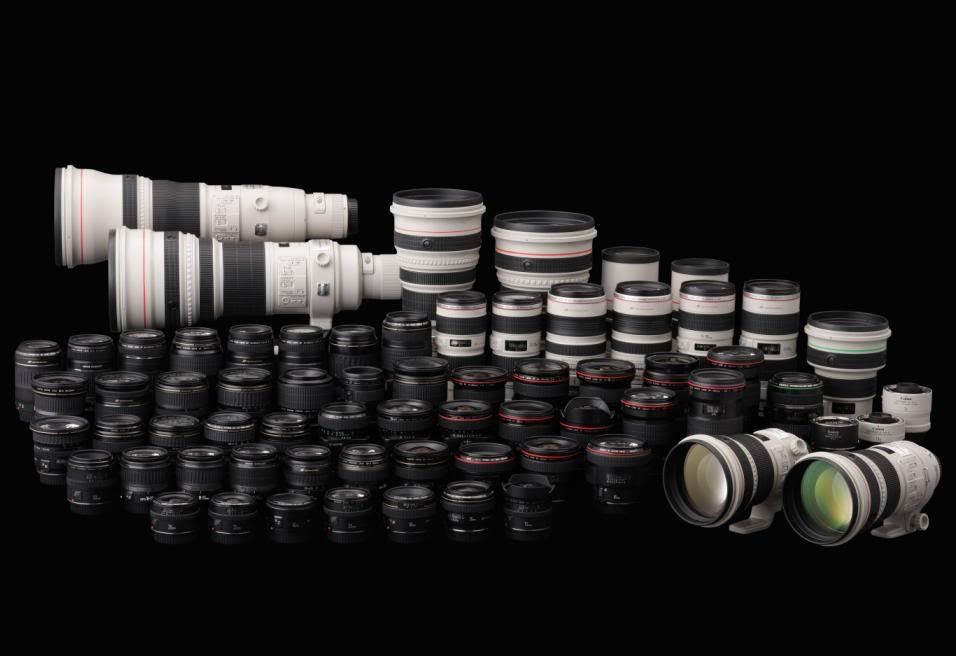 The Big Family! » Click to show Spoiler - click again to hide... «
EOS 1Dc/1DX
thelightside
borneosailor
EOS 5D Mark III
The King (obviously)
mauinsons
Tony Stark
yushin
Reix
Vincent Pang
FishnChipx
Kar Leong
pengster
Michael
alexlimco
lucuias
loverjinx
thelightside
EOS 5D Mark II
mauinsons
legend
The King
Tony Stark
yankiat
fukadavin
Jing-leBelle
Clerickilla
Inspire4x
thelightside
vivi_meow
C.P.U
EOS 5D without Mark
fruitie
V-zero
C.P.U
EOS 6D
ek_lim
infra
SkylineFreak
coduosp
LaxxerS
visualfoley
bodybyvi
leonghan
EOS 7D
jaycee
Xiu Keong
D.Sync
firslash88
leongkokloon
alexlimco
EOS 70D
Tuyin
sulfuriq
Mr.DC
Xiia0Ban
keropi88
EOS 60D
King Goldy
KYTZ
Sniper
adam
kilawe
skittlesz07
chongkiatz
shutterzen
tachlio
Christopher7
eball88
tachlio
Kar Leong
Aaron135LC
heLL[tuRt]
ooiwbng
jitshiong
Andrewtst
Michael_Lee
FeiZai_5155
thelightside
azrul83
ben5113
MP9090
civic_noob
EOS 50D
onghy
EOS 40D
jackyyong
Grajindo
skysaw
EOS 20D
civic_noob
EOS 10D
ejat9058
EOS 700D
Chiqess
KuzumiTaiga
stevendefool
EOS 100D
sjr
ek_lim
EOS 650D
Emoslay
gofey
faiz293
Rice_Owl84
andie le-ta
Fighteden
zamdry
EOS 600D
rayz90
afiqms
OH-
jksthing
LegendLee
Clem1982
Stark Industries
Sky0ne
big2me
Baronic
ken120
vankodoq
EOS 550D
Ryuk
onijoseph
mingyuyu
qy1121
yenforyen
sulfuriq
EOS 500D
Silfer
ejat9058
EOS 350D
Goldfries aka King Goldy
EOS 450D
Dafreak
imran
wwlai87
EOS 400D
batik0
C.P.U
EOS 1000D
Tony Stark
DecaPix
Woon Ann
PM Me if i missed someone or to add you to the list
Pricelist » Click to show Spoiler - click again to hide... « To be updated Be great too to share prices of things you all recently purchase so we can know where to get the good stuff  . Pm Me Continue all Canon EOS discussions here. Here is the link to the Previous TopicGuideline Show some humility and respect, We are all here to learn from one another, not to discriminate by showing you a more superior than others in terms of gears and knowledge. 70D owner. |
|
|
|
|
|
tboxmy
|
Aug 1 2014, 12:28 AM
|
|
|
Have taken both photos at same distance, but why the 1st photo can't get the pet in focus? Blur behind barsPets are in focusI am attempting to use the auto focus feature of 70D and hope to learn further. This post has been edited by tboxmy: Aug 1 2014, 12:49 AM |
|
|
|
|
|
tboxmy
|
Aug 1 2014, 12:48 AM
|
|
|
Guys, how do I show the photos from Flicker here? In other forums, I have the option for attachment. Here, I do not have this option.  This post has been edited by tboxmy: Aug 1 2014, 12:49 AM This post has been edited by tboxmy: Aug 1 2014, 12:49 AM |
|
|
|
|
|
tboxmy
|
Aug 1 2014, 11:31 AM
|
|
|
QUOTE(cIvIc_noob @ Aug 1 2014, 10:40 AM) Because the pet is on the same plane as the bar so it will confuse which to focus. I have always set the focus point to the middle and use that middle focus point for it to autofocus. 99% accurate, 1% for failing in shooting small subject far away. Strangely I managed to get the focus once as is shown in 2nd photo. Just could not get the focus again despite many attempts to change zoom, f stops. What should I do without doing manual focus? |
|
|
|
|
|
tboxmy
|
Aug 4 2014, 12:47 AM
|
|
|
QUOTE(cIvIc_noob @ Aug 1 2014, 12:20 PM) 1. Keep autofocus on, set focus point to middle. 2. Aim your middle focus point on animal through viewfinder 3. Half press shutter so it locks focus and don't let go, recompose. 4. Full press shutter Will review the steps given. Looks like problem on no.1. Didnt know how to put focus on middle. Thank you. |
|
|
|
|
|
tboxmy
|
Aug 4 2014, 12:50 AM
|
|
|
QUOTE(nicotine @ Aug 1 2014, 02:45 PM) Using Autofocus is like betting on lottery on those scenario. You may want to use Auto when you are shooting sports and etc with AI servo on. First pic, auto focus hit the cage metal, not the subject pet. 2nd pic, auto focus might hit part of ya pet but still it's not a perfect one. You may want to review the pic on ya cam for which AF point it use on those pic and try to get some idea why it look soo funny/ no in focus. Anyway, learn to manually set the focus point, you have either 11 or 9 AF point... so explore and play with it. Get yourself familiar composing using different AF point on your viewfinder. As you progress, you might use wunna use center AF with focus /recompose technique. For me the later F and R works better as my 5d2 had extra 6 assist AF point surrounding the center AF. Will be looking back at the manual on how to set to manual focus and how to choose the focus point. Just can't remember. Yes, working on focus/recompose technique at this moment. Not that simple with moving subject. |
|
|
|
|
|
tboxmy
|
Sep 18 2014, 11:52 AM
|
|
|
QUOTE(Michaelbyz23 @ Sep 18 2014, 10:52 AM) why not go straight for 5d mark iii? or 6d?  6D is higher end than 7D? |
|
|
|
|
|
tboxmy
|
Sep 18 2014, 11:57 AM
|
|
|
I saw a site selling Tamron lens for the 300mm. Why some are at RM2,985 (28-300mm f/3.5-6.3 Di VC PZD Lens (Model A010) for Canon EOS ) and some RM490 (70-300mm f/4-5.6 Di LD Macro Zoom Telephoto Autofocus Lens)?
Such a big difference if I just need to shoot zoomed distance objects.
|
|
|
|
|
|
tboxmy
|
Sep 18 2014, 11:59 AM
|
|
|
QUOTE(Michaelbyz23 @ Sep 18 2014, 11:57 AM) sensor-wise, yes. Because it's full-frame sensor. But technology wise, no. 7d mark ii is a whole new camera with 65 af focus points. Plus 10fps on the 7d mark ii. Since he already owns the 60D, i don't see any good reason to upgrade to 7d mark ii, spending thousands just to have a better AF. In my opinion, if you are not shooting olympics, F1 or any high end sports frequently, then don't need the 7d mark ii AF system. Maybe upgrade to FF, it opens up another whole new level of photography world for you. Different perspective, different image quality, different bokeh quality. If you already fully utilizing the APSC sensor, maybe you can jump to FF, but need enough budget as well.  That saves some $$. |
|
|
|
|
|
tboxmy
|
Sep 20 2014, 12:11 PM
|
|
|
 Guidance needed here. How not to make photo too yellow and the front row boy's hand not look shaky. Iso was at 600. Thank you in advanced. This post has been edited by tboxmy: Sep 20 2014, 12:12 PM |
|
|
|
|
|
tboxmy
|
Sep 20 2014, 02:02 PM
|
|
|
QUOTE(mingyuyu @ Sep 20 2014, 01:43 PM) shutter speed was too slow for the picture you posted. I can even see handshake from you. Try to increase the ISO, maybe to iso1600 so you have a faster shutter speed to freeze the motion from children. for the yellow part, you are using the wrong WB i think. it's quite easy to fix though, if your camera has Auto White Balance on it, try using that one, it's quite accurate most of the time. If not, choose the preset according to surrounding (for example daylight when you are outdoor). or you can adjust it in computer (using PS or Lightroom if you have it, or even Canon's own Digital Photo Professional). If had time, would have tried diff iso and shutter speed. At least to see how higher iso can be used for this shot. WB need to be checked as I have not set that before. |
|
|
|
|
|
tboxmy
|
Sep 20 2014, 06:29 PM
|
|
|
QUOTE(mingyuyu @ Sep 20 2014, 03:38 PM) always keep an eye for the Shutter Speed shown in the bottom left of the viewfinder when shooting, it helps a lot in preventing shaky/ blurred images :) On the 70d I haven't seen the number in view finder, is this possible? I can only see it when using live view screen. |
|
|
|
|
|
tboxmy
|
Sep 20 2014, 06:31 PM
|
|
|
QUOTE(goldfries @ Sep 20 2014, 04:10 PM) for events like that, try to go the widest aperture you can and shutter speed at least 1/100. as for the photo - the skin tone looks fine, just slightly warm but overall it's acceptable. look at the other areas like the flags and leaves, the colors look fine. the whole photo looks yellow because of the walls around. white surfaces may show cast of the colors of the surrounding. Actual place have a black cement floor and nothing like in the photo. Will look at the WB later to see what was its setting. |
|
|
|
|
|
tboxmy
|
Sep 26 2014, 06:15 PM
|
|
|
QUOTE(leonghan @ Sep 26 2014, 10:53 AM)  Waiting.Someone Waiting.Someone by LeongHan, on Flickr Shot with Super Takumar 50mm F1.4  Waiting for ghost?  |
|
|
|
|
|
tboxmy
|
Apr 5 2015, 01:49 PM
|
|
|
How do i remove the eye piece view finder For eos 70d?
I see a bug jumping through the eye piece. But with the lcd, nothing. Removed the lense, nothing.
If got video or youtube even better.
|
|
|
|
|
|
tboxmy
|
May 6 2015, 01:31 PM
|
|
|
QUOTE(goldfries @ May 2 2015, 02:08 AM) The 60D is the reason why I didn't end up with 5D2. So many good features there, there's really no reason to jump to FF body when the IQ on APS-C system is already very good. I am happy with 70D. |
|
|
|
|
|
tboxmy
|
May 11 2015, 07:42 PM
|
|
|
QUOTE(LegendLee @ May 8 2015, 09:41 AM) Great photo BTW. Esp on ur first try. Ah. The phottix strato 2. Amazing trigger. Reliable. Very nice. When can I become like you pros? |
|
|
|
|
|
tboxmy
|
Jun 11 2015, 09:54 PM
|
|
|
QUOTE(goldfries @ Jun 11 2015, 02:59 PM) He's referring to filters that stop down the exposure. Any example of such a filter? |
|
|
|
|
|
tboxmy
|
Jul 16 2015, 04:31 PM
|
|
|
I am seeing a little bug jumping across the viewfinder over the last few months. Have opened the lense and did not find anything, doesnt effect the photos taken. Left the body without lense for an hour but nothing crawled out. Called the Canon service centre, they say must leave it there for a week plus to determine problem and there is a charge. Anyone with some advice that I can do myself? I am considering to use the vacumm cleaner blower, from the lense opening. Not sure if there is a passage connected to the viewfinder. But, wanted some advice before I do any damage. Looked for advice on the net, One advice was to place in a bag and put into a freezer. https://www.ephotozine.com/forums/topic/tin...amera-----71513Others include upgrading firmware to fix the bug....but I wasn't laughing |
|
|
|
|
|
tboxmy
|
Jul 17 2015, 12:05 AM
|
|
|
QUOTE(LegendLee @ Jul 16 2015, 11:45 PM) Do not use the vacuum cleaner. You don't want a whole lot of dust to go through your camera. I say just leave it and send it to canon for regular cleaning. They still provide free cleaning right ? I called this no.1800882000 in shah alam. He didnt say have any free cleaning. Just informed me there is a charge but will tell me after they inspect. I reckon the blower function in the vacumm will be able to kick the bug out. Hope its not one bug that can self multiply. |
|
|
|
|



 Quote
Quote

 0.0521sec
 0.79
0.79
 7 queries
 GZIP Disabled