Welcome Guest ( Log In | Register )

Bump Topic Topic Closed RSS Feed
129 Pages « < 25 26 27 28 29 > » Bottom

Outline · [ Standard ] · Linear+

 Xiaomi Mi3 Official Thread V12, Strictly on technical discussion ONLY!

views
     
briantwj
post Jul 22 2014, 08:55 AM

Pierluigi Collina
*******
Senior Member
3,968 posts

Joined: Sep 2012


QUOTE(viqq @ Jul 22 2014, 08:54 AM)
I've tried everything possible I could before, resetting, setting this and that High performance, battery saving, GPS only, to no avail.

After resetting for the 3rd time, I chose allow location access at the setup page, and now seems to be working.

Phewww.. Will do further testing on the apps later. Charging the phone now.
*
Sumtimes when u reboot, the google location pop up right? Can choose agree or decline. Did u mean dat?
SUSjolokia
post Jul 22 2014, 09:00 AM

So Hot It Burns..!!!
*******
Senior Member
3,274 posts

Joined: May 2013


QUOTE(viqq @ Jul 22 2014, 08:54 AM)
I've tried everything possible I could before, resetting, setting this and that High performance, battery saving, GPS only, to no avail.

After resetting for the 3rd time, I chose allow location access at the setup page, and now seems to be working.

Phewww.. Will do further testing on the apps later. Charging the phone now.
*
I tried on/off the phone twice & use google map so far no problem, should be permanently solved.
SUSgogo2
post Jul 22 2014, 09:01 AM

gogo2
********
All Stars
18,672 posts

Joined: Jan 2003
From: Penang


QUOTE(jolokia @ Jul 22 2014, 08:40 AM)
No lah !

1.) Only Maxis user is complaining, Umobile no problem, Digi & Celcom so far no info (maybe user can shared).

2.) If really firmware problem then all Telco should faced the same, now seem only Maxis.

3.) Just need to Go to maps - menu - setting - google location setting - tap Access to my location. (i think the update off the function by default).

Somehow i feel Mi3 user is the most panic among all the thread in lyn..  tongue.gif  Sikit sikit bising sampai diding runtuh  doh.gif  worst still most complaint due to own ignorance, got problem try find solution not crying  cry.gif  & kicking like baby..  tongue.gif
*
I think Mi3 user panic because they feel why Mi3 so cheap buy high spec. So they start to find faults. Then when they realise got problem, they become panic. LOL.
LightningZERO
post Jul 22 2014, 09:01 AM

The Golden Knight
******
Senior Member
1,696 posts

Joined: Feb 2007
From: Penang


QUOTE(viqq @ Jul 22 2014, 08:54 AM)
I've tried everything possible I could before, resetting, setting this and that High performance, battery saving, GPS only, to no avail.

After resetting for the 3rd time, I chose allow location access at the setup page, and now seems to be working.

Phewww.. Will do further testing on the apps later. Charging the phone now.
*
I had this problem last night and I reinstall the Google Map app and the GPS works again

But today it no longer works...

QUOTE(briantwj @ Jul 22 2014, 08:55 AM)
Sumtimes when u reboot, the google location pop up right? Can choose agree or decline. Did u mean dat?
*
Can you actually click agree or decline? I got the pop up but I can't click on it

This post has been edited by LightningZERO: Jul 22 2014, 09:03 AM
apache_utara
post Jul 22 2014, 09:12 AM

:: 35mm ::
*******
Senior Member
3,326 posts

Joined: Apr 2005
From: Ukay Perdana


QUOTE(jolokia @ Jul 22 2014, 08:40 AM)
No lah !

1.) Only Maxis user is complaining, Umobile no problem, Digi & Celcom so far no info (maybe user can shared).

2.) If really firmware problem then all Telco should faced the same, now seem only Maxis.

3.) Just need to Go to maps - menu - setting - google location setting - tap Access to my location. (i think the update off the function by default).

Somehow i feel Mi3 user is the most panic among all the thread in lyn..  tongue.gif  Sikit sikit bising sampai diding runtuh  doh.gif  worst still most complaint due to own ignorance, got problem try find solution not crying  cry.gif  & kicking like baby..  tongue.gif
*
Last time Maxis disabled the SMS thingy with Xiaomi MiCloud right?
Maybe they changed something too that disturbed the signal?
hmm.gif

QUOTE(andrekua2 @ Jul 22 2014, 08:44 AM)
No.

I already check the image for the modem. Its been the same for China ROM and now even Malaysia ROM, ever since KitKat.

Totally cant make any calls now. The 3G speed is awesome though, clocking the highest 1.5MB/s (not sure the speedometer at notification bar is accurate or not).
*
Oh.. same modem?
Mind sharing what modem version ours is using?
notworthy.gif

QUOTE(LightningZERO @ Jul 22 2014, 09:01 AM)
I had this problem last night and I reinstall the Google Map app and the GPS works again

But today it no longer works...
Can you actually click agree or decline? I got the pop up but I can't click on it
*
Can you screenshot for both situations? (google maps no working & the can't click part)

notworthy.gif
blahbleh
post Jul 22 2014, 09:14 AM

Regular
******
Senior Member
1,243 posts

Joined: Sep 2005
Hi,

I can confirm that the latest update makes my touch screen less sensitive. I've restored to the previous stable ROM and my touch screen works fine now.

Perhaps TS can update the first page on the common problems that some users faced after the upgrade? Just a suggestion.

briantwj
post Jul 22 2014, 09:14 AM

Pierluigi Collina
*******
Senior Member
3,968 posts

Joined: Sep 2012


QUOTE(LightningZERO @ Jul 22 2014, 09:01 AM)
I had this problem last night and I reinstall the Google Map app and the GPS works again

But today it no longer works...
Can you actually click agree or decline? I got the pop up but I can't click on it
*
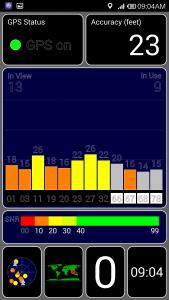
Not fast enuff to choose too. But i change the location mode to device only. Then i reboot for few times. Wanting the google location to pop up again. Rebooted 3 times. It didn pop up. Then i try gps test and papago again. Sudd its working!

Attached Image

Attached Image

I think nid to restart ur phone for a few times
SUSgogo2
post Jul 22 2014, 09:15 AM

gogo2
********
All Stars
18,672 posts

Joined: Jan 2003
From: Penang


QUOTE(blahbleh @ Jul 22 2014, 09:14 AM)
Hi,

I can confirm that the latest update makes my touch screen less sensitive. I've restored to the previous stable ROM and my touch screen works fine now.

Perhaps TS can update the first page on the common problems that some users faced after the upgrade? Just a suggestion.
*
I remember someone said that need to calibrate screen. Maybe you just use the special code go into the special setting and do that touchscreen calibration.
SUSjolokia
post Jul 22 2014, 09:17 AM

So Hot It Burns..!!!
*******
Senior Member
3,274 posts

Joined: May 2013


QUOTE(LightningZERO @ Jul 22 2014, 09:01 AM)
I had this problem last night and I reinstall the Google Map app and the GPS works again

But today it no longer works...
Can you actually click agree or decline? I got the pop up but I can't click on it
*
How about check your phone permission ?

Security - Permission - manage app permission - Positioning - see maps allowed to use your positioning & also enabled WLAN.
genjo
post Jul 22 2014, 09:18 AM

⭐⭐⭐⭐⭐⭐
******
Senior Member
1,431 posts

Joined: Mar 2009

After update, my digi signal at office normally 1 bar becomes 3 bar !
viqq
post Jul 22 2014, 09:20 AM

From the Eastside
******
Senior Member
1,836 posts

Joined: Oct 2005
From: Mars

OK GPS is OK now but now I can't move apps to the dock area. Great.
Dothan
post Jul 22 2014, 09:22 AM

Dingle Berries
******
Senior Member
1,053 posts

Joined: Jan 2003


QUOTE(viqq @ Jul 22 2014, 08:54 AM)
I've tried everything possible I could before, resetting, setting this and that High performance, battery saving, GPS only, to no avail.

After resetting for the 3rd time, I chose allow location access at the setup page, and now seems to be working.

Phewww.. Will do further testing on the apps later. Charging the phone now.
*
It might be caused by your GPS location file is outdated. The file contains calculated satellites position based on your location for a certain amount of time. So this save a lots of calculation to be done on your phone and get GPS location fixed very fast.

When your file is outdated, it needs to be downloaded again. And when the downloading failed, your phone takes longer time to get a fix.
blahbleh
post Jul 22 2014, 09:22 AM

Regular
******
Senior Member
1,243 posts

Joined: Sep 2005
QUOTE(gogo2 @ Jul 22 2014, 09:15 AM)
I remember someone said that need to calibrate screen. Maybe you just use the special code go into the special setting and do that touchscreen calibration.
*
I've tried it multiple times, rebooted several times and retried again and again, but still failed. I will stick to the previous stable ROM at this moment.

Based on the this thread, I can see that there is a variant of problem to some of us, even though we are using the same phone, same specs, still puzzle me though.
bitcomet79
post Jul 22 2014, 09:25 AM

Casual
***
Junior Member
356 posts

Joined: Nov 2013
sign0006.gif sorry offtopic..... MI4 conference will start in about 35 minutes..... hope the spec will be amazing!! brows.gif drool.gif
SUSgogo2
post Jul 22 2014, 09:25 AM

gogo2
********
All Stars
18,672 posts

Joined: Jan 2003
From: Penang


QUOTE(blahbleh @ Jul 22 2014, 09:22 AM)
I've tried it multiple times, rebooted several times and retried again and again, but still failed. I will stick to the previous stable ROM at this moment.

Based on the this thread, I can see that there is a variant of problem to some of us, even though we are using the same phone, same specs, still puzzle me though.
*
Maybe Mi3 use different supplier of touchscreen. Haha
sickx
post Jul 22 2014, 09:27 AM

:)
******
Senior Member
1,232 posts

Joined: Dec 2005


updated my phone earlier this morning. after checking out this thread, i tested my GPS using google maps. it can't lock my position because i switched off my wifi, so i switched it on. straight away locked my position accurately. i tested waze and foursquare/swarm as well. both the same. can't detect my position accurately if wifi is off.

for screen sensitivity, i think it's getting more sensitive instead. even if i just touch my screen lightly, the phone will detect my touch.
lkyoong
post Jul 22 2014, 09:28 AM

Getting Started
**
Junior Member
188 posts

Joined: Jan 2011
QUOTE(blahbleh @ Jul 22 2014, 09:14 AM)
Hi,

I can confirm that the latest update makes my touch screen less sensitive. I've restored to the previous stable ROM and my touch screen works fine now.

Perhaps TS can update the first page on the common problems that some users faced after the upgrade? Just a suggestion.
*
Yes please also provide steps on how to revert to previous stable ROM.

Does the Mi3 keep the previous rom in the storage or automatically delete once another update is applied?
surefire v LED
post Jul 22 2014, 09:28 AM

Never Say Never But Say Never 2 Proton
*******
Senior Member
4,349 posts

Joined: Sep 2005
After update my gps Papago & Google maps lock the satellite under 5 seconds under the roof.
briantwj
post Jul 22 2014, 09:30 AM

Pierluigi Collina
*******
Senior Member
3,968 posts

Joined: Sep 2012


QUOTE(surefire v LED @ Jul 22 2014, 09:28 AM)
After update my gps Papago & Google maps lock the satellite under 5 seconds under the roof.
*
Mine b4 update dy can do dat. brows.gif mi3 gps memang pro. flex.gif
Max2006
post Jul 22 2014, 09:31 AM

Look at all my stars!!
*******
Senior Member
4,099 posts

Joined: Mar 2006
QUOTE(lkyoong @ Jul 22 2014, 06:39 AM)
Notice the new update is for listed under Philipines in the MIUI download section.

Any possibility we might be getting incorrect update because i see the previous update not in the same download section.
*
Read from the miui forum, this new update is a GLOBAL version update. So it's not specially for either Philipine, Malaysia or Singapore. It's for the whole world outside of China (the China users have their own kitkat stable update version). I wonder if there's a new stable kitkat version specially for malaysia in the future, which similar to the previous version v14. If there is, then I think we better wait for it. Because apparently, everyone is getting different result from the latest Global update. Some are better, some are worse.

Frankly speaking, I am quite fed up with this Miui's act. They suppose to continue to work on the Malaysia rom and release stable kitkat version based on that. Instead, they are releasing the Global version for the whole world, which may sound very convenient, but this also mean that problems are bound to be happened. Where are our Malaysian Miui team? Aren't they suppose to work on this?

129 Pages « < 25 26 27 28 29 > » Top
Topic ClosedOptions
 

Change to:
| Lo-Fi Version
0.0211sec    1.09    6 queries    GZIP Disabled
Time is now: 9th December 2025 - 11:33 AM