Welcome Guest ( Log In | Register )

Outline · [ Standard ] · Linear+

 SanDisk SD Card Ori or Fake?, SanDisk Extreme SD card.

views
     
TSBlizzardCraft
post Jul 9 2014, 11:07 PM, updated 12y ago

ChiakChiak
******
Senior Member
1,562 posts

Joined: May 2012


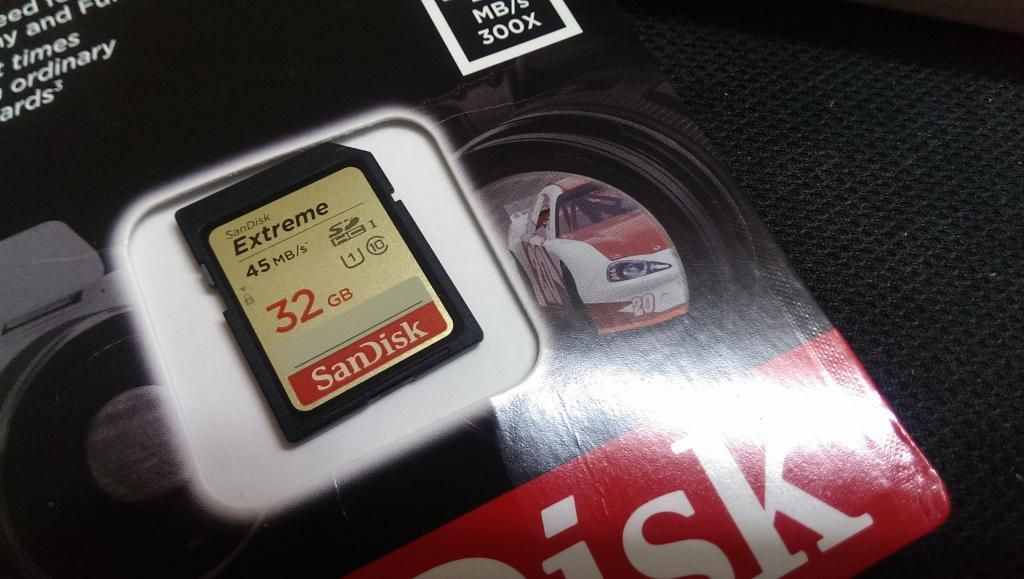
Hi, I've just recently purchase a SanDisk Extreme Pro card for my photography needs... I've tried looking at internet to determine whether is fake or not.

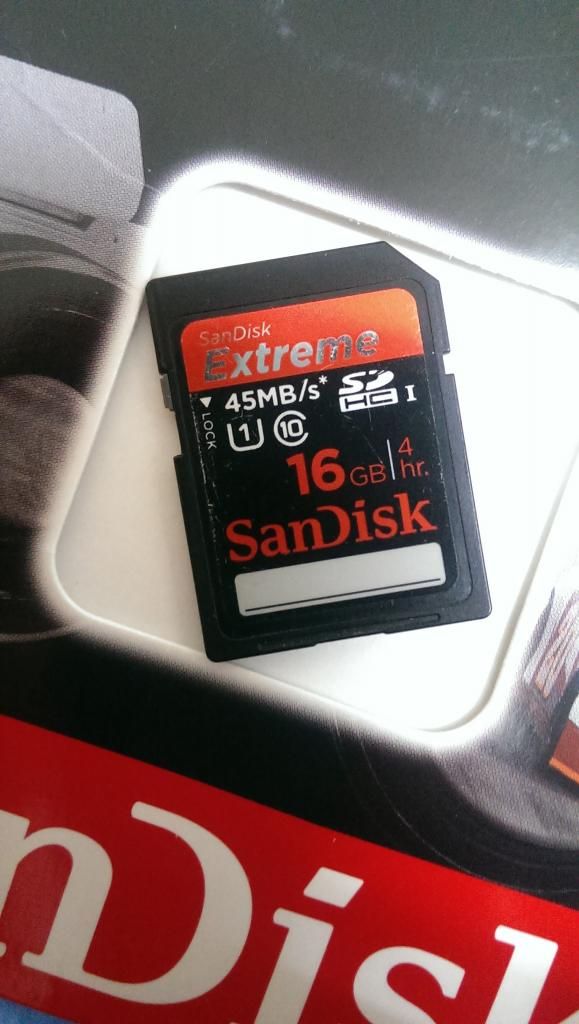
16GB ( bought last time )
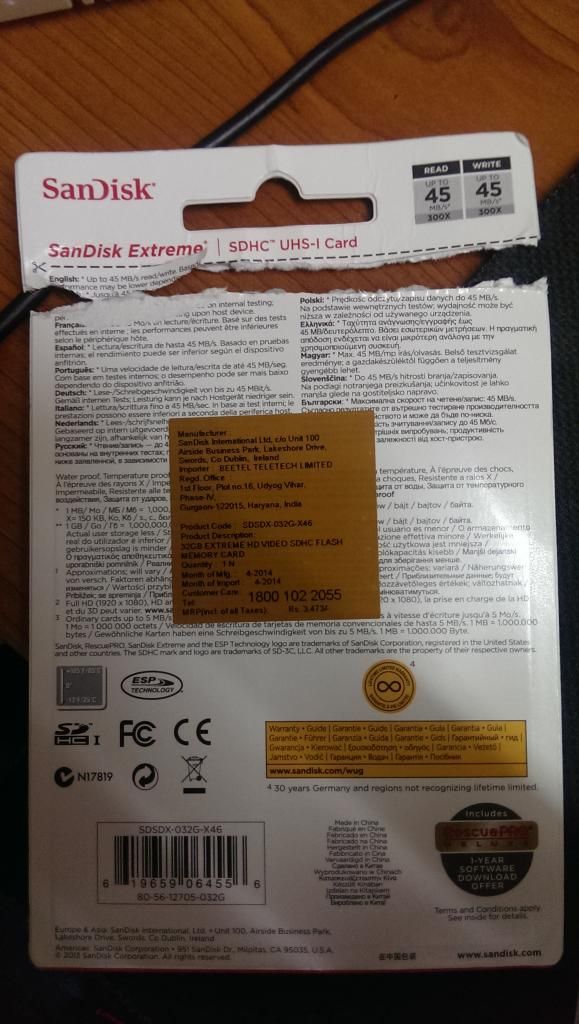
32GB ( bought yesterday )
can sifus help to confirm?

if its fake i'll return the purchase immediately..

thanks alot smile.gif

16GB
Front and Back View
» Click to show Spoiler - click again to hide... «

32GB
Front and Back view + Casing.
» Click to show Spoiler - click again to hide... «
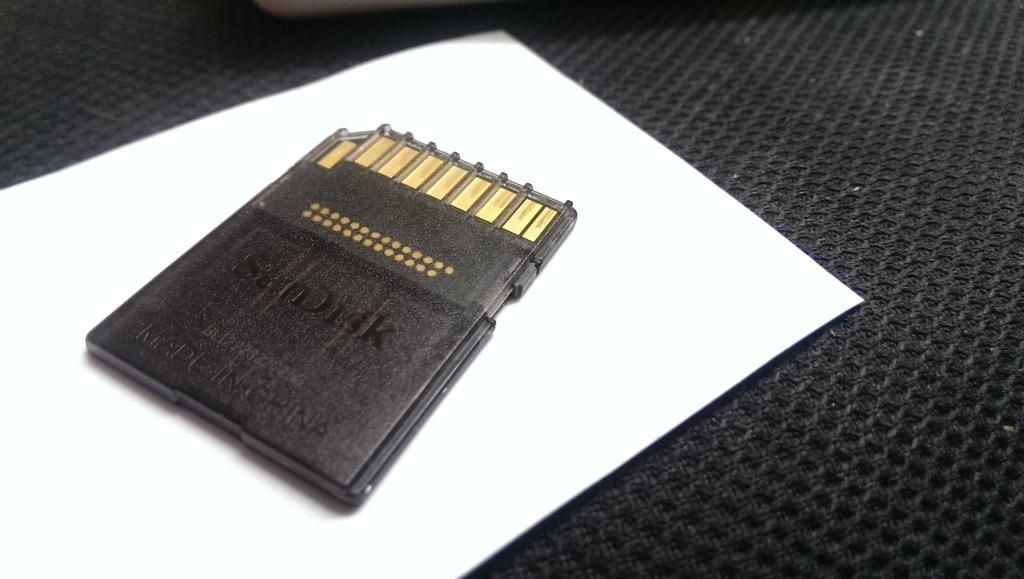
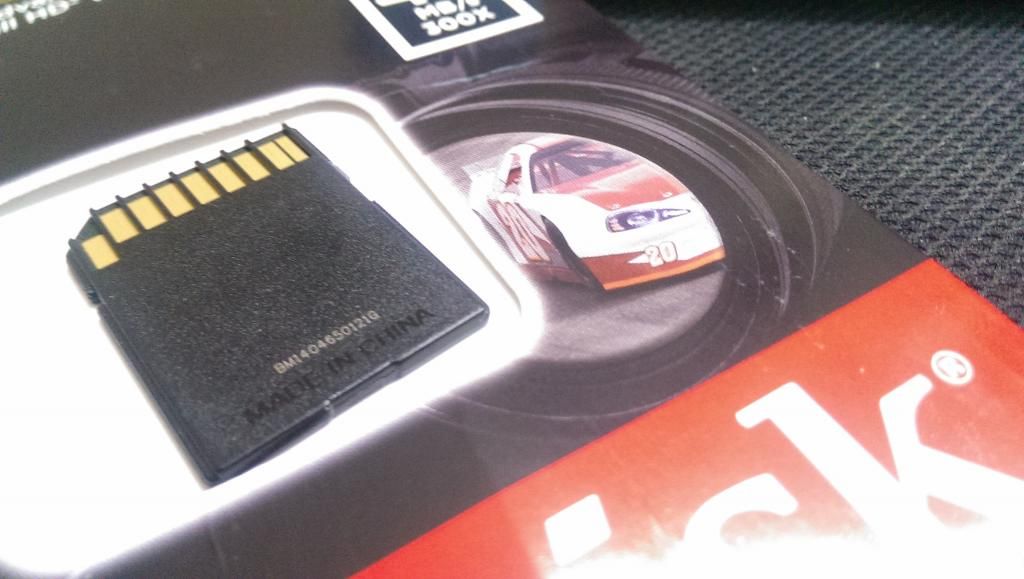
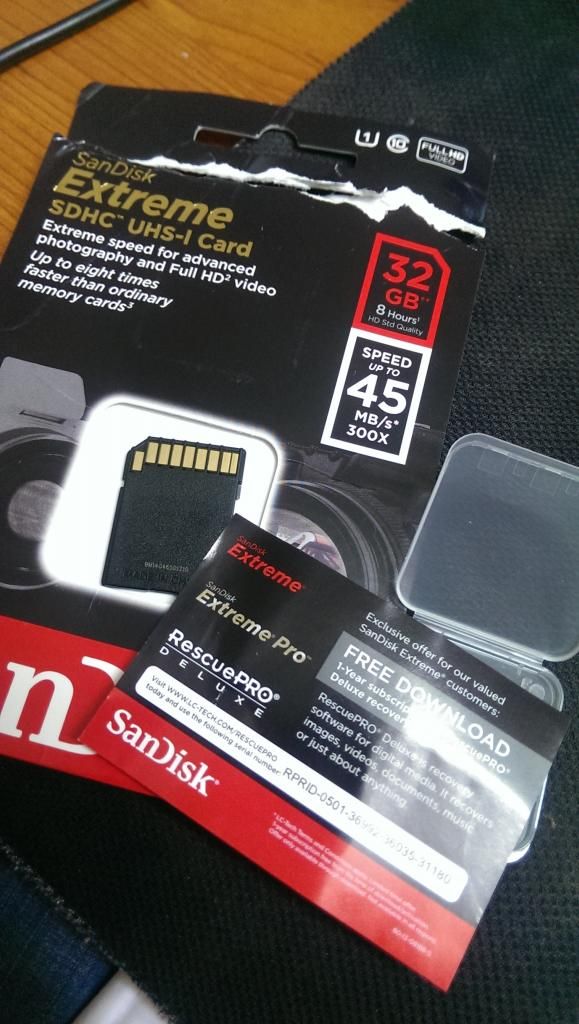
About the 32gb, without the semi transparent casing of the card behind, isit like that? and there's no sandisk logo.

thanks in advance ! smile.gif

teetaatee
post Jul 9 2014, 11:24 PM

Regular
******
Senior Member
1,061 posts

Joined: Jul 2011
i have one 16gb extreme 45mb/s, but the behind same as ur 32gb's
TSBlizzardCraft
post Jul 9 2014, 11:33 PM

ChiakChiak
******
Senior Member
1,562 posts

Joined: May 2012


QUOTE(teetaatee @ Jul 9 2014, 11:24 PM)
i have one 16gb extreme 45mb/s, but the behind same as ur 32gb's
*
how about the front?


-kytz-
post Jul 9 2014, 11:35 PM

10k Club
********
All Stars
12,573 posts

Joined: Nov 2008
QUOTE(BlizzardCraft @ Jul 9 2014, 11:33 PM)
how about the front?
*
Dunno how to google ah?

http://www.sandisk.com/products/memory-car...me-uhs-1-45mbs/

Btw which shop did you buy it from and how much?

p/s: 16GB is fine, looks similar as mine.
SUSXiia0Ban
post Jul 9 2014, 11:38 PM

Look at all my stars!!
*******
Senior Member
3,657 posts

Joined: Aug 2009
My 16GB Extreme front part look the same also, just that the behind is similar to your 32GB Extreme.

Maybe you can check whether you have the sticker of the authorised distributor stick on it or not.
http://www.sandisk.com/about-sandisk/find-a-retailer/

This post has been edited by Xiia0Ban: Jul 9 2014, 11:44 PM
TSBlizzardCraft
post Jul 9 2014, 11:45 PM

ChiakChiak
******
Senior Member
1,562 posts

Joined: May 2012


QUOTE(-kytz- @ Jul 9 2014, 11:35 PM)
Dunno how to google ah?

http://www.sandisk.com/products/memory-car...me-uhs-1-45mbs/

Btw which shop did you buy it from and how much?

p/s: 16GB is fine, looks similar as mine.
*
yeah googled d, those discussion d statement about counterfeit being similar, made me go confuse 99 @@
so decided to ask u guys tru my pic.

erm i bought from flipkart. (studying @ india now)
around rm100 bah.. the price low compared to msia, before this i did researched bout the price, i notice that the memory card over here in india cheaper, maybe the tax or shipping fees etc... correct me if im wrong.

hmm.. ok 16GB should be okay then.

QUOTE(Xiia0Ban @ Jul 9 2014, 11:38 PM)
My 16GB Extreme front part look the same also, just that the behind is similar to your 32GB Extreme.
*
isit different version? some say sandisk change packaging / style rclxub.gif
SUSXiia0Ban
post Jul 9 2014, 11:47 PM

Look at all my stars!!
*******
Senior Member
3,657 posts

Joined: Aug 2009
QUOTE(BlizzardCraft @ Jul 9 2014, 11:45 PM)

isit different version? some say sandisk change packaging / style  rclxub.gif
*
I'm not sure about it. I bought mine last year December.
TSBlizzardCraft
post Jul 9 2014, 11:50 PM

ChiakChiak
******
Senior Member
1,562 posts

Joined: May 2012


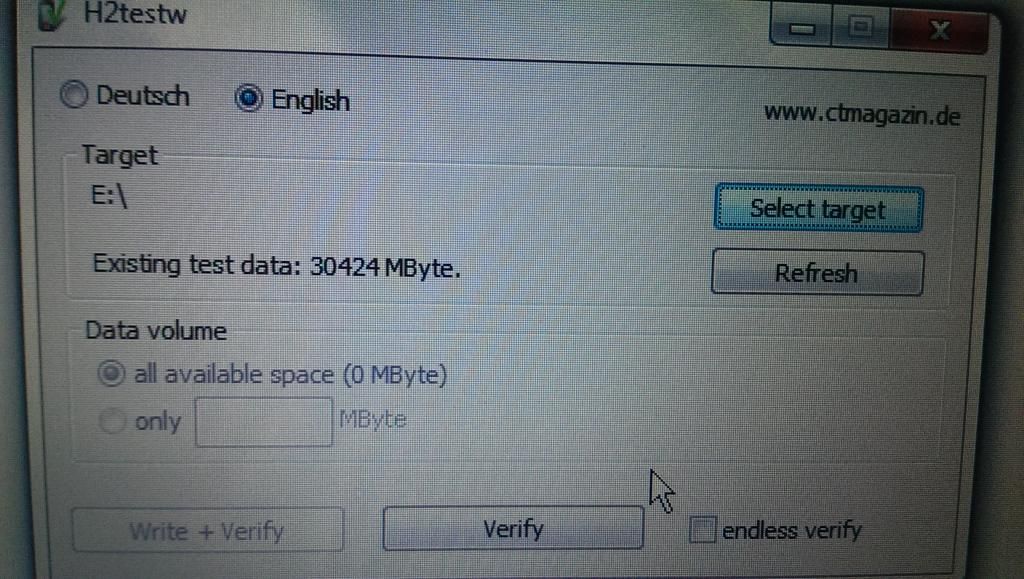
about the H2test, isit as long as the capacity matches the capacity stated on the card. means ori?

or should i test the speed as well..

btw any idea why shashiki pricing their memory card so high? http://shashinki.com/shop/sandisk-extreme-...on-p-17275.html

rm268 =O

This post has been edited by BlizzardCraft: Jul 10 2014, 12:01 AM
teetaatee
post Jul 10 2014, 12:05 AM

Regular
******
Senior Member
1,061 posts

Joined: Jul 2011
QUOTE(BlizzardCraft @ Jul 9 2014, 11:33 PM)
how about the front?
*
QUOTE(Xiia0Ban @ Jul 9 2014, 11:38 PM)
My 16GB Extreme front part look the same also, just that the behind is similar to your 32GB Extreme.

Maybe you can check whether you have the sticker of the authorised distributor stick on it or not.
http://www.sandisk.com/about-sandisk/find-a-retailer/
*
LegendLee
post Jul 10 2014, 01:15 AM

><3LG3|\|D
Group Icon
Elite
2,725 posts

Joined: Mar 2006


Sandisk SD card have several different versions/revisions.
I've seen legit sandisk cards with your designs.

Just do a speed test and a capacity test.

If still in doubt, just follow
http://www.sandisk.sg/about-sandisk/warran.../warranty-apac/
-kytz-
post Jul 10 2014, 03:07 PM

10k Club
********
All Stars
12,573 posts

Joined: Nov 2008
QUOTE(BlizzardCraft @ Jul 9 2014, 11:50 PM)
about the H2test, isit as long as the capacity matches the capacity stated on the card. means ori?

or should i test the speed as well..

btw any idea why shashiki pricing their memory card so high? http://shashinki.com/shop/sandisk-extreme-...on-p-17275.html

rm268 =O
*
Capacity can't 100% match the written storage la. Just like your 1TB HDD, you won't get 1000 GB of usable data. You only get like 92-93% of usable Data. Same goes with the SDHC card smile.gif

And like legendlee mentioned, do some benchmark tests like Crystal DiskMark or HDTune
TSBlizzardCraft
post Jul 10 2014, 04:22 PM

ChiakChiak
******
Senior Member
1,562 posts

Joined: May 2012


QUOTE(-kytz- @ Jul 10 2014, 03:07 PM)
Capacity can't 100% match the written storage la. Just like your 1TB HDD, you won't get 1000 GB of usable data. You only get like 92-93% of usable Data. Same goes with the SDHC card smile.gif

And like legendlee mentioned, do some benchmark tests like Crystal DiskMark or HDTune
*
thx guys smile.gif will do it.

btw if the code on the paper for the registry of the RESCUE PRO program is recognised by the website, means ori?
TSBlizzardCraft
post Jul 11 2014, 03:33 AM

ChiakChiak
******
Senior Member
1,562 posts

Joined: May 2012


QUOTE(-kytz- @ Jul 10 2014, 03:07 PM)
Capacity can't 100% match the written storage la. Just like your 1TB HDD, you won't get 1000 GB of usable data. You only get like 92-93% of usable Data. Same goes with the SDHC card smile.gif

And like legendlee mentioned, do some benchmark tests like Crystal DiskMark or HDTune
*
thx for the crystal DM suggestion, i did a test on it.

it turns out 20mbps?
32GB Extreme 45mbps SDHC 1
user posted image

does that means its fake? since the written speed is 45mbps. should i call for a refund?

Update :

16GB 45mbps SDHC 1

user posted image

the write speed seems to be slower.

sry, kinda new to these stuff.

from another LEXAR 8GB SDHC class 4

user posted image

in comparison to the above 2

This post has been edited by BlizzardCraft: Jul 11 2014, 04:27 AM
iXora.ix
post Jul 11 2014, 05:54 AM

scoot scoot
******
Senior Member
1,682 posts

Joined: Jan 2007
From: Kuala Lumpur


QUOTE(BlizzardCraft @ Jul 11 2014, 03:33 AM)
thx for the crystal DM suggestion, i did a test on it.

it turns out 20mbps?
32GB Extreme 45mbps SDHC 1
user posted image

does that means its fake? since the written speed is 45mbps. should i call for a refund?

Update :

16GB 45mbps SDHC 1

user posted image

the write speed seems to be slower.
The 45mbps thinggy is actually the READING speed. The Sandisk (or other competitor) tend to use read speed as advertisement. Its part of marketing gimmick.
Both card that you own seems legit icon_rolleyes.gif

Also what card of card reader you use? It's UBS3.0? It's support UHS-I? It could affect the benchmark
-kytz-
post Jul 11 2014, 10:28 AM

10k Club
********
All Stars
12,573 posts

Joined: Nov 2008
Card reader WILL AFFECT the speed of reading/writting. Get a decent card reader and you should notice a good increase in speed smile.gif
TSBlizzardCraft
post Jul 11 2014, 02:59 PM

ChiakChiak
******
Senior Member
1,562 posts

Joined: May 2012


QUOTE(iXora.ix @ Jul 11 2014, 05:54 AM)
The 45mbps thinggy is actually the READING speed. The Sandisk (or other competitor) tend to use read speed as advertisement. Its part of marketing gimmick.
Both card that you own seems legit  icon_rolleyes.gif

Also what card of card reader you use? It's UBS3.0? It's support UHS-I? It could affect the benchmark
*
ASUS card reader. thanks for the green light biggrin.gif

i'm able to register the Serial number of the RESCUEPro Deluxe provided in the 32GB memory card. hence should be legit i guess. rclxms.gif

QUOTE(-kytz- @ Jul 11 2014, 10:28 AM)
Card reader WILL AFFECT the speed of reading/writting. Get a decent card reader and you should notice a good increase in speed smile.gif
*
thx for the reply guys smile.gif notworthy.gif notworthy.gif

hmm.. im using a ASUS laptop built in card reader... tried to check the specs but couldnt find the speed of it.

btw the difference between the write speed of the 32GB and the 16GB from 512k onwards, isit becuz of the version of 32GB being a newer version?
imran
post Jul 12 2014, 11:12 AM

Casual
***
Junior Member
312 posts

Joined: Feb 2009
sorry, a bit blurr..normally buy kingston brand at lowyat shop
iXora.ix
post Jul 12 2014, 12:36 PM

scoot scoot
******
Senior Member
1,682 posts

Joined: Jan 2007
From: Kuala Lumpur


QUOTE(BlizzardCraft @ Jul 11 2014, 02:59 PM)

btw the difference between the write speed of the 32GB and the 16GB from 512k onwards, isit becuz of the version of 32GB being a newer version?
*
Normally the benchmark could give a weido result as you using built in card reader. Have you try to redo the test? it's giving a same result?
IF you do have other card reader,then the conclusion can be made laugh.gif

But trust me, IMHO I dont really care the benchmark result. If the card doesn't give you any problem ( corrupt pic, slow buffer on cam) just go out and shoot the picture icon_rolleyes.gif
TSBlizzardCraft
post Jul 12 2014, 03:53 PM

ChiakChiak
******
Senior Member
1,562 posts

Joined: May 2012


QUOTE(iXora.ix @ Jul 12 2014, 12:36 PM)
Normally the benchmark could give a weido result as you using built in card reader. Have you try to redo the test? it's giving a same result?
IF you do have other card reader,then the conclusion can be made  laugh.gif

But trust me, IMHO I dont really care the benchmark result. If the card doesn't give you any problem ( corrupt pic, slow buffer on cam) just go out and shoot the picture icon_rolleyes.gif
*
thx for the assurance smile.gif hmm.. about the buffer on cam, I manage to get 10 RAW BURST continuously on D7k ( before the buffer kicks in , 1/8000s ) on all 3 of the cards in cluding the LEXAR class 4.

do i test the buffer like that? or am i looking at it wrongly.


Change to:
| Lo-Fi Version
0.0159sec    0.63    5 queries    GZIP Disabled
Time is now: 22nd December 2025 - 02:28 PM