
Welcome Guest ( Log In | Register )

Bump Topic Topic Closed RSS Feed

Outline · [ Standard ] · Linear+

 Xiaomi Mi3 Official Thread V11, Strictly on technical discussion ONLY!

views
     
jinxiang
post Jul 5 2014, 12:16 PM

Getting Started
**
Junior Member
69 posts

Joined: Aug 2009
Not sure if this topic has been brought up before.....

I notice there is no "message template" in MIUI. For example, you can save some commonly use phrases such as email address, "I'm on my way now", etc and select it in sms.

IOS did it in a better way that not only SMS but anywhere you can use such phrases in "shortcut".

I thought this is a standard feature for Android but not found in MIUI. Please enlighten me in case it is just me didn't know where to find it.

Thanks!


jinxiang
post Jul 5 2014, 12:32 PM

Getting Started
**
Junior Member
69 posts

Joined: Aug 2009
QUOTE(siren @ Jul 5 2014, 12:18 PM)
Who say don't have?
I am using htc m8, there is this feature
*
I'm referring to Xiaomi MIUI woh..... shocking.gif
jinxiang
post Jul 5 2014, 01:35 PM

Getting Started
**
Junior Member
69 posts

Joined: Aug 2009
QUOTE(kennethkee93 @ Jul 5 2014, 01:05 PM)
MIUI does have this feature, you need to dig in deeper. Btw, go to messaging > send a message > beside you'll see a "+" button, press it > scroll to left.  smile.gif
*
Bravo!! You are my Sifu!!

Thanks!!
jinxiang
post Jul 8 2014, 11:47 AM

Getting Started
**
Junior Member
69 posts

Joined: Aug 2009
Not sure if this question was raised before:

Any way to turn on the USB mass storage? I prefer to copy files such as mp3 / photos / novels directly to and from the phone thru USB, i.e. access the phone directories and folders directly. But now only can see "Mi 3W" camera in Windows Explorer......
jinxiang
post Jul 8 2014, 12:57 PM

Getting Started
**
Junior Member
69 posts

Joined: Aug 2009
QUOTE(suntzulee @ Jul 8 2014, 11:51 AM)
actually it all depends what os u used in your lappy/desktop...if windows 7 or 8, u need not to worry as it auto detect...if win xp, then a bit troublesome...as drivers are needed tongue.gif
*
I'm using Windows 7. Previously installed MiuiLite and found it unfriendly and uninstalled. Now when I plug in USB, all I can see is just Mi3W camera...... sad.gif
jinxiang
post Jul 8 2014, 01:04 PM

Getting Started
**
Junior Member
69 posts

Joined: Aug 2009
QUOTE(apache_utara @ Jul 8 2014, 01:02 PM)
I don't get it.

You mean you can't access Mi3 folder from PC?
rclxub.gif
*
I remember before I install MiUI Lite (contained in the phone and shown as CDROM drive), the first time I connected to USB, all the folders are shown in explorer. After I installed MiUI Lite, no more such folders.....and therefore I uninstalled it....but still can't see the folders. sad.gif
jinxiang
post Jul 8 2014, 01:29 PM

Getting Started
**
Junior Member
69 posts

Joined: Aug 2009
QUOTE(apache_utara @ Jul 8 2014, 01:08 PM)
So you're saying before this, you can see the MI3 Drive at PC Windows Explorer, but now you only see MI3 Camera Device?

In your phone, did you set the "USB Connected" drop down notification as "Files" instead of "Photos"?
*
Great! Didn't notice that before.

Now I change it to "Files" and new driver automatically installed. After that all OK liao!

thumbup.gif Thanks for the advice!!
jinxiang
post Jul 8 2014, 02:24 PM

Getting Started
**
Junior Member
69 posts

Joined: Aug 2009
Has anyone tried the Magnifying function under Accessibility?

It says tap 3 times to magnify, working on whole screen except keyboard area.

Unfortunately, when using Swift keyboard, when you tap 3 times (such as backspace), the screen will magnify......can't see any way to stop this.

Ah Pek like me loves function like this. Too bad not well designed.

It should make it similar to IOS, which needs 3 fingers to tap to magnify.
jinxiang
post Jul 8 2014, 07:35 PM

Getting Started
**
Junior Member
69 posts

Joined: Aug 2009
I posted this question before but couldn't get any working advice. Now try again with photo illustration. biggrin.gif Hopefully some sifu out there can advise.
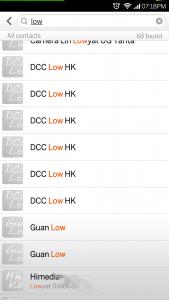
I have multiple contacts in my contacts list (see photo). One contact name becomes 4-6 more because of duplication of xiaomi, waze, whatsapp, ringtones x 2, etc. shakehead.gif

Attached Image

I've stopped the sync with Xiaomi account but didn't help. If I delete all the irrelevant ones, it won't appear again.

I go to contacts setting and noticed that there are few "contact lists" but already set to "Google". I don't understand why there is a "waze contact list" too and it seems unable to remove.

Attached Image

Merge duplicates won't help. Reboot also won't help.

If the only way to solve this is to delete all the account and re-sync from google, can I do it without resetting the phone? cry.gif

Anyone else has this problem?
jinxiang
post Jul 8 2014, 08:04 PM

Getting Started
**
Junior Member
69 posts

Joined: Aug 2009
QUOTE(deadravel @ Jul 8 2014, 07:51 PM)
did u notice ur google got 3060 contacts? shocking.gif
u really got 3060 contacts or u sync duplicates contacts to ur google jor??  please check xia

if u aldy sync duplicate contacts to ur google,
then u must go n delete 1 by 1 and resync with google again lo  sweat.gif
*
The numbers just don't tally. The numbers I have in gmail is 2710. In contact. In contacts it shows 2690. In contacts list it shows 3060 for google....and I just finished sync.....
jinxiang
post Jul 9 2014, 04:32 PM

Getting Started
**
Junior Member
69 posts

Joined: Aug 2009
QUOTE(blurjoey @ Jul 9 2014, 08:16 AM)
You can just clear your contacts by going to Contacts > Menu > Settings > Contacts > Organize contacts > Clear data
*
If I do this, does it mean I will clear all the contacts in all my contacts lists?

Should I disconnect my phone first to do this and later re-sync with gmail?

Topic ClosedOptions
 

Change to:
| Lo-Fi Version
0.0240sec    0.15    7 queries    GZIP Disabled
Time is now: 3rd December 2025 - 11:33 AM