

i still looking for this solution....
any antivirus recommended
Win32 Services Error, Win32 Services Encountered A Problem
Win32 Services Error, Win32 Services Encountered A Problem
|
|
 May 31 2009, 10:43 AM May 31 2009, 10:43 AM
|
 
Junior Member
283 posts Joined: Dec 2004  
|
i still looking for this solution....
any antivirus recommended |
|
|
|
|
|
Jul 18 2009, 09:12 AM
|

Junior Member
16 posts Joined: Sep 2008
|
QUOTE(pezal @ May 31 2009, 10:43 AM) i still looking for this solution.... try use www.avast.com is free register and free useany antivirus recommended   |
|
|
Aug 26 2009, 04:28 PM
|

Newbie
1 posts Joined: Aug 2009
|
i use regedit...download torrent also (watch stepbystep video on youtube)
good luck.. but still got this problem. win32 i'll try your download soon |
|
|
Aug 27 2009, 06:37 PM
|

Junior Member
15 posts Joined: Oct 2006
|
i think windows firewall...
|
|
|
Oct 1 2009, 10:12 PM
|

Junior Member
62 posts Joined: Dec 2007 From: Ipoh
|
these are cause by a downadup virus , its able to spread though network and VPN and bridge mode modem, then copy it self to removeable drive
under a hidden recycler folder with a name jwgkvsq.vmx it also will turn of your "window audio service" , and network sharing "workstation" ,check it by start > run > services.msc download a remove tool here , http://www.symantec.com/business/security_...-011316-0247-99 update your windows ,enable your firewall This post has been edited by sookean: Oct 1 2009, 10:19 PM Attached thumbnail(s) 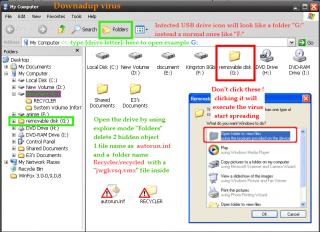
|
|
|
Oct 4 2009, 10:16 PM
|

All Stars
19,324 posts Joined: Jan 2003  
|
QUOTE(sookean @ Oct 1 2009, 10:12 PM) these are cause by a downadup virus , its able to spread though network and VPN and bridge mode modem, then copy it self to removeable drive All tis long i thought it was just win bug. XDunder a hidden recycler folder with a name jwgkvsq.vmx it also will turn of your "window audio service" , and network sharing "workstation" ,check it by start > run > services.msc download a remove tool here , http://www.symantec.com/business/security_...-011316-0247-99 update your windows ,enable your firewall |
|
|
|
|
|
Oct 5 2009, 03:41 PM
|

Junior Member
186 posts Joined: Aug 2006 From: Magic Dimensions
|
Hi everyone,please install Security Updated patch to prevent attacker access and gain over your computer,this will help your computer protected
from automatically disable some "Windows Services" like "Server"(Supports file, print, and named-pipe sharing over the network for this computer) "Windows Audio" (Manages audio for Windows-based programs.) Windows XP Service Pack 2 or 3 (32 Bits) Important Security Updated list : 1.IE7-WindowsXP-KB947518-x86-ENU (if you're using IE7) (SP2/SP3) 2.WindowsXP-KB884020-x86-enu (SP2 only) 3.WindowsXP-KB894391-x86-ENU (SP2 only) 4.WindowsXP-KB921883-x86-ENU (SP2 only) 5.WindowsXP-KB932823-v3-x86-ENU (SP2 only) 6.WindowsXP-KB954211-x86-ENU (SP2/SP3) 7.WindowsXP-KB955069-x86-ENU (SP2/SP3) 8.WindowsXP-KB956802-x86-ENU (SP2/SP3) 9.WindowsXP-KB956803-x86-ENU (SP2/SP3) 10.WindowsXP-KB957097-x86-ENU (SP2/SP3) 11.WindowsXP-KB958644-x86-ENU (SP2/SP3) 12.WindowsXP-KB958687-x86-ENU (SP2/SP3) 13.WindowsXP-KB960225-x86-ENU (SP2/SP3) Download Link My SkyDrive (Please extract using Winrar 3.80 or later verion to prevent file damage or corrupted.) Reboot your computer after installing these updated and disable "Background Intelligent Transfer Services"(BITS) and "Automatic Update" in Control Panel->Adminstrative Tools->Services P/S : These update are also available for search and download from Microsoft website This post has been edited by ghost705: Nov 3 2009, 05:56 PM |
|
|
Oct 30 2009, 10:48 PM
|

Junior Member
59 posts Joined: Nov 2007 From: Subang or Shah Alam
|
can someone like put up a definite list of solutions to this problem?
instead of scouring thru 13 pages of ppl complaining of the same problem. |
|
|
Nov 11 2009, 03:49 PM
|

Senior Member
1,285 posts Joined: Mar 2007
|
any solution? gone through the whole thread but non of them work for me
|
|
|
Nov 20 2009, 09:35 AM
|

Junior Member
93 posts Joined: Apr 2009
|
aku gune cara ni dah bertahun²..
-1st- - go to run - regedit - cari hkey_local_machine - system - currentcontrolset - services - browser - parameter - isdomainmaster - SET TO FALSE - then restart -2nd- - run - cmd - netsh - winsock - TYPE RESET -3rd- - run - hkey_local_machine - system - currentcontrolset - services - netbt - parameters - transportbindname - DOUBLE KLIK VALUE, DELETE, LET IT BLANK. -4- - hkey_local_machine - software - microsoft - ole - enableDCOM - SET VALUE TO: N (IT SHOULD Y) DONE! RESTART. SEPATUTNYA TIADA MASALAH DAN BERJAYA |
|
|
Nov 30 2009, 05:21 AM
|
|
Junior Member
59 posts Joined: Nov 2007 From: Subang or Shah Alam
|
hie guys, still no solution? updated the windows accordin to previous instructions in the thread.
but the bug is still dere, disturbing my audio jack thingy. |
|
|
Nov 30 2009, 10:42 AM
|

Junior Member
187 posts Joined: Jul 2009
|
I got GENERIC HOST 32 Problem also,always disturb my internet connections.Connect no long time,then disconnect again,connect then a few minutes disconnect again.This problem is me just need to install KB958644 then the problem will solved ? Me is using manually connections and win xp sp2. Help me pls.
|
|
|
Jan 24 2010, 06:41 PM
|

Junior Member
54 posts Joined: Sep 2008 From: Seri Kembangan \ Cyberjaya
|
guys...u might wanna try this...it worked for me...
Close Port 445: 1. Start Registry Editor (Regedit.exe) by clicking Start menu, and then click the Run icon. 2. In the small box that Opens, type: regedit then click the OK button. The Registry Editor will now have opened. 3. Locate the following key in the registry: HKEY_LOCAL_MACHINESystemCurrentControlSetServicesNetBTParameters In the right-hand side of the window find an option called TransportBindName. Double click that value, and then delete the default value, thus giving it a blank value. Close Port 135: 1. Then you must now navigate to the following registry key: HKEY_LOCAL_MACHINESoftwareMicrosoftOLE 2. You will see there is a String Value called: EnableDCOM Set the value to: N (it should currently be Y) 3. Close the Registry Editor. Shutdown and Restart your computer. source: http://www.sizlopedia.com/2007/01/28/fix-g...hostexe-errors/ |
|
|
|
|
|
Mar 8 2010, 02:07 PM
|

Senior Member
536 posts Joined: Nov 2006 From: Kuala Lumpur
|
new victim here...
my PC @ office and another PC here got that problem too... 've done ronDON and ashkann's solution but the problem is still there... now this PC got sound problem, local network sharing problem, and firefox problem (type something in google, hit search then it'll crash...  Luckily there is no problems with internet connection...(at least I can search for some solution and still can do my work..  ) )now, scouring for fixes/tips/solution before I'll just format this PC...  update : just've done ghost705's solution... still no luck with this thing...  mine is Win XP SP3... so I've just download and install update 6 - 13 (in the list)... guess I'll just format this PC next morning...  This post has been edited by nk3371: Mar 8 2010, 04:33 PM |
|
|
Nov 30 2010, 11:21 AM
|

Junior Member
439 posts Joined: Nov 2010 
|
hey guys my winxp also gv me blue screen?format will solve the problem?
|
|
|
Dec 22 2010, 10:46 AM
|
|
Senior Member
2,096 posts Joined: May 2008
|
Depends on what error message that you get. Try reboot in safe mode.
|
|
|
Jul 6 2012, 05:19 PM
|

Junior Member
52 posts Joined: Dec 2006 From: Penang Mainland / Ipoh
|
Maybe your software (os) it self corrupted....
|
|
|
Oct 10 2012, 08:58 PM
|

Newbie
2 posts Joined: Aug 2012 From: Petaling Jaya
|
How to remove this follow post?
This post has been edited by 1minternet: Oct 10 2012, 08:59 PM |
|
|
Apr 13 2013, 02:00 AM
|
|
Newbie
2 posts Joined: Apr 2013
|
how can i get windows 7 activation key?
|
|
|
Nov 21 2014, 10:02 PM
|
|
Junior Member
45 posts Joined: Oct 2014
|
Dont know this. I dint faced before
|
|
Topic ClosedOptions
|
| Change to: |  0.0385sec 0.0385sec
 0.64 0.64
 6 queries 6 queries
 GZIP Disabled GZIP Disabled
Time is now: 13th December 2025 - 03:14 PM |
 Quote
Quote