Welcome Guest ( Log In | Register )

Bump Topic Topic Closed RSS Feed

Outline · [ Standard ] · Linear+

 Xiaomi Mi3 Official Thread V9, Flagship phone killer

views
     
mhhee
post Jun 17 2014, 03:44 PM

Regular
******
Senior Member
1,310 posts

Joined: Feb 2005


QUOTE(jeisern @ Jun 17 2014, 03:40 PM)
Hmmm.....does anyone else face the same issue ?

I disabled the dload with Wifi however with Mi Market, Google Play and Google Installer (installed from Mi Market)

The apps insist on using wifi to download even though i disabled any thing i could find pertaining to using wifi.

Anyone have the same issue ?
*
Goto Download-Settings, then set the Data usage to Unlimited.

mhhee
post Jun 22 2014, 12:18 PM

Regular
******
Senior Member
1,310 posts

Joined: Feb 2005


QUOTE(patrick94 @ Jun 22 2014, 11:57 AM)
Yes, you need google pinyin… touchpal can't type simplified chinese…
This is the answer~ smile.gif
Yes if with google pinyin will do…
Mine come with touchpal also face same thing… can't type simplified chinese, but I love it more than google pinyin biggrin.gif
*
Bro, TouchPal can type Simplified Chinese n Traditional Chinese as well. I'm using it now. Just press a button it will switch between.

你好嗎 vs 你好吗

Same with Google Pinyin or other Chinese keyboard.


mhhee
post Jun 22 2014, 07:14 PM

Regular
******
Senior Member
1,310 posts

Joined: Feb 2005


QUOTE(patrick94 @ Jun 22 2014, 06:33 PM)
Wow, thanks for correct me bro ..
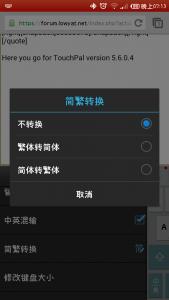
between I still can't find the button you mentioned ... can screen shot ? Thanks alot...
*
Here you go for TouchPal version 5.6.0.4


Attached thumbnail(s)
Attached Image
mhhee
post Jun 22 2014, 08:03 PM

Regular
******
Senior Member
1,310 posts

Joined: Feb 2005


QUOTE(alucard89 @ Jun 22 2014, 07:52 PM)
Guys, with the latest update for dev rom, I keep getting systemui crash error and I can't bypass it unless I restart the phone.
And that already happened a few times today.
How and can I still revert back to the previous stable dev firmware from last week?
*
Reboot to SYSTEM 2 in Recovery.

mhhee
post Jun 23 2014, 08:08 AM

Regular
******
Senior Member
1,310 posts

Joined: Feb 2005


QUOTE(yuan415 @ Jun 23 2014, 03:28 AM)
is there any possible way to solve the reception problem? i always cant make calls and even receive calls when im inside office, this is really unacceptable!! vmad.gif if no then im going to sell of mine.
*
Could it be yours telco line issue? Last time I used Samsung S4 n Digi no line inside my office. After switched to U mobile no more issue.

So far I'm using Mi 3 with U Mobile also no issue.
mhhee
post Jun 24 2014, 07:28 AM

Regular
******
Senior Member
1,310 posts

Joined: Feb 2005


QUOTE(andrekua2 @ Jun 24 2014, 12:27 AM)
System1 System2?

What phone are you using? Mi3 is not dual sim phone.
*
Mi3 ownself comes with 2 systems. System 1 n 2. Normally when system 1 getting errors or unable to boot. You may boot to system 2 to use it as usual. Consider as last known working version n also version before you upgraded to the latest.

It's also can be modified become dual boot system where 2 OS in one phone. Example MIUI n ASOP.

For Mi3, it's safety features to ensure your phone is available all the time even soft brick.


mhhee
post Jun 24 2014, 09:51 AM

Regular
******
Senior Member
1,310 posts

Joined: Feb 2005


I saw many members asking about the charging issue on Mi3 & many members here already answered it.

Here I may explain a little based on my own understanding & experiences.

1. Can I use 5V 2.0A or above charger to charge Mi3?
Yes, you may but the maximum input voltage of Mi3 capped to 5V 1.2A. No matter how high the Amp the charger supported but still Mi3 only can charged at 5V 1.2A max.

To those who saw the launching video of Mi3 in China before, may aware that Mi3 is claiming supported fast charging technology & can boost the current charging speed up to 30% faster by purchasing optional higher Amp charger. So our original Mi3 charger is rated at 5V 1.A & battery capacity is 3050mAh, the formula of charging time from 0% to 100% is simple.

3.05Ah(3050mAh)/1.0A = 3 hours 5 mins if you're using 1A charger.

3.05Ah(3050mAh)/1.2A = 2 hours 35 mins if you're using 2A charger. (Maximum charging input voltage is 1.2A for Mi3)

This is what Xiaomi claiming about up to 30% fast charging technology.

However, there is one statement to be cleared here, don't assumed that charging time I posted here is accurate because the charging time is normally higher that what I posted due to below reasons:-

1) The Amp charging of phone will be fluctuated within 10% to 40% due to your phone is on or background running task that may consumes battery. That's why when you're playing games while charging the phone charging speed is slow.

2) The charging speed will be slowed down when phone battery is almost full.

3) Other factors like battery temperature, charging currents losing & etc.

Therefore, don't provide wrong statement to Mi3 users that if using 2A charger can finished charging it 2x the speed where our Mi3 didn't support 2A charging input voltage. However, if you're using Samsung S4, Note 3 & others then you may see the different because they are supported 2A.

2. How to I check the charging input voltage?
There are few battery apps available, my personal favourite would be Exilir 2. You may monitoring the charging current based on below screenshots. For example, negative value means the phone is charging & positive value means the phone is discharging.

user posted image

3. Does it means Mi Powerbank is useless if it supports up to 5V 2.1A output voltage while my Mi3 only supports 5V 1.2A input voltage?
Powerbank is designed to suit & support most of the devices in the market & that's why Mi Powerbank is designed to support charging devices up to 5V 2.1A where you may charge your iDevices, Samsung, Xperia & etc.

Don't you want something that can rules them all?

Statement provided above may be wrong & I'm not an electrical literate ppl. I just shared what I know & hope it will be knowledgeable to you. laugh.gif

This post has been edited by mhhee: Jun 24 2014, 09:59 AM

mhhee
post Jun 24 2014, 10:03 AM

Regular
******
Senior Member
1,310 posts

Joined: Feb 2005


QUOTE(miloy2k @ Jun 24 2014, 09:58 AM)
The funny this is, I usually charge faster for my s3 (max is 1A) when using my wife Note 2 charger hmm.gif
Eh bukan cnc can link with FB? AFAIK nope sweat.gif
*
Using battery current monitoring app to check when you're charging using S3 original adaptor & Note 2 original adaptor. You may see the different. smile.gif
mhhee
post Jun 24 2014, 10:05 AM

Regular
******
Senior Member
1,310 posts

Joined: Feb 2005


QUOTE(gogo2 @ Jun 24 2014, 10:01 AM)
I go home test. I don't believe you.
*
Haha... I may be wrong but I really tested all using S4 charger, Xiaomi charger, Nexus 7 charger & even 5V 5A charger. tongue.gif

Topic ClosedOptions
 

Change to:
| Lo-Fi Version
0.0422sec    0.27    7 queries    GZIP Disabled
Time is now: 8th December 2025 - 01:34 PM