» Click to show Spoiler - click again to hide... «
V5 Theme
» Click to show Spoiler - click again to hide... «
V6 Theme
» Click to show Spoiler - click again to hide... «
V7 Theme
» Click to show Spoiler - click again to hide... «
Xiaomi 15.5.14 Event
There will be version of MI-3 sold in malaysia here which is: WCDMA(Qualcomm Snapdragon 800 8274AB Quad-core 2.3Ghz processor, Adreno 330 450MHz GPU, 2GB LPDDR3 RAM, and eMMC 4.5 flash memory.
Specifications
» Click to show Spoiler - click again to hide... «
What's in the package: 1 * Xiaomi phone 1 * Charger 1 * Data cable 1 * Battery 1 * User Manual
» Click to show Spoiler - click again to hide... «
Xiaomi unleashes the Mi-3, you pick Tegra 4 or Snapdragon 800
Xiaomi has revealed its MiPhone 3 (or just Mi-3) at a product event in Beijing today, just as previously expected. As recent rumors suggested, the device is powered by either a Tegra 4 with four Cortex-A15 cores (for China Mobile) or a Snapdragon 800 with four Krait 400 cores at 2.2 GHz each (for China Unicom). The Xiaomi Mi-3 will cost RMB1999 ($327) for the 16 gig model and RMB2499 ($408) for the 64 GB. The device will go on sale in China in October, after which it will start selling across Hong Kong and Taiwan. No word about the rest of the world, though.
The Xiaomi Mi-3 The device is very slender at 144mm×72mm×8.1mm and weighs only 145 g, has a 5" 1080p IPS dislay, Android 4.2.1 skinned with MIUI v5 and covers imaging needs with 13 MP and 2 MP cameras. We've seen previously seen a pre-release Mi-3 with a Snapdragon 800 do really well on AnTuTu. Here's the promo video of the Mi-3.
In case you have missed it, Xiaomi is the Chinese manufacturer that poached Google's VP for Android, Hugo Barra. He has already taken up his duties as a VP of Xiaomi Global this week and attended today's launch event. Here's a picture of him all happy in China.
» Click to show Spoiler - click again to hide... «
Xiaomi Announces the MI3 - Tegra 4 and MSM8974AB inside by Brian Klug on September 5, 2013 2:58 AM EST
Xiaomi has been making some interesting news lately, first with the abrupt transition of Hugo Barra from Google to Xiaomi, now with the announcement of their latest high end smartphone, the MI3, at their New Product Convention 2013 event. What was interesting about the MI2 announcement last year was that it was one of the first to include Qualcomm's quad core APQ8064 SoC inside, and Xiaomi has included Qualcomm SoCs since the MI1 (MSM8660). I still remember my first experiences with the Xiaomi MI1 and the value prospect that the device made me realize existed with the right set of conditions, and how impressed I was with that hardware. With the MI3 Xiaomi goes to variants based on both Snapdragon 800 (MSM8974AB) and NVIDIA's Tegra 4 platform.
The WCDMA (China Unicom) and CDMA2000 (China Telecom) variants of the MI3 come based on Qualcomm's Snapdragon 800 MSM8974AB platform, while the TD-SCDMA (China Mobile) variant is based on NVIDIA's Tegra 4 platform.
Xiaomi makes the first (to my knowledge) public disclosure of MSM8974AB, which is analogous to the changes we saw between APQ8064 and APQ8064AB. From 8974 to 8974AB, Adreno 330 GPU clocks climb from 450 MHz to 550 MHz, LPDDR3 memory interface maximum data rates go from 800 MHz to 933 MHz, and the ISP clock domain (I think Xiaomi might mean the Hexagon DSP here) goes from 320 MHz to 465 MHz. 8974 comes in both a bin with the 4 Krait 400 CPUs clocked at 2.2 GHz (really 2.15 GHz) and 2.3 GHz (2.26 GHz) with slightly different pricing, while 8974AB comes with a Krait 400 clock available only at 2.3 GHz. Process is still TSMC 28nm HPM, but I suspect that the AB variant might have the high k dielectric and/or transistor mix tuned slightly differently based on a few rumblings I've heard recently.
It's safe to say that Tegra 4 hasn't been the overwhelming success that NVIDIA had hoped for, nor able to continue the momentum that Tegra 3 built, so winning a slot with Xiaomi MI3 is a relatively big deal, even if Xiaomi's slice of the Chinese market isn't very large yet. The TD-SCDMA variant includes Tegra 4's 1.8 GHz ARM Cortex A15 4+1 architecture with 72 core GeForce GPU built on TSMC 28nm HPL. We've written a lot about Tegra 4, and got a chance to look at performance in the NVIDIA Shield review and came away impressed with performance in that platform. Of course the real interesting question is how Tegra 4 will perform in platform with smaller TDP and available platform power. Xiaomi claims relatively similar performance between Tegra 4 and 8974AB variants in a few system benchmarks as well. If we get the chance the MI3 might make for an interesting vehicle to compare the two SoCs in almost the same platform.
I'm not sure whether the MI3 uses the discrete Icera i500 modem for TD-SCDMA. i500 is fully TD-SCDMA enabled, so there's no reason that NVIDIA couldn't have won the entire platform slot, but I haven't confirmed it yet. Update: We've confirmed that the MI3 isn't using the i500 modem.
Either way Xiaomi is an increasingly interesting player in the Chinese market and always seems to make SoC choices that interest us.
» Click to show Spoiler - click again to hide... «
Xiaomi MiPhone 3 will come with either Tegra or Snapdragon processors by Aloysius Low | 5 September 2013 3:37pm SGT Xiaomi's latest Android handset, the Xiaomi MiPhone 3, will come in two flavors. Buyers can choose to either get the Nvidia Tegra 4 model, which sports a quad-core 1.8GHz Cortex A15 processor, or the Qualcomm Snapdragon 800 quad-core processor clocked at 2.3GHz.
Most of the other specs are the same for both models, such as the amount of RAM (2GB), internal storage (16GB) as well as a large 3,050mAh battery. The Xiaomi MiPhone 3 will sport a 5-inch full-HD IPS display with a pixels-per-inch count of 441ppi.
Xiaomi is also boasting that the phone takes really good pictures with its 13-megapixel camera. The camera uses a Sony sensor and sports an F2.2 aperture, a wide angle of 28mm and a five element lens setup. It will also pack a dual-LED flash.
The Weibo account of the company posted a picture of image samples with very impressive looking shots that you can see below.
The Nvidia-based Xiaomi MiPhone 3 is set to launch with a price of 1,999 Chinese Yuan (US$326). The Qualcomm Snapdragon 800 version is set to debut with China Unicom and China Telecom while the Nvidia Tegra 4 model will launch with China Mobile. It will go on sale starting September 9 in China.
» Click to show Spoiler - click again to hide... «
Xiaomi unveils new Android-powered 5-inch MI3, 47-inch smart TV in China HD By Richard Lawler posted Sep 5th, 2013 at 3:23 AM 66
We've had early previews thanks to leaks, but Chinese manufacturer Xiaomi -- more recently known as the new home of former Google exec Hugo Barra -- just took the wraps off of a new flagship Android phone and smart TV. The MI3 candy bar phone is available with either a 1.8GHz Tegra 4 processor (on China Mobile's TD-SCDMA network) or Snapdragon 800 CPU (the more powerful MSM8974AB variant; on China Unicom's WCDMA network and China Telecom's CDMA2000 network) that provide a 40 percent performance boost over the MI2S. It also sports a 5-inch 1080p IPS LCD built by Sharp or LG with "ultra sensitive touch" that works even when the user has wet hands or has gloves on.
Seeing how its local competitors are putting emphasis on the audio performance, Xiaomi pointed out that the MI3 features the Cirrus Logic CS42L73 DAC chip, which is apparently what the iPhone uses. Another surprise is that there's also Immersion haptic feedback, which adds some rumbling fun to games and certain UI elements. As for the cameras, the backside has a 13MP Sony IMX135 sensor with an F2.2 sapphire lens and dual LED, while the front side has a less exciting but adequate 2MP camera. Interestingly, MIUI's latest camera app will support RAW capture, as well as smart beautification by identifying the gender and age of the subjects in a shot.
Other bits of the phone include 2GB of LPDDR3 RAM, 16GB for storage (with a nice 120MB/s read speed), dual-band WiFi and NFC. Given the 8.1mm body thickness, the 3,050mAh battery is quite impressive (and the included charger provides fast charging with a 2A current), but only time will tell how well it lasts under those beastly processors. As for the price, the phone runs CN¥1,999 (US$330) for the 16GB version and CN¥2,499 ($410) for the 64GB, though only the China Mobile version (Tegra 4) has a mid-October date. Following the announcement of the MI3, CEO Lei Jun also decided to keep the 32GB MI2S (with Snapdragon 600) at a reduced price of CN¥1,799 (US$290), which is quite a drop from the original CN¥2,299 (US$380).
Xiaomi unveils new Androidpowered 5inch MI3, 47inch smart TV in China
Moving on, we have the 47-inch 3D-capable Xiaomi TV which is assembled by Wistron (who apparently also makes TVs for Sony), and it'll come in six colors for the aluminium faceplate. The body boasts an 8.4mm bezel plus 2mm to 4.8cm thickness thanks to LG's IPS and Samsung's SVA panels. Like the Xiaomi Box, the TV also runs the company's MIUI flavor of Android, supported by a quad-core Snapdragon 600 with 2GB of RAM, 8GB of storage, dual-band WiFi and Bluetooth 4.0. It even claims an "easy to use" remote with 11 buttons and Bluetooth. Shockingly, the TV will cost just CN¥2,999 (US$490) when it arrives in mid-October. [/spoiler]
1. rename 1_MI3_WCDMA_stable_root.zip to update.zip 2. put into root of storage 3. boot into mi recovery (u can boot into recovery by launching update app) 4. flash update.zip n restart
5. repeat the step (1 - 4) using 2_MI3_WCDMA_su.zip thats all
3. each setting can run specific app or action including unique function of miui for example, clean ram, take homescreen screenshot and enable/disable rotation
4. an additional in each setting we can add multiple action for an example --->1 click setting:- i. open gallery ii. open calculator it mean if u click mikey once, it will run both apps in that order.
--->to make it fun, u can add something like:- i. shortcut key. up to 4 shortcut can be assigned
ii. take a camera shot in 1 click, might be useful if u want to take a pic without no one notice (front or back camera are useable) or even a quick snap in standby mode iii. or maybe more, will be explore later..
2. Recommended Casing for Mi3
» Click to show Spoiler - click again to hide... «
3. How to differentiate mikey ori or fake
QUOTE(figure8 @ Jun 1 2014, 08:22 AM)
» Click to show Spoiler - click again to hide... «
plz refer here for original images of original mikey. plz link into 1st page. hehe:-
the original packaging. mikey came in this package. i think the black sticker refer to the color of the earphone holder
i bought one unit earlier from china which claimed as an original mikey. later bought directly from xiaomi.com and it really different. left is original mikey.
original mikey respond better. hope it help.
This post has been edited by suntzulee: Jun 7 2014, 12:35 PM
» Click to show Spoiler - click again to hide... «
I have to first warn you that i held no responsible to your device warranty shall anything bad happened to it. I'm only based on my using experience, trial and error and with some courage to test out the great features available for mi3. My review is just for the sake of reference and shall not liable to any bias and untoward incident.
How to Flash Developer Rom (Latest build is 4.6.6)
» Click to show Spoiler - click again to hide... «
1. Download the rom and flashing guide is available here http://en.miui.com/download-101.html#164 2. After successfully flashing dev rom, you will encounter google play FC. Uninstall it. Go to mi market and search for google installer. Open it and install google play and all its other resources. After finish, google play will still FC. Dont worry, uninstall it again. Go back to google installer and install google play again. This time it should work flawlessly.
Changelog in dev 4.6.6 rom
» Click to show Spoiler - click again to hide... «
Erm...okay, something new for you guys. just sharing. I just flash miui 4.6.6 dev version which just release today, i mean yesterday since now over 12am. haha! what i realise is it is in 4.4.2 kitkat, this is totally different from stable version. and the speed is twice as faster as compare to stable version which is the current 14.0 build.
once u flash the rom, you only have mi store which i personally quite like it more than play store. LOL! and ofcoz there are no google services inside the rom except google keyboard. by the way, here are some few tweak to let u know, u can actually go to mi store and search google installer, then install all the google services. You can install all google services except google contact sync, this will cause your phone comes out error.
google camera by google is now perfectly work with 4.6.6 rom. fotor (for photo edit app) is now able to open without error, unlike previous version. compare to 14.0 build, 4.6.6 build has more theme, is alot more! and weather app works very well, can detect my place as well and weather. no bug at all so far i tested, will keep on test it. Go have a try on 4.6.6 rom, you can feel the smoothness of nexus 5 with great battery life. and oh ya, i heard some of users complaint about battery slow charging on 4.5.30 build, and it's now fixed. so far i dont have any wifi or data issue, all have full bar and very fast speed.
i feel the speaker now clearer and louder compare btw 4.6.6 and 14.0 stable build. Not so sure.
internet browing and download speed is more likely faster than 14.0 build as well, alot faster, is like iphone browsing speed. cannot 100% sure but at least happen to me. haha!
too many things to mention already, so...try it urself ya. PS: it will wipe all ur data
For Xiaomi Powerbank batch 3, mine one is deliver by UPS, and already reach shah alam, if they deliver tomorrow i believe i can receive it by tomorrow or most late on monday. they make batch 3 powerbank earlier already.
This post has been edited by harrie: Jun 7 2014, 12:32 AM
My phone speaker went crazy just now I'm not sure what went wrong. Awful low volume and I smack it few times, and it became totally silent. Smack again few times, now back to original. I wonder how the speaker module so loose?
This post has been edited by andrekua2: Jun 7 2014, 12:47 AM
It's v8 now.. Congratulations.. But can I suggest everyone to stop posting about the delivery updates of the pb or mi3? Just leave it to yourself. If u think it's slower than it should be, kindly contact the courier company. There is nothing much we can do on behalf of them. If u can't find their contact and wanted to know it here, feel free to ask. But not keep posting about the latest status of your Order.
Thank you, I hope TS can also look into this matter.
I made hard reset. Now google english keyboard is completely gone. Manage to install google play store but still cant find google english keyboard installer.
My phone speaker went crazy just now I'm not sure what went wrong. Awful low volume and I smack it few times, and it became totally silent. Smack again few times, now back to original. I wonder how the speaker module so loose?
I made hard reset. Now google english keyboard is completely gone. Manage to install google play store but still cant find google english keyboard installer.
Really ar? Now I'm scared to flash dev rom, the one you're using is the latest one rite? Also, what's the default keyboard if google eng keyboard is missing?
Really ar? Now I'm scared to flash dev rom, the one you're using is the latest one rite? Also, what's the default keyboard if google eng keyboard is missing?
I see, I don't really understand chinese So I should go for WCDMA/CDMA version if I want to flash dev rom is it? Anything else I need to be cautious before flashing the rom?
My phone mi3 has started to having problem getting weak signal or no signal at all after just 2 weeks use. Already check the sim card by using my old phone and the reception signal is just fine.. Apparently this is the phone problem.. Ask uncle google and find that this no signal problem has happened to mi2 before. the only solution is to go to service center. Check the working time of service center and they are not working today. Looks like need to wait until monday.
wow its v8 already? such a short period of time move so fast
i had been asked so many time in real life bout what phone i'm holding,i gave up and say china cheap phone. most ppl been poison to know only samsung and apple
I really hope no more Tracking status or PB SOLD OUT?? SO FAST on v8 (but most likely going to happen again on next tuesday..)
QUOTE(suntzulee @ Jun 7 2014, 07:58 AM)
omg! omg! MIUI 4.6.6 one of the vital change log i have been waiting for....Fix - OTG couldn't write in...YEAHH!!!!! I'm updating now!!!!
omg omg omg, share the result after you done it and update the page 1 accordingly
QUOTE(Ujer @ Jun 7 2014, 08:04 AM)
My phone mi3 has started to having problem getting weak signal or no signal at all after just 2 weeks use. Already check the sim card by using my old phone and the reception signal is just fine.. Apparently this is the phone problem.. Ask uncle google and find that this no signal problem has happened to mi2 before. the only solution is to go to service center. Check the working time of service center and they are not working today. Looks like need to wait until monday.
anyone having the same problem?
Yo, if you got time, try to do read from en.miui.com/forum (use the search function there) or search using correct keyword in www.google.com
I notice that if you aware what you are doing on your Mi3, it will perform very well, but if you don't know what you doing, you will get stuck and the phone just make you angrier
Sometime it might be hardware issue, Sometime it might be the MIUI limitation, but most of the time it can be fixed....
so how you know it is limitation? post your Q&A/BUG question in the forum, the MIUI DEV team will look into it and give you an opinion
below is bias, but i found it quite true... Please don't think that I kutuk you unless you think i am.
» Click to show Spoiler - click again to hide... «
Mi3 act superb if the user know how to optimize it, Mi3 act like rubbish if the user not entirely sure what to do.
it auto reload back to the original version 8 already after it died itself... now considering should i try again to update to built 14.
my other friends m3 KO and cannot turn on totally when he try update the previous version last 2 weeks, lol.
one basic rules,
if you are flashing from older version to newer version, it can be done without wipe but if you are downgrading from New version to older version, you must wipe the data
if can't turn on totally, did try Vol Up Key + Power ? (Hold 10sec) , this act the same like you unplug battery and plug it back.
Erm...okay, something new for you guys. just sharing. I just flash miui 4.6.6 dev version which just release today, i mean yesterday since now over 12am. haha! what i realise is it is in 4.4.2 kitkat, this is totally different from stable version. and the speed is twice as faster as compare to stable version which is the current 14.0 build.
once u flash the rom, you only have mi store which i personally quite like it more than play store. LOL! and ofcoz there are no google services inside the rom except google keyboard. by the way, here are some few tweak to let u know, u can actually go to mi store and search google installer, then install all the google services. You can install all google services except google contact sync, this will cause your phone comes out error.
google camera by google is now perfectly work with 4.6.6 rom. fotor (for photo edit app) is now able to open without error, unlike previous version. compare to 14.0 build, 4.6.6 build has more theme, is alot more! and weather app works very well, can detect my place as well and weather. no bug at all so far i tested, will keep on test it. Go have a try on 4.6.6 rom, you can feel the smoothness of nexus 5 with great battery life. and oh ya, i heard some of users complaint about battery slow charging on 4.5.30 build, and it's now fixed. so far i dont have any wifi or data issue, all have full bar and very fast speed.
i feel the speaker now clearer and louder compare btw 4.6.6 and 14.0 stable build. Not so sure.
internet browing and download speed is more likely faster than 14.0 build as well, alot faster, is like iphone browsing speed. cannot 100% sure but at least happen to me. haha!
too many things to mention already, so...try it urself ya. PS: it will wipe all ur data
For Xiaomi Powerbank batch 3, mine one is deliver by UPS, and already reach shah alam, if they deliver tomorrow i believe i can receive it by tomorrow or most late on monday. they make batch 3 powerbank earlier already.
So we can't sync google contacts with this dev rom?
Anyone notices that when you want to end the call after finished talking, you wanna press End Call. But the screen won't get on back when your finger is nearby. I have to press the side on button.
How to let the screen on it when I have moved away from my ear?
Anyone notices that when you want to end the call after finished talking, you wanna press End Call. But the screen won't get on back when your finger is nearby. I have to press the side on button.
How to let the screen on it when I have moved away from my ear?
I really hope no more Tracking status or PB SOLD OUT?? SO FAST on v8 (but most likely going to happen again on next tuesday..) omg omg omg, share the result after you done it and update the page 1 accordingly
bro this dev version is as good or better than stable rom...luckily i did not revert back to stable rom...now all my problems like OTG not writeable and whatsapp notification failure now solved!!!
Does anyone knows where can replace the sim card cover located at the top of phone? I use small pin to pull it out and accidentally damaged the cover...
Anyone notices that when you want to end the call after finished talking, you wanna press End Call. But the screen won't get on back when your finger is nearby. I have to press the side on button.
How to let the screen on it when I have moved away from my ear?
Remove the SP or whatever. It's blocking the proximity sensor.
i just installed 4.6.6, follow the instruction to install google play, uninstall, and install back, it doesn't FC, but google play cannot show no connection...
Does anyone knows where can replace the sim card cover located at the top of phone? I use small pin to pull it out and accidentally damaged the cover...
ask around. if u have silver color, most of us have extra sim tray cover.
if I move from stable to Dev, no need clear data and cache right?
I think it is advisable to do so.. Because you are replacing the entire ROM with a Dev rom right.. Same principle when you are changing to different custom room like we always did on our previous phones.. Always better do a full wipe and restore
This post has been edited by un_id: Jun 7 2014, 10:46 AM
1st page lack of info. proper flashing guide need to be updated. even in previous thread, no step by step guide.
Mayb can pull out the guide from miui.com. bcoz they shows step by step how to flash. From stable to dev, please clean up all ur data to avoid system crash or error. i clear all my data only i flash to dev and i clean my all data again. so far from install until now...already one day...dont have any issue at all. my theme works perfectly n load extremely fast. whatsapp no delay at all. dont have single issue at all.
i found out one more thing....feels like battery charge faster on 4.6.6...anyone feel it? lol!
i dont encounter any issue so far. erm...screen protector will affect ur proximity sensor bcoz it cover on top of it. but i use cheap cheap RM2 clear screen protector only, and everything looks good n clear for me. no proximity sensor problem also. lol!
i found out one more thing....feels like battery charge faster on 4.6.6...anyone feel it? lol!
i dont encounter any issue so far. erm...screen protector will affect ur proximity sensor bcoz it cover on top of it. but i use cheap cheap RM2 clear screen protector only, and everything looks good n clear for me. no proximity sensor problem also. lol!
There's a fix for slow charging to last week's rom. Now it's back to normal.
wait...perhaps I'm too happy early...the whatsapp notification got problemmmm...no....we are so closed but yet so far....damn
baowen, your whatsapp notification in dev 4.6.6 got problem?
suntzulee my whatapps got no issue on notification since 4.5.30, but below is my setting
Security > Permission > Manage App Permissions > Apps > Trust this app 1. Whatsapp 2. Google Services Framework 3. Google Play Services
QUOTE(ahhon83 @ Jun 7 2014, 09:40 AM)
i just installed 4.6.6, follow the instruction to install google play, uninstall, and install back, it doesn't FC, but google play cannot show no connection...
any advice?
That is normal, i got that issue before, make sure you have google play services / google services framework installed as well.
And if you already have that and still show no connection > Reboot your phone one more time
QUOTE(UNDERGROUND @ Jun 7 2014, 11:04 AM)
From Stab to Dev should be an easy job.
Dev reverting back to Stab.... Pain in the A$$
Not really, just extra 2 thing to do only compare to Stable to ROM
QUOTE(droidtrix @ Jun 7 2014, 11:17 AM)
U are right, my set fully charged to 100% from 72% in 36mins ..
I using default charger, 16% > 98% less than 3.5 hour.
For dev back to stab right. Just download rom pack for malaysia version, change zip file name to update.zip, boot to recovery n flash. As easy as flash to dev. Where got pain as ass?
There's user data and cache that needs to be wiped. Should I also clear All Data too?
You're updating from Stable to Dev? If yes then you can either choose to either wipe it or not. If you're changing from Dev to stable rom, yes you must wipe it.
Okay, another problem after clear data and cache. My google signed in, but contacts are not in selection, but check in Google, contacts still there. I didnt sign in mi cloud, not register also.
I read b4, someone mentioned mi cloud shouldn't sync to allow oni google
Okay, another problem after clear data and cache. My google signed in, but contacts are not in selection, but check in Google, contacts still there. I didnt sign in mi cloud, not register also.
I read b4, someone mentioned mi cloud shouldn't sync to allow oni google.
contact>menu>accounts>google>your account email. u will see contacts as an available selection to sync. if not, u need to install GoogleContactsSyncAdapter
wow its v8 already? such a short period of time move so fast
i had been asked so many time in real life bout what phone i'm holding,i gave up and say china cheap phone. most ppl been poison to know only samsung and apple
Just said is XIAOMI lah, i been doing that since got my MI3 and friends were all poisoned back by xiaomi
Hey all, I have a question, how come the line and what sapp doesn't refresh itself? Have to open the app only it will receive messages. I checked notifications setting, everything seems alright. So is there any setting affecting this?
Hey all, I have a question, how come the line and what sapp doesn't refresh itself? Have to open the app only it will receive messages. I checked notifications setting, everything seems alright. So is there any setting affecting this?
Possible solution at 1st page under Whatsapp delay or no notification solution
bro you power settings is on balance or battery saving mode?
on any mode also no problem. Just remember to Locked your Whatapps apps, so it will receive the notification promptly,
FYI, I just do a test, with the whatapps task killed from task manager, any new message will not get notify unless i open whatapps manually.
So the main point is, your Whatapps must locked in your task manager.
QUOTE(miyakochan89 @ Jun 7 2014, 01:07 PM)
Hey all, I have a question, how come the line and what sapp doesn't refresh itself? Have to open the app only it will receive messages. I checked notifications setting, everything seems alright. So is there any setting affecting this?
read back my post early, we take whatapps as example, you can add LINE, WeChat yourself. (for me, i have wechat, messenger, facebook added and locked.)
is the 4.6.6 some kind of iOS update? Like I mean software update , iOS only use as example? New to android cause android abit confusing for me since iOS to android
is the 4.6.6 some kind of iOS update? Like I mean software update , iOS only use as example? New to android cause android abit confusing for me since iOS to android
yeap, 4.6.6 is the latest update for the developer rom of MI3
is the 4.6.6 some kind of iOS update? Like I mean software update , iOS only use as example? New to android cause android abit confusing for me since iOS to android
Yes, sort of like an update. However, 4.6.6 we referring to is the developer rom, not stable rom.
QUOTE(suntzulee @ Jun 7 2014, 01:25 PM)
ok guys...pls screen shot your highest antutu score you ever achieved here and i will pin it...Let's have top three highest...
I don't see the point of pinning the benchmark on first post. Benchmark scores varies differently, sometimes you get high score, sometimes you get a bit lower.
I thought developer rom for developer only , how come you guys can get it one ? Or developer is just another word for beta rom?
So a stable rom once a month is quite fast .
Some sort like beta, it's available for public to test it and give feedbacks, and that's how they can provide updates every Friday. If you're interested, can get the rom from en.miui.com download page.
Some sort like beta, it's available for public to test it and give feedbacks, and that's how they can provide updates every Friday. If you're interested, can get the rom from en.miui.com download page.
Nice , not like iOS need to get dev update very troublesome haha
Yes, sort of like an update. However, 4.6.6 we referring to is the developer rom, not stable rom. I don't see the point of pinning the benchmark on first post. Benchmark scores varies differently, sometimes you get high score, sometimes you get a bit lower.
No harm in posting either. Top 3 scores to show what it can acheive.
so the mi3 screen is almost not visible at all when using polarized sunglasses! found that out in the car today lol. previously was using htc one and 5s, both displays were still visible
dont really whats the point for benchmark....lol! most important the phone is lag free and fast. lol! even score with 40k benchmark and use it with hang here n there oso useless lar~ lol!
dont really whats the point for benchmark....lol! most important the phone is lag free and fast. lol! even score with 40k benchmark and use it with hang here n there oso useless lar~ lol!
The higher the benchmark point the less likely the phone will lag lah . But every phone will lag here and there one lah , not every phone is perfect
For dev back to stab right. Just download rom pack for malaysia version, change zip file name to update.zip, boot to recovery n flash. As easy as flash to dev. Where got pain as ass?
Ohh, need to rename to update.zip? I have no idea about that...
My friend MI3 had his phone rebooted by itself once a day since he got it..i cannot find those report/ workaround foe this issue..only saw it reported for MI2s..anyone here has experienced it?
Possible solution at 1st page under Whatsapp delay or no notification solution
Thank s! Settle on the Whatsapp. But line doesn't seem to work on the notification part. Anyone facing the same? I'm sure the setting in the asp itself is fine.
My friend MI3 had his phone rebooted by itself once a day since he got it..i cannot find those report/ workaround foe this issue..only saw it reported for MI2s..anyone here has experienced it?
gonna be some rogue or funny apps he installed that is running at the background
so the mi3 screen is almost not visible at all when using polarized sunglasses! found that out in the car today lol. previously was using htc one and 5s, both displays were still visible
The higher the benchmark point the less likely the phone will lag lah . But every phone will lag here and there one lah , not every phone is perfect
erm...samsung note 3 already have high benchmark score but will have some lite lag also..haha! what i mean is..mark doesnt important, but user experience more important. haha! so far LG and xiaomi mi3 give me iphone-like user experience in term of smoothness. lol...
does it means that i can download apps using memory in mi cloud available rather than using on my defaulted 16GB mi3??
wats the real purpose of the mi clould? only for back up
I oso have dropbox....would this be conflicting with mi cloud??
micloud is using 金山cloud storage. and it's like icloud, google+,drop box. wont conflict with ea other since all of them are independent. u can use micloud to backup ur photo and bla bla bla lar. but im using google+ to backup all my stuff since it is easy for me to switch phone from different brand mar.
hey guys...try the personal assistant in 4.6.6. it is more pro than siri. lol! i said play micheal jackson song, and my phone dont have any song, it will auto check whole album in music player to play it online. lol! but i speak in mandarin, so....not sure english work or not. lol! go try! very fun!
gonna be some rogue or funny apps he installed that is running at the background
very unlikely to be hardware fault
It is the plain rom as shipped. No additional apps so far he installed..i suggest him to do a factory reset on the phone..so no one here hv the same issue ya?..perhaps a remote case.
Dropped my phone on the concrete floor just now, luckily the screen didn't crack because of the temepered sp absord the impact, and has a hairline crack on it, thanks God
Dropped my phone on the concrete floor just now, luckily the screen didn't crack because of the temepered sp absord the impact, and has a hairline crack on it, thanks God
Wahh baru dapat phone drop edi , take care of your phone well haha
I oledi set it to high benchmark, score only 22215...
I m using default rom which is come together with phone, not yet update to any rom...
What's the problem?
Maybe you can try to ask in miui forum..
QUOTE(movanns @ Jun 7 2014, 03:09 PM)
It is the plain rom as shipped. No additional apps so far he installed..i suggest him to do a factory reset on the phone..so no one here hv the same issue ya?..perhaps a remote case.
Been using 1 week + and no prob at all..Consult with xiaomi CS..they may rectify the prob...worst case visit service centre..
QUOTE(windskill @ Jun 7 2014, 03:22 PM)
I am having problem of replacing my wrongly typed word with dictionary word. Once i select the word from the dictionary, it will automatically crash.
Anyone facing this issue when using google keyboard for mi3?
Been using Google Keyboard since the first minute using the phone and never encounter any problem at all.. you did anything to the keyboard setting??
Dropped my phone on the concrete floor just now, luckily the screen didn't crack because of the temepered sp absord the impact, and has a hairline crack on it, thanks God
hi guyys.. just got my mi3 silver yesterday.. kind of great phone., bought at 1gadget at pgrm tower.. can mod here add me as mi3 user? thanks in advance
Erm...okay, something new for you guys. just sharing. I just flash miui 4.6.6 dev version which just release today, i mean yesterday since now over 12am. haha! what i realise is it is in 4.4.2 kitkat, this is totally different from stable version. and the speed is twice as faster as compare to stable version which is the current 14.0 build.
once u flash the rom, you only have mi store which i personally quite like it more than play store. LOL! and ofcoz there are no google services inside the rom except google keyboard. by the way, here are some few tweak to let u know, u can actually go to mi store and search google installer, then install all the google services. You can install all google services except google contact sync, this will cause your phone comes out error.
google camera by google is now perfectly work with 4.6.6 rom. fotor (for photo edit app) is now able to open without error, unlike previous version. compare to 14.0 build, 4.6.6 build has more theme, is alot more! and weather app works very well, can detect my place as well and weather. no bug at all so far i tested, will keep on test it. Go have a try on 4.6.6 rom, you can feel the smoothness of nexus 5 with great battery life. and oh ya, i heard some of users complaint about battery slow charging on 4.5.30 build, and it's now fixed. so far i dont have any wifi or data issue, all have full bar and very fast speed.
i feel the speaker now clearer and louder compare btw 4.6.6 and 14.0 stable build. Not so sure.
internet browing and download speed is more likely faster than 14.0 build as well, alot faster, is like iphone browsing speed. cannot 100% sure but at least happen to me. haha!
too many things to mention already, so...try it urself ya. PS: it will wipe all ur data
For Xiaomi Powerbank batch 3, mine one is deliver by UPS, and already reach shah alam, if they deliver tomorrow i believe i can receive it by tomorrow or most late on monday. they make batch 3 powerbank earlier already.
sound good, but it wil wipe all my data...
can i backup my system to my pc via the xiaomi pc software, later if want restore to malaysia rom, restore to the backup?
Guys if you decide to buy the GGMM case from Taobao. Be prepare to mode some holes. Apparently their version has the mic hole in different position. But the quality is damn good.
Guys if you decide to buy the GGMM case from Taobao. Be prepare to mode some holes. Apparently their version has the mic hole in different position. But the quality is damn good.
Yes, my friend bought one from Taobao too, although another brand. The mic hole is beside the 3mm jack.
can i backup my system to my pc via the xiaomi pc software, later if want restore to malaysia rom, restore to the backup?
actually u can use backup thru google service, once u update to 4.6.6, go download google installer to grab playstore, then u go to my apps, u can saw all ur downloaded app. and...for app data, online games those will sync with ur google+ account or fb. so..not a problem. for offline games...cannot backup if no root it gua. try backup via pc lor. for me...i nvr backup anything on pc. i use google acc to backup everything including contacts
wow its v8 already? such a short period of time move so fast
i had been asked so many time in real life bout what phone i'm holding,i gave up and say china cheap phone. most ppl been poison to know only samsung and apple
i do agree china make, is really poor quality and cheap in last 20 years. Most have deep impression on chian make...
the lowyat.net xiaomi interview, lin bin also agree, last 20 years, china make is no quality, because they didn't have enough knowledge and technology to make world class hardware... but now china have the technology and ability to make the world class hardware, you see iphone, samsung all is mke in china...
anyone try this rom & mi developer rom? any different?
if want flash, don't know flash which 1, both same?
The only difference between this and the original dev. rom is this one have preinstalled google apps. In original dev. rom you need to get it manually.
Maybe you can try to ask in miui forum.. Been using 1 week + and no prob at all..Consult with xiaomi CS..they may rectify the prob...worst case visit service centre.. Been using Google Keyboard since the first minute using the phone and never encounter any problem at all.. you did anything to the keyboard setting??
I just try again. This time it doesn't crash. Hmmmm...that's weird. Haha.
Mayb can pull out the guide from miui.com. bcoz they shows step by step how to flash. From stable to dev, please clean up all ur data to avoid system crash or error. i clear all my data only i flash to dev and i clean my all data again. so far from install until now...already one day...dont have any issue at all. my theme works perfectly n load extremely fast. whatsapp no delay at all. dont have single issue at all.
For dev back to stab right. Just download rom pack for malaysia version, change zip file name to update.zip, boot to recovery n flash. As easy as flash to dev. Where got pain as ass?
only can do it in recovery? can it be done in phone system update here?
only can do it in recovery? can it be done in phone system update here?
not so confident do it in recovery mode...
Bro, i do appreciate you have ask a lot question, Please follow the flashing guide given in Page 1 and do it
There is no point keep asking when you didn't start any action...
Bottom Line, if you are not confident to do it, please stick with Stable ROM, If you prepare to do it, please do with confident and be patience to read all relevant guide/step given.
No one here know how to do it since day 1, all is learn and read the guide carefully without asking people to spoon feeding..
i do agree china make, is really poor quality and cheap in last 20 years. Most have deep impression on chian make...
the lowyat.net xiaomi interview, lin bin also agree, last 20 years, china make is no quality, because they didn't have enough knowledge and technology to make world class hardware... but now china have the technology and ability to make the world class hardware, you see iphone, samsung all is mke in china...
My colleagues can detect my phone as Xiaomi instantly woh, some more ask me "Wah ! You can get one ! " I think xiaomi had create quite an awareness on social media. Those who unaware probably living in very closed environment. .lol There r some still skeptical about these Branded China phone, but those r the one who only know 3 phones in this world, ipon, S5 & Note 3...lol The very same people also had not idea Lenovo is a China brand & HTC is Taiwan.
Dropped my phone on the concrete floor just now, luckily the screen didn't crack because of the temepered sp absord the impact, and has a hairline crack on it, thanks God
Bro, i do appreciate you have ask a lot question, Please follow the flashing guide given in Page 1 and do it
There is no point keep asking when you didn't start any action...
Bottom Line, if you are not confident to do it, please stick with Stable ROM, If you prepare to do it, please do with confident and be patience to read all relevant guide/step given.
No one here know how to do it since day 1, all is learn and read the guide carefully without asking people to spoon feeding.. ya, i am bias again!
i do have read the 1st page in flash to dev rom, this is clear enough, and in xiaomi website, also tell how to do, is ok for me.
but i f want flash back to malaysia rom, it is not clear at all...
My colleagues can detect my phone as Xiaomi instantly woh, some more ask me "Wah ! You can get one ! " I think xiaomi had create quite an awareness on social media. Those who unaware probably living in very closed environment. .lol There r some still skeptical about these Branded China phone, but those r the one who only know 3 phones in this world, ipon, S5 & Note 3...lol The very same people also had not idea Lenovo is a China brand & HTC is Taiwan.
is hard to make some people accept a new brand, when he didn't know the brand, even worst if teh brand is from where most people think is not realiable(make in china)...
but after sometimes, they really knwo about the brand and product, they will accept it...
i do have read the 1st page in flash to dev rom, this is clear enough, and in xiaomi website, also tell how to do, is ok for me.
but i f want flash back to malaysia rom, it is not clear at all...
currently going to flash back to MY rom...
What im doing...
1. backup 2. flash MyROM 3. Factory Reset
or
1. backup 2. Factory reset 3. flash MyROM 4. Factory Reset just this info is not enough...
For going back to MY rom, u download it and flash as usual lor...thru system update or in recovery flash update lor then do a reset again and that it. miui.com teach all steps already....lol!!!!!!
host, perhaps you can screenshot from this link and put on 1st page.
same way to flash to dev or back to stable version.
if cannot understand chinese, can also refer to pictures as steps too...wont go wrong one. 100% safe to flash to dev or my version.
Please download WCDMA version rom for dev 4.6.6. NOT TD!!!! if flash back to MY, please download MY rom and flash then do a factory reset.
Everytime do a factory reset after flash rom u will not have crash or issues. Unless you're OTA update from let say 14.0 to 15.0 then no need factory reset. or from 4.6.6 to 4.6.13
Is that anyone facing issue with contact add。I added a contact which got whatsapp, but the contact didn't link with the Whatsapp account, and I can't find the contact in whatsapp as well ...
Is that anyone facing issue with contact add。I added a contact which got whatsapp, but the contact didn't link with the Whatsapp account, and I can't find the contact in whatsapp as well ...
+6 +6 +6 +6 +6 +6 +6 +6 +6 +6 +6 all you need is country code, please do check the 1st page (if TS had updated in v8) this has been mention since V5, v6, v7 and V8
QUOTE(mulut99 @ Jun 7 2014, 06:25 PM)
My Mi3 charging from 20% to 100% bout 2.5 hours only & using Mi3 ori charger.
yup, me also the same 38% > 100% less than 2 hours & using Mi3 Ori charger.
Is that anyone facing issue with contact add。I added a contact which got whatsapp, but the contact didn't link with the Whatsapp account, and I can't find the contact in whatsapp as well ...
add +6 to all your contacts and put Whatsapp as trusted apps in Permission apps..
Anyone know which shop can fix mi3 sim card pin problem?? Today my sim tray stuck inside my phone , after i took out the sim card pin was broken and it can't detect sim card anymore. My phone is bought from china so can't go for warranty here. Need help
Maybe you can try to ask in miui forum.. Been using 1 week + and no prob at all..Consult with xiaomi CS..they may rectify the prob...worst case visit service centre.. Been using Google Keyboard since the first minute using the phone and never encounter any problem at all.. you did anything to the keyboard setting??
U need a trick to score high score
1) Set batery to high performance 2) Reboot ur phone
Anyone know which shop can fix mi3 sim card pin problem?? Today my sim tray stuck inside my phone , after i took out the sim card pin was broken and it can't detect sim card anymore. My phone is bought from china so can't go for warranty here. Need help
mayb send to xiaomi service center to pay some charges to fix it?
Mayb is the only way. But it will be better if lowyat got some professional can fix it. You know any shop can fix?
i dont really prefer lowyat....u send to service center at least u have the real pro of xiaomi technician can fix it for u. i guess it wont be cost you alot.
If u pay even less then any chap parang brand soda lime glass.
I get complaints from customer about Nillkin though.. Good brand name but their glass SP is a fingerprint magnet and some even say it scratches easily..
i dont really prefer lowyat....u send to service center at least u have the real pro of xiaomi technician can fix it for u. i guess it wont be cost you alot.
u are right. but my mi3 is oversea set. Do they will accept it for fix? or they just accept the local set?
If u pay even less then any chap parang brand soda lime glass.
Uhm just wondering , is it really necessary to get such high priced SP? What is the difference between a rm100+ ones and pasar malam ones? Don't they serve the same purpose? To protect the screen
I get complaints from customer about Nillkin though.. Good brand name but their glass SP is a fingerprint magnet and some even say it scratches easily..
Using nillkin for a month now. I don't have problem with finger print issue, is better than the screen.
Uhm just wondering , is it really necessary to get such high priced SP? What is the difference between a rm100+ ones and pasar malam ones? Don't they serve the same purpose? To protect the screen
Is that anyone facing issue with contact add。I added a contact which got whatsapp, but the contact didn't link with the Whatsapp account, and I can't find the contact in whatsapp as well ...
Reboot your phone and your new contact should appear in your whatsapp contact list after restart.
Uhm just wondering , is it really necessary to get such high priced SP? What is the difference between a rm100+ ones and pasar malam ones? Don't they serve the same purpose? To protect the screen
Like original charger vs RM 10 charger or original battery vs cheap China battery.
Your choice if i think cheap charger & battery will do the job then is your choice loh..
Like original charger vs RM 10 charger or original battery vs cheap China battery.
Your choice if i think cheap charger & battery will do the job then is your choice loh..
This analogy is not valid. SP as the name itself suggest is to protect. He's raising a valid argument whether a 100+ SP protect better than a cheap one. The plain and simple answer is NO.
This analogy is not valid. SP as the name itself suggest is to protect. He's raising a valid argument whether a 100+ SP protect better than a cheap one. The plain and simple answer is NO.
This analogy is not valid. SP as the name itself suggest is to protect. He's raising a valid argument whether a 100+ SP protect better than a cheap one. The plain and simple answer is NO.
Agree. Capalang and branded glass sp protection not much different. Only different is the smoothness. I m using capalang glass sp on my Lenovo. Fall on tarmac road screen facing down. The capalang glass sp protect my lenovo screen. The glass sp crack only. I m using branded glass sp on my Note3 and Mi3. Thats why i know the only different between branded glass sp and capalang glass sp is the smoothness when sliding it.
P/S: My lenovo capalang glass sp no scratches till today. Same also on my Note3 branded glass sp. If u all want more protection for glass sp......got for thicker glass sp but touch sensitivity will drop and some casing cannot be use on it.. Brand......what brand also can, unless u want a super smooth glass sp then go for branded glass sp.
This post has been edited by mulut99: Jun 7 2014, 09:12 PM
+6 +6 +6 +6 +6 +6 +6 +6 +6 +6 +6 all you need is country code, please do check the 1st page (if TS had updated in v8) this has been mention since V5, v6, v7 and V8
I read and added it with +6, but it still doesn't work.
and alot louder!!!~~ hehe! oh ya, plug in ur earphone and go to sound under setting, go to last 2nd row, enable it and choose General. u'll feel beats quality.
you install the google play from mi market, right?
my google play pop up error, after flash to dev, is it normal?
i dont know which error u have, perhaps u screenshot and post here. yes i install from mistore. lol!!! no problem at all. remember, dont install google contact sync, that one cause u error. others u can install.
i saw other version, with google play rom, but i didn't flash this row.
The one u downloaded is China dev ROM , my link is for multilang dev ROM where Google apps are preinstalled, no Mi market available but play store preintalled
i dont know which error u have, perhaps u screenshot and post here. yes i install from mistore. lol!!! no problem at all. remember, dont install google contact sync, that one cause u error. others u can install.
The one u downloaded is China dev ROM , my link is for multilang dev ROM where Google apps are preinstalled, no Mi market available but play store preintalled
Agree. Capalang and branded glass sp protection not much different. Only different is the smoothness. I m using capalang glass sp on my Lenovo. Fall on tarmac road screen facing down. The capalang glass sp protect my lenovo screen. The glass sp crack only. I m using branded glass sp on my Note3 and Mi3. Thats why i know the only different between branded glass sp and capalang glass sp is the smoothness when sliding it.
P/S: My lenovo capalang glass sp no scratches till today. Same also on my Note3 branded glass sp. If u all want more protection for glass sp......got for thicker glass sp but touch sensitivity will drop and some casing cannot be use on it.. Brand......what brand also can, unless u want a super smooth glass sp then go for branded glass sp.
Well , here is one of the examples of good stuff doesn't always mean that it is expensive . Like what xiaomi is doing here . People may think aiya xiaomi so cheap , furthermore still China brand sure quality very bad. But that is not the case here .
I can install Google Play on the original developer rom. No problem or crashes here.
not sure how you can do it, but i try another rom, is work now, just the uk keyboard not work, and google pinyin keyboard missing, just need reinstall google pinyin keyboard...
not sure how you can do it, but i try another rom, is work now, just the uk keyboard not work, and google pinyin keyboard missing, just need reinstall google pinyin keyboard...
google play is working
Well, just download Google Apps from MiMarket and install from there, works like charm, just that Play Store will crash if I restore my backup copy of Play Store from Backup app. Uninstall it then reinstall and it works properly.
Well, just download Google Apps from MiMarket and install from there, works like charm, just that Play Store will crash if I restore my backup copy of Play Store from Backup app. Uninstall it then reinstall and it works properly.
well, b4 i flash the 2nd rom, i had try uninstall the google play, then go mi market re-install google play, still np luck , can't work, then only i decide flash 2nd rom(have google play)...
well, b4 i flash the 2nd rom, i had try uninstall the google play, then go mi market re-install google play, still np luck , can't work, then only i decide flash 2nd rom(have google play)...
No choice then. I did that with clean install of the rom, wiping all cache and data before flashing.
not sure how you can do it, but i try another rom, is work now, just the uk keyboard not work, and google pinyin keyboard missing, just need reinstall google pinyin keyboard...
im using WCDMA Mi3 W 16 GB and MIUI 4.6.6 now. from earlier stage of using this phone i found out when something i talk on the phone, its suddenly become no sound and drop my call. this is happen occasionally, i not sure whether if my hand or face touch the drop call button, or is it a bug? its quite anoying if having somr important call as well
im using WCDMA Mi3 W 16 GB and MIUI 4.6.6 now. from earlier stage of using this phone i found out when something i talk on the phone, its suddenly become no sound and drop my call. this is happen occasionally, i not sure whether if my hand or face touch the drop call button, or is it a bug? its quite anoying if having somr important call as well
I've just found out whysome time the ringtone come in 2 second later for incoming call.. (after some research in the past 2 day)
When this option is Enable, you will face below scenario.
Go to Phone > press "Menu" button > Settings > Call Settings > Incoming Call settings > Mute unknown numbers
Example: a) IF the incoming call number is a "unknown number" (not saved in your contact list), it will not play the ringtone for the first 2 second
b) IF the incoming call number already saved in your contact (no longer act as unknown number), it will just play normally
To have these "good" features turn off, you must Disable the Mute unknown numbers
I think this feature/function in MIUI should annoying most of you guy/gal/gentlement/ladies/ajussi/ajuma here, especially your Mi 3 doesn't recognize the incoming call number, where you have saved it in your contact list ( your contact list saved as 0129876543 but the incoming number show +60129876543 )
Ok, since I have mention on this topic,
If your current contact list have most of the number saved as 0123456789 (without country code) and you have call/sms/whatapps them, when they reply, MIUI will open it as a new conversation (instead of showing the name)
Workaround as below, (you can take this as permanent solution too, but MIUI Dev team is currently working on it)
1. Go to Google Play Store, install Number Fixer application 2. Open Number Fixer and go to Control > Add area/country code 3. It will prompt for option : Set number search options 3a. Find numbers that are this many digit long: (choose 10 or 11) > press OK 3b. it will display all the number (10 digit) currently found in your contact, KINDLY check it properly if all those are Malaysia phone number, simply press the "X" at left to exclude it from the list. 3c. Area code to be prepend: input +6 then choose "FIX ALL" 4. it will took around 1 minutes or less to complete and all set!
Additional ! If your WhatsApp cannot retrieve your contact list, Kindly go to Security > Permission > Manage App Permissions > A) if you go by Permission tab , select Contacts > WhatsApp > Allow B) if you go by Apps tab, select WhatsApp > Contacts > Allow
I will recommend you to Trust this app for WhatsApp because that will fix the notification delay too
MIUI DEV team is currently looking at this bug, below is the relevant discussion
» Click to show Spoiler - click again to hide... «
hey guys im letting go my mi3 for RM850. the phone got problem with the voice call, u cant hear when ppl talk to you. theres no voice tones either. other than that everything works fine.
srs buyer kindly PM me . deal only for tmorow cod in KL because i dont have time later, outstation for a week.
Same phone, just that you won't able to claim the warranty in Malaysia.
ok. so which one is better? AP set by directd with 2 years warranty from Brandstar @ ori set from singapore but can say like no warranty at all? (i live in jb but seldom la go to sg.hv frens but not close fren)
I've just found out whysome time the ringtone come in 2 second later for incoming call.. (after some research in the past 2 day) When this option is Enable, you will face below scenario.
Go to Phone > press "Menu" button > Settings > Call Settings > Incoming Call settings > Mute unknown numbers
Example: a) IF the incoming call number is a "unknown number" (not saved in your contact list), it will not play the ringtone for the first 2 second
b) IF the incoming call number already saved in your contact (no longer act as unknown number), it will just play normally
To have these "good" features turn off, you must Disable the Mute unknown numbers
I think this feature/function in MIUI should annoying most of you guy/gal/gentlement/ladies/ajussi/ajuma here, especially your Mi 3 doesn't recognize the incoming call number, where you have saved it in your contact list ( your contact list saved as 0129876543 but the incoming number show +60129876543 ) Ok, since I have mention on this topic,
If your current contact list have most of the number saved as 0123456789 (without country code) and you have call/sms/whatapps them, when they reply, MIUI will open it as a new conversation (instead of showing the name)
Workaround as below, (you can take this as permanent solution too, but MIUI Dev team is currently working on it)
1. Go to Google Play Store, install Number Fixer application 2. Open Number Fixer and go to Control > Add area/country code 3. It will prompt for option : Set number search options 3a. Find numbers that are this many digit long: (choose 10 or 11) > press OK 3b. it will display all the number (10 digit) currently found in your contact, KINDLY check it properly if all those are Malaysia phone number, simply press the "X" at left to exclude it from the list. 3c. Area code to be prepend: input +6 then choose "FIX ALL" 4. it will took around 1 minutes or less to complete and all set!
Additional ! If your WhatsApp cannot retrieve your contact list, Kindly go to Security > Permission > Manage App Permissions > A) if you go by Permission tab , select Contacts > WhatsApp > Allow B) if you go by Apps tab, select WhatsApp > Contacts > Allow
I will recommend you to Trust this app for WhatsApp because that will fix the notification delay too
MIUI DEV team is currently looking at this bug, below is the relevant discussion
» Click to show Spoiler - click again to hide... «
hey guys im letting go my mi3 for RM850. the phone got problem with the voice call, u cant hear when ppl talk to you. theres no voice tones either. other than that everything works fine.
srs buyer kindly PM me . deal only for tmorow cod in KL because i dont have time later, outstation for a week.
Tell us what happen before this problem happen U did some flashing? Hp fell down? Does it happen when u try other simkad? Or at good signal?
Oversea unit or malaysia?
My s3 kena like this. Can play song, record voice but similar problem Speaker n microphone are different unit Could be hardware problem
im using WCDMA Mi3 W 16 GB and MIUI 4.6.6 now. from earlier stage of using this phone i found out when something i talk on the phone, its suddenly become no sound and drop my call. this is happen occasionally, i not sure whether if my hand or face touch the drop call button, or is it a bug? its quite anoying if having somr important call as well
I've had on two consecutive occasions the other party just couldn't hear me a during a call. One after approx 1min of conversation and the other after 4mins. Signal strength also Yoyo..
Does your phone heat up significantly when Waze is used? Very much hotter compared to my previous phone.
Phone still naked. Need a cover preferably gel bumper type. Any recommendations?
This post has been edited by snapshots: Jun 8 2014, 05:56 AM
hey guys im letting go my mi3 for RM850. the phone got problem with the voice call, u cant hear when ppl talk to you. theres no voice tones either. other than that everything works fine.
srs buyer kindly PM me . deal only for tmorow cod in KL because i dont have time later, outstation for a week.
Pls review your price. Maybe RM700.
Second hand + faulty phone still wanna sell for RM850.
People rather spend RM39 more to get a brand new set.
ok. so which one is better? AP set by directd with 2 years warranty from Brandstar @ ori set from singapore but can say like no warranty at all? (i live in jb but seldom la go to sg.hv frens but not close fren)
U live in jb, easy for u to go sg for warranty claim. N oso can giv to directd for warranty as well. Not bad ma.
This post has been edited by harrie: Jun 8 2014, 10:38 AM
//off topic Hi guys, is there an offline gps navigation/map application for Android? I'm using Windows phone with Here Maps which is awesome. However, i haven't been able to find an equivalent app for the Mi3 :/
//off topic Hi guys, is there an offline gps navigation/map application for Android? I'm using Windows phone with Here Maps which is awesome. However, i haven't been able to find an equivalent app for the Mi3 :/
try papago. i never fail to get to a location using it...
hey guys im letting go my mi3 for RM850. the phone got problem with the voice call, u cant hear when ppl talk to you. theres no voice tones either. other than that everything works fine.
srs buyer kindly PM me . deal only for tmorow cod in KL because i dont have time later, outstation for a week.
//off topic Hi guys, is there an offline gps navigation/map application for Android? I'm using Windows phone with Here Maps which is awesome. However, i haven't been able to find an equivalent app for the Mi3 :/
Offline GPS is fast becoming obsolete. After using WAZE you won't want anything else.
//off topic Hi guys, is there an offline gps navigation/map application for Android? I'm using Windows phone with Here Maps which is awesome. However, i haven't been able to find an equivalent app for the Mi3 :/
To be Honest... No offline gps in Android can beat Windows Here Maps..
If u insist to go for offline gps.. u can try Sygic or Papago..
But for sure it wont be as accurate as online gps (Waze)...
Sometimes Offine GPS will bring me go holland thou
Well,the battery really not great as 3050mah suggested Anyone who using dev rom fare much better than stock one? Ps: im getting 4 sot with minimum brightness and light use
Well,the battery really not great as 3050mah suggested Anyone who using dev rom fare much better than stock one? Ps: im getting 4 sot with minimum brightness and light use
it is just u, I have great battery life so far on stock rom.
This post has been edited by Boldnut: Jun 8 2014, 12:20 PM
Aish.. Seems there's really nothing that can match Here Maps. There main reason I'm looking for offline navigation is because I don't turn on data when traveling overseas.
This post has been edited by AREA51: Jun 8 2014, 12:26 PM
Well,the battery really not great as 3050mah suggested Anyone who using dev rom fare much better than stock one? Ps: im getting 4 sot with minimum brightness and light use
erm...i have great battery life. in dev version. 4hours screen on time, left52% i keep play for 4hours non stop XD if normal i can last like 2 days wor....i use high performance, brightness auto..everything on....
Using nillkin for a month now. I don't have problem with finger print issue, is better than the screen.
Ok, i will buy H+ for SP then...
I got oily face..most of the time after listen to call, the SP will have oil stains....using this SP, will it be better, or better in term of cleaning? it is easier to cclean?
erm...i have great battery life. in dev version. 4hours screen on time, left52% i keep play for 4hours non stop XD if normal i can last like 2 days wor....i use high performance, brightness auto..everything on....
Wow! That's amazing Both my friend n mine unit also hit 20% when 4 sot,maybe our unit still new.
there are some problem in sending msgs in fb. can't send audio in private msgs. and app hangs. type msgs in private...sometime wrongly spell...it prompt to do correction...as u try to correct it..whole page disappeared...hang... anyone have this problem?
and also there are one or two bugs in other apps....
Well,the battery really not great as 3050mah suggested Anyone who using dev rom fare much better than stock one? Ps: im getting 4 sot with minimum brightness and light use
I'm on dev rom now, and battery life seems to have improved a lot. Only bug I found is that sometimes my phone would randomly lose signal. So far it has happened twice for the past 2 days.
I'm on dev rom now, and battery life seems to have improved a lot. Only bug I found is that sometimes my phone would randomly lose signal. So far it has happened twice for the past 2 days.
i notice signal lost when poor coverage area, my fren still can receive 1bar and online, i'm lost...
U mean 100% to 20% with 4 hrs SOT? got play games onot? What's the settings?
yes,sometimes less than that brightness=auto,half power=balanced greenified all apps half day data off,on when screen on,later back home full wifi ram always 60%,as i dont have many apps no games played,occasionally watching 720p movie for an hour
QUOTE(alucard89 @ Jun 8 2014, 02:17 PM)
I'm on dev rom now, and battery life seems to have improved a lot. Only bug I found is that sometimes my phone would randomly lose signal. So far it has happened twice for the past 2 days.
ahhh,i see...should observed dev rom more before i decide to move in it,thanks for the feedback
Do you guys notice that xiao mi phone call apps is usually slower to response? When i want to make a call it usually take few seconds to load up. And if someone call me the ringtone came first then then display.
Do you guys notice that xiao mi phone call apps is usually slower to response? When i want to make a call it usually take few seconds to load up. And if someone call me the ringtone came first then then display.
yes,sometimes less than that brightness=auto,half power=balanced greenified all apps half day data off,on when screen on,later back home full wifi ram always 60%,as i dont have many apps no games played,occasionally watching 720p movie for an hour ahhh,i see...should observed dev rom more before i decide to move in it,thanks for the feedback
once u update to 4.6.6 dev rom, ram still same high usage but no lag at all only. ram usage high is normal in miui rom. no need to worry
Just changed to Dev Rom. Having issues with WhatsApp notification despite trying the solution on page one. Couldn't find Google Play Services and Framework under my apps list.
Previously in stable rom, I could just close/clear all my apps including WA and I will still get notifications.Now I need to lock my WA in the background for it to receive notifications. Anybody managed to solve this?
This post has been edited by evolutionize: Jun 8 2014, 04:46 PM
Just changed to Dev Rom. Having issues with WhatsApp notification despite trying the solution on page one. Couldn't find Google Play Services and Framework under my apps list.
Previously in stable rom, I could just close/clear all my apps including WA and I will still get notifications.Now I need to lock my WA in the background for it to receive notifications. Anybody managed to solve this?
In your mi market, search Google, it will display as chinese 谷歌应用下载器, After you installed, open it, will give you bunch of Google apps list, choose accordingly and install it your Google playstore might not working after installed, you might need to uninstall it and redo.
Pm me if still not working. And welcome to the new world.. (dev rom)
nickchk89 Mi3 is IPS screen, one of the screen that drink a lot of juice (especially with more brightness ), and it is 441ppi, if your brightness is 50%, most likely you will get lesser SoT compare with 10% brightness... other apps usually don't eat too much juice, just the screen..
This post has been edited by baowen: Jun 8 2014, 05:20 PM
Just changed to Dev Rom. Having issues with WhatsApp notification despite trying the solution on page one. Couldn't find Google Play Services and Framework under my apps list.
Previously in stable rom, I could just close/clear all my apps including WA and I will still get notifications.Now I need to lock my WA in the background for it to receive notifications. Anybody managed to solve this?
QUOTE(baowen @ Jun 8 2014, 05:14 PM)
In your mi market, search Google, it will display as chinese 谷歌应用下载器, After you installed, open it, will give you bunch of Google apps list, choose accordingly and install it your Google playstore might not working after installed, you might need to uninstall it and redo.
Pm me if still not working. And welcome to the new world.. (dev rom) nickchk89 Mi3 is IPS screen, one of the screen that drink a lot of juice (especially with more brightness ), and it is 441ppi, if your brightness is 50%, most likely you will get lesser SoT compare with 10% brightness... other apps usually don't eat too much juice, just the screen..
Had the same issue when I updated to Dev Rom. So, I just unistalled all Google Apps (Gmail, G+, etc), then I downloaded the Google Installer from MiMarket (if not mistaken, the developer is Eric Zhiang)
I installed that, then installed everything in the list back.
Had the same issue when I updated to Dev Rom. So, I just unistalled all Google Apps (Gmail, G+, etc), then I downloaded the Google Installer from MiMarket (if not mistaken, the developer is Eric Zhiang)
I installed that, then installed everything in the list back.
Problem solved
I wipe all user data and reflash the Dev rom. Managed to get WA working perfectly for a moment until I install all my apps and the problem persists again.
Tried Apache's method but the problem is still there.
Those who want to buy Xiaomi mi3 can buy at lazada from DirectD. RM949. Apply code Fire100zeo and can get discount RM100. So total is RM849. Cheaper than xiaomi official Malaysia.
Those who want to buy Xiaomi mi3 can buy at lazada from DirectD. RM949. Apply code Fire100zeo and can get discount RM100. So total is RM849. Cheaper than xiaomi official Malaysia.
but warranty with directd not with xiaomi malaysia
Those who want to buy Xiaomi mi3 can buy at lazada from DirectD. RM949. Apply code Fire100zeo and can get discount RM100. So total is RM849. Cheaper than xiaomi official Malaysia.
Add original xiaomi flip case rm49.90, still can get total price rm849.
Those who want to buy Xiaomi mi3 can buy at lazada from DirectD. RM949. Apply code Fire100zeo and can get discount RM100. So total is RM849. Cheaper than xiaomi official Malaysia.
That rating is about the product, not the supplier. Perhaps those who bought it not very happy with the product coz maybe the performance is not up to their expectation.
That rating is about the product, not the supplier. Perhaps those who bought it not very happy with the product coz maybe the performance is not up to their expectation.
That rating is about the product, not the supplier. Perhaps those who bought it not very happy with the product coz maybe the performance is not up to their expectation.
Still no lag on my phone after I flood 5 pages of screen with widgets. What widget do you put in when you test? I'd put youtube widget, antutu widget, calender, newstand, and poweramp to test. Transition between screens with no noticeable lag.
Still no lag on my phone after I flood 5 pages of screen with widgets. What widget do you put in when you test? I'd put youtube widget, antutu widget, calender, newstand, and poweramp to test. Transition between screens with no noticeable lag.
It is running with snapdragon 2.3GHz Quad core.......lag.....i think it won't lag. If lag....other phone like note3 and other phones using snapdragon also will lag too.
asked around at mid valley and surprise to know already got shop selling screen protector. offered me RM30 for a no-brand normal SP... what a rip off
anyone know if there are physical shops selling mi3 casings and SP? need professional help to put it on.
They can sell u a china brand at rm30 though.. U ok with it? Brand or no brand.. It's still the same.. Unless u buy the oleophobic type or 5H type. Else, plastic sp are all the same Lo...
They can sell u a china brand at rm30 though.. U ok with it? Brand or no brand.. It's still the same.. Unless u buy the oleophobic type or 5H type. Else, plastic sp are all the same Lo...
Xiaomi already official announce it is 8274AB, Xiaomi & Qualcomm also had announcement to clarify these thing.. It just the bloody naming convention , leave it and this is Qualcomm Snapdragon 801 - 8274AB
QUOTE(nickchk89 @ Jun 8 2014, 10:43 PM)
bro,pls dont start again remember what happen to us if we say its 801?kena bash kao kao tu
not bashing but just telling the fact..
QUOTE(kennethkee93 @ Jun 8 2014, 10:44 PM)
Mi3 is using MSM8274. MSM8974 is able to support LTE connection, otherwise it's totally the same with MSM8274.
yes, that absolutely correct.!!!
This post has been edited by baowen: Jun 9 2014, 01:46 AM
In another words, the processor is S801 instead of S800. For RM 889, it is value for money as u won't find any S801 phones under RM 1k. Yeah, no LTE but who cares anyway... LTE coverage barely 30% nationwide. Sometimes have LTE but connection slow like turtle.
My D5503 (Z1C) uses MSM8974 clocked at 2.2GHz and costs RM 1.5k but Antutu X performance is less than Mi3 by 2000 points. Phone feels snappy enough after firmware upgrade to Resurrection Remix.
This post has been edited by acbc: Jun 9 2014, 08:11 AM
Both MSM8x74AB and MSM8x74AC belong to Snapdragon 801 series after confirmed by Qualcomm earlier this year. During the launched of XiaoMi in January 2014, Qualcomm did not clarify about the processor models yet. Therefore, the AB and AC models were not categorized as Snapdragon 801 series at that time. For your information, Sony Xperia Z2 and Oppo Find 7A are powered by the AB model of Snapdragon 801 processor. The AB model is”usually” clocked at 2.3GHz while the AC model is “usually” clocked at 2.5GHz.
our 8274AB that time is known as ''faster version of snapdragon 800'' but qualcomm confusing naming said AB now is a s801, lei jun already said,our processor is faster than the one in note 3,but he been gaving the wrong model name,hence 8794AB,but actually is 8274AB with 3g only.
thats still means its a snapdragon 801,just qualcomm including it into the 801 lineup.
This post has been edited by nickchk89: Jun 9 2014, 08:19 AM
Xiaomi already official announce it is 8274AB, Xiaomi & Qualcomm also had announcement to clarify these thing.. It just the bloody naming convention , leave it and this is Qualcomm Snapdragon 801 - 8274AB not bashing but just telling the fact.. yes, that absolutely correct.!!!
I have this problem too when running waze for more than 10mins
The reason I ask is because I have a friend who told me he can't answer call after putting his phone in his back pocket due to overheating. He need to restart his phone.
there are some problem in sending msgs in fb. can't send audio in private msgs. and app hangs. type msgs in private...sometime wrongly spell...it prompt to do correction...as u try to correct it..whole page disappeared...hang... anyone have this problem?
and also there are one or two bugs in other apps....
sure there is something wrong when opening my facebook....it closed by itself. I have to reboot my phone. The above problem still persist.
Sifu in here,i got a question If i come from stock MY rom wanna upgrade to kitkat dev rom,issit: 1-straight dl kitkat dev rom n flash it 2 dl stock wdcma rom,then flash to kitkat dev rom
Sifu in here,i got a question If i come from stock MY rom wanna upgrade to kitkat dev rom,issit: 1-straight dl kitkat dev rom n flash it 2 dl stock wdcma rom,then flash to kitkat dev rom
Sifu in here,i got a question If i come from stock MY rom wanna upgrade to kitkat dev rom,issit: 1-straight dl kitkat dev rom n flash it 2 dl stock wdcma rom,then flash to kitkat dev rom
For me I use option 1 No need to wipe also unless you're reverting back to stock rom Btw, how to enable google play to download apps using data ? It won't start unless I'm on wifi.
i left my pb charged from 11.30pm yesterday...until now it is not fully charged yet 10.43am today...i'm using iPad 2.1A charger. you guys got this problem too?
i left my pb charged from 11.30pm yesterday...until now it is not fully charged yet 10.43am today...i'm using iPad 2.1A charger. you guys got this problem too?
How much you're selling the mi3 my set and mi powerbank?
i left my pb charged from 11.30pm yesterday...until now it is not fully charged yet 10.43am today...i'm using iPad 2.1A charger. you guys got this problem too?
I think direct charge fr wall socket might solve the issue.. dont charge usin the extension plug.. I cud b wrong though..
For me I use option 1 No need to wipe also unless you're reverting back to stock rom Btw, how to enable google play to download apps using data ? It won't start unless I'm on wifi.
go to downloads, set the download limit to unlimited, settle
For me I use option 1 No need to wipe also unless you're reverting back to stock rom Btw, how to enable google play to download apps using data ? It won't start unless I'm on wifi.
easy only bro, set up download limit to unlimited. then fix.
Thanks, i thought dev rom got gapps preinstalled,but luckily u remind me bout that Will follow ur guide
QUOTE(alucard89 @ Jun 9 2014, 10:40 AM)
For me I use option 1 No need to wipe also unless you're reverting back to stock rom Btw, how to enable google play to download apps using data ? It won't start unless I'm on wifi.
Thanks for the help bro I thought setting inside playstore got mentioned? but i not sure if its a dev rom problem
OK I managed to reinstall 4.6.6 Dev ROM from a clean install by wiping all data. Trusted WA, google play services and google framework. Managed to get instant notifications from WA momentarily but the issue of not receiving notifications came back again. Anyone still facing this issue? Had to lock WA in the background now. Still monitoring on the battery drain.
Just had a chat with my friend , he is using an huawei dunno p what , he said he bought it at RM1.2K . Then I told him about the mi3 , he said ya that phone quite good but the price RM1K something , then i said it is only RM889 and you can buy it online , he doesn't believe me .... Katak di bawah tempurung LOL .
And he is selling a RM100 10400mAh powerbank the brand is what romeo one , then i told him xiaomi powerbank 10400mAh only sold at RM36 , straight ignore me change topic LOL
Just had a chat with my friend , he is using an huawei dunno p what , he said he bought it at RM1.2K . Then I told him about the mi3 , he said ya that phone quite good but the price RM1K something , then i said it is only RM889 and you can buy it online , he doesn't believe me .... Katak di bawah tempurung LOL .
And he is selling a RM100 10400mAh powerbank the brand is what romeo one , then i told him xiaomi powerbank 10400mAh only sold at RM36 , straight ignore me change topic LOL
Problem is Xiaomi pb are limited in quantity. While your friend's are "unlimited"... Haha
Joined: Jan 2010
From: Ara Damansara, Petaling Jaya & Batu Pahat, Johor.
QUOTE(jvilous @ Jun 9 2014, 12:20 PM)
Just had a chat with my friend , he is using an huawei dunno p what , he said he bought it at RM1.2K . Then I told him about the mi3 , he said ya that phone quite good but the price RM1K something , then i said it is only RM889 and you can buy it online , he doesn't believe me .... Katak di bawah tempurung LOL .
And he is selling a RM100 10400mAh powerbank the brand is what romeo one , then i told him xiaomi powerbank 10400mAh only sold at RM36 , straight ignore me change topic LOL
I notice my Xiaomi Mi3 screen is quite dim compare with Iphone 5 which I currently using. Full brightness in Xiaomi Mi3 equivalent to less than half brightness in Iphone 5 (both auto-brightness off). Does anyone having this problem? Please help. Thanks.
OK I managed to reinstall 4.6.6 Dev ROM from a clean install by wiping all data. Trusted WA, google play services and google framework. Managed to get instant notifications from WA momentarily but the issue of not receiving notifications came back again. Anyone still facing this issue? Had to lock WA in the background now. Still monitoring on the battery drain.
It's a known issue for now. Locking it on the task manager is the temporary solution for now, just wait for them to fix this bug, hopefully at this Friday's update.
I notice my Xiaomi Mi3 screen is quite dim compare with Iphone 5 which I currently using. Full brightness in Xiaomi Mi3 equivalent to less than half brightness in Iphone 5 (both auto-brightness off). Does anyone having this problem? Please help. Thanks.
not me. less than half brightness already satisfied.
Problem is Xiaomi pb are limited in quantity. While your friend's are "unlimited"... Haha
Would you pay extra RM70 for powerbank that is the same quality and the same mAh capacity for this "romeo" one . I think most people would not do that haha
Hello guys, how do u guys protect the power button? Other than using the mikey, any other way to wake up the phone without using the power button or volume button?
Hello guys, how do u guys protect the power button? Other than using the mikey, any other way to wake up the phone without using the power button or volume button?
Would you pay extra RM70 for powerbank that is the same quality and the same mAh capacity for this "romeo" one . I think most people would not do that haha
might as well get a pineng pb then getting a romeo one which i have never heard before...
Would you pay extra RM70 for powerbank that is the same quality and the same mAh capacity for this "romeo" one . I think most people would not do that haha
actually xiaomi pb has it limitation too.. some ppl do appreciate a pb with 2 usb slots or even a torch light.. some might even like it to have a infra red..
It's a known issue for now. Locking it on the task manager is the temporary solution for now, just wait for them to fix this bug, hopefully at this Friday's update.
This Friday they have an update for the Dev Rom? I need to download and transfer to my phone right? Will I lose everything?
This Friday they have an update for the Dev Rom? I need to download and transfer to my phone right? Will I lose everything?
Developer rom will get updates every Friday, in MIUI community they called it Orange Friday.
You won't lose everything, just use updater app to update or download from PC and transfer to phone and flash manually without wiping your data and cache.
2 issue i encounter with dev rom.... any one have same issue with me??
1) gps estimate position (indoor) - failed (normally indoor use network and wifi to estimate position) - whatsapp / line or etc... cannot get estimated location
2) voice call - recipient not able to hear clearly.... they told me very low pitch
Developer rom will get updates every Friday, in MIUI community they called it Orange Friday.
You won't lose everything, just use updater app to update or download from PC and transfer to phone and flash manually without wiping your data and cache.
Woo! thanks! Hopefully they fix the notifications issues.
OK I managed to reinstall 4.6.6 Dev ROM from a clean install by wiping all data. Trusted WA, google play services and google framework. Managed to get instant notifications from WA momentarily but the issue of not receiving notifications came back again. Anyone still facing this issue? Had to lock WA in the background now. Still monitoring on the battery drain.
as mention bykennethkee93, is a known bug, what we do is a workaround but i receive my notification instantly even i have remove them from task manager .
I not sure why you all have these issue.
later tonight when i got time, i do some testing again.. then i will revert back.
For me, i think MIUI had too many lock down due to "Security" reason, it is good to protect your privacy but sometime over protected , some people might pissed off
but for me, it is an option to configure myself or the way i want (That good about Android vs iOS)
QUOTE(miyakochan89 @ Jun 9 2014, 01:20 PM)
This Friday they have an update for the Dev Rom? I need to download and transfer to my phone right? Will I lose everything?
QUOTE(kennethkee93 @ Jun 9 2014, 01:27 PM)
Developer rom will get updates every Friday, in MIUI community they called it Orange Friday.
You won't lose everything, just use updater app to update or download from PC and transfer to phone and flash manually without wiping your data and cache.
Update won't affect your user data, it just change on system data, but please take note that some application might not working after the update, you need go to the apps > application> clear cache/data example: Widget, Theme and etc..
No need download from PC and transfer to phone, Usually, around 6~8pm, At your phone > go to "Updater" > it will prompt you to update to the latest one. or Your notification bar will prompt you as well asked to update it (which is OTA)
the naming convention for DEV ROM is MIUI 4.6.6 <<< (the .6.6 is date, so next one will be 4.6.13 and next next week is 4.6.20, and next next next week is 4.6.27 and next next next next week is 4.7.4.......)
This post has been edited by baowen: Jun 9 2014, 02:16 PM
Anyone having issues with the messaging app? Sometimes my contact names are not displayed in the messages, just the numbers, and sometimes they do.
Also, I find it annoying that the native messaging app does not recognize a 016-xxxxxxx and a +6016-xxxxxxx as message from the same contact, so they appear in two different message thread even if they are from the same contact....
as mention bykennethkee93, is a known bug, what we do is a workaround but i receive my notification instantly even i have remove them from task manager .
I not sure why you all have these issue.
later tonight when i got time, i do some testing again.. then i will revert back.
For me, i think MIUI had too many lock down due to "Security" reason, it is good to protect your privacy but sometime over protected , some people might pissed off
but for me, it is an option to configure myself or the way i want (That good about Android vs iOS) Update won't affect your user data, it just change on system data, but please take note that some application might not working after the update, you need go to the apps > application> clear cache/data example: Widget, Theme and etc..
No need download from PC and transfer to phone, Usually, around 6~8pm, At your phone > go to "Updater" > it will prompt you to update to the latest one. or Your notification bar will prompt you as well asked to update it (which is OTA)
the naming convention for DEV ROM is MIUI 4.6.6 <<< (the .6.6 is date, so next one will be 4.6.13 and next next week is 4.6.20, and next next next week is 4.6.27 and next next next next week is 4.7.4.......)
should pin to first page,now i know something about dev rom
just now i dl the roms(stable/dev/my rom),i notice the rom size quite small,and the phone space allocated for us is quite ok compare to already light with aosp phone like moto g this means miui is actually quite lightweight(compare to samsung rom i dl near 1gb in space ) they need optimize the processor more so it would react like 3050mah would,it would be flawless
ps: 800 or 801,doesnt matter,we pawn them(note3,g2) without cheating(antutu x)
Anyone having issues with the messaging app? Sometimes my contact names are not displayed in the messages, just the numbers, and sometimes they do.
Also, I find it annoying that the native messaging app does not recognize a 016-xxxxxxx and a +6016-xxxxxxx as message from the same contact, so they appear in two different message thread even if they are from the same contact....
maybe u can refer to this
QUOTE(baowen @ Jun 8 2014, 01:07 AM)
I've just found out whysome time the ringtone come in 2 second later for incoming call.. (after some research in the past 2 day) When this option is Enable, you will face below scenario.
Go to Phone > press "Menu" button > Settings > Call Settings > Incoming Call settings > Mute unknown numbers
Example: a) IF the incoming call number is a "unknown number" (not saved in your contact list), it will not play the ringtone for the first 2 second
b) IF the incoming call number already saved in your contact (no longer act as unknown number), it will just play normally
To have these "good" features turn off, you must Disable the Mute unknown numbers
I think this feature/function in MIUI should annoying most of you guy/gal/gentlement/ladies/ajussi/ajuma here, especially your Mi 3 doesn't recognize the incoming call number, where you have saved it in your contact list ( your contact list saved as 0129876543 but the incoming number show +60129876543 ) Ok, since I have mention on this topic,
If your current contact list have most of the number saved as 0123456789 (without country code) and you have call/sms/whatapps them, when they reply, MIUI will open it as a new conversation (instead of showing the name)
Workaround as below, (you can take this as permanent solution too, but MIUI Dev team is currently working on it)
1. Go to Google Play Store, install Number Fixer application 2. Open Number Fixer and go to Control > Add area/country code 3. It will prompt for option : Set number search options 3a. Find numbers that are this many digit long: (choose 10 or 11) > press OK 3b. it will display all the number (10 digit) currently found in your contact, KINDLY check it properly if all those are Malaysia phone number, simply press the "X" at left to exclude it from the list. 3c. Area code to be prepend: input +6 then choose "FIX ALL" 4. it will took around 1 minutes or less to complete and all set!
Additional ! If your WhatsApp cannot retrieve your contact list, Kindly go to Security > Permission > Manage App Permissions > A) if you go by Permission tab , select Contacts > WhatsApp > Allow B) if you go by Apps tab, select WhatsApp > Contacts > Allow
I will recommend you to Trust this app for WhatsApp because that will fix the notification delay too
MIUI DEV team is currently looking at this bug, below is the relevant discussion
» Click to show Spoiler - click again to hide... «
" 3. If you update across different versions (i.e. Update from stable version to developer version), please fully wipe all data to avoid data conflict. And please don't forget to back up data before flashing (Settings-System-Backup & reset-Back up my data)"
MIUI suggest to fully wipe data to avoid conflict, who did the flash without wiping the data, and no issue so far? Please share some light. Im currently in stable ROM. Thxs


 Jun 7 2014, 12:17 AM, updated 12y ago



 Quote
Quote


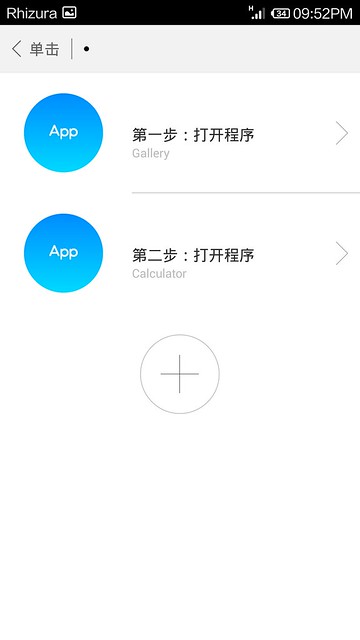
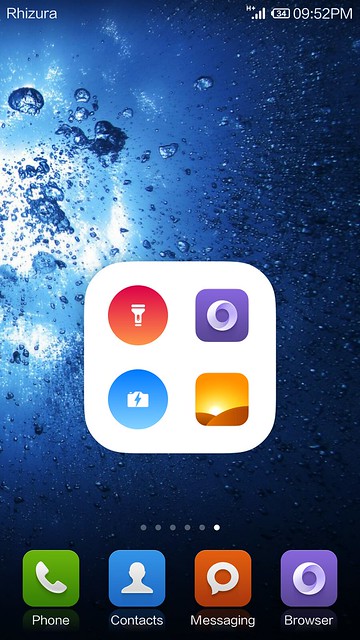


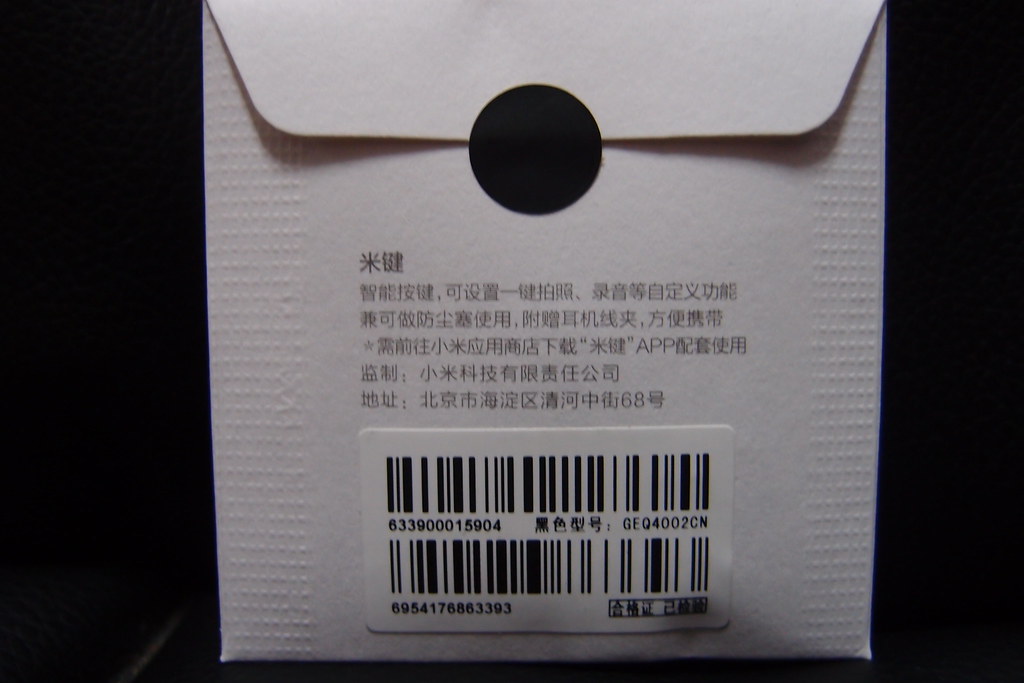
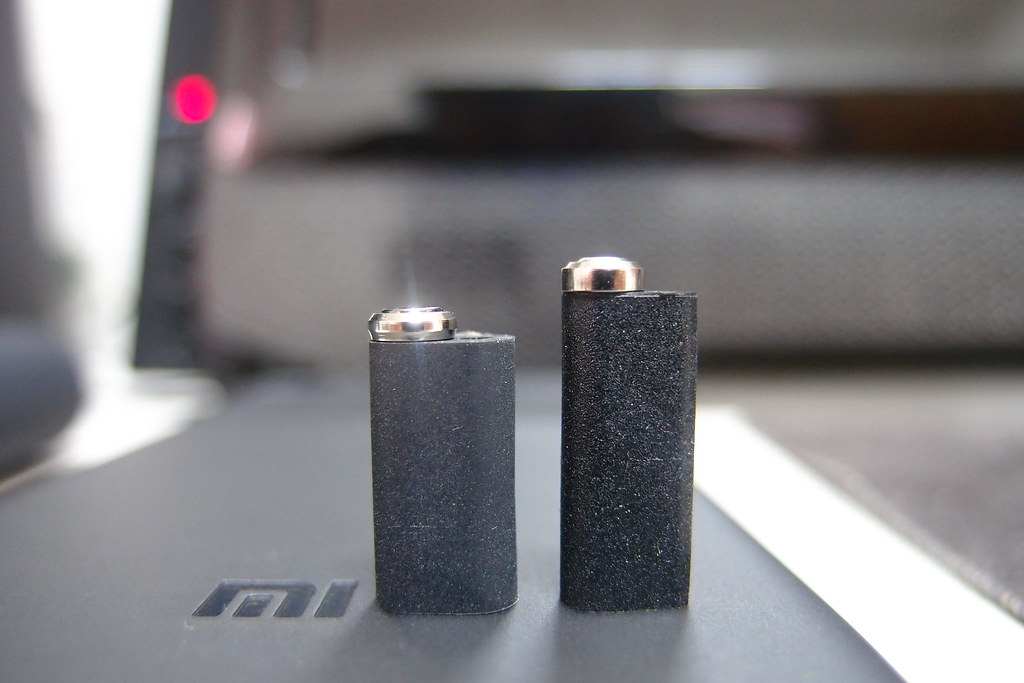
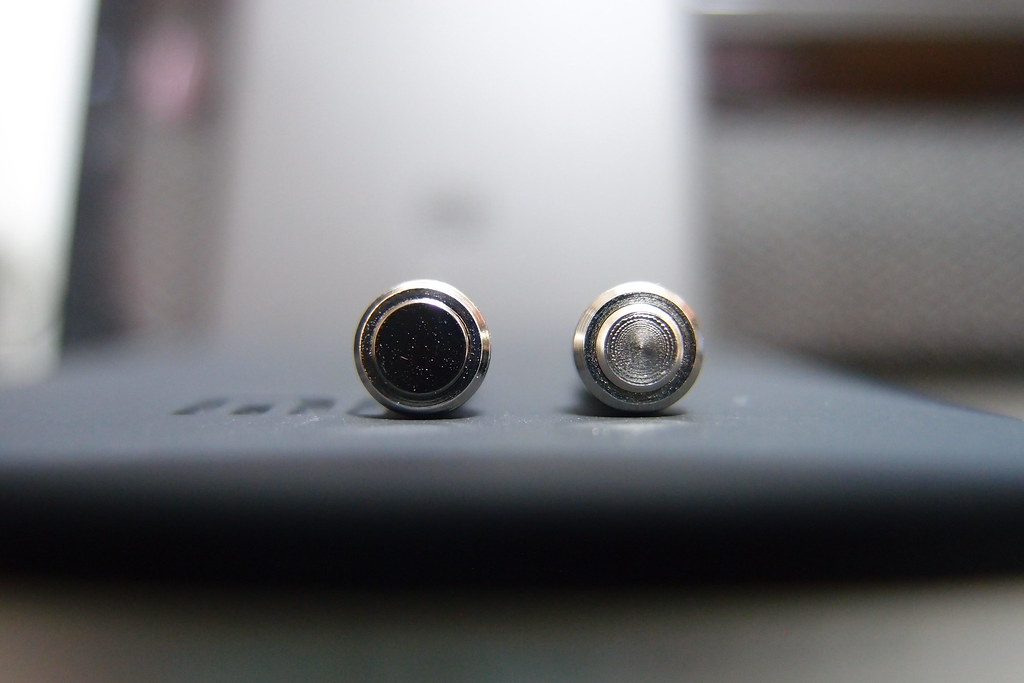
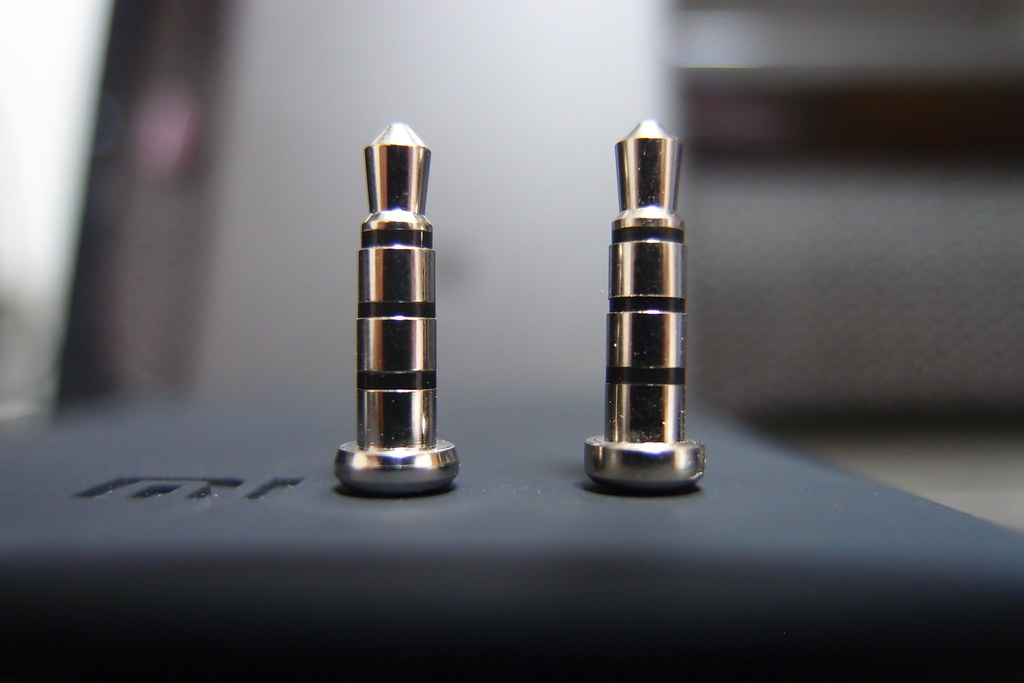








 such a short period of time move so fast








 , anyone of you has extra?



























 0.1420sec
 0.59
0.59
 6 queries
 GZIP Disabled