

i wonder when will monoprice monitor break our local market..
LCD Monitor Thread v13.
LCD Monitor Thread v13.
|
|
 Feb 11 2015, 02:06 PM Feb 11 2015, 02:06 PM
Show posts by this member only | IPv6 | Post
#681
|
 
Senior Member
1,053 posts Joined: Sep 2009 From: In Your Mind   
|
i wonder when will monoprice monitor break our local market..
|
|
|
|
|
|
Feb 11 2015, 03:39 PM
|

All Stars
11,245 posts Joined: Jul 2005
|
QUOTE(hpares @ Feb 10 2015, 08:07 PM) I am just worried that I have to give all my credit card details (number,exp date,name, behind 3 digit) to the salesperson in order to purchase. I only worry next time what they can do with that info. Its safe dont worry    |
|
|
Feb 14 2015, 04:30 PM
|
 
Staff
25,802 posts Joined: Jan 2003 From: Penang
|
Just bought U2412m, everything fine, no bright/dark pixel, black level is good, but the problem is white colour not uniform.
At left corner the white appear "yellowish and brighter" than the rest particular noticeable with white background. Grey background noticeable a little but not as bad as white. Strangely, other colour, red, green, blue, even black, the colour seems quite ok and uniform. I don't know this is called bleeding or IPS glow. It said bleeding, it should be noticeable with black background, but it doesn't. Only with white/light grey background.  The factory preset is too "yellowish" in the first place, just like many complain the yellow tint issue. But able to set into proper "white" after refer to icc profile on the net. |
|
|
Feb 14 2015, 06:00 PM
|

Senior Member
4,934 posts Joined: Sep 2008 From: Setapak
|
wta, using u2713hm now, any1 know how i change the settings of "Display port 1.2 to Disable"??
i found no such things on my monitor menu/settings. QUOTE forix Posted by forix on 6 Nov 2013 6:44 PM Verified Answer Verified by DELL-Chris M Hello Chaoflux, I have the same "entering power saving mode" problem, but after I changed the display port settings to Displayport 1.1 form Menu -> Display settings -> DisplayPort 1.2 to Disable, the problem never occurred again. Hope that fix your problem too. Kind Regards |
|
|
Feb 16 2015, 01:21 AM
|

Senior Member
4,254 posts Joined: Nov 2011
|
QUOTE(cherroy @ Feb 14 2015, 04:30 PM) Just bought U2412m, everything fine, no bright/dark pixel, black level is good, but the problem is white colour not uniform. this, i noticed even my U2515H is yellowish as compared to my ICC profile calibrated U2312HMAt left corner the white appear "yellowish and brighter" than the rest particular noticeable with white background. Grey background noticeable a little but not as bad as white. Strangely, other colour, red, green, blue, even black, the colour seems quite ok and uniform. I don't know this is called bleeding or IPS glow. It said bleeding, it should be noticeable with black background, but it doesn't. Only with white/light grey background. The factory preset is too "yellowish" in the first place, just like many complain the yellow tint issue. But able to set into proper "white" after refer to icc profile on the net. |
|
|
Feb 16 2015, 10:08 AM
|
|
Staff
25,802 posts Joined: Jan 2003 From: Penang
|
QUOTE(marfccy @ Feb 16 2015, 01:21 AM) this, i noticed even my U2515H is yellowish as compared to my ICC profile calibrated U2312HM I don't know why Dell factory preset being set at so "yellowish" for white. Their factory ambient lighting? Last time using U2209WA, 4 monitor all "white" and uniform across, no issue. Don't need to do anything. For the new U2412m, I need to spend considerable of time to calibrate between the RGB to get the proper "white" using try and error method.  |
|
|
|
|
|
Feb 16 2015, 03:08 PM
|
|
Senior Member
4,254 posts Joined: Nov 2011
|
QUOTE(cherroy @ Feb 16 2015, 10:08 AM) I don't know why Dell factory preset being set at so "yellowish" for white. the sad part of using U2515H is that its relatively new, so there isnt much ICC profile to test around at all :/Their factory ambient lighting? Last time using U2209WA, 4 monitor all "white" and uniform across, no issue. Don't need to do anything. For the new U2412m, I need to spend considerable of time to calibrate between the RGB to get the proper "white" using try and error method. unless im willing to manually tweak and test |
|
|
Feb 16 2015, 03:46 PM
|

Junior Member
124 posts Joined: Oct 2009
|
Any ROG Swift PG278Q users here?
wanna get some feedback from u guys... |
|
|
Feb 16 2015, 10:57 PM
|

Junior Member
530 posts Joined: Oct 2005
|
Juz get my dell U2715H, =333, Ordered last tuesday and arrived today. Question, my old monitor dont have DP port, only hdmi. Should i stick with HDMI? or should I use Dp port instead?
|
|
|
Feb 17 2015, 04:21 AM
|
|
Senior Member
4,254 posts Joined: Nov 2011
|
QUOTE(hpares @ Feb 16 2015, 10:57 PM) Juz get my dell U2715H, =333, Ordered last tuesday and arrived today. Question, my old monitor dont have DP port, only hdmi. Should i stick with HDMI? or should I use Dp port instead? i dont understand, why would you want to use DP if your old monitor cant utilise DP?  HDMI have limitations, dont use it for >1080p resolutions |
|
|
Feb 17 2015, 06:44 AM
|
|
Junior Member
530 posts Joined: Oct 2005
|
QUOTE(marfccy @ Feb 17 2015, 04:21 AM) i dont understand, why would you want to use DP if your old monitor cant utilise DP? HDMI have limitations, dont use it for >1080p resolutions  lol i mean my old monitor dont have dp port even tho my gpu have. So I not sure whether dp port is better or HDMI is better. Since now i using 2560 x 1440 resolution, so it is better if i use dp port right? Btw does dp port have audio like HDMI? lol i mean my old monitor dont have dp port even tho my gpu have. So I not sure whether dp port is better or HDMI is better. Since now i using 2560 x 1440 resolution, so it is better if i use dp port right? Btw does dp port have audio like HDMI? |
|
|
Feb 17 2015, 04:32 PM
|
|
Senior Member
4,254 posts Joined: Nov 2011
|
QUOTE(hpares @ Feb 17 2015, 06:44 AM) lol i mean my old monitor dont have dp port even tho my gpu have. So I not sure whether dp port is better or HDMI is better. Since now i using 2560 x 1440 resolution, so it is better if i use dp port right? Btw does dp port have audio like HDMI?DP carries audio as well. HDMI (at least the older revisions) have enough bandwidth for 1920x1080 at 60Hz only DP supports up to 4K at 60Hz |
|
|
Feb 17 2015, 04:49 PM
|
|
Junior Member
530 posts Joined: Oct 2005
|
I just realize the cable dell provide is DP to MDP. Should be no different in terms of anything?
|
|
|
|
|
|
Feb 17 2015, 06:04 PM
|

Senior Member
7,723 posts Joined: Jan 2005
|
QUOTE(hpares @ Feb 17 2015, 04:49 PM) I just realize the cable dell provide is DP to MDP. Should be no different in terms of anything? full size or miniDP, no different. just use the Dell monitor bundled cable. |
|
|
Feb 17 2015, 07:59 PM
|
|
Senior Member
4,254 posts Joined: Nov 2011
|
QUOTE(hpares @ Feb 17 2015, 04:49 PM) I just realize the cable dell provide is DP to MDP. Should be no different in terms of anything? no issues, im using DP to mDP as well. they work the same provided you have the connectors for it |
|
|
Feb 20 2015, 10:25 PM
|
|
Junior Member
36 posts Joined: Jun 2005
|
I has a small problem I'm hoping one of you guys can help me out with. I'm really keen to get the U2715H, but my videocard only has DVI-D. Is there an adaptor I can use?
|
|
|
Feb 21 2015, 05:19 PM
|
|
Senior Member
1,138 posts Joined: May 2010
|
QUOTE(bloophead @ Feb 20 2015, 10:25 PM) I has a small problem I'm hoping one of you guys can help me out with. I'm really keen to get the U2715H, but my videocard only has DVI-D. Is there an adaptor I can use? Attached thumbnail(s) 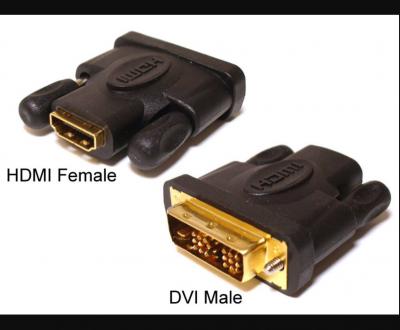
|
|
|
Feb 21 2015, 06:18 PM
|
|
Junior Member
36 posts Joined: Jun 2005
|
Thanks for your reply. However, I am looking to maintain the 2560 x 1440 resolution and HDMI will not suffice.
|
|
|
Feb 22 2015, 12:01 AM
|
|
Senior Member
4,254 posts Joined: Nov 2011
|
QUOTE(bloophead @ Feb 21 2015, 06:18 PM) Thanks for your reply. However, I am looking to maintain the 2560 x 1440 resolution and HDMI will not suffice. DVI to DP connectors, rather rare to find in Msia, but it exists |
|
|
Feb 22 2015, 09:49 AM
|

Senior Member
5,987 posts Joined: Jan 2003 From: North Borneo & South Nihon/Nippon
|
QUOTE(marfccy @ Feb 22 2015, 12:01 AM) DVI to DP connectors, rather rare to find in Msia, but it exists Though... that's a DP to DVI... it could be a cable pass-through... or a digital converter... but, I suspect the former...I personally have one or 2 units (cable pass-through)... This post has been edited by BeastX: Feb 22 2015, 09:51 AM |
| Change to: |  0.0212sec 0.0212sec
 0.54 0.54
 6 queries 6 queries
 GZIP Disabled GZIP Disabled
Time is now: 2nd December 2025 - 03:03 PM |
 Quote
Quote