Welcome Guest ( Log In | Register )

172 Pages « < 147 148 149 150 151 > » Bottom

Outline · [ Standard ] · Linear+

 LCD Monitor Thread v13.

views
     
miyakochan89
post Sep 4 2023, 09:23 AM

Wut?
*******
Senior Member
6,724 posts

Joined: Aug 2008


QUOTE(Andrewtst @ Sep 4 2023, 01:32 AM)
1.5k is a bit too low for a good 4K.

For 1440p in 27", you may consider GIGABYTE M27Q P (within your budget) or M27Q X (a bit over your budget)

https://www.rtings.com/monitor/tools/compar...&threshold=0.10
*
Where in Klang Valley can you find a shop to look at these monitors? I went to Lowyat the other day and couldn’t find much also.
Andrewtst
post Sep 4 2023, 12:46 PM

Forgiveness is Happiness
*********
All Stars
29,764 posts

Joined: Jan 2009
From: Johor, Malaysia.


QUOTE(miyakochan89 @ Sep 4 2023, 09:23 AM)
Where in Klang Valley can you find a shop to look at these monitors? I went to Lowyat the other day and couldn’t find much also.
*
I not from Klang, sorry can't help.
Windsux P
post Sep 5 2023, 02:23 PM

New Member
*
Probation
13 posts

Joined: Jun 2019
After few day research is that getting a wqhd better or just a normal 27 QHD ? But lg oled also catch my eyes … really dunno which to get 1st cos I already using dual monitor , any sifu can recomend ?
Windsux P
post Sep 5 2023, 02:24 PM

New Member
*
Probation
13 posts

Joined: Jun 2019
QUOTE(miyakochan89 @ Sep 4 2023, 09:23 AM)
Where in Klang Valley can you find a shop to look at these monitors? I went to Lowyat the other day and couldn’t find much also.
*
Try go digital mall
Andrewtst
post Sep 5 2023, 04:39 PM

Forgiveness is Happiness
*********
All Stars
29,764 posts

Joined: Jan 2009
From: Johor, Malaysia.


QUOTE(Windsux @ Sep 5 2023, 02:23 PM)
After few day research is that getting a wqhd better or just a normal 27 QHD ? But lg oled also catch my eyes … really dunno which to get 1st cos I already using dual monitor , any sifu can recomend ?
*
I will suggest go for any brand of 34" 3440x1440 QD-OLED. You will impress how stunning the image quality especially on HDR performance.
Shanlayz
post Sep 6 2023, 02:45 PM

New Member
*
Newbie
0 posts

Joined: Apr 2018


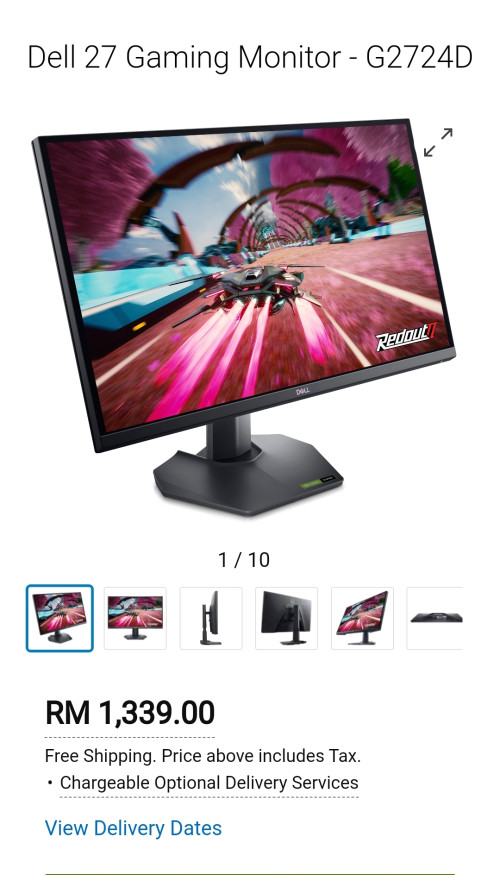
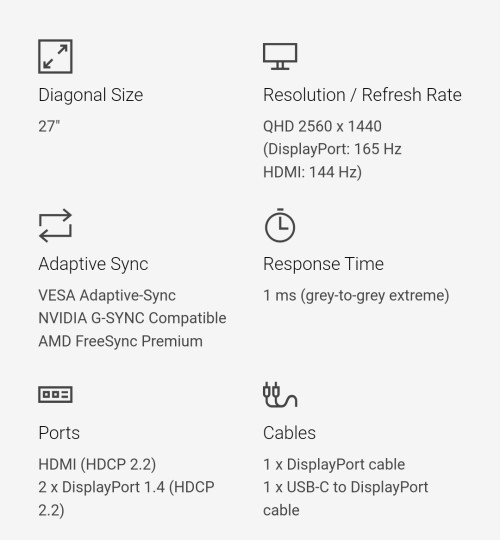
hi, anyone have experience with this 1440p monitor? g2724d
still new. waiting the review from rtings ..


user posted image
user posted image
Shanlayz
post Sep 6 2023, 05:44 PM

New Member
*
Newbie
0 posts

Joined: Apr 2018


QUOTE(Shanlayz @ Sep 6 2023, 02:45 PM)
hi, anyone has experience with this 1440p monitor panel? g2724d
still new. waiting the review from rtings ..
user posted image
user posted image
*
wait, am i in the right thread?
Windsux P
post Sep 7 2023, 03:22 AM

New Member
*
Probation
13 posts

Joined: Jun 2019
QUOTE(Shanlayz @ Sep 6 2023, 05:44 PM)
wait, am i in the right thread?
*
Yes I are just here sifu so less not like cpu forum
wiki47
post Sep 9 2023, 10:24 PM

New Member
*
Junior Member
26 posts

Joined: Oct 2011


Hi Sifus,

Hi i am currently looking to upgrade my current PC display setup.

Current setup:
Model: Panasonic Viera TH-L32X50K
Size: 32-inch
Resolution: 1080p

Other spec not sure since even uncle Gugel didn't give a lot of clear results for this model. Too old I guess, before 2014 I think. confused.gif

Use case:
1. Gaming - open-world types (Red Dead Redemption, No Mans Sky) and FPS (Battlebit, Apex Legends)
2. Media consumption - movies, internet browsing, Youtube

Order of priority for considerations:
1. Visuals - for movies and cinematic views. If possible would like to graduate from 1080p. 2K is good enough for me.
2. Performance - since I play FPS as well, would like to have good refresh rate as well.
3. If it helps, I am also using MSI RTX3060Ti Ventus 2X OC - so would like to harness its capabilities as well.
4. Budget: Aiming for mid range models, so I can consider up to RM3k.


For the new display / monitor, my requirements are as follows:
1. Size: 32-inch preferred. But if big a bit like 34inch still can consider.
2. Have build-in sound speaker (to watch movies not preferred wear headphones)
3. Form factor: Flat screen, not curved.
4. Panel type: IPS display or OLED if possible (best for viewing)
5. Refresh rate: 144Hz is ok (current display is 60Hz I think, so would like a smoother experience)
6. Prefer TV type if possible (with remote as it will dual function as TV as well) - but can consider to monitors (no remote) if not possible.

A cursory Google search yields so many choice. Would like the Sifus to help recommend which monitors / displays are best suited for this use case.

Sorry if in wrong thread.

Thanks thumbup.gif

This post has been edited by wiki47: Sep 9 2023, 10:24 PM
Andrewtst
post Sep 10 2023, 12:55 AM

Forgiveness is Happiness
*********
All Stars
29,764 posts

Joined: Jan 2009
From: Johor, Malaysia.


QUOTE(wiki47 @ Sep 9 2023, 10:24 PM)
Hi Sifus,

Hi i am currently looking to upgrade my current PC display setup.

Current setup:
Model: Panasonic Viera TH-L32X50K
Size: 32-inch
Resolution: 1080p

Other spec not sure since even uncle Gugel didn't give a lot of clear results for this model. Too old I guess, before 2014 I think.  :confused:

Use case:
1. Gaming - open-world types (Red Dead Redemption, No Mans Sky) and FPS (Battlebit, Apex Legends)
2. Media consumption - movies, internet browsing, Youtube

Order of priority for considerations:
1. Visuals - for movies and cinematic views. If possible would like to graduate from 1080p. 2K is good enough for me.
2. Performance - since I play FPS as well, would like to have good refresh rate as well.
3. If it helps, I am also using MSI RTX3060Ti Ventus 2X OC - so would like to harness its capabilities as well.
4. Budget: Aiming for mid range models, so I can consider up to RM3k.
For the new display / monitor, my requirements are as follows:
1. Size: 32-inch preferred. But if big a bit like 34inch still can consider.
2. Have build-in sound speaker (to watch movies not preferred wear headphones)
3. Form factor: Flat screen, not curved.
4. Panel type: IPS display or OLED if possible (best for viewing)
5. Refresh rate: 144Hz is ok (current display is 60Hz I think, so would like a smoother experience)
6. Prefer TV type if possible (with remote as it will dual function as TV as well) - but can consider to monitors (no remote) if not possible.

A cursory Google search yields so many choice. Would like the Sifus to help recommend which monitors / displays are best suited for this use case.

Sorry if in wrong thread.

Thanks thumbup.gif
*
Basically they is no mid range. Either cheap not good, or expensive very good.

Your budget cannot get OLED, OLED minimum requirement RM 4.5k++
wiki47
post Sep 10 2023, 01:04 AM

New Member
*
Junior Member
26 posts

Joined: Oct 2011


QUOTE(Andrewtst @ Sep 10 2023, 12:55 AM)
Basically they is no mid range. Either cheap not good, or expensive very good.

Your budget cannot get OLED, OLED minimum requirement RM 4.5k++
*
I see. How expensive is "very good"?

Still can consider if near RM3k.
Andrewtst
post Sep 10 2023, 01:45 AM

Forgiveness is Happiness
*********
All Stars
29,764 posts

Joined: Jan 2009
From: Johor, Malaysia.


QUOTE(wiki47 @ Sep 10 2023, 01:04 AM)
I see. How expensive is "very good"?

Still can consider if near RM3k.
*
Rtings.com is a very good reputable monitor review site.

Here is the latest listing of best gaming monitor.

https://www.rtings.com/monitor/reviews/best/by-usage/gaming

You may also checkout YouTube monitor unboxed as well.

https://www.youtube.com/@monitorsunboxed/videos

This post has been edited by Andrewtst: Sep 10 2023, 03:00 AM
incognitroll
post Sep 10 2023, 06:16 AM

Getting Started
**
Junior Member
148 posts

Joined: Oct 2018
hi all, my aoc less than a year now showing some lines at the bottom of the screen. seems to be spreading upward, from few lines to now close to 20 pixel accross or may be more. shop asks me to call whatsapp number on the box for on-site warranty claim. anyone knows how it goes? are they coming over to fix it or bring the monitor back? for how long? asking because this is my main monitor, not sure if i should get a new one now or just wait... thanks a lot.
Andrewtst
post Sep 10 2023, 10:25 AM

Forgiveness is Happiness
*********
All Stars
29,764 posts

Joined: Jan 2009
From: Johor, Malaysia.


QUOTE(incognitroll @ Sep 10 2023, 06:16 AM)
hi all, my aoc less than a year now showing some lines at the bottom of the screen. seems to be spreading upward, from few lines to now close to 20 pixel accross or may be more. shop asks me to call whatsapp number on the box for on-site warranty claim. anyone knows how it goes? are they coming over to fix it or bring the monitor back? for how long? asking because this is my main monitor, not sure if i should get a new one now or just wait... thanks a lot.
*
Call and ask them, then you will known how the process and how long it take.

This post has been edited by Andrewtst: Sep 10 2023, 10:26 AM
toffy
post Sep 11 2023, 09:01 PM

Getting Started
**
Junior Member
182 posts

Joined: Aug 2017
<deleted>

Found the answer. Yay!

This post has been edited by toffy: Sep 15 2023, 12:29 AM
Windsux P
post Sep 13 2023, 05:23 PM

New Member
*
Probation
13 posts

Joined: Jun 2019
Need sifu teaching my monitor hdr on in my pc the colour become very poor … but if I don’t on at pc my monitor can’t active hdr … what setting shud I do ya ?
lolzcalvin
post Sep 13 2023, 08:50 PM

shibe in predicament
******
Senior Member
1,588 posts

Joined: Mar 2014
From: 75°26'11.6"S, 136°16'16.0"E


QUOTE(Windsux @ Sep 13 2023, 05:23 PM)
Need sifu teaching my monitor hdr on in my pc the colour become very poor … but if I don’t on at pc my monitor can’t active hdr … what setting shud I do ya ?
*
what monitor?
soulz69
post Sep 13 2023, 09:55 PM

:: LoveHate ::
******
Senior Member
1,972 posts

Joined: Dec 2007
From: Cheat Enabled!


QUOTE(Windsux @ Sep 13 2023, 05:23 PM)
Need sifu teaching my monitor hdr on in my pc the colour become very poor … but if I don’t on at pc my monitor can’t active hdr … what setting shud I do ya ?
*
can share the monitor brand/model
Windsux P
post Sep 14 2023, 12:04 AM

New Member
*
Probation
13 posts

Joined: Jun 2019
QUOTE(soulz69 @ Sep 13 2023, 09:55 PM)
can share the monitor brand/model
*
Asus tuf vg27aqml1a
Andrewtst
post Sep 14 2023, 03:55 AM

Forgiveness is Happiness
*********
All Stars
29,764 posts

Joined: Jan 2009
From: Johor, Malaysia.


QUOTE(Windsux @ Sep 14 2023, 12:04 AM)
Asus tuf vg27aqml1a
*
Nothing much can help as this monitor is entry level HDR, any monitor label DisplayHDR™ 400 is poor performance in HDR.

For a proper HDR, DisplayHDR™ 600 is minimum requirement and recommended for DisplayHDR™ 1000 and above (this included IPS, VA or mini-LED in either)

For OLED only, it is ok for any HDR certification, this included DisplayHDR™ True Black 400.
Remember DisplayHDR™ 400 and DisplayHDR™ True Black 400 is two different certification.

In future if you plan to get OLED monitor, try avoid Asus brand, currently Asus had issue on HDR output which look incorrect and dull even on OLED, this included PG42UQ, PG48UQ and also PG27AQDM. Also avoid Acer brand as Acer Predator X27U is the only OLED monitor did not provide way to turn off ABL.

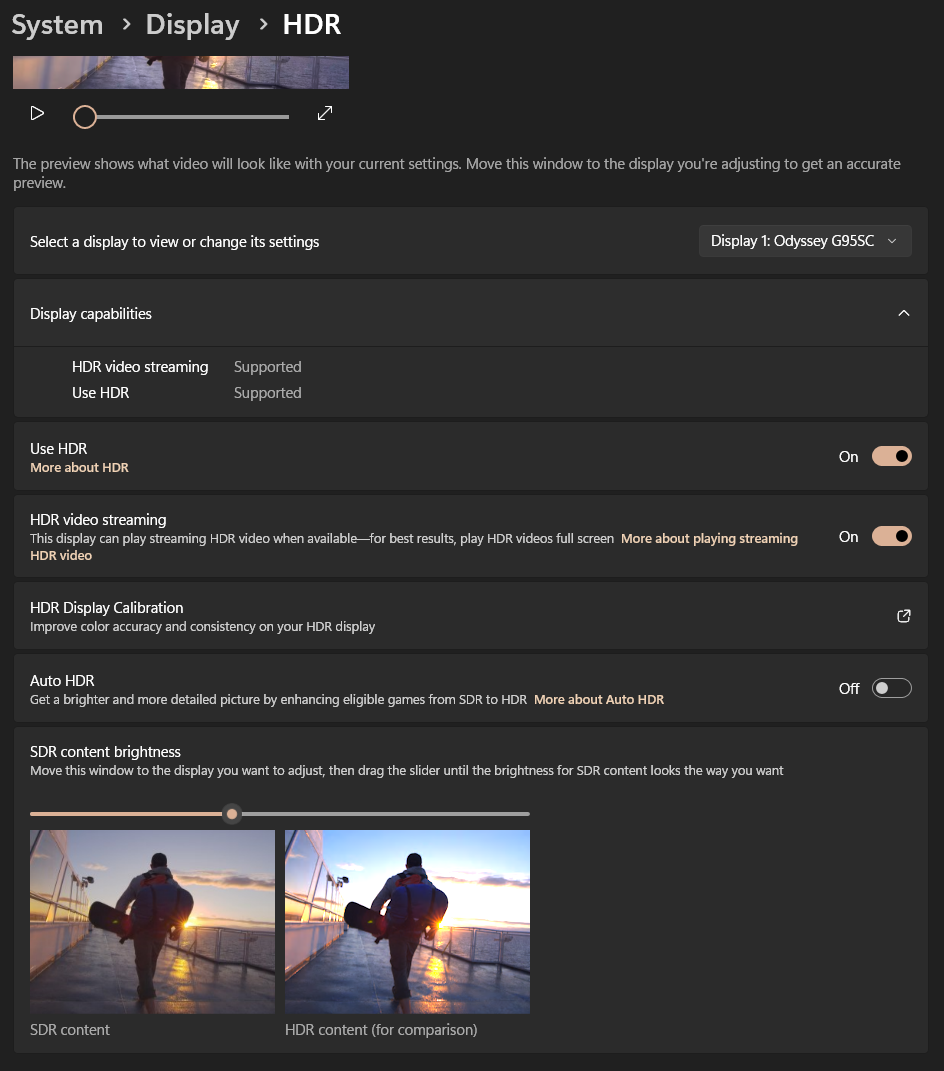
You can try Microsoft Store - Windows HDR Calibration for getting slightly better output but don't put too high hope on it as this is hardware limitation where 400 nits (except OLED) is never enough for a proper HDR output.

Also try adjusting the SDR content brightness to get a much better output in Windows desktop environment. Default value is 40.
This SDR content brightness only impact to Windows desktop environment, no impact in HDR gaming or HDR video.

user posted image

This post has been edited by Andrewtst: Sep 14 2023, 11:17 AM

172 Pages « < 147 148 149 150 151 > » Top
 

Change to:
| Lo-Fi Version
0.0281sec    0.37    6 queries    GZIP Disabled
Time is now: 3rd December 2025 - 12:09 AM