Welcome Guest ( Log In | Register )

3 Pages  1 2 3 >Bottom

Outline · [ Standard ] · Linear+

Guide [Guide] Madcatz R.A.T.3 Disassemble and repair, Not for the weak hearted!

views
     
TSc2_lover
post Apr 26 2014, 01:13 AM, updated 10y ago

I am DRAGAN-BORN!!!
*****
Senior Member
742 posts

Joined: Mar 2007
From: Shaw or West End or Foggy Bottom or somewhere else


Bought this mouse more than a year ago due to its design. Wanted R.A.T.7 but i'm too poor to get one so i settle with R.A.T.3. Though it have no customiztion like R.A.T.5 and R.A.T.7 has, it still get the job done and its pretty comfortable too.
Few weeks back, my R.A.T.3 starts to behave erratically. The mice start to have double click on the right button and then the LED died. i got another mouse as replacement recently but that feel of the mouse is just different in feel so i tried to revive back my R.A.T.3 and thank god its back to its full glory after the repair.
» Click to show Spoiler - click again to hide... «


First of all i would like to apologize if the image quality not that good as it was taken with my phone.

Tools Required:
1) 2.5mm Hex Key/Allen key
2) #0 phillip + screwdriver
3) #1 phillip + screwdriver
4) small Flat - screwdriver
5) Soldering Iron (optional if you just want to see whats inside)
6) Solder Sucker (optional if you just want to see whats inside)
7) Common sense (Must have, not optional smile.gif )

Optional Part Required:
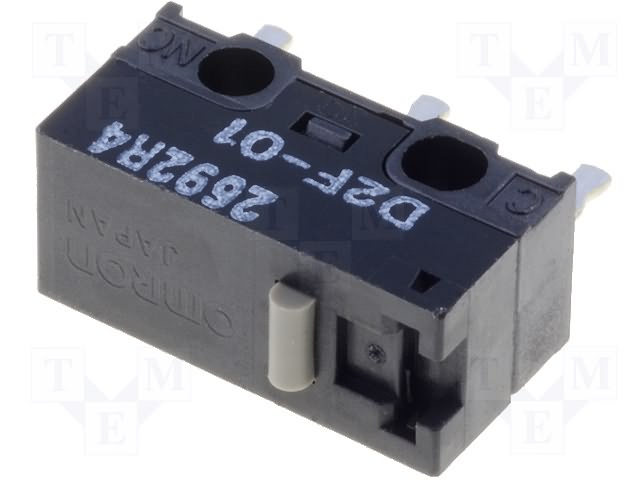
1) Microswitches
- Omron D2FC-F-7N (cheap and mostly used in all gaming mouse except this mouse sweat.gif and made in China for china market. It is duplicate of D2F microswitches for china market)
- Omron D2F-01F (Made in Japan. 0.74N to press)
- Omron D2F-01 (Made in Japan. 1.47N to press)
Where to get: D2FC can only found in Ebay while D2F can be found in Element14/RS Malaysia/Ebay website.
» Click to show Spoiler - click again to hide... «

2) LED
- Minimum of 5000MCD of light intensity.
- 5mm or T-1 3/4 in size
- Wavelength 630nm
- Red lumination
Where to get: Element14 / RS malaysia/Ebay
» Click to show Spoiler - click again to hide... «

Q: Can Use other colour LED?
A: Maybe. but using back the same spec led should not cause any performance hit. other colour have different wavelength so do it at your own risk!
If you do managed to get it to work on other colour without any performance hit, do share it with me!! i want orange colour LED or maybe white rclxms.gif

This post has been edited by c2_lover: Jun 10 2016, 08:25 PM
TSc2_lover
post Apr 26 2014, 01:13 AM

I am DRAGAN-BORN!!!
*****
Senior Member
742 posts

Joined: Mar 2007
From: Shaw or West End or Foggy Bottom or somewhere else


1) Use 2.5mm Hex key and unscrew both screw on the side.
» Click to show Spoiler - click again to hide... «


2) Using #1 + screwdriver, take out the screw holding the palm rest. Slide it out to detach it from the body.
» Click to show Spoiler - click again to hide... «


3) Turn the mouse around and unscrew the bottom 3 screw. Top require #1 + screwdriver while the bottom 2 screw require #0 + Screwdriver
» Click to show Spoiler - click again to hide... «

TSc2_lover
post Apr 26 2014, 01:13 AM

I am DRAGAN-BORN!!!
*****
Senior Member
742 posts

Joined: Mar 2007
From: Shaw or West End or Foggy Bottom or somewhere else


4) Turn the mouse back up and now slowly take the top cover up. Open it up from where you can notice the R.A.T.3 label is.
» Click to show Spoiler - click again to hide... «


notice the notches in front of the mouse hence the reason to open it from the back!
» Click to show Spoiler - click again to hide... «


And voila! rclxms.gif
» Click to show Spoiler - click again to hide... «


the dpi button can be taken out if needed.
» Click to show Spoiler - click again to hide... «


Some Pic of the Internal of the mouse and a look at the cheapo switch.
» Click to show Spoiler - click again to hide... «


This post has been edited by c2_lover: Apr 26 2014, 01:23 AM
TSc2_lover
post Apr 26 2014, 01:14 AM

I am DRAGAN-BORN!!!
*****
Senior Member
742 posts

Joined: Mar 2007
From: Shaw or West End or Foggy Bottom or somewhere else


Time to dug deep!

5) take out the screw as shown below using #1 + screwdriver and pull it out.
» Click to show Spoiler - click again to hide... «


6) Disconnect the connector from the top layer board.
» Click to show Spoiler - click again to hide... «


7) time to take out the dpi indicator. Use #0 + screwdriver and lift it up to take it out.
» Click to show Spoiler - click again to hide... «


8) To take out the top layer board, unscrew the 3 screw on it.
» Click to show Spoiler - click again to hide... «


Upclose pic of top board.
» Click to show Spoiler - click again to hide... «


This post has been edited by c2_lover: Apr 26 2014, 01:18 AM
TSc2_lover
post Apr 26 2014, 01:14 AM

I am DRAGAN-BORN!!!
*****
Senior Member
742 posts

Joined: Mar 2007
From: Shaw or West End or Foggy Bottom or somewhere else


9) to take out the flex cable, use a tweezer and pull up the black flap on left/right of the connector.
» Click to show Spoiler - click again to hide... «


10) Time to disconnect the USB/Power cable from the mainboard.
» Click to show Spoiler - click again to hide... «


11) once set the cable aside, you need to take out 3 more screw as shown below using #1 + screwdriver
» Click to show Spoiler - click again to hide... «

If it still hard to get it out, try to turn the mouse upside down and try again.

And Voila yet again!
» Click to show Spoiler - click again to hide... «


TSc2_lover
post Apr 26 2014, 01:14 AM

I am DRAGAN-BORN!!!
*****
Senior Member
742 posts

Joined: Mar 2007
From: Shaw or West End or Foggy Bottom or somewhere else


Time for more photos!
Le Body/Case
» Click to show Spoiler - click again to hide... «


The mainboard
Top View. IC with A3090 is the Avago ADNS-3090 sensor. take note of the left and right microswitches placement.
» Click to show Spoiler - click again to hide... «


Bottom View
» Click to show Spoiler - click again to hide... «


Sensor is one big pimple
» Click to show Spoiler - click again to hide... «


With black tape taken off. Take note of the microswitch positioning!
» Click to show Spoiler - click again to hide... «


The Lense. Dont touch the center with your finger as you might get dirt on it and get reduce performance.
» Click to show Spoiler - click again to hide... «

TSc2_lover
post Apr 26 2014, 01:14 AM

I am DRAGAN-BORN!!!
*****
Senior Member
742 posts

Joined: Mar 2007
From: Shaw or West End or Foggy Bottom or somewhere else


Now that the mainboard is out, you free to
A) change new switch.
» Click to show Spoiler - click again to hide... «


B) change dead LED
» Click to show Spoiler - click again to hide... «


Reverse the steps to get everything back in order and enjoy your newly repaired mouse thumbup.gif
syin16
post May 19 2014, 07:57 AM

On my way
****
Senior Member
665 posts

Joined: Mar 2010


QUOTE(c2_lover @ Apr 26 2014, 01:13 AM)
The mice start to have double click on the right button and then the LED died.
Bro, my gaming mouse also got the same problem but haven't died yet, how did you determine whether it is an hardware issue cause my mouse sometimes got double click, sometimes not. It's a Roccat Pyra Wireless btw.

TSc2_lover
post May 19 2014, 08:27 AM

I am DRAGAN-BORN!!!
*****
Senior Member
742 posts

Joined: Mar 2007
From: Shaw or West End or Foggy Bottom or somewhere else


QUOTE(syin16 @ May 19 2014, 07:57 AM)
Bro, my gaming mouse also got the same problem but haven't died yet, how did you determine whether it is an hardware issue cause my mouse sometimes got double click, sometimes not. It's a Roccat Pyra Wireless btw.
*

only way i know my mouse have double click issue on right click is when it show 2right click menu one after another when i move the mouse fast enough. or you can have a go at the mouse properties menu, switch the primary and secondary button then test it on the double click speed and see if it open/close the folder in one click...
user posted image
hope this helps...

This post has been edited by c2_lover: May 19 2014, 09:38 AM
syin16
post Jun 14 2014, 11:16 PM

On my way
****
Senior Member
665 posts

Joined: Mar 2010


QUOTE(c2_lover @ May 19 2014, 08:27 AM)
hope this helps...
*
thx you, never thought of that. I'll test it when i found back my mouse..huhu cry.gif
LegendLee
post Jun 15 2014, 12:24 AM

><3LG3|\|D
Group Icon
Elite
2,725 posts

Joined: Mar 2006


My Rat's Scroll Wheel died !
It's really loose, I wonder if there's anything I can do to fix that.
NoKusshon
post Jun 15 2014, 06:49 AM

Knowledge is Everything. Well Yeah.
******
Senior Member
1,391 posts

Joined: May 2011
From: Muar, Johor


QUOTE(LegendLee @ Jun 15 2014, 12:24 AM)
My Rat's Scroll Wheel died !
It's really loose, I wonder if there's anything I can do to fix that.
*
Hello bro, did it still in warranty ? If do, you can try send to fix it. Besides that, you can try call the Rat's mouse service centre in order to ask them how to fix the wheel scroll thingy. Hope this help, thank you smile.gif
LegendLee
post Jun 15 2014, 12:08 PM

><3LG3|\|D
Group Icon
Elite
2,725 posts

Joined: Mar 2006


QUOTE(NoKusshon @ Jun 15 2014, 06:49 AM)
Hello bro, did it still in warranty ? If do, you can try send to fix it. Besides that, you can try call the Rat's mouse service centre in order to ask them how to fix the wheel scroll thingy. Hope this help, thank you  smile.gif
*
Nope, it's no longer in warranty.
The warranty is only 6 Months lol ? I thought it would be 1 year.
Wasted so much on a Rat 9 that it spoilt in less than a year.

Thanks for the advice though, I'll still contact them to see if they've any suggestions.
NoKusshon
post Jun 15 2014, 12:51 PM

Knowledge is Everything. Well Yeah.
******
Senior Member
1,391 posts

Joined: May 2011
From: Muar, Johor


QUOTE(LegendLee @ Jun 15 2014, 12:08 PM)
Nope, it's no longer in warranty.
The warranty is only 6 Months lol ? I thought it would be 1 year.
Wasted so much on a Rat 9 that it spoilt in less than a year.

Thanks for the advice though, I'll still contact them to see if they've any suggestions.
*
Ah i see, sorry bro can't help more.. Since it's mouse thingy, you can try to contact them it's the best way smile.gif
TSc2_lover
post Jun 15 2014, 12:55 PM

I am DRAGAN-BORN!!!
*****
Senior Member
742 posts

Joined: Mar 2007
From: Shaw or West End or Foggy Bottom or somewhere else


if you feeling adventurous and wanna DIY,

problem is where to get the scroll wheel replacement...
NoKusshon
post Jun 15 2014, 02:53 PM

Knowledge is Everything. Well Yeah.
******
Senior Member
1,391 posts

Joined: May 2011
From: Muar, Johor


QUOTE(c2_lover @ Jun 15 2014, 12:55 PM)
if you feeling adventurous and wanna DIY,

problem is where to get the scroll wheel replacement...
*
How about order from Rats service centre, then DIY hehe ? smile.gif
LegendLee
post Jun 15 2014, 04:00 PM

><3LG3|\|D
Group Icon
Elite
2,725 posts

Joined: Mar 2006


Thanks for the advice.
Will look it through !
NoKusshon
post Jun 15 2014, 05:46 PM

Knowledge is Everything. Well Yeah.
******
Senior Member
1,391 posts

Joined: May 2011
From: Muar, Johor


QUOTE(LegendLee @ Jun 15 2014, 04:00 PM)
Thanks for the advice.
Will look it through !
*
no problemo. becareful on repair your mouse DIY smile.gif
leo_ck
post Nov 23 2014, 03:42 AM

New Member
*
Newbie
3 posts

Joined: Feb 2012
zOMG, thanks a lot for this guide! My left mouse button was becoming soft already! Mine is R.A.T 7 this guide is almost similar but with the assist of this youtube (https://www.youtube.com/watch?v=-XLzHzRB514) and your guide, it definitely simplifies this process!

Thanks!
kyLL
post Dec 3 2014, 03:30 PM

-=-
******
Senior Member
1,638 posts

Joined: Jan 2003
From: Subang Jaya


lesson learnt from this thread.. R.A.T. is quite a fickle beast..


3 Pages  1 2 3 >Top
 

Change to:
| Lo-Fi Version
0.0208sec    0.38    5 queries    GZIP Disabled
Time is now: 13th December 2025 - 07:17 PM