Welcome Guest ( Log In | Register )

Outline · [ Standard ] · Linear+

 how to WRITE-PROTECT [SOLVED], flash drive

views
     
TSfunnyTONE
post Apr 3 2014, 11:10 AM, updated 12y ago

certified /k/ oldfag
*******
Senior Member
2,949 posts

Joined: Apr 2006


Hi guys,
Do you have any simple solution to write-protect a flash drive?
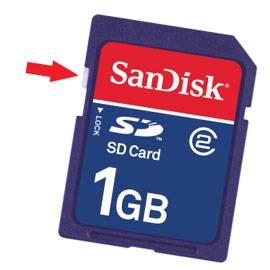
I know the best method is hardware-lock like this:

user posted image

But its very hard to find these days.
Well basically I want to save files into my flash drive and set it so that no changes is made to it.
Rampant autorun.inf and shortcut.ink viruses are running around my school and my student's computer, so its basically difficult to transfer important files and notes without getting infected.

If tried using DISKPART, but it only works to write-protect the flash drive on the same PC I executed the command. sad.gif

SOLUTION
QUOTE
To disable writing access to USB drives and make all USB drives has only read-only access, follow these steps:

Run Registry Editor (regedit).
Navigate to the following registry key:
HKEY_LOCAL_MACHINE\SYSTEM\CurrentControlSet\Control

Create a New Key named as StorageDevicePolicies.
Highlight StorageDevicePolicies, and then create a New DWORD (32-bit) Value named as WriteProtect.
Double click on WriteProtect, and set its value data to 1.
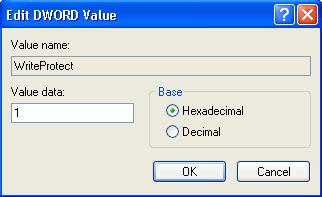
user posted image

Once set, all users on the computer is now blocked and prevented from copying, transferring or writing any files, documents and data to the USB disk drives, without the need to restart or reboot computer. Any attempt to download or copy files to USB drive will return the following error message:
user posted image
To revert and remove the blocked write access to USB drivers, just delete the StorageDevicePolicies registry key, or delete the WriteProtect registry entry, or change the value data for WriteProtect to 0.


This post has been edited by funnyTONE: Apr 7 2014, 10:46 PM
TSfunnyTONE
post Apr 3 2014, 11:39 AM

certified /k/ oldfag
*******
Senior Member
2,949 posts

Joined: Apr 2006


QUOTE(WebWalker @ Apr 3 2014, 11:14 AM)
Get a memory card reader and get a SD card.

SD card has the lock beside which you can lock and unlock your card.

user posted image
*
Thanks.
That's a good idea which I might consider.
But a lot of my students uses flash drives for their assignment.
I don't think all of them can afford to buy another SD card and reader.
Even with the hardware-lock on SD card, there must be a software-side that tells the computer that the SD card is write protected.

user posted image

I plugged in my portable broadband modem and it shows CDFS format.
Is this possible to do on a normal flash drive?
TSfunnyTONE
post Apr 3 2014, 12:25 PM

certified /k/ oldfag
*******
Senior Member
2,949 posts

Joined: Apr 2006


QUOTE(WebWalker @ Apr 3 2014, 11:53 AM)
You modem might having files (installer) in ROM which in un-writable format.

Flash lock usually is hardware lock, I never see any software lock (maybe someone here might have see one)
*
Quick readup tells me that CDFS is similar to optical storage, a format that most often used for CD-Roms and audio CDs.
If that's the case, I suspect one way to approach is via image and 'burn' to the flash drive. My gut tells me its going to require a long process and may need linux and several other third party apps. sad.gif

What I meant about software side is that, when SD cards physically set to WRITE-PROTECT, how does the system reads the switch and translate it as READ-ONLY. What instruction is used when write-protect the SD card so that I may try to emulate the same process via code (software)?

Like the old floppy disk, we can simply tape over the wrote-protect tab on the disk and the floppy drive will read it as read-only. But with flash drives, only the usb stick is inserted to the port, not the whole portion. Which leads to my curiosity to how the system read write-protect mode on flash drives that has these physical switch on them.

I'm also curious to why there is lesser flash drives with write-protect switch on them these days. It makes flash-drive unreliable despite its reducing cost.
TSfunnyTONE
post Apr 3 2014, 10:52 PM

certified /k/ oldfag
*******
Senior Member
2,949 posts

Joined: Apr 2006


I'm going to try a certain program tomorrow and try to create a CDFS partition in my flash drive.
In the meantime, I'd appreciate if anyone else could give an input on the matter.
Any suggestions are welcomed. smile.gif
TSfunnyTONE
post Apr 5 2014, 03:02 PM

certified /k/ oldfag
*******
Senior Member
2,949 posts

Joined: Apr 2006


QUOTE(netmatrix @ Apr 4 2014, 01:08 AM)
Most USB drives comes with its own secure encrypting software. Even the not so famous JetFlash drive has it. So you do not need to have physical write protect switch on the drive anymore. Some of them are ANSI rated which means very secure. There was this software used to test the encrypted data, but i forgot where i d/l and kept it.

You should try that. It actually creates a single encrypted file. You run the program that u used to encrypt it, it expands the file and you have a virtual file explorer folder where you can create, copy and paste between windows. After u close that program the folders that you worked with is automatically encrypted back into the file again.
*
But does it prevent my flash drive from being written?
My main objective is to create a flash drive as a read-only so that whatever files are in it stays intact, and at the same time prevent virus from hitching a ride in my flash drive.
You're suggesting somewhere along the line of protecting files via encrypt/decrypt and using a third party program.
Kinda beat the purpose of portability when I need to install the program whenever I need to use the flash drive on a different computer.
TSfunnyTONE
post Apr 6 2014, 11:37 AM

certified /k/ oldfag
*******
Senior Member
2,949 posts

Joined: Apr 2006


QUOTE(netmatrix @ Apr 6 2014, 10:27 AM)
I guess you have never worked in a secure environment before. If you have drives that you can take here and there everywhere you cannot expect a little switch is going to secure your data. What if you forgot to WP the drive? And when you overwrite the file you aren't gonna get the old one back.

There are overpriced add ons you can buy. http://www.amazon.com/WiebeTech-31300-0192...s/dp/B002DH1P0W

And i assume you want to create a drive where it allows the data to go one way and not the other? Much like those broadband modem, HP printers with built in flash memory installers? Make a CD or DVD.

Or you could try these software. (No i did not try them as i have no spare ones to do it)

http://forum.raymond.cc/threads/protect-an...read-only.9201/

http://www.gaijin.at/en/dlusbwp.php

Some guy suggested this,
There are way many more if you search. If i put them all here, i think greatest hits compilation.  laugh.gif  laugh.gif
*
To answer your question, no I haven't worked in a secure environment before. In my school, everything is haven for viruses and trojans. Its always been common sense as my best anti-virus, except when it involves my student's work.
And yes, that's exactly what I aim to achieve; a way that only let my flash drive to show files as read-only. Making a CD isn't feasible because it'll mean a lot of CD's and DVD's to use after a while. For now, my simplest goal is probably trying to fool the system to think my flash drive works as a CD drive, just like your example of broadband modem.

I'll definitely check out your suggestions though, since you've eventually understood my intention...I'm really happy. blush.gif
That windows 8 method looks too easy, but it might work.

As for the search, I've actually searched a lot from google and other forums, but didn't really produce anything concrete, hence why I tried lyn too. Sometimes, the solution is rather simple, but I might end up going to furthest route going about it.

Anyway, I truly appreciate your feedback. Gives me a lot of ways to try this week. notworthy.gif
TSfunnyTONE
post Apr 7 2014, 10:41 PM

certified /k/ oldfag
*******
Senior Member
2,949 posts

Joined: Apr 2006


Finally I've found a SOLUTION!
Well, its not exactly what I was looking for, but its a great alternative to achieve a secure flash drive in any system without needing a third party program install.

Basically, I just need to edit the registry. So a prerequisite to this method is to have admin access before I can proceed.

QUOTE
To disable writing access to USB drives and make all USB drives has only read-only access, follow these steps:

Run Registry Editor (regedit).
Navigate to the following registry key:
HKEY_LOCAL_MACHINE\SYSTEM\CurrentControlSet\Control

Create a New Key named as StorageDevicePolicies.
Highlight StorageDevicePolicies, and then create a New DWORD (32-bit) Value named as WriteProtect.
Double click on WriteProtect, and set its value data to 1.
user posted image

Once set, all users on the computer is now blocked and prevented from copying, transferring or writing any files, documents and data to the USB disk drives, without the need to restart or reboot computer. Any attempt to download or copy files to USB drive will return the following error message:
user posted image
To revert and remove the blocked write access to USB drivers, just delete the StorageDevicePolicies registry key, or delete the WriteProtect registry entry, or change the value data for WriteProtect to 0.


Its rather powerful and risky method that write protect ALL external drives once activated. I need to be sure to disable the registry key after I'm done, or otherwise the system can't write or edit files in any external drives.

I've tested this one Windows 8, and I'm pretty sure it'll work for previous Windows version since this method been around for years. rclxms.gif

Lets just hope this method will better help to reduce the risk of USB viruses.
TSfunnyTONE
post Apr 8 2014, 12:16 PM

certified /k/ oldfag
*******
Senior Member
2,949 posts

Joined: Apr 2006


Found another alternative.
This time using Group Policy editor in Windows.

- Windows Run dialog box
- type "Gpedit.msc"
-Browse to this

user posted image

This setting allows external drives to be write-protected on the fly, so long you know how to disable the functions again via the same method.
Requires admin account. smile.gif


Change to:
| Lo-Fi Version
0.0122sec    0.55    6 queries    GZIP Disabled
Time is now: 20th December 2025 - 12:11 PM