

Hey, gamers.
Does casing really affects the temperature?
Worried about my cpu temperature.
Any advice?
Thanks
Does casing affects temperature?
Does casing affects temperature?
|
|
 Mar 30 2014, 12:03 AM, updated 12y ago Mar 30 2014, 12:03 AM, updated 12y ago
Return to original view | Post
#1
|
 
Junior Member
152 posts Joined: Feb 2014 
|
Hey, gamers.
Does casing really affects the temperature? Worried about my cpu temperature. Any advice? Thanks |
|
|
|
|
|
Apr 5 2014, 12:47 AM
Return to original view | Post
#2
|
|
Junior Member
152 posts Joined: Feb 2014
|
QUOTE(drivenheat @ Apr 5 2014, 12:30 AM) u have also think to get custom cpu cooler.. What brand of RAM do you recommend? Because I used to do lots of video editing and gaming but my RAM seems to get spoilt by the heat. |
|
|
Apr 11 2014, 12:49 AM
Return to original view | Post
#3
|
|
Junior Member
152 posts Joined: Feb 2014
|
QUOTE(drivenheat @ Apr 5 2014, 12:59 AM) what is ur ram spec u r using rite now? I'm using a 8 gb DDR3 RAM 1333MHzfor fast multi tasking go for higher speed than 1600MHz.. for higher programming load go for high capacity.. what processor model? and what gpu u are using now? the right way to check before u made decision.. i7 930 processor (2.8GHz) 1 gb ATI Radeon HD 5670 This post has been edited by StephenNg95: Apr 11 2014, 12:50 AM |
|
|
Apr 11 2014, 12:57 AM
Return to original view | Post
#4
|
|
Junior Member
152 posts Joined: Feb 2014
|
QUOTE(lthock @ Apr 5 2014, 02:17 PM) yup casing does affects ur temperature, get those tower casing if space/mobilty is not an isu Hey. Thanks for replying. Does ram cooler really make a difference? Is it expensive?get a custom cpu cooler, even those cheap CM cooler with 120mm fans will be better than intel stock cooler there are few types of RAM cooler too u know |
|
|
Apr 13 2014, 10:11 PM
Return to original view | Post
#5
|
|
Junior Member
152 posts Joined: Feb 2014
|
QUOTE(drivenheat @ Apr 12 2014, 06:27 PM)  1600mhz 3ple chennel feel the different.. Hahaha.... Still new to all this modification stuff. |
|
|
Apr 14 2014, 09:26 PM
Return to original view | Post
#6
|
|
Junior Member
152 posts Joined: Feb 2014
|
QUOTE(drivenheat @ Apr 13 2014, 11:55 PM) MHz is the speed of transfer in a second, since u r using 1366 processor, the ram can run in triple channel smoother than dual channel.. dual channel smoother than single channel.. I see....1600mhz speed transfer rate 12.8 GB/s in a single way. 1333mhz will be 10.667 GB/s in a single way.. imagine 1600mhz run in triple way.. how to make it triple channel? buy 3 unit ram, same speed same spec, install it on same colour RAM slot.. your motherboard should have 6 slot with 2 different colour. A bit worried about my temperature.... Attached thumbnail(s) 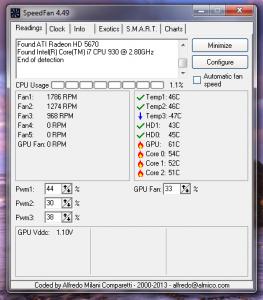
|
|
|
|
|
|
Apr 26 2014, 11:22 AM
Return to original view | Post
#7
|
|
Junior Member
152 posts Joined: Feb 2014
|
Well this is my standard Dell casing. It's has 3 fans but it sucks.
Based on the last post. My overall temperature are ok. But the graphic card and ram temperature worries me. And somehow when aI play STEAM games ( COD, TF2, Total War.) somehow my ram or graphic card will be faulty. Any of you heard this problem before This post has been edited by StephenNg95: Apr 26 2014, 09:32 PM Attached thumbnail(s) 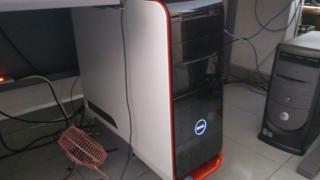
|
|
|
May 2 2014, 02:20 PM
Return to original view | Post
#8
|
|
Junior Member
152 posts Joined: Feb 2014
|
QUOTE(drivenheat @ May 2 2014, 01:27 PM) this reading while gaming or idle? Thanks for replying.if u want to use custom air cooler maybe can fit, but liquid cooler have to verify the location, space and size.. advice u to do some cleaning on gpu heatsink, change the thermal paste and new thermal pad.. The reading is idle. It's consider high, right? |
|
|
May 2 2014, 05:03 PM
Return to original view | Post
#9
|
|
Junior Member
152 posts Joined: Feb 2014
|
QUOTE(drivenheat @ May 2 2014, 02:27 PM) yeah consider high, upgrade your gpu to newer model.. Such as? Or can you recommend a build PC? I think I might get a mid tower. |
|
|
May 2 2014, 07:03 PM
Return to original view | Post
#10
|
|
Junior Member
152 posts Joined: Feb 2014
|
QUOTE(drivenheat @ May 2 2014, 05:53 PM) sure can but on pm, here i cant make suggestion or go to this section https://forum.lowyat.net/HardwareQuestions&Answers Thanks. I'll PM you when I'm going to upgrade it.let me know how much is your budget? Is RM1500-RM1800 enough ? |
|
|
May 2 2014, 10:04 PM
Return to original view | Post
#11
|
|
Junior Member
152 posts Joined: Feb 2014
|
QUOTE(drivenheat @ May 2 2014, 08:58 PM) upgrading with that budget should be enough.. if u want to change, u wont get better spec than u r using now.. I see..... Is a motherboard expensive? |
| Change to: |  0.0209sec 0.0209sec
 0.16 0.16
 7 queries 7 queries
 GZIP Disabled GZIP Disabled
Time is now: 2nd December 2025 - 04:19 AM |
 Quote
Quote