Outline ·
[ Standard ] ·
Linear+
[WTA]Case fans and noise, Kinda noisy IMO
|
TSLightningChan
|
 Mar 6 2014, 04:33 AM, updated 12y ago Mar 6 2014, 04:33 AM, updated 12y ago
|

|
Hi casing and cooling sifus and masters.. I have a question.. Recently I bought a SilverStone RL-01 case. The case came with a 120mm Silverstone FN121 1200RPM fan mounted to the rear but I moved the fan to the bottom of the case to suck air out. Then I fitted 2x CoolerMaster 120mm SickleFlow 2000RPM fans at the top to suck air in. I figure sucking air in from the top will be cleaner and less dusty as the bottom of the case always collects dust. The PC turn out to be quite noisy when turned on. So my question is, are there any methods to make the fan more silent? Maybe by using WD-40 or Silicone Grease Spray? Reference SilverStone RL-01 - http://www.silverstonetek.com/product.php?pid=329SilverStone FN212 Fan - http://www.silverstonetek.com/product.php?scase=&pid=349CoolerMaster SickleFlow Fan - http://www.coolermaster-usa.com/category.p...name=SickleFlowThis post has been edited by LightningChan: Mar 6 2014, 04:34 AM |
|
|
|
|
|
wira_laju
|
Mar 6 2014, 07:47 AM
|
Getting Started

|
im use simple solution.use fan controller.100% in hot day,60% at night.my aerocool shark more noisy than ur fan.
|
|
|
|
|
|
kherel77
|
Mar 6 2014, 09:11 AM
|
|
|
At 2000rpm, any fan will make loud noise especially with honeycomb intake hole. Plus, sleeve bearing fan is not suitable to mount vertically as their lubricant for bearing is not effective. Try other lower speed fan as AC F12 or Bitfenix Spectre + fan rubber gasket to reduce the noise. If possible, make the intake hole bigger...
|
|
|
|
|
|
ronron
|
Mar 6 2014, 10:23 AM
|
|
|
if u want less noice, change the CoolerMaster SickleFlow Fan to either bitfenix spectre or enermax t.b. silence.
I have used CoolerMaster SickleFlow Fan before,the blowing noice is loud, so I changed to bitfenix spectre.
|
|
|
|
|
|
TSLightningChan
|
Mar 6 2014, 09:06 PM
|
|
|
QUOTE(wira_laju @ Mar 6 2014, 07:47 AM) im use simple solution.use fan controller.100% in hot day,60% at night.my aerocool shark more noisy than ur fan. fan controller only works if your can is connected to the mobo right? Sorry me noobie here  |
|
|
|
|
|
TSLightningChan
|
Mar 6 2014, 09:09 PM
|
|
|
QUOTE(kherel77 @ Mar 6 2014, 09:11 AM) At 2000rpm, any fan will make loud noise especially with honeycomb intake hole. Plus, sleeve bearing fan is not suitable to mount vertically as their lubricant for bearing is not effective. Try other lower speed fan as AC F12 or Bitfenix Spectre + fan rubber gasket to reduce the noise. If possible, make the intake hole bigger... Thanks for your advise and recommendation bro..  Looks like I'll be fan shopping this weekend.. Any shops at LYP or other IT malls you would recommend? I usually go to Sri Computer at LYP to find fans and other misc items..  |
|
|
|
|
|
ntw
|
Mar 6 2014, 10:35 PM
|
|
|
QUOTE(LightningChan @ Mar 6 2014, 04:33 AM) Hi casing and cooling sifus and masters.. I have a question.. Recently I bought a SilverStone RL-01 case. The case came with a 120mm Silverstone FN121 1200RPM fan mounted to the rear but I moved the fan to the bottom of the case to suck air out. Then I fitted 2x CoolerMaster 120mm SickleFlow 2000RPM fans at the top to suck air in. I figure sucking air in from the top will be cleaner and less dusty as the bottom of the case always collects dust. The PC turn out to be quite noisy when turned on. So my question is, are there any methods to make the fan more silent? Maybe by using WD-40 or Silicone Grease Spray? Reference SilverStone RL-01 - http://www.silverstonetek.com/product.php?pid=329SilverStone FN212 Fan - http://www.silverstonetek.com/product.php?scase=&pid=349CoolerMaster SickleFlow Fan - http://www.coolermaster-usa.com/category.p...name=SickleFlowi recommend u to setup the top fan to exhaust and the ditch the bottom fan if you worry about sucking in dust from under the case. reason being the top fan is nearer to your CPU area and can effectively suck those heat out from the case rather than pushing hot air from the CPU into the casing. btw, what motherboard r u using? u can just control the speed of the fan using a software called Speedfan. iinm, once u tune down the Sickleflow to around 900-1200rpm, the noise would be much more acceptable. |
|
|
|
|
|
TSLightningChan
|
Mar 6 2014, 11:34 PM
|
|
|
QUOTE(ntw @ Mar 6 2014, 10:35 PM) i recommend u to setup the top fan to exhaust and the ditch the bottom fan if you worry about sucking in dust from under the case. reason being the top fan is nearer to your CPU area and can effectively suck those heat out from the case rather than pushing hot air from the CPU into the casing. btw, what motherboard r u using? u can just control the speed of the fan using a software called Speedfan. iinm, once u tune down the Sickleflow to around 900-1200rpm, the noise would be much more acceptable. Hmm.. yeah.. makes sense to turn the fan on top to suck air out instead..  I'm using a Gigabyte B75M-D3V motherboard. I got a CoolerMaster Hyper 101 CPU heat sink to replace my stock Intel heat sink because I accidentally broke 1 of the pin when reassembling from dust cleaning one day . I've set up 2 fans on the CM Hyper 101 so both the CPU and SYS fan header on the motherboard are being used up. |
|
|
|
|
|
ntw
|
Mar 6 2014, 11:44 PM
|
|
|
QUOTE(LightningChan @ Mar 6 2014, 11:34 PM) Hmm.. yeah.. makes sense to turn the fan on top to suck air out instead.. I'm using a Gigabyte B75M-D3V motherboard. I got a CoolerMaster Hyper 101 CPU heat sink to replace my stock Intel heat sink because I accidentally broke 1 of the pin when reassembling from dust cleaning one day . I've set up 2 fans on the CM Hyper 101 so both the CPU and SYS fan header on the motherboard are being used up. u will need some fan splitter which u can customize from electronic shop or get it cheap from lowyat  using fan splitter u can connect the two fans on your CM Hyper 101 to the CPU_FAN socket. and the remaining fans connected to the SYS_FAN using another fan splitter. |
|
|
|
|
|
TSLightningChan
|
Mar 6 2014, 11:45 PM
|
|
|
QUOTE(ntw @ Mar 6 2014, 11:44 PM) u will need some fan splitter which u can customize from electronic shop or get it cheap from lowyat using fan splitter u can connect the two fans on your CM Hyper 101 to the CPU_FAN socket. and the remaining fans connected to the SYS_FAN using another fan splitter. Ah.. I see.. I am connecting the fans directly to the PSU now BTW, powering 3 fans from 1 header which is designed to power 1 wont harm the motherboard? |
|
|
|
|
|
ntw
|
Mar 6 2014, 11:50 PM
|
|
|
QUOTE(LightningChan @ Mar 6 2014, 11:45 PM) Ah.. I see.. I am connecting the fans directly to the PSU now BTW, powering 3 fans from 1 header which is designed to power 1 wont harm the motherboard? connected via the molex header? that means your fans will be running at full 12v and full rpm. that explains the loud noise. im using these to connect to 4 Spectre Pros on 1 fan header, so far no problem. i automate the fan speed using Speedfan to increase the rpm on these fan to 90% only when the CPU temperature >55c, normal times the fan is only running at 30% of its full speed. so its gonna be REALLY quiet |
|
|
|
|
|
TSLightningChan
|
Mar 6 2014, 11:51 PM
|
|
|
QUOTE(ntw @ Mar 6 2014, 11:50 PM) connected via the molex header? that means your fans will be running at full 12v and full rpm. that explains the loud noise. im using these to connect to 4 Spectre Pros on 1 fan header, so far no problem. i automate the fan speed using Speedfan to increase the rpm on these fan to 90% only when the CPU temperature >55c, normal times the fan is only running at 30% of its full speed. so its gonna be REALLY quiet Yeah.. directly to the PSU.. haha  Any idea where to find the fan splitter in LYP? I'm guessing Sri Computers since they have the most misc items for sale.. |
|
|
|
|
|
ntw
|
Mar 6 2014, 11:57 PM
|
|
|
QUOTE(LightningChan @ Mar 6 2014, 11:51 PM) Yeah.. directly to the PSU.. haha Any idea where to find the fan splitter in LYP? I'm guessing Sri Computers since they have the most misc items for sale.. i think u can still find some in garage sale by APES, i bought mine from them, iinm price around rm25 (Phobya 4pin pwm to 3x3pin). im not really sure where u can get one in LYP, Sri Comp might be a good place to start.  |
|
|
|
|
|
TSLightningChan
|
Mar 6 2014, 11:58 PM
|
|
|
QUOTE(ntw @ Mar 6 2014, 11:57 PM) i think u can still find some in garage sale by APES, i bought mine from them, iinm price around rm25 (Phobya 4pin pwm to 3x3pin). im not really sure where u can get one in LYP, Sri Comp might be a good place to start. Thanks for the advise and recommendation bro.. Will try the splitter and post results soon |
|
|
|
|
|
ntw
|
Mar 7 2014, 12:00 AM
|
|
|
QUOTE(LightningChan @ Mar 6 2014, 11:58 PM) Thanks for the advise and recommendation bro.. Will try the splitter and post results soon good luck dude  if u need help with setting up the Speedfan u can pm me |
|
|
|
|
|
TSLightningChan
|
Mar 9 2014, 04:26 PM
|
|
|
Anyone know any shop that sells fan splitter cable or fan controller?
I went to every single All IT outlet in Klang Valley, Went to nearly all shops in PJ Digital Mall, Nearly all shops in LYP even Sri Computer all don't have.
|
|
|
|
|
|
TSLightningChan
|
Mar 9 2014, 07:46 PM
|
|
|
I did some changes and added 2 more fans. Exhaust : 2x 120mm Sickle Flow on top 1x 120mm Sickle Flow on rear Intake : 1x 120mm SilverStone FN-121 from the bottom 1x 120mm SickleFlow from the front Turned the PSU over so the fan faces the bottom of the case to suck clean cool air in instead of hot air from the casing(previously). Checked the temperature in HW Monitor and noticed a drop of roughly 5 degrees or so.. 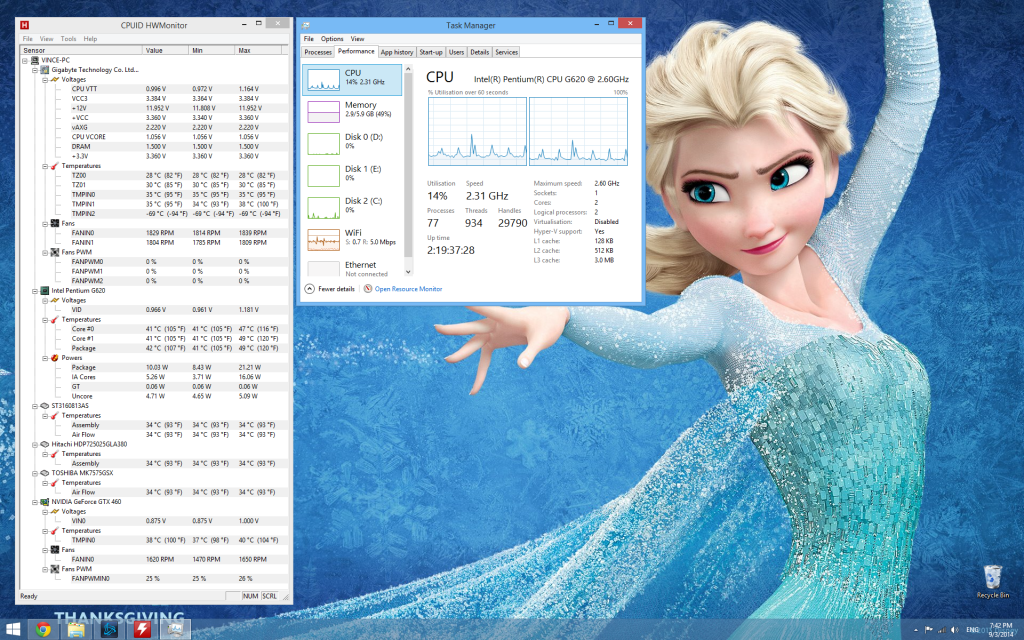 Is my temperature normal for the amount of processor usage shown in the task manager? Seems a little hot to me.. |
|
|
|
|
|
ntw
|
Mar 10 2014, 02:13 AM
|
|
|
given the weather nowadays, it is normal for your processor to be idling at an avg of 45deg
and i don't think the Elsa wallpaper is gonna help much in cooling ur pc Xp
|
|
|
|
|
|
TSLightningChan
|
Mar 10 2014, 03:02 AM
|
|
|
QUOTE(ntw @ Mar 10 2014, 02:13 AM) given the weather nowadays, it is normal for your processor to be idling at an avg of 45deg and i don't think the Elsa wallpaper is gonna help much in cooling ur pc XpElsa Wallpaper is to cool me down.. xD Btw, I'm getting a NZXT SENTRY MESH FAN CONTROLLER from this lingloong guy.. |
|
|
|
|
|
ntw
|
Mar 10 2014, 07:14 AM
|
|
|
Cant find the splitter cable?
|
|
|
|
|



 Quote
Quote





 0.0181sec
 1.30
1.30
 5 queries
 GZIP Disabled