It's not the aluminium button I'm concerned about; it's the spring and rubber seal beneath it. With my locksceen widget and tap to wake, I will not need to use the power button anymore.
So far I've installed smart call handling, calendar, messaging, sketch, notes and clock from the Z2 port with no issues. I like the smart call handling very much.
I got a question though. How can I replace my stock Chinese font without changing my English font? I tried one of those app on the play store. It replaced my stock English fonts too.
dont worry, we will get it on the z1, official or XDA way xD
Guys i wanna ask, how much time does it take for you to full charge the phone using the Magnet cable? i bought the cable only and sometimes it charge fast, sometime it take 5 hours or more O.o maybe the cable is not original?
those cable quality is not good, charging very slow, I throw it away & using charging dock now. using dock charging around 2-3 hrs charging to 100% I remember some user burn the mobo using those charging cable? Better use the dock, although expansive but worth it.
This post has been edited by cheebc: Mar 10 2014, 10:41 AM
the only bad thing about using a dock is that it cannot be used together with phone casing. constant removing and installing might pose scratching problem onto the phone :/
just get a case which could support charging dock, or mod the dock
Anyone heard before nilkin 9h tempered screen protector? Is it good? I am currently using the one with self repairing, still get scratched also
I'm now using Nillkin glass now, so far so good, no scratch or whatsoever at all, prolly because I didn't put my phone together with coins/keys. I always put my phone in the pocket with nothing else. And I'm using full cover casing as well, double protection
This post has been edited by cheebc: Mar 13 2014, 06:11 PM
but if you drop your phone...will this case protect ?
most slim cases have very little protection against dropping, those cases are design to protect against scratches, not against impact/shock. U have to use those thick rubber case like Ballistic etc to protect against dropping.
This post has been edited by cheebc: Mar 17 2014, 10:31 AM
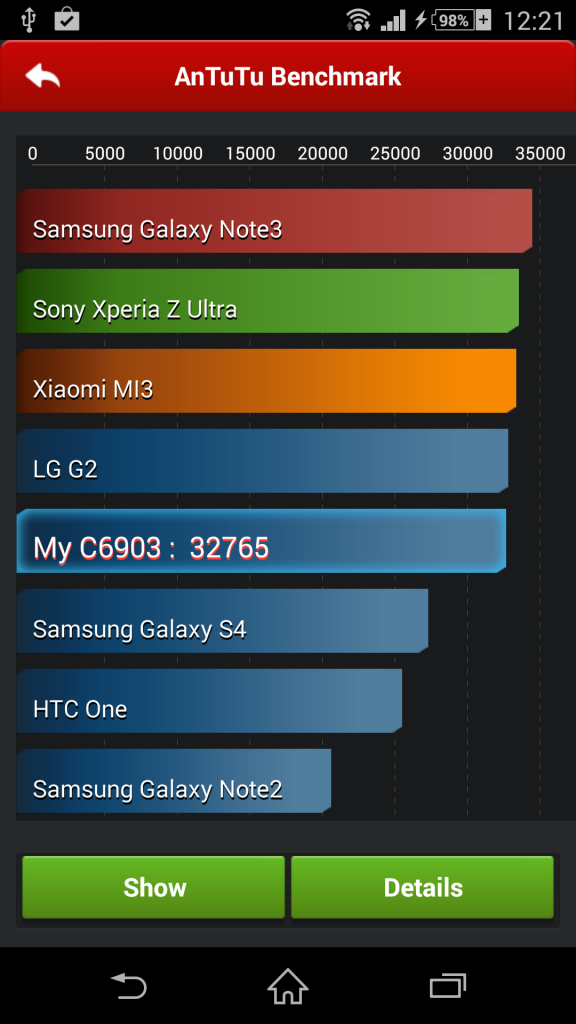
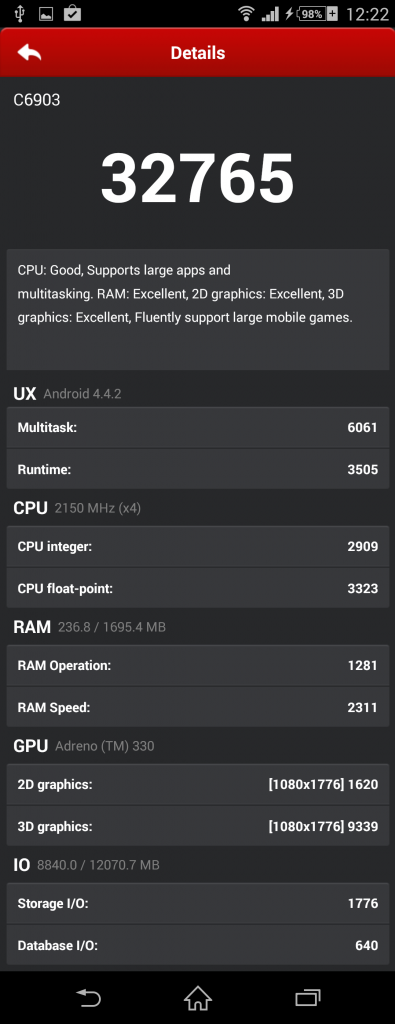
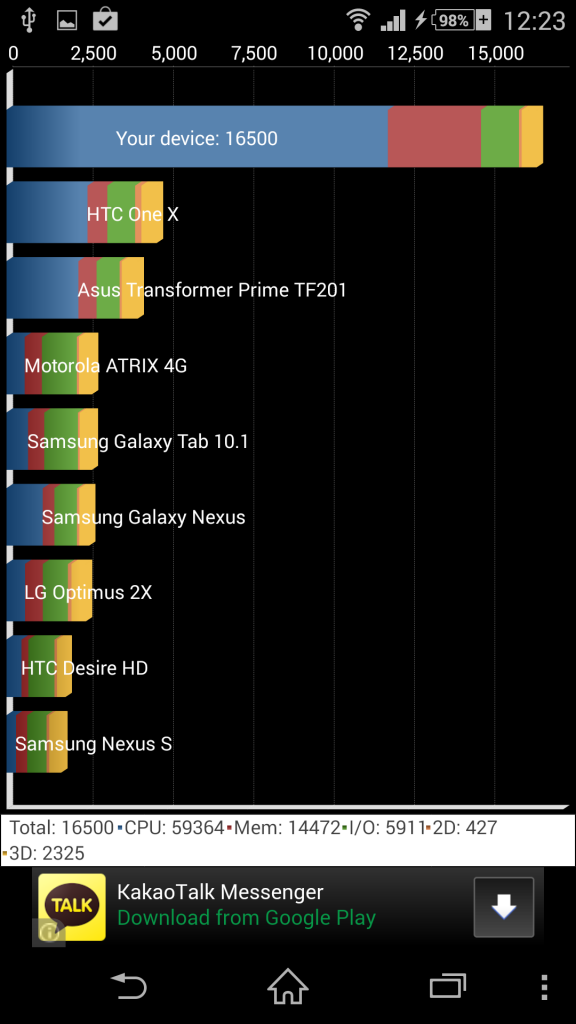
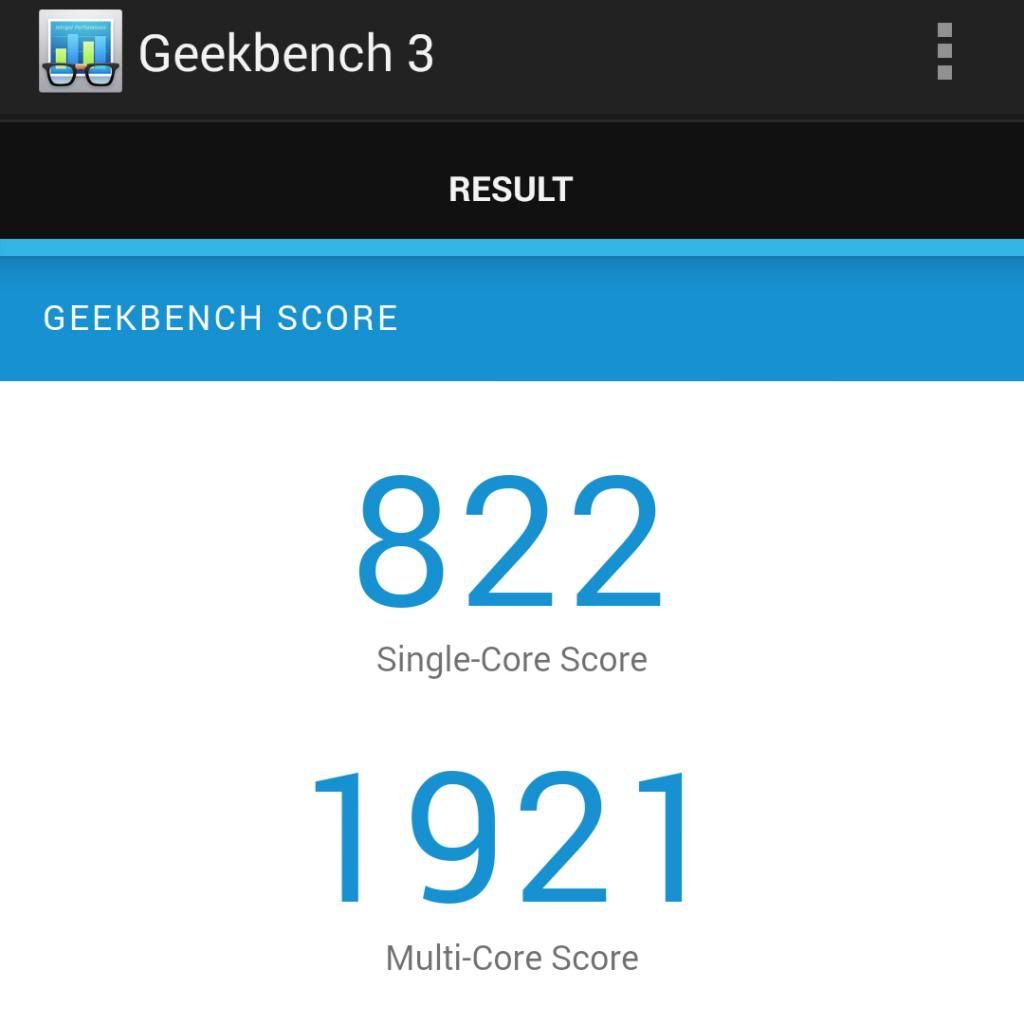
Just in case if there's anyone wondering. My results are all untouched. No tweaking like rooting and all. No, I have done nothing to tweak here and there. Running the latest update, Android 4.4.2. Antutu:
» Click to show Spoiler - click again to hide... «
my Antutu score also seems lower than 4.3, everything stock also. I can get around 35k on 4.3, now only can get 33k, memory usage doesnt seem to have any different from 4.3, quite disappoint cos google claim that kitkat is more resource & memory optimized
QUOTE(s3n1sh1 @ Mar 21 2014, 12:44 PM)
updated to kitkat 4.4.2~ i like the previous notification bar better.. looks more classy~ anyway, i din see no background defocus feature on the camera..i thot it's available on this firmware release? any1?
background defocus is not included, u can dl the apk from xperia blog
This post has been edited by cheebc: Mar 21 2014, 06:42 PM
transparent status and nav bar (love it! makes the screen looks bigger) battery indicator and battery stamina mode icon changed. for me i like it as it save more space in the status bar notification bar changed. may need some time to get use to it new themes louder ring tone. so far my case only. dunno why some others is softer some games will be displayed in full screen. the nav bar will be hidden
got some other settings also. but to me not so important
not only games, many apps have full screen mode as well, like movie player & photo viewer
anyone noticed that the text in web browser now do not automatically rewrap to fit the screen when u zoom in?
found out this is an issue with android 4.4 (not sony's fault but google). text reflow function in most browser will not work in kitkat anymore. apparently google removed this support from kitkat onwards
so far 2 "issues" with kitkat 4.4 (google's fault). why la google remove all these neat features??? 1. text reflow in web browser 2. write to SDcard using 3rd party file manager apps
not only file manager apps, all 3rd party apps will fail to write on SDcard. even sony's privilege movie can no longer save to SD card. U can only write SD card with file commander
can someone check on the box the model number? The example given in web is something like this: KDL-40EX520 MY1
I believe, there is some numbers/alphabet other than C6903 ..
The only serial no for any mobile phone is the IMEI no.
if u want to register xperia phone online, sadly M'sia's Sony webside do not support registration for smartphones. The s/n required for the webside is for other product, not for smartphone.
may i know can one register the warranty later without a receipt? read the terms of their warranty it said with a valid warranty OR a valid proof of purchase
I register online without providing any proof / receipt. I just provide the IMEI & warranty card no. No sure if they want to check ur receipt when u send ur phone to service center.
thks mate. So we cant register online? How to claim for wrranry if we lost the receipt?
we can register online, it just that u have to contact Sony Mobile http://www.sonymobile.com/my/support/contact-us/ & tell them u want to register ur phone, provide the necessary data & they will register for u.
new owner of z1 here. Just want to check if it is possible to stream the FM radio to other devices. Scenario is that one colleague of mine wants to listen to FM radio, however her device do not have a built in FM radio thus her only option are the internet radio stations which will incur data charges.
did any1 successfully installed camera apps ported from Z2 (portrait retouch, 4k video, timeshift) ? after installing the them, whenever I try to open it crash.
edit: after several tries both my cameras mulfuction, damn, after flashing back to stock +factory reset, main camera fix but front camera still cannot function. DONT TRY IT.
This post has been edited by cheebc: Apr 27 2014, 09:27 AM
yes i'm rooted, upgraded to .757, locked bootloader, try to install on odex & deodex rom, all cannot. and guess what? after several attempt on installing & running the portrait retouch & 4k video, both of my camera become malfunctioned! it always show error "No camera detect" whenever I start the camera, even in superior auto or manual mode. Try flashing back to prev stock rom (.257, .136, .290) + multiple factory resets, now my main camera is back to normal, but front camera still not functioning. so DO NOT TRY the portrait retouch & super video camera, the only working camera apps is background defocus, the rest dont install them!
Vroot with build library 140618 still fail to root 4.4, although it claim that it can root z1 on 4.4. to try it out I purposely flash my phone back to stock then upgrade to .757 & try to root with Vroot, but fail after several attempt
edit: had tried to flash other version .681 & .757 is not rootable using vroot, only .534 & .257 is rootable.
P.S. damn xiaomi selling mi3 for only RM769, they really wanna spoil the market
This post has been edited by cheebc: Jun 18 2014, 06:49 PM


 Mar 6 2014, 08:03 PM


 Quote
Quote


 looks more classy~ anyway, i din see no background defocus feature on the camera..i thot it's available on this firmware release? any1?


 0.0385sec
 0.49
0.49
 7 queries
 GZIP Disabled