Welcome Guest ( Log In | Register )

Bump Topic Topic Closed RSS Feed

Outline · [ Standard ] · Linear+

 NVIDIA GeForce Community V13

views
     
shikimori
post Oct 28 2014, 05:01 PM

Getting Started
**
Junior Member
236 posts

Joined: Jul 2007
From: Penang


so sad today finish work early and went to hunt for gtx 970 only to find out it is out of stock everywhere .

Instead of getting new shiny graphics card I had to settled down with free headset and water bottle

user posted image

oh well , 1 week wait pre-order is not that long for gigabyte gtx 970 g1 gaming .

Erm , is there a lot of rich people in malaysia until this card run out or just normal ? sweat.gif
shikimori
post Oct 28 2014, 05:55 PM

Getting Started
**
Junior Member
236 posts

Joined: Jul 2007
From: Penang


QUOTE(pot @ Oct 28 2014, 05:04 PM)
Asus Strix GTX970 today shipment tomorrow can arrive! =D
Huge improvement gain from Intel HD4000 to GTX970 4GB  tongue.gif
Hope dun disappointed me.  blush.gif
*
nice bro , please OC and do short review + benchies rclxms.gif .

I had a choice between asus strix (2 days leadtime) and gigabyte gtx 970 g1 (1 Week eta). Ended up choosing
for gigabyte due to freeebies and OC ability

QUOTE(ongweiping @ Oct 28 2014, 05:20 PM)
The price point is ok for most ppl, erm, i should say single ppl with not much commitment. Haha
Congratz on the upgrade!  drool.gif
*
If its at rm 1.1k I would say its bang for buck but rm 1.5k not so hahaha . But I notice a lot of people making a jump for upgrade from older graphic card .

For me its .. kinda routine for every 7 months hahaha . From red team to green team , to red team to green team. But dayum this gtx 970 if OC can compete against stock gtx 980 thumbup.gif


shikimori
post Oct 29 2014, 12:11 PM

Getting Started
**
Junior Member
236 posts

Joined: Jul 2007
From: Penang


QUOTE(Unseen83 @ Oct 29 2014, 10:00 AM)
eh rich ppl.. hmm are u talking about urself ? by way ur already using R9 290... (if reference gpu  sure GTX 970 performance 5%+/ but if TriX/vaporX performance kinda same) unless you worried electric bills ?? smile.gif
*
Where got rich la .. I had to sell my r9 290 to fund for the gtx970.
Lazy to update signature .

I know its not much of a gain in terms of perfomance but I still have plan to get a gsync monitor once year end bonus is out lol.
shikimori
post Oct 30 2014, 09:43 AM

Getting Started
**
Junior Member
236 posts

Joined: Jul 2007
From: Penang


QUOTE(Unseen83 @ Oct 29 2014, 01:07 PM)
eh so u gonna  sell ur 29 inch to go for  g-sync lcd hmm oh go for 4K+ g sync .
*
No la ,wont sell cuz by right cant sell epp monitor to 3rdparty .

But gsync monitor got limited choice . Between acer's and asus rog swift . Better save money and become ifag again instead

Btw , I just realize gigabye got two rendition for the gtx970 windforce. One for the g1 gaming with backplate and slightly higher base clock . While the other version without backplate and slightly lower base clock.

shikimori
post Oct 31 2014, 10:14 PM

Getting Started
**
Junior Member
236 posts

Joined: Jul 2007
From: Penang


QUOTE(antaras @ Oct 31 2014, 03:01 PM)
Dafuq , this is going to be shortest period for me to use a GPU and resell .

Damn u nvidia for releasing 4gb and 8gb in close release date.
shikimori
post Nov 1 2014, 10:39 AM

Getting Started
**
Junior Member
236 posts

Joined: Jul 2007
From: Penang


QUOTE(alfiejr @ Nov 1 2014, 12:37 AM)
you bought the new maxwell card already?
*
Erm something like pre ordered paid full but eta next week
Gigabye gtx 970 g1 gaming zzz

QUOTE(DarkNite @ Nov 1 2014, 09:37 AM)
Damn I just bought the Gainward GTX970 and still have NOT arrived and now 8GB version! vmad.gif
*
Same here , wtf they are thinking . I hope the price difference is a lot else I'll be piss
shikimori
post Nov 2 2014, 03:04 PM

Getting Started
**
Junior Member
236 posts

Joined: Jul 2007
From: Penang


QUOTE(skylinelover @ Nov 2 2014, 03:00 PM)
happy birthday bday.gif  party.gif  cheers.gif  wish.gif
*
Thanks lol . I'm glad the 8gb variant not coming too soon else it diminished the gtx 970 4gb value

shikimori
post Nov 23 2014, 01:54 PM

Getting Started
**
Junior Member
236 posts

Joined: Jul 2007
From: Penang


QUOTE(pot @ Nov 23 2014, 12:01 PM)
Are my card normal? little coil whine only and open casing only spotted like mosquito volume.
All is stock speed. TQ
*
About normal I think , here is my score without overclocking .
Bare in mind G1 version clock speed is higher than standard gtx 970

Attached Image
shikimori
post Nov 23 2014, 05:53 PM

Getting Started
**
Junior Member
236 posts

Joined: Jul 2007
From: Penang


QUOTE(alfiejr @ Nov 23 2014, 05:23 PM)
Bought at Sri Computer(i know haha) but their pricing is slightly lower than other shop @ RM1190

If you wanna buy from Viewnet , it's RM1250 and they'll give you an AMD Never Settle game coupon  sweat.gif , they also sell galaxy cards which is quite interesting.

But for Asus Strix most of the shops that I've been to it's usually out of stock and I don't see any Gigabyte cards(gtx 970/980) anywhere either  hmm.gif

Performance wise it's very good, idle temp is around 32-38 degrees and at full load (benchmark with unigine heaven) , it ran up to 76 degrees which is acceptable to me  nod.gif
A of now, I don't notice any coil whine yet. hopefully it stays that way  wink.gif
*
huh you got amd endorsed game instead of nvidia inbed with ubisoft game ? Contemplating whether to get another gtx 970 for sli but my case cant fit another g1 gaming gtx 970 . Is it true that even if I used different brand gtx 970 it will use the lower clock card to match the speed ?

Will that be a much issue in terms of performance ? Looking where pc gaming is heading it looks like single card wont just cut it even if you are gaming at 1080p with all eye candy on . I'm a graphic whore and 60 fps addict

Combining either zotac gtx 970 , msi gtx 970 or asus strix 970 with a gtx g1 gaming 970 will that be a problem ?
shikimori
post Nov 25 2014, 04:29 AM

Getting Started
**
Junior Member
236 posts

Joined: Jul 2007
From: Penang


QUOTE(marfccy @ Nov 25 2014, 03:19 AM)
little to no bottleneck, my i5 2500 still isnt even struggling for most games

unless you play Battlefield 4, Watch Dogs, Assassin's Creed Unity, you dont really need the latest up to date CPU
*
Even my shitty i7 2600k doesnt seems to be using much usage when playing new games . I just don't see the point upgrading to newer cpu unless doing video editting , compression and any other cpu intensive apps
shikimori
post Nov 25 2014, 05:36 PM

Getting Started
**
Junior Member
236 posts

Joined: Jul 2007
From: Penang


QUOTE(SSJBen @ Nov 25 2014, 04:53 AM)
"Tahan" is a subjective word. An 8800GT can still play Dragon Age Inquisition at 720p with all settings at low and some simple tweaks to the .ini/.cfg files.
Wait for Skylake then, your CPU isn't actually bad at all. Even if Skylake turns out to be another boring Ivy Bridge to Haswell transition, at least you still have a relatively powerful card when Skylake releases.
Whoa there. You do not call Sandy Bridge shitty bro. That's like the last CPU architecture that Intel made before going into all the cost cutting bs and PR nonsense.

If only Intel isn't so intent on milking customers (I'm exaggerating here of course) by releasing new sockets at every architecture (there's nothing wrong 1155 pins), I'd still take a 2600k/2700k and slap that into a Z97 board, overclock the bejesus out of it and be a very happy PC user.
Of course, that changes how Z97 boards would have been built too (less cost cutting, better VRM designs).
*
hahaha I mean for my own 2600k not in general thumbup.gif . Then again its probably my fault , what happen is I might have overvoltage the proc and now it wont go 4.4ghz above without BSOD on me .

Temp rise up to 80c even though I just re-applied thermal compound using CM Extreme Fusion X1 .
shikimori
post Nov 29 2014, 10:39 AM

Getting Started
**
Junior Member
236 posts

Joined: Jul 2007
From: Penang


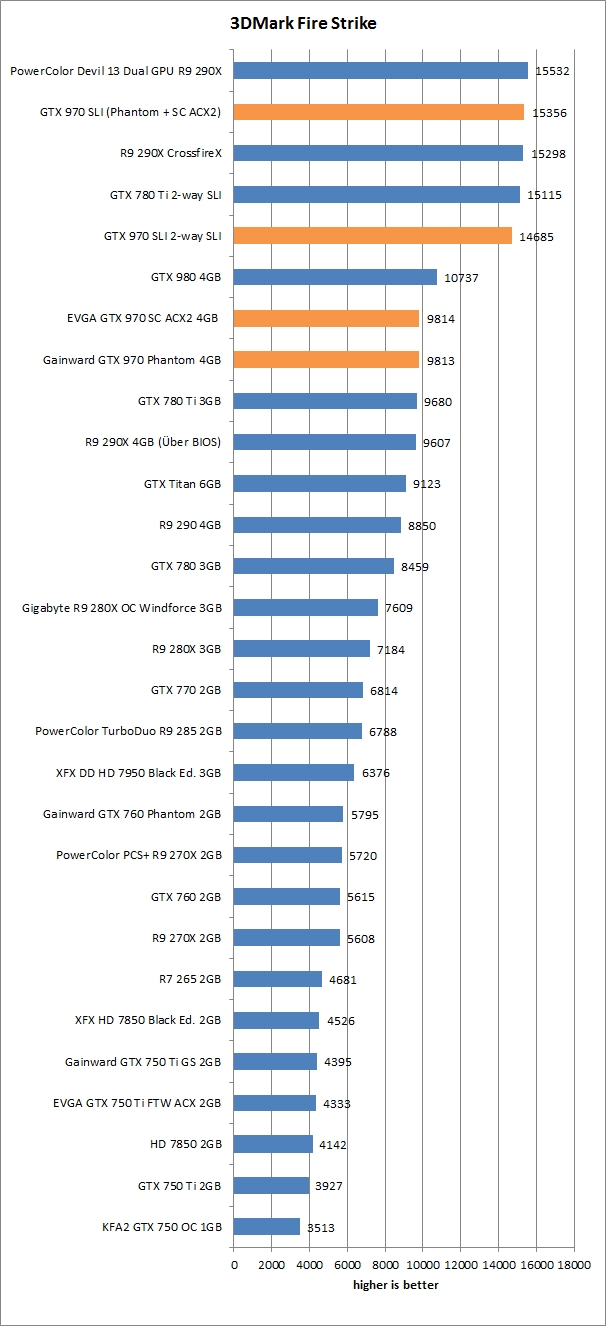
sad.gif is my score for 3dmark firestrike lower than it should be

user posted image

Made a mistake purchase a different brand of gtx 970 for sli instead of going for the same g1 gaming edition .
Tempted with the offer get 128gb ssd with purchase of leadtek gtx 970 for rm1.4k

user posted image
shikimori
post Nov 29 2014, 01:11 PM

Getting Started
**
Junior Member
236 posts

Joined: Jul 2007
From: Penang


QUOTE(alfiejr @ Nov 29 2014, 12:23 PM)
nice, how's gta 5 for the PS4? gooding if compared to the PS3 version?
*
gta v in fps view ? Sh1t mang that is a must experience thing .
Getting hooker giving bj to you while in fps view brows.gif and killing her after getting the deed done
($0 spent) priceless I feel reborn smile.gif


NSFW
» Click to show Spoiler - click again to hide... «


This post has been edited by shikimori: Nov 29 2014, 01:13 PM
shikimori
post Nov 30 2014, 06:10 AM

Getting Started
**
Junior Member
236 posts

Joined: Jul 2007
From: Penang


QUOTE(Unseen83 @ Nov 29 2014, 10:39 PM)
hm  maybe u disable sec gpu ?  have you run DDU ?  wah RM 1.4K .. why don't u got  2x R9 290(Sapphire R9 290 TriX RM1.2-1.3K) i saw this go up to 17K... in 3D mark

Here is from my Obsolete Gpu... is Stock Clock by Sapphire
[attachmentid=4238147]
Hello,  Have you done Display Driver Uninstaller ? choose option New Gpu install this make sure fully remove of the previous file from past gpu.  And use CCleaner to clean up Reg file smile.gif  good luck

Note: do DDu first than CCleaner.. / best way to found out if your Gpu compromise ot down-performance is by benchmark not using Online game which sometime  speed broadband Count.
*
just did a clean windows reinstallation when I got the new card in . But anyway I tried rerun the test again while using single monitor and changing settings in nvidia control panel for power management to become maximum perfomance .

Only gained minor increase

user posted image

Maybe its my 2600k limiting me down . Cant OC any further than 4ghz for some reason without getting bsod , I used to get it up till 4.7ghz .
Oh well real game performance is good enough for me

user posted image
shikimori
post Nov 30 2014, 06:15 AM

Getting Started
**
Junior Member
236 posts

Joined: Jul 2007
From: Penang


QUOTE(alfiejr @ Nov 30 2014, 01:20 AM)
here's my score btw, all ran at stock specs

[attachmentid=4238311]
*
I think you should be getting around 10k unless its the cpu thats holding it back

This post has been edited by shikimori: Nov 30 2014, 06:15 AM
shikimori
post Nov 30 2014, 06:43 PM

Getting Started
**
Junior Member
236 posts

Joined: Jul 2007
From: Penang


QUOTE(Unseen83 @ Nov 30 2014, 06:39 PM)
eh firstly i don't OC my cpu.. if i use OCgenie(is msi mobo auto oc)  my usb power become unstable... e.g. keyboards/ wifi usb seem to be having power withdraw... is strange but i suspect bad bios in that part.. SO! i dun use OC my CPU unless i want to push my Physic CPU score extra 100-200 point...  in term performance gain on Real life Gaming (as i game on 4K)  i go stable  average FPS 35-40FPS  im good  only oc my GPU if  want benchmark...  as  gpu using FAN too cool it i dun go over core 1,100mhz/mem 1,500mhz +is on Crossfire...  but manage to keep it under 75C .

Note: i notice using CCleaner by running Reg cleaner it seem to improve  my Physic score smile.gif i suspect clean out previous unwanted physic count ? i dunno but i try notice a improvement ...
*
nice 4k drool.gif is it worth it bro ? I heard there are scaling issue and font are really small

Nvidia have the dsr but I cant really see much difference

This post has been edited by shikimori: Nov 30 2014, 06:43 PM
shikimori
post Dec 5 2014, 07:32 PM

Getting Started
**
Junior Member
236 posts

Joined: Jul 2007
From: Penang


QUOTE(alfiejr @ Dec 4 2014, 03:39 PM)
Just found a fix for Dragon Age Inquisition. If you're suffering from frame hitching , go to nvidia control panel , change power management option to 'maximum performance' and turn on the triple buffering option.

It completely remove the annoying frame hitching and the game ran a lot more smoother (really2 please with this fix)

Though I tried the same fix on BF4 and the frame hitching is still there sad.gif . I'm pretty convinced now that's a driver  issue right.
*
zzzz I never had this issue when using 344.75 driver but after updating to 344.80 oh gawd its stuttering like a retard .

Playing battlefield 4 was a nightmare
shikimori
post Dec 5 2014, 09:13 PM

Getting Started
**
Junior Member
236 posts

Joined: Jul 2007
From: Penang


QUOTE(alfiejr @ Dec 5 2014, 08:44 PM)
have u tried unchecking all the notifications and enabled origin in game in the application settings? that totally fix most of my problems  rclxms.gif
*
bf4 works before without me having to disable those things . I think its more to the sli/drivers issue
shikimori
post Dec 9 2014, 06:05 PM

Getting Started
**
Junior Member
236 posts

Joined: Jul 2007
From: Penang


QUOTE(TristanX @ Dec 9 2014, 11:16 AM)
Got this last Friday.

[attachmentid=4251431]

No stuttering, no coil whine at 1080p maxed with my PC setup.
*
got the same card and a bit disappointed no custom bios release sad.gif

Anway , I need you guys opinion about the low pixel/texture fill rate for this leadtek card .
Will it impact perfomance a lot ?

If compared as per below attachment , its looks like leadtek is having the lower rate and I have a theory that this is what causing me to get lower scores when doing 3dmark strike test . Thinking of selling this card if thats the case and get myself another g1 gaming 970. I think by removing the backplate should fix the size issue


user posted image

This post has been edited by shikimori: Dec 9 2014, 06:06 PM
shikimori
post Dec 9 2014, 06:27 PM

Getting Started
**
Junior Member
236 posts

Joined: Jul 2007
From: Penang


QUOTE(Acid_RuleZz @ Dec 9 2014, 06:23 PM)
Set your card base clock same as the G1. hmm.gif
*
sad.gif that only net me around 19k for gpu score .

If OC gained around 22.9k but ive seen people getting around 25-26k

2 Pages  1 2 >Top
Topic ClosedOptions
 

Change to:
| Lo-Fi Version
0.0424sec    0.29    7 queries    GZIP Disabled
Time is now: 13th December 2025 - 03:42 PM