
I am still do not receive my device.
The delivery arrangement is so slow...

When I can receive for my device??
 Lowyat.NET -> Garage Sales -> Special Interest Garage Sales -> Home Electronics & Wares Garage Sales
[WTS] 1OTT, Smart TV Streaming Media Box
|
|
 Mar 7 2014, 01:12 PM Mar 7 2014, 01:12 PM
Return to original view | Post
#1
|
 
Newbie
0 posts Joined: Mar 2014 
|
Hi Alex,
I am still do not receive my device. The delivery arrangement is so slow... When I can receive for my device?? |
|
|
|
|
|
Mar 10 2014, 12:01 PM
Return to original view | Post
#2
|
|
Newbie
0 posts Joined: Mar 2014
|
QUOTE(Alex_Lim @ Mar 7 2014, 06:12 PM) Hi Judy, Hi Alex,Cheers. Your parcel was shipped out and in transit now. You shall received it either tomorrow or Monday. The sales is getting good now as we have your great supports. Thanks you for your patient and kind understanding.   Finally I have received the device. Its really very easy to install. Just plug and play . 


Would need more time to explore on the content. Thanks for your service. Judy |
|
|
Mar 20 2014, 03:08 PM
Return to original view | Post
#3
|
|
Newbie
0 posts Joined: Mar 2014
|
QUOTE(ehwwong @ Mar 20 2014, 02:51 PM) Wow, many updates indeed! Yup Yup.    I started to enjoy this as well. Its play really smooth.. |
|
|
Mar 21 2014, 11:43 AM
Return to original view | Post
#4
|
|
Newbie
0 posts Joined: Mar 2014
|
Found new thing in 1OTT.
There is a 中华TVapp which contained a lots of categories and also VOD. Got food channel, kids programs, healths, history, etc..... 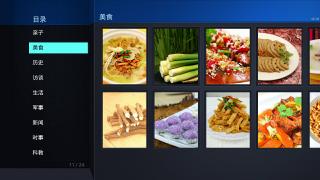


|
|
|
Apr 11 2014, 02:13 PM
Return to original view | Post
#5
|
|
Newbie
0 posts Joined: Mar 2014
|
Found a really good app for 1OTT again.
Let's try again, friend. Setting up the sopcast channel takes a few minutes of your time, without complicated software or hardware requirements. Just follow the instructions below. 1. Install the sopcast engine from the Apps Market.  2. The install app will appear under "MY Apps" 3. Start the sopcast engine app. Cloud Channel 1. Login to access to cloud channel.  Username: Anonymous Password: "leave blank" 2. After logging in, you now have access to many SopCast channels hosted all over the web.  Local Channel 1. Start to add "Local Channel"  2. On your remote, press the BLUE button to add a new channel.  3. Specify a name and the sopcast URL.   4. Once completed, press DONE. Congratulation, you have added your first sopcast channel!  5. You can continue to add more sopcast channels.  6. You can always add your favorite channel by pressing the GREEN button on your remote. This will place that particular channel to the "Favorites".  Examples of SopCast channels available on the Internet. http://www.livefootballol.com http://soccer188.net/link-sopcast/live-sopcast-link http://livefootballvideo.com/tag/premier-league-sopcast-link http://sports-tv.eu Attached image(s)  |
|
|
May 26 2014, 04:32 PM
Return to original view | Post
#6
|
|
Newbie
0 posts Joined: Mar 2014
|
QUOTE(pgkt @ May 23 2014, 12:21 PM) Bro can you confirm as today got live F1 at 8pm thanks. Hi Bro,Guess everybody was busy with the Thomas Cup on the last weekend. Can you please share what is the channel that do have Live F1 match? So that, i can share with my friend also. Appreciated. |
|
|
Aug 28 2014, 10:15 AM
Return to original view | Post
#7
|
|
Newbie
0 posts Joined: Mar 2014
|
Thanks for the wonderful device.
It make me doesn't feel to go out for movies, but sit back at home and enjoy those contents. Help me to save a lot of money in this way. Beside that, my nieces and nephew also love to come my place and enjoy the Cartoon, and kid channels from 1OTT. Keep your good job, 1OTT!!!  |
|
Topic ClosedOptions
|
| Change to: |  0.0258sec 0.0258sec
 0.40 0.40
 7 queries 7 queries
 GZIP Disabled GZIP Disabled
Time is now: 8th December 2025 - 11:13 AM |
 Quote
Quote