

Will government ban kodi in the future?
XBMC / KODI users club, An Open Source Media Center
XBMC / KODI users club, An Open Source Media Center
|
|
 Jun 10 2015, 07:47 AM Jun 10 2015, 07:47 AM
Return to original view | Post
#1
|
 
Junior Member
253 posts Joined: Jan 2010 
|
Will government ban kodi in the future?
|
|
|
|
|
|
Jun 20 2015, 03:25 PM
Return to original view | Post
#2
|
|
Junior Member
253 posts Joined: Jan 2010
|
Dear sifu,
I planned to buy this item Item(s): CS918 RK3188 Quad Core Hardware Specifications: Rockchip RK3188 Quad Core Cortex A9 1.6GHz (1.8GHz max.) 2GB Ram 8GB NAND Flash Android 4.4 android tv box 802.11 b/g/n Wi-Fi(2.4GHz) RJ-45, Micro SD Card reader, USB, OTG, SPDIF Quad Core Mali 400MP GPU Is this item compatible with Kodi? Everything can run smoothly? I'm newbie here. Thank you in advanced |
|
|
Jun 20 2015, 04:06 PM
Return to original view | Post
#3
|
|
Junior Member
253 posts Joined: Jan 2010
|
QUOTE(stevenlee @ Jun 20 2015, 03:45 PM) do you hv the link for this product? Pm to you the link akteady .I looking one for my TV as well... not sure it is good... I ask here last week, they advise not to buy those cheap stuff like this   Now I'm headache ... |
|
|
Jun 26 2015, 11:02 PM
Return to original view | Post
#4
|
|
Junior Member
253 posts Joined: Jan 2010
|
Sorry, guys..
Newbie here, what is AS? |
|
|
Jun 27 2015, 09:25 AM
Return to original view | Post
#5
|
|
Junior Member
253 posts Joined: Jan 2010
|
Again newbie here, what is iptv stalker?
I know what is iptv but not iptv stalker...kindly explain, thank you very much |
|
|
Jun 27 2015, 10:17 AM
Return to original view | Post
#6
|
|
Junior Member
253 posts Joined: Jan 2010
|
Thanks for the advice.
Problem here is I have not received my RPI yet which I don't know what problem I might be encounter, so now I am learning to avoid all potential problems from you guys. That why your advice is important.. |
|
|
|
|
|
Jun 27 2015, 10:45 AM
Return to original view | Post
#7
|
|
Junior Member
253 posts Joined: Jan 2010
|
QUOTE(voncrane @ Jun 27 2015, 10:34 AM) Dude, Easy... At least read a few pages back. Nobody likes to answer the same questions over and over again. Lots of info in this thread. Major rule here is to read and or search first, then if encounter issues not yet resolved, then can request for help and sifus will respond. Thanks for all sifu....P.S. iptv stalker is a Live TV feature. You get tons of live channels on KODI. I ordered my RPI yesterday from RS, hope to receive by next week. Let me try to play around with it, and see what problems.... |
|
|
Jun 28 2015, 04:05 PM
Return to original view | Post
#8
|
|
Junior Member
253 posts Joined: Jan 2010
|
Hi sifu
Newbie (Raspberry PI) here, what should I do after install OS Openelec? I just want discovery channels and YouTube mainly. Can you list down the steps for me? Thank you in advanced |
|
|
Jul 2 2015, 10:59 AM
Return to original view | Post
#9
|
|
Junior Member
253 posts Joined: Jan 2010
|
Hi sifu,
I really need help here... Problem 1 I can not install "Maintenance Tool" from fusion addon installer from tvaddons.ag I go to program installer and select maintenance tool, press yes to install but I can not install maintenance tool after 6% downloading. Message is Error: script failed, addon installer. Problem 2 I can not install "Parental Controls" from fusion addon installer from tvaddons.ag I go to program installer and select Parental Controls, press yes to install but I can not install Parental Controls after 3% downloading. Message is Error: script failed, addon installer. Somehow I managed to install "Universal Parental Control". I wonder why? Problem 3 I can not install "Genesis" from fusion addon installer from tvaddons.ag I go to addons installer and select Genesis, press yes to install but I can not install Genesis after a while. Message is Error: script failed, addon installer. Problem 4 I can not install "Azdrama" from fusion addon installer from tvaddons.ag I go to addons installer and select Azdrama, press yes to install but I can not install Azdrama after a while. Message is Error: script failed, addon installer. Please help Thank you in advanced |
|
|
Jul 2 2015, 03:49 PM
Return to original view | Post
#10
|
|
Junior Member
253 posts Joined: Jan 2010
|
QUOTE(tharmaraj @ Jul 2 2015, 03:41 PM) Dude, is your KODI installation on a Android device or RPI2? If Android I'm not sure but if for RPI2 I can suggest the following; Thanks for helping1. Did you follow the steps-->http://www.tvaddons.ag/install-addons-kodi/, Fusion installer, config wizard (you may hv selected UNIX) and Addon Installer (step by step guide tutorial from the above link) - my advice DO NOT Follow the above guide for RPI2, it will definitely will not work. I had the same issue. Once your KODI is up just configure the necessary, network, time, display, etc. and install the normal Add-ons. my 2cents. cheers Raj I am using RPI2, let say I select UNIX, what shall I do next ? Attached thumbnail(s) 
|
|
|
Jul 3 2015, 04:06 PM
Return to original view | Post
#11
|
|
Junior Member
253 posts Joined: Jan 2010
|
QUOTE(lleihuan @ Jul 3 2015, 09:27 AM) Fusion down at the moment You are right....because some addons can be installed.  |
|
|
Jul 3 2015, 04:07 PM
Return to original view | Post
#12
|
|
Junior Member
253 posts Joined: Jan 2010
|
QUOTE(tharmaraj @ Jul 2 2015, 03:57 PM) like i said don't follow this guide for Rpi2. Do not even come to this part where you want install for UNIX. Anyhow I fresh start it....now a bit more familiar with Kodi and Openelec I guess you are using OpenElec, there's plenty of tutorial what to do on the web once your KODI is up on your Rpi2. An example; http://www.htpcbeginner.com/raspberry-pi-openelec-tweaks/ I didn't do overclocking and my Rpi2 still run's fantastic. cheers Raj |
|
|
Jul 3 2015, 04:22 PM
Return to original view | Post
#13
|
|
Junior Member
253 posts Joined: Jan 2010
|
Hi sifu, how to do minimize stuttering and buffering issues on my RPI 2 with Openelec?
I try to follow below steps but I can not find advanced setting.xml file in my RPI 2... From http://www.htpcbeginner.com/raspberry-pi-openelec-tweaks/ 7. Minimize Stuttering and Buffering Issues XBMC 13 Gotham with improvements to address buffering issues on Raspberry Pi. In my opinion this is also one of the must do Raspberry Pi OpenELEC tweaks. This basically involves creating or editing the advancedsettings.xml file to add the code below. <advancedsettings> <network> <buffermode>1</buffermode> <!-- Comment: Default is 1 --> <cachemembuffersize>0</cachemembuffersize> <!-- Comment: Default is 20971520 bytes or 20 MB --> <readbufferfactor>4.0</readbufferfactor> <!-- Comment: Default is 1.0 --> </network> </advancedsettings> This OpenELEC Raspberry Pi tweak configures video caching mechanism during playback. Since this might increase the writes to the SD card, having a reliable high-speed SD card is strongly recommended. |
|
|
|
|
|
Jul 4 2015, 02:35 PM
Return to original view | Post
#14
|
|
Junior Member
253 posts Joined: Jan 2010
|
QUOTE(lleihuan @ Jul 3 2015, 06:27 PM) don't go there first.I have these android box,minix x7,minix X-8 and 2 -pi2.And I love my pi2 more. Thanks LeiHuan for respondingdon't do anything to your pi yet.start from the basic troubleshooting. what is your broadband package? what is your ip you getting? wired or wireless? I use VIP 5 Mbps Sorry, I don't know what is Ip? Kindly explain, appreciate it I use erthenet ( wired, i think) Attached thumbnail(s) 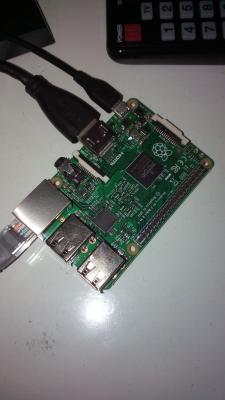
|
|
|
Jul 4 2015, 11:48 PM
Return to original view | Post
#15
|
|
Junior Member
253 posts Joined: Jan 2010
|
QUOTE(lleihuan @ Jul 4 2015, 03:10 PM) Wired is good.Not the fancy wireless for live streaming. I think this is the problem, what do you think? As shown in pictureTo check ip,use the following apps if- pc- http://www.speedtest.net/ android phone/tablet- https://play.google.com/store/apps/details?...m.iptools&hl=en and check which ip work better for you. you can change the ip address each time you off the modem for 20sec. Look for the 1st 3 front number.for a start do not take the one starting with 175.very bad. remember Telexxx ip changes every hours or day,(dynamic ip) there is trick to capture a good ip and maintain it for weeks and month. cannot disclose here.big brother may be reading. Attached thumbnail(s) 
|
|
|
Jul 6 2015, 01:54 PM
Return to original view | Post
#16
|
|
Junior Member
253 posts Joined: Jan 2010
|
QUOTE(lleihuan @ Jul 6 2015, 08:37 AM) look like a class 4.the different between class 4 and 10 is the read/write.Never used before.I am using a class 10.something this this- I had tried to add this advanced setting.XML file into userdata with following setting.http://www.lazada.com.my/sandisk-ultra-mic...ty-1049269.html <advancedsettings> <network> <buffermode>1</buffermode> <!-- Comment: Default is 1 --> <cachemembuffersize>0</cachemembuffersize> <!-- Comment: Default is 20971520 bytes or 20 MB --> <readbufferfactor>4.0</readbufferfactor> <!-- Comment: Default is 1.0 --> </network> </advancedsettings> It becomes worst than before....so now I change the setting to this <advancedsettings> <network> <buffermode>1</buffermode> <!-- Comment: Default is 1 --> <cachemembuffersize>20971520</cachemembuffersize> <!-- Comment: Default is 20971520 bytes or 20 MB --> <readbufferfactor>4.0</readbufferfactor> <!-- Comment: Default is 1.0 --> </network> </advancedsettings> Much better but buffering still happen once in a while |
|
|
Jul 6 2015, 04:03 PM
Return to original view | Post
#17
|
|
Junior Member
253 posts Joined: Jan 2010
|
QUOTE(lleihuan @ Jul 6 2015, 03:18 PM) Can I know what do you intent to use the pi for? I use it to watch-Live stream-news? -movies? -tv series and chinese drama? - discovery channel - science channel - national geograph channel Mostly from iptv stalker Some movies from phoenix |
|
|
Jul 6 2015, 05:22 PM
Return to original view | Post
#18
|
|
Junior Member
253 posts Joined: Jan 2010
|
QUOTE(limjenson @ Jul 6 2015, 04:44 PM) Is there any settings that you do for iptv stalker? Whenever I tried IPTV Stalker, I keep getting timeout. Today I face the same thing as you, always timed out... |
|
|
Jul 9 2015, 07:34 PM
Return to original view | Post
#19
|
|
Junior Member
253 posts Joined: Jan 2010
|
QUOTE(jaan76 @ Jul 9 2015, 04:18 PM) Bro you are welcome Newbie here,... The easiest way is either install IPTV Simple Client or Playlist Loader, either one will work depending on you like to watch. Playlist Loader Add-on is available in "Super Repo" and IPTV Simple Client you can download from this link http://www.bbtsip.tv/iptv-simple-client2.htmlWhat is the m3u play list URL for PVR IPTV simple client 2? Thank you Attached thumbnail(s) 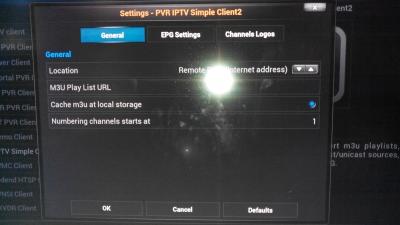
|
|
|
Jul 10 2015, 05:04 PM
Return to original view | Post
#20
|
|
Junior Member
253 posts Joined: Jan 2010
|
QUOTE(jaan76 @ Jul 9 2015, 03:13 AM) Hi All, Those who are using LiveTV feature in Kodi with "IPTV Simple Client" or "Playlist Loader".. I have compiled a playlist with working channels... Thank you for sharing...Jaan76The Single playlist consist of following country channels: 1. Malaysia 2. USA 3. UK 4. India 5. Pakistan and have all Movies, Music, News, Sports and Entertainment channels. I have also grouped channels as per each country. List consist of about 120++ channels and i have personally checked almost all of them working at the time of writing and consist both HD & SD channels Those interested can access playlist from the following URL http://bit.ly/rizchannels ENJOY I appreciate very much I just found a few channels not working maybe you could help to check out 28 37 84 |
|
Topic ClosedOptions
|
| Change to: |  0.0600sec 0.0600sec
 0.41 0.41
 7 queries 7 queries
 GZIP Disabled GZIP Disabled
Time is now: 7th December 2025 - 12:00 PM |
 Quote
Quote