Welcome Guest ( Log In | Register )

Bump Topic Topic Closed RSS Feed
206 Pages « < 149 150 151 152 153 > » Bottom

Outline · [ Standard ] · Linear+

 XBMC / KODI users club, An Open Source Media Center

views
     
nuke13
post Nov 20 2015, 03:35 PM

Casual
***
Junior Member
460 posts

Joined: Sep 2008
QUOTE(AVFAN @ Nov 19 2015, 02:27 PM)
i use asus, rm200 (now maybe rm250 due to weak rm). excellent for ethernet and wifi.
forget the unifi stock router which is ok for basic use, small space.
no.
unifi 30 will not do more in kodi.
kodi buffering is usually due to geoblocks, bad links or unsupported chipset.
vip10 has enough speed for everything if single user.
higher speed is necessary if u have multi users at any one time.
incl torrenting.
but, since unifi30 now is same price as old vip10, might as well change unless u need the upload speed.
*
That's what I'm thinking right now. Might as well upgrade. I don't mind the upload speed as I only do download and streaming only. Hardly use cloud and I think 5mb is enough. But while I'm using Kodi, I have 2 other devices streaming youtube videos. Might be good to upgrade right. Nothing to lose I think.
Like a Bause
post Nov 20 2015, 03:40 PM

Casual
***
Junior Member
419 posts

Joined: Nov 2013
QUOTE(voncrane @ Nov 20 2015, 02:12 PM)
Sure, we can, depends on the sources.... Examples....Phoenix, Navi-X, Pulsar, HD King (Robin Hood), 4K Media..... You can get HD audio, DD 5.1 and above from those addons...
*
i think among of those you mentioned, Phoenix is the best?
farsight73
post Nov 20 2015, 05:00 PM

New Member
*
Junior Member
21 posts

Joined: May 2011
QUOTE(farsight73 @ Nov 20 2015, 01:10 PM)
Hi all,

Sorry if this is the wrong thread.. but.. but..
How do you all managed the latest TM HyppTV Huawei EC6108v8 storage??
Is only 2GB right? but systems and data already used almost 60% of it.
It seemed not enough and almost full. I only installed Kodi & MxPLayer.
I did disable some pre-installed apps to get more storage but still storage is in critical level now.

Clearing cache didn't help much..
*
If you put your mind to it, you can accomplish anything..!!

I found my own solution.. and it work like heaven..!!
Link below is the guide of moving Kodi User Data folder and Add-ons to external storage like MicroSD. No root required to do this process. Would surely save some storage space for other great apps from PlayStore...

http://kodi.wiki/view/HOW-TO:Change_settin...der_for_Android

voncrane
post Nov 20 2015, 10:14 PM

Noir et fier!
*******
Senior Member
7,120 posts

Joined: Oct 2011
From: Wakanda


QUOTE(Like a Bause @ Nov 20 2015, 03:40 PM)
i think among of those you mentioned, Phoenix is the best?
*
"Best" is subjective... But, yeah Phoenix is currently better maintained. Pulsar streams actual torrent files... So, with enough seeders & under the right conditions (when the addon isn't acting out), that's actually the best source for HD audio.
Ravin21
post Nov 20 2015, 10:42 PM

New Member
*
Newbie
1 posts

Joined: Nov 2015
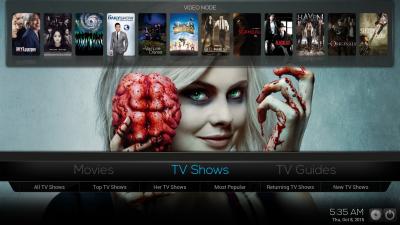
Hi want to share, spinztv build one of the best atm, can try for those who want biggrin.gif


Attached thumbnail(s)
Attached Image
manx
post Nov 21 2015, 12:27 AM

Regular
******
Senior Member
1,849 posts

Joined: Jan 2003


QUOTE(Ravin21 @ Nov 20 2015, 10:42 PM)
Hi want to share, spinztv build one of the best atm,  can try for those who want  biggrin.gif
*
any links how to get as in your image? mine still the old one Done. all sui sui now thumbup.gif

This post has been edited by manx: Nov 21 2015, 06:52 AM
toytoy
post Nov 21 2015, 02:56 AM

Enthusiast
*****
Senior Member
875 posts

Joined: Jan 2003


Hi all. I have 2 units of raspberry pi 1st gen for sale.

No problem running kodi.

Please let me know if interested 😁
pekkauwer
post Nov 21 2015, 06:52 AM

Getting Started
**
Junior Member
273 posts

Joined: Nov 2010


for those who like build do like tis group/join... i never fan of custom build since its the same thing, you watch genesis, robinhood, entertainment hub, phoenix, lihattv, azdrama,dramago etc

https://www.facebook.com/groups/KodiCustomBuilds/

zher4883
post Nov 21 2015, 02:02 PM

Look at all my stars!!
*******
Senior Member
4,490 posts

Joined: Oct 2014


Which addon offers watching live sports for free tongue.gif tongue.gif something like (ast** supersport)?

This post has been edited by zher4883: Nov 21 2015, 02:04 PM
pekkauwer
post Nov 21 2015, 02:13 PM

Getting Started
**
Junior Member
273 posts

Joined: Nov 2010


QUOTE(zher4883 @ Nov 21 2015, 02:02 PM)
Which addon offers watching live sports for free  tongue.gif  tongue.gif  something like (ast** supersport)?
*

robnhood afaik
under kodim

if you really want to use xbmc... better forget astroll la, honest said
my customer all fail... ada line 30mbps nk xbmc, sanggup keluar duit beli android box, aku setupkan semua,


dalam 2 minggu
survey rumah customer

» Click to show Spoiler - click again to hide... «


dia pergi install astroll balik, katanya tk jumpa... padahal dah bagi note kalau nak tgk apa2...
aku tak rugi, dia la rugi..
jai2power
post Nov 21 2015, 04:37 PM

Getting Started
**
Junior Member
82 posts

Joined: May 2009


Salam, saya bru beli android box himedia h8, nk tanya pasal kodi nk dptkan audio passthrough ke amplifier nk buat mcm mana yer, dh enable passthrough kt kodi pun still x dpt audio digital hd, kalau movie play terus guna himedia player ok je, kt amp mmg dpt HD AUDIO DTS HD, DOLBY TRUE HD.
Ngto
post Nov 21 2015, 07:51 PM

Look at all my stars!!
*******
Senior Member
4,350 posts

Joined: Sep 2005
QUOTE(jai2power @ Nov 21 2015, 04:37 PM)
Salam, saya bru beli android box himedia h8, nk tanya pasal kodi nk dptkan audio passthrough ke amplifier nk buat mcm mana yer, dh enable passthrough kt kodi pun still x dpt audio digital hd, kalau movie play terus guna himedia player ok je, kt amp mmg dpt HD AUDIO DTS HD, DOLBY TRUE HD.
*
Saya pernah cuba PC Windows Kodi dan Optical 5.1, memang ok.

Kalau Android Box Kodi dan HD audio 7.1 HDMI, tunggu orang lain jawab.


WildChai
post Nov 21 2015, 08:33 PM

Wut is this?
******
Senior Member
1,022 posts

Joined: Sep 2005
From: nomad in the Sahara...


QUOTE(WaCKy-Angel @ Nov 18 2015, 08:24 PM)
Different source different bro.
So far im using Dizilab and Dizimag 1080p no buffering even on 5Mbps.
Moviefars 1080p got buffer.
*
What's this dizilab and dizimag?
WaCKy-Angel
post Nov 21 2015, 08:52 PM

PeACe~~
*********
All Stars
21,962 posts

Joined: Dec 2004
From: KL


QUOTE(WildChai @ Nov 21 2015, 08:33 PM)
What's this dizilab and dizimag?
*
The source/provider of the movie u select.
Pisasu69
post Nov 21 2015, 09:51 PM

New Member
*
Junior Member
40 posts

Joined: Apr 2013


Hi All

I am using the tutorial from youtube to install KODI(V15.2) ( very new user )...almost all video will add Fusion and move along. But that is where I will get stuck, after enable add on...go to programs and click on config wizard....click on windows...installs for few sec and I get this error ''Config Wizard Error''

Could some one assist me with this? I have tried reinstalling the complete Kodi 5 times still the same error...

This post has been edited by Pisasu69: Nov 21 2015, 09:52 PM
Pegasus88
post Nov 21 2015, 09:59 PM

Enthusiast
*****
Senior Member
725 posts

Joined: Mar 2011
From: MIRI


Hello boss sekalian,

Im new to Kodi here, just installed today after plenty of research.

I have one very stupid question to ask, repository add on (SuperRepo) and IPTV Add-on for m3u lists, They are not related right ?

Kodi>SuperRepo>Genesis

Kodi>IPTV Addon>add in m3u list.

Am I correct ?
voncrane
post Nov 21 2015, 10:30 PM

Noir et fier!
*******
Senior Member
7,120 posts

Joined: Oct 2011
From: Wakanda


QUOTE(Pisasu69 @ Nov 21 2015, 09:51 PM)
Hi All

I am using the tutorial from youtube to install KODI(V15.2) ( very new user )...almost all video will add Fusion and move along. But that is where I will get stuck, after enable add on...go to programs and click on config wizard....click on windows...installs for few sec and I get this error ''Config Wizard Error''

Could some one assist me with this? I have tried reinstalling the complete Kodi 5 times still the same error...
*
Here u go... Simply follow the steps and you can't go wrong... Fusion Installer for Kodi...... Afterwards, Config Wizard for Kodi.
QUOTE(Pegasus88 @ Nov 21 2015, 09:59 PM)
Hello boss sekalian,

Im new to Kodi here, just installed today after plenty of research.

I have one very stupid question to ask, repository add on (SuperRepo) and IPTV Add-on for m3u lists, They are not related right ?

Kodi>SuperRepo>Genesis

Kodi>IPTV Addon>add in m3u list.

Am I correct ?
*
SuperRepo.... Simply a repository containing most addons, all under one "roof". HowTo.
IPTV addon.... Which? There r a many out there, starting from the official one from the KODI repository. Primarily an IPTV addon is an addon that can pull media streams (usually Live TV) from .m3u lists, which are hosted either locally or off a server. Maintenance depends on who's list you are using.

The above's a rough idea... Hope it leads you down the right path.. icon_rolleyes.gif

This post has been edited by voncrane: Nov 21 2015, 10:31 PM
Ngto
post Nov 21 2015, 10:46 PM

Look at all my stars!!
*******
Senior Member
4,350 posts

Joined: Sep 2005
QUOTE(Pegasus88 @ Nov 21 2015, 09:59 PM)
Hello boss sekalian,

Im new to Kodi here, just installed today after plenty of research.

I have one very stupid question to ask, repository add on (SuperRepo) and IPTV Add-on for m3u lists, They are not related right ?

Kodi>SuperRepo>Genesis

Kodi>IPTV Addon>add in m3u list.

Am I correct ?
*
Don't waste time setting m3u lists manually in Kodi unless there are specific streams you can't get from addons . Otherwise just install addons will do.

This post has been edited by Ngto: Nov 21 2015, 10:48 PM
Pegasus88
post Nov 21 2015, 11:43 PM

Enthusiast
*****
Senior Member
725 posts

Joined: Mar 2011
From: MIRI


QUOTE(voncrane @ Nov 21 2015, 10:30 PM)
Here u go... Simply follow the steps and you can't go wrong... Fusion Installer for Kodi...... Afterwards, Config Wizard for Kodi.

SuperRepo.... Simply a repository containing most addons, all under one "roof". HowTo.
IPTV addon.... Which? There r a many out there, starting from the official one from the KODI repository. Primarily an IPTV addon is an addon that can pull media streams (usually Live TV) from .m3u lists, which are hosted either locally or off a server. Maintenance depends on who's list you are using.

The above's a rough idea... Hope it leads you down the right path.. icon_rolleyes.gif
*
QUOTE(Ngto @ Nov 21 2015, 10:46 PM)
Don't waste time setting m3u lists manually in Kodi unless there are specific streams you can't get from addons . Otherwise just install addons will do.
*
Noted. I will just start with SuperRepo first.

Thank you very much thumbup.gif
pekkauwer
post Nov 22 2015, 06:51 AM

Getting Started
**
Junior Member
273 posts

Joined: Nov 2010


btw husham list updated...

206 Pages « < 149 150 151 152 153 > » Top
Topic ClosedOptions
 

Change to:
| Lo-Fi Version
0.0225sec    0.59    6 queries    GZIP Disabled
Time is now: 9th December 2025 - 04:53 PM