Outline ·
[ Standard ] ·
Linear+
Why's the system cache taking up so much of ram?, How to reduce it?
|
TScutiesbaby312
|
  Jul 11 2006, 05:44 PM, updated 20y ago Jul 11 2006, 05:44 PM, updated 20y ago
|

|
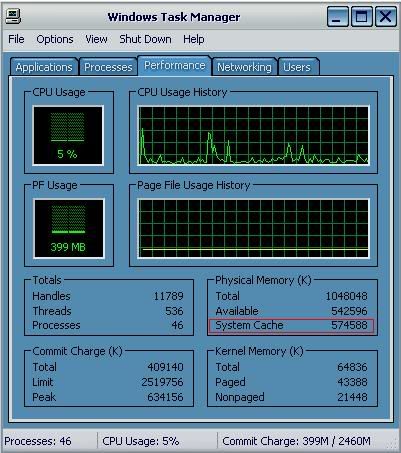
Hi professionals/professionists out there, I have this 'major' problem with my physical memory (RAM) The system cache is taking so much of ram. I have 1 GB of ram but only left back 500MB or less for my own usage everytime. It resulted my application runs so slow and also lags down my system. What cause this to happen? I have used all those system utilities to clean my pc, defrag my hdd and i'm not running any java background. Anyone out there, can tell me how to reduce the system cache from eating up my memory? P.S : I've just reinstalled my windows and i've restarted many times but no avail   Here's the picture of it. » Click to show Spoiler - click again to hide... « This post has been edited by cutiesbaby312: Jul 11 2006, 06:39 PM |
|
|
|
|
|
ltw82
|
Jul 11 2006, 06:10 PM
|
|
|
 r u using internal GC processor built-in inside mobo? what mobo u've using? r u using window xp sp2? |
|
|
|
|
|
TScutiesbaby312
|
Jul 11 2006, 06:42 PM
|
|
|
QUOTE(ltw82 @ Jul 11 2006, 06:10 PM) r u using internal GC processor built-in inside mobo? what mobo u've using? r u using window xp sp2? No.. I just bought this pc end of last march. I'm using a XFX 6600 GT here. So it's not eating up my memory. I'm using Gigabyte K8 Triton, nForce 4 SLI series, running on a AMD 64 3000+ And yes I'm using win xp sp2.. any probs with that ar?  This post has been edited by cutiesbaby312: Jul 11 2006, 06:47 PM This post has been edited by cutiesbaby312: Jul 11 2006, 06:47 PM |
|
|
|
|
|
TScutiesbaby312
|
Jul 11 2006, 06:49 PM
|
|
|
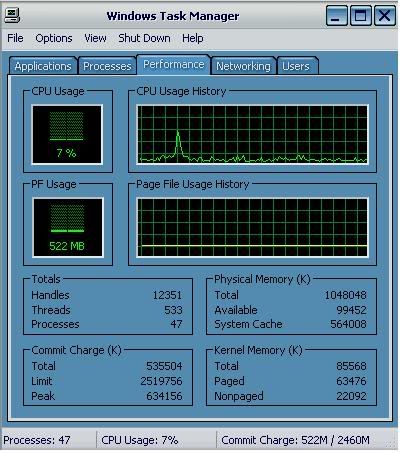
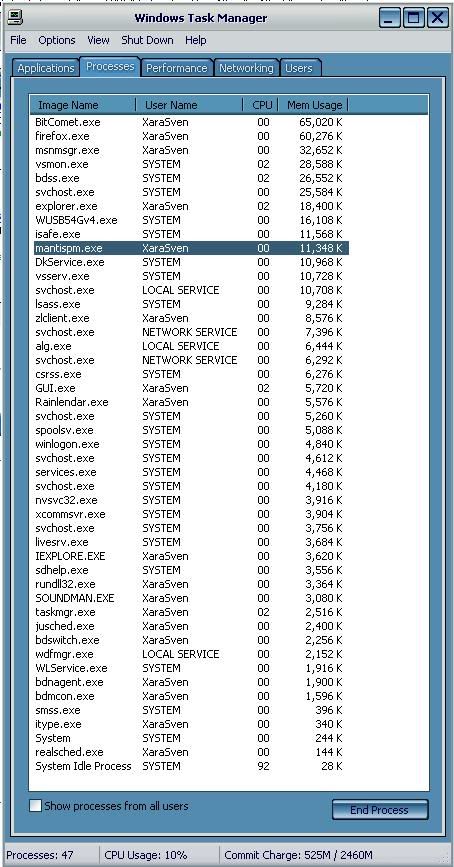
There are the pictures after all my usual programs started and I only left back 100MB OMG!! I bought this pc to play games.. now no games cant even do my work properly  » Click to show Spoiler - click again to hide... « » Click to show Spoiler - click again to hide... « |
|
|
|
|
|
satanhead2003
|
Jul 11 2006, 07:01 PM
|
|
|
Youre running torrent app. Thats y
|
|
|
|
|
|
amyhs99
|
Jul 11 2006, 07:02 PM
|
|
|
should this thread appear in technical support?
|
|
|
|
|
|
Shah81
|
Jul 11 2006, 07:04 PM
|
|
|
QUOTE(satanhead2003 @ Jul 11 2006, 07:01 PM) Youre running torrent app. Thats y and you got 47 processes runnig in the background.....  |
|
|
|
|
|
whiteboard
|
Jul 11 2006, 07:06 PM
|
|
|
stop those program that run behind it, go to run and type msconfig to configure the start up program, unselect all the program that u don't want
|
|
|
|
|
|
TScutiesbaby312
|
Jul 11 2006, 07:19 PM
|
|
|
I've done that.... and i dunno what's that 47 programs running behind besides those which shows in processors.
(satanhead2003).. i've used bitcomet for almost 1 1/2 years or more than that.. before this my system cache only used up 200MB or less than that.. that also using a lower performances pc which was using 784MB of SD ram only... and i've installed less programs here.. how could it be possible?
guys.. last resort izzit to reinstall windows again?
|
|
|
|
|
|
satanhead2003
|
Jul 11 2006, 07:24 PM
|
|
|
I've used bitcomet and azureus, n bitcomet...hmmm.... resource monster. N for those startup apps, i recommend disabling it. use Spybot S&D. goto advance mode, there u will see which active-x, BHO n startup apps are spyware [ with a brief descriptions - in startup apps]as its actually a spyware detector.
|
|
|
|
|
|
TScutiesbaby312
|
Jul 11 2006, 07:58 PM
|
|
|
In my start up i only have bitdefender prof 9, zone alarm security suite, easytuner5 for gigabyte mobo, my linksys wireless software and nvidia software for my gc... i've minimized to the fullest.. still the same.. and my pc is freed from spyware & viruses... coz i just scanned it last night...
|
|
|
|
|
|
TScutiesbaby312
|
Jul 11 2006, 10:08 PM
|
|
|
hello.. any help??
|
|
|
|
|
|
Thrust
|
Jul 11 2006, 11:09 PM
|
|
|
I think it's normal... Look at mine.... kekeke CPU100% cos running folding@home, torrent downloads My laptop is running 61apps on background  I guess new CPU these days are able to handle al those threads  TASK MANAGER taken from DesktopThis post has been edited by Thrust: Jul 11 2006, 11:14 PM
 |
|
|
|
|
|
TScutiesbaby312
|
Jul 11 2006, 11:19 PM
|
|
|
QUOTE(Thrust @ Jul 11 2006, 11:09 PM) I think it's normal... Look at mine.... kekeke CPU100% cos running folding@home, torrent downloads My laptop is running 61apps on background I guess new CPU these days are able to handle al those threads
TASK MANAGER taken from Desktophi mate... u just said ur using lappie but i'm using a 3 months old pc ler... and i didnt install much applications also.. sighz.. |
|
|
|
|
|
Thrust
|
Jul 11 2006, 11:23 PM
|
|
|
No, the picture i took was from my desktop. Pentium 4 2.4B.. with 1Gig of RAM. Actually from my knowledge, the system cache won't cause your system to slow down much... To see the amount of RAM used by your system, you should look at Commit Charge (k). The Peak value will show the amount of RAM used at maximum... From what i see, your peak value only hit around 600 plus MB meaning that you still got 400MB more of RAM to spare |
|
|
|
|
|
TScutiesbaby312
|
Jul 11 2006, 11:41 PM
|
|
|
QUOTE(Thrust @ Jul 11 2006, 11:23 PM) No, the picture i took was from my desktop. Pentium 4 2.4B.. with 1Gig of RAM. Actually from my knowledge, the system cache won't cause your system to slow down much... To see the amount of RAM used by your system, you should look at Commit Charge (k). The Peak value will show the amount of RAM used at maximum... From what i see, your peak value only hit around 600 plus MB meaning that you still got 400MB more of RAM to spare  really??? but why is my available showing only 100MB one? |
|
|
|
|
|
Thrust
|
Jul 12 2006, 07:05 AM
|
|
|
No idea I assume your system is working fine... Hope some other LYN forummers could post a screen shot of their task manager to make more comparison  |
|
|
|
|
|
ahhuat
|
Jul 12 2006, 09:08 AM
|
|
|
cutiesbaby312 , tumpang ur thread. Guys , this is taken from my task manager.  My cpu usage is 100% and it is causing my com lagging all the way. what should i do to reduce my cpu usage and keep my com running smoothly? |
|
|
|
|
|
GameSky
|
Jul 12 2006, 09:08 AM
|
|
|
Mine:  Why it uses low mem?...because I disable most unnecessary background programs in startup.. you can use www.ccleaner.com [Ccleaner] to view whats your startup programs...and disable those unnecessary programs... |
|
|
|
|
|
beehawk
|
Jul 12 2006, 09:19 AM
|
|
|
i am assuming that u install a lot of stuff.....but u said u cleaned it.
i am guessing of the work of spyware.
newly installed xp will not be like that, unlesssssssss, u have installed each and every app that ur mobo driver provided, and also a few anti virus running at back ground with those aditional personal firewall, and some other cleaning utilities installed to ur pc.
but, good news is 500 MB of ram is enough for every thing. try install the folding@home for a change. it take up ur processor. but not ur ram. Gave me a secure feeling that no spy ware is running at the back some how. haha. since its using up my processes.
Good luck!
|
|
|
|
|
|
TScutiesbaby312
|
Jul 12 2006, 10:42 AM
|
|
|
Errr.. i have one question to ask u guys... currently I'm using bitdefender prof 9 and zone alarm internet security suite 2006. ZA security suite has its own antivirus as well but I prefer to use bitdefender coz ZA takes a long time to scan ur files and that lags my pc so much... For instance I play The Sims2.. it scanned like crazy but when i use bitdefender.. it scans also but very fast... Can i know.. can this be done as in deactivate ZA's antivirus and use Bitdefender's ones.. ? Will this still cause a conflict in my system?
Last time I also did this to my old system but no probls at all.. and yes.. i've installed some programs that's provided in my mobo's cd...
|
|
|
|
|
|
GameSky
|
Jul 12 2006, 10:58 AM
|
|
|
lol...you shouldnt use 2 antivirus system in your computer...it will make whole things slow down...
just use either BitDefender or ZA Internet security suite... dont install both of them at the same time
|
|
|
|
|
|
ltw82
|
Jul 12 2006, 11:01 AM
|
|
|
QUOTE(cutiesbaby312 @ Jul 11 2006, 07:58 PM) In my start up i only have bitdefender prof 9, zone alarm security suite, easytuner5 for gigabyte mobo, my linksys wireless software and nvidia software for my gc... i've minimized to the fullest.. still the same.. and my pc is freed from spyware & viruses... coz i just scanned it last night...  ofcourse taking up all the resources....! u have all real-time monitoring bitdefender9, zone alarm, bitcomet, firefox + what ever spyware app running at the background?  is there alot of desktop quick launch app too? mayb u can try monitoring ur ram resources by installing everest app? more accurate.... |
|
|
|
|
|
TScutiesbaby312
|
Jul 12 2006, 08:32 PM
|
|
|
I think i knew what's the real problem... i just found out this morning... it maybe my hdd giving problems... i have to send back for warranty... |
|
|
|
|
|
byter
|
Jul 14 2006, 07:28 PM
|
New Member

|
yeah, i think its normal. my opera sometimes took around 200Meg! u should close bitcomet and opera haha QUOTE mayb u can try monitoring ur ram resources by installing everest app?
more accurate.... yeah~~ This post has been edited by byter: Jul 14 2006, 07:29 PM |
|
|
|
|
|
keith_hjinhoh
|
Jul 15 2006, 12:36 PM
|
|
|
QUOTE(cutiesbaby312 @ Jul 12 2006, 08:32 PM) I think i knew what's the real problem... i just found out this morning... it maybe my hdd giving problems... i have to send back for warranty... HDD Problem doesn't make high Cache in memory |
|
|
|
|
|
TScutiesbaby312
|
Jul 15 2006, 01:18 PM
|
|
|
QUOTE(keith_hjinhoh @ Jul 15 2006, 12:36 PM) HDD Problem doesn't make high Cache in memory Thanks everyone.. i've fixed my problem edi.. i have to upgrade my hdd's firmware from maxtor.. few batches of maxtor hdd (diamond max 10) having incompatibility problem with nforce 4 series mobo... that's why my system cache's taking so much of ram.. data corruptions occur between my mobo and hdd.. need more time to find the data i need.. |
|
|
|
|
|
Atlantis
|
Jul 16 2006, 02:25 PM
|
|
|
i also have the same problem.
using 1G Ram ... and i just reformat my computer only ... have about 700k+ cache memory
|
|
|
|
|
|
Atlantis
|
Jul 17 2006, 10:36 AM
|
|
|
err issit really normal ma ?? i just reformated my computer and computer in idle ... also memory cache can become 700k+ ...
anyway to reduce it >.>
|
|
|
|
|
|
TScutiesbaby312
|
Jul 18 2006, 10:53 PM
|
|
|
QUOTE(Atlantis @ Jul 17 2006, 10:36 AM) err issit really normal ma ?? i just reformated my computer and computer in idle ... also memory cache can become 700k+ ... anyway to reduce it >.> Hmm.. just go type msconfig in the "run" then disable what u dont want to start up with ur computer. That would help. |
|
|
|
|
|
Atlantis
|
Jul 19 2006, 04:13 PM
|
|
|
nothin much lurr ... btw cutiebaby ur prob ok le la ?
|
|
|
|
|
|
yhcyber
|
Jul 20 2006, 12:33 PM
|
|
|
ya, he is correct.... bcoz when v doing stuff using pc, all data will goto RAM 1st then HDD.. if there is conflict btw HDD to other part such as mobo or Ram, it will take longer time to store and retrieve data....
Atlantis, try upgrade all the firmware of ur mobo and HDD. n oso pls check out did ur RAM can support ur mobo properly o not. u can check it out on the RAM manufacturer website o other source...
|
|
|
|
|





 Quote
Quote






 0.0204sec
 0.49
0.49
 6 queries
 GZIP Disabled