Welcome Guest ( Log In | Register )

Outline · [ Standard ] · Linear+

 Underexposed Picture in Canon G11 Manual Mode, Picture always underexposed -2 stops

views
     
TScarloz28
post Jan 28 2014, 12:18 AM, updated 12y ago

Sons of Anarchy
***
Junior Member
499 posts

Joined: Oct 2008
From: Perth, Western Australia


Hi experts,

Recently I'm having issues using the manual mode (M) in my Canon G11 camera.

Everytime I try to compose a shot in manual mode, the pictures always appear underexposed -2 stops, irregardless of how bright the setting is. Even if i try to compose under broad daylight, the composed shot still look underexposed. The little orange bar (exposure level) is always in -2 stops.(???)

See image below, this picture is composed with 1/30 and F2.8 settings in MANUAL MODE

user posted image


When i try to compose the picture under a different setting (in AUTO or Av Priority mode) using the same shutter speed and aperture settings, it appears OK as shown below.

user posted image


Been trying tinker around with my camera in manual mode, but can't seem to find the solution. I know it's not normal because i used the camera in manual mode 2 years ago perfectly. So im not sure if I screwed up the camera setting or anything?????

Kindly advise please? Thanks. rclxub.gif
dkk
post Jan 28 2014, 01:55 AM

10k Club
Group Icon
Elite
11,400 posts

Joined: Jan 2003
on some of the older cheap ixus, there's no way to directly set aperture of shutter speed. Instead, there's a setting for "aperture compensation", which can be set to 0, 1/3, 2/3, , etc. This is set in the menu that appears when we press the Function key. Perhaps this is it?
ckseng
post Jan 28 2014, 09:02 AM

Casual
***
Junior Member
328 posts

Joined: Jan 2003


the problem is the ISO setting.

First picture using ISO 80, Second picture using ISO1000. Increase the ISO to 1000 then ur picture might be same.
goldfries
post Jan 28 2014, 09:06 AM

40K Club
Group Icon
Forum Admin
44,415 posts

Joined: Jan 2003


in Manual mode you're supposed to adjust shutter speed, aperture and ISO.

picture number one and number 2 are totally different.

the exposure between the first photo and the 2nd photo is approx 3+ stops apart. It's -2 because you pointed the angle differently.
TScarloz28
post Jan 28 2014, 09:08 AM

Sons of Anarchy
***
Junior Member
499 posts

Joined: Oct 2008
From: Perth, Western Australia


QUOTE(ckseng @ Jan 28 2014, 09:02 AM)
the problem is the ISO setting.

First picture using ISO 80, Second picture using ISO1000. Increase the ISO to 1000 then ur picture might be same.
*
Good catch. I set ISO setting to auto. But is there a EV compensation in manual mode (G11) as what dkk pointed out?
goldfries
post Jan 28 2014, 09:10 AM

40K Club
Group Icon
Forum Admin
44,415 posts

Joined: Jan 2003


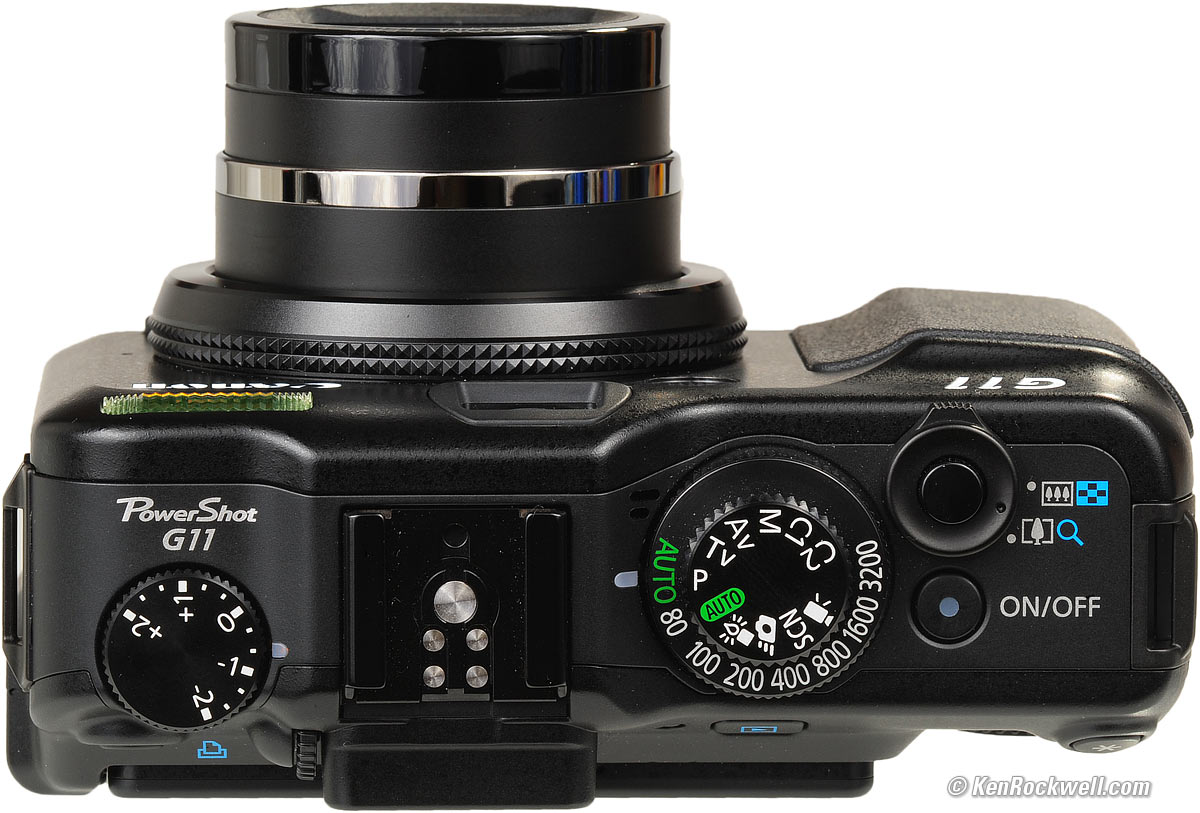
since you mentioned ISO set to AUTO, then you have to adjust the exposure compensation dial.

user posted image

It's the dial on the left, just under the words "Powershot G11". Adjust it to 0.
TScarloz28
post Jan 28 2014, 09:15 AM

Sons of Anarchy
***
Junior Member
499 posts

Joined: Oct 2008
From: Perth, Western Australia


QUOTE(goldfries @ Jan 28 2014, 09:10 AM)
since you mentioned ISO set to AUTO, then you have to adjust the exposure compensation dial.

It's the dial on the left, just under the words "Powershot G11". Adjust it to 0.
*
Did checked that as well. The composed shot is still appeared very dark. I'm just thinking here if my camera is kaputt?
goldfries
post Jan 28 2014, 09:27 AM

40K Club
Group Icon
Forum Admin
44,415 posts

Joined: Jan 2003


QUOTE(carloz28 @ Jan 28 2014, 09:08 AM)
Good catch. I set ISO setting to auto. But is there a EV compensation in manual mode (G11) as what dkk pointed out?
*
I just checked my Powershot G1X.

from what I observed, I don't think you set ISO at Auto.

You might have done that in other modes but once you reach Manual mode, the AUTO ISO is off.

If it was set to AUTO, you will see the word AUTO under the word ISO.

Also, the exposure compensation dial doesn't work on manual mode.

Perhaps you should just take a picture of the dials you set.


Change to:
| Lo-Fi Version
0.0178sec    0.35    5 queries    GZIP Disabled
Time is now: 24th December 2025 - 01:17 AM