Outline ·
[ Standard ] ·
Linear+
P2P BitComet Thread, Latest:0.99, info at 1st post
|
diablo69
|
 Dec 7 2006, 10:09 PM Dec 7 2006, 10:09 PM
|

|
bc user here... got one question... one of my files just stop at 89%... no matter wat type also same... .avi or .rar.... wat could be da problem... even fresh download on another computer also stuck...
|
|
|
|
|
|
diablo69
|
Jan 25 2007, 12:58 PM
|
|
|
hrmmm... why majority of my torrent not downloading... after yesterday only manage 2 download 4 of 16 files... da rest still trying to connect... wats interesting was that yesterday manage to reach as high as 100kbps download rate...
|
|
|
|
|
|
diablo69
|
Feb 12 2007, 08:41 PM
|
|
|
my current half open limit is unrecognized... how do i set da new half open limit... cant select da box to put in da recommended figures...
|
|
|
|
|
|
diablo69
|
Feb 12 2007, 10:48 PM
|
|
|
thanks... tried it but somehow now my download speed is always lower than my upload speed... oledi set limit 150/50... should i increase da value of half-open... coz while it was still 10 had no error...
|
|
|
|
|
|
diablo69
|
Feb 13 2007, 06:18 AM
|
|
|
is it me or 0.84 wont remember to auto resume all download... didnt have this problem with 0.70... after changing half-open to 50 n upload limit to 35 manage to get good speed... but fluctuating like mad... 1 second can be 14 da next would jump until 60++...
|
|
|
|
|
|
diablo69
|
Feb 14 2007, 04:13 PM
|
|
|
how to do port forwarding when using 2 network... im using 1 at work(wired) n 1 at home(wireless)...
|
|
|
|
|
|
diablo69
|
Feb 15 2007, 09:46 AM
|
|
|
QUOTE(scorps @ Feb 14 2007, 06:14 PM) if at home using da one given my tmnet... in da office by dlink... |
|
|
|
|
|
diablo69
|
Feb 16 2007, 09:19 AM
|
|
|
tan_pang.... hows da review on 0.84... having problem wit auto resume when windows start....
|
|
|
|
|
|
diablo69
|
Feb 17 2007, 08:17 PM
|
|
|
will download/upload be effected if the listening port is unknown??
|
|
|
|
|
|
diablo69
|
Feb 21 2007, 07:22 PM
|
|
|
anybody using smc wireless router, smcwbr14t-g barricade-g... can pm me da default password for da router... lost my instruction guide...
|
|
|
|
|
|
diablo69
|
Feb 24 2007, 07:35 PM
|
|
|
which port should i put in da public port??
|
|
|
|
|
|
diablo69
|
Feb 28 2007, 10:45 AM
|
|
|
finally manage to portforward my office's router... not bad at all da download speed... so far no problem with 0.84... just cant seem to keep da tab setting... i mean da preview n comment tab...
|
|
|
|
|
|
diablo69
|
Feb 28 2007, 12:42 PM
|
|
|
under peers -> initiation.... wats da different between NAT transverse, remote n local... which 1 will give da highest download...
coz im getting higher download rate from remote peers...
This post has been edited by diablo69: Feb 28 2007, 12:44 PM
|
|
|
|
|
|
diablo69
|
Feb 28 2007, 04:55 PM
|
|
|
small office ma.. so can lor... apprently da ppl who set up da router n switch didnt change da password... tried my luck... ehehehehe....
wat i mean is that dont wan to see da preview n comment column... every time open bitcomet have to manually remove... again its revolves around da setting... like auto start, da column will be there everytime reopen da bitcomet window...
|
|
|
|
|
|
diablo69
|
Feb 28 2007, 10:47 PM
|
|
|
finally manage to portforward my home wireless router... crazy smc router... its cheap but need sometime to understand... da speed not bad at all... between 110~30kbps...
|
|
|
|
|
|
diablo69
|
Mar 1 2007, 09:15 PM
|
|
|
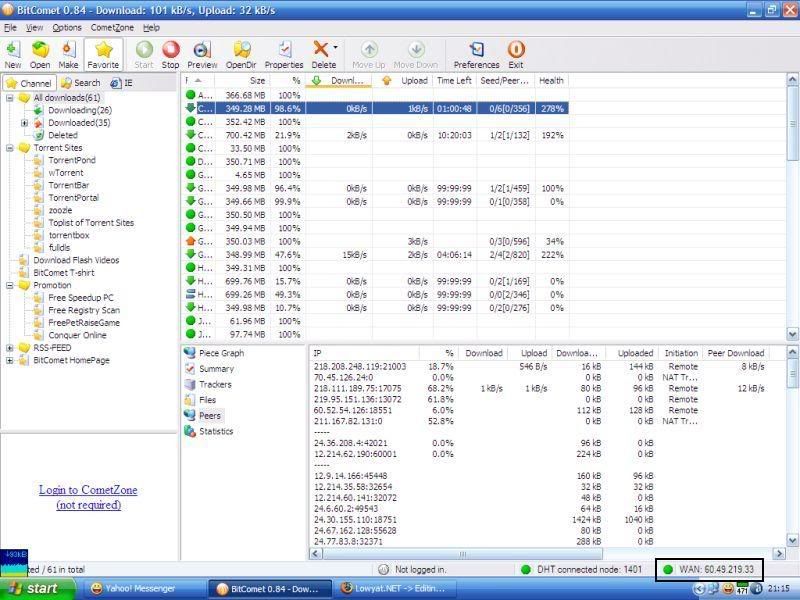
QUOTE(Snyy @ Mar 1 2007, 08:09 PM) hi guys, how do I know whether I successfully port forwarded or not?? if u notice at da lower right corner of ur bitcomet window there will be a green circle with WAN:60.**.***.** on da side... that shows ur portforward has been completed... » Click to show Spoiler - click again to hide... « This post has been edited by diablo69: Mar 1 2007, 09:22 PM |
|
|
|
|
|
diablo69
|
Mar 2 2007, 09:58 AM
|
|
|
QUOTE(Snyy @ Mar 1 2007, 11:02 PM) oh..thanks for all the given info. it seem like my port forwarding is not successful. anyone have any idea? I follow all the instruction at port forward.com and I already turn my windows firewall off. wat kind of router did u use... maybe need to manual set ur router... QUOTE(wengjoe @ Mar 2 2007, 09:24 AM) just tried BitComet 0.84 today notice the initiation collum there showing remote,NAT Traversal and local as well,3 huh ? is this normal or what ? i though should be only remote and local ? something sound fishy here yups thats normal... for me lor... dont know about others...  |
|
|
|
|
|
diablo69
|
Mar 2 2007, 01:49 PM
|
|
|
QUOTE(Snyy @ Mar 2 2007, 12:15 PM) @diablo69 I have a DLink 624+ router. what do you means by manually set? oh ya. 1 more thing. Do I need to do port forwarding on my modem as well? manually mean configuring da router urself... logging into ur modem by ur default gateway ip... assuming u havent change da admin password for ur router, da link below will provide u da default username and password... if im not mistaken, if use modem without router no need to portforward... http://www.speedguide.net/broadband.php |
|
|
|
|
|
diablo69
|
Mar 5 2007, 10:33 PM
|
|
|
QUOTE(WingKalimdor @ Mar 5 2007, 08:49 PM) Hi, I wonder what happen to my port because it shown connectivity status is unknown. Thank for helping. Regard. didnt u change ur listening port afew times too many in a day... that also sometimes can cause that... |
|
|
|
|
|
diablo69
|
Mar 6 2007, 12:16 AM
|
|
|
QUOTE(scorps @ Mar 5 2007, 10:58 PM) sometime me also happen like him, but what i do is just close that bitcomet, and then re-open it, and it will be okk.. if u've done portforward correctly, then just restart bitcomet and it will return to green... if no portforward, it turn back to yellow... |
|
|
|
|



 Quote
Quote

 0.0485sec
 0.67
0.67
 7 queries
 GZIP Disabled