Outline ·
[ Standard ] ·
Linear+
FAQ Windows Media Player - MINI F.A.Q, MINI F.A.Q (Frequently Asked Questions)
|
TSsakuraguy
|
  Jul 7 2006, 08:12 PM, updated 19y ago Jul 7 2006, 08:12 PM, updated 19y ago
|

|
Windows Media Player - MINI F.A.Q (Frequently Asked Questions) Hello all, This is a thread started for Windows Media Player enthusiasts to avoid, solve and retrieve from their problems. Have a good read and understand, as this F.A.Q is really important and unveils the potential of Installing, Using and Uninstalling Windows Media Player series. Source: http://www.myorice.net/forum/showpost.php?p=7&postcount=1Taken with permission from the Administrator This post has been edited by sakuraguy: Sep 23 2007, 12:04 PM |
|
|
|
|
|
TSsakuraguy
|
Jul 7 2006, 08:12 PM
|
|
|
There is a general focus herein on Windows Media Player 11, 10 and 9 Series. However, this FAQ also covers Windows Media Player 7 (WMP7), Windows Media Player 6 (WMP6), and Media Player for XP (MPXP). Most anything about a previous version applies to the next version(s) too.
* Generally, microsoft.public.windowsmedia.player is where beta issues/feedback should be discussed. Please know your netiquette - newsgroup feedback is pretty dodgy, so the better your posts are, the more likely it is that goodness will result. Provide precise details as possible and make sure what you write is readable. Create bullet points for stuff you feel should be acted on. Even if people agree with you, big messes of text are really hard to sort through and address. Snarkiness will most likely be counter-productive. Nobody's deliberately being mean to you - everybody on the WM team tries to do the right thing.
* v11 Beta setup issues are covered here.
* You can uninstall the WMP11 beta by ticking "Show Updates" in the Add/Remove Programs control panel. If you have run CCleaner, that will destroy WMP's ability to uninstall. I personally strongly recommend not using CCleaner. If you have run CCleaner or otherwise find that uninstall fails, you should still be able to use the System Restore point that WMP created in order to roll back to your previous player version.
* There are some known issues with how albums are sorted in some displays - if albums aren't grouped properly, I believe you would want to turn off the "Release Year" column in the library. There's some third field (beyond Album and Artist) that's being used a sort for your view - turning that field off fixes that up.
* Drag and drop of tracks may not work in some cases. This is being looked into.
* To get a tally of the number of songs and their time, select them. That tally will show up in the chrome briefly. Or hover the mouse over the "Now Doing" region, which is the region above the playlist.
* The Urge service requires the user to be a member of the Administrators group at this time. This is being looked into.
* Archaic MS visualizations are not supported.
* If you have an iPod, stuff like XPlay and MusicBridge is your friend. I personally have one of the new iRiver Clix devices, which are quite cool - I think CNet said "simply awesome". =)
* If the transport controls won't go away in Full Screen mode, delete the registry value "PinFullScreenControls" from HKEY_CURRENT_USER, software\microsoft\media player\preferences .
* If you hit a crash in drmv2clt.dll , run "c:\windows\inf\unregmp2.exe /PerformIndiv" and then you should be good.
|
|
|
|
|
|
TSsakuraguy
|
Jul 7 2006, 08:12 PM
|
|
|
Windows Media Player 10 Questions
A surprisingly great list of the further updates available to WMP10 is available here. If your host bans that site, here is a paltry mirror.
If you have problems installing or starting up the player, this section deals with all known issues.
If you're having video problems after the latest WMP update and have an nVidia card, go to WMP's Tools:Options:Devices:Performances and uncheck "Use High Quality Mode".
Don't install the WM v9 codec pack on top of WMP10. It doesn't make any sense to do that, and it may break WMA playback for DRM files. Reinstall the v10 player if you install the v9 codec pack by mistake. Symptoms of this problem are a 1) "Module not found" error when playing DRM content, and 2) wmploc.dll being version 10.0.0.3802 or later while wmadmod.dll and/or wmvdmod.dll is only version 10.0.0.3646.
A feature you probably didn't notice: click on the time display in the player - you can now have the player show Current Time:Total Time, as was requested (since normally it just shows Current Time). =)
You must have a music service available in order to use the Info Center feature.
If you get a double library listing (which is just a visual defect), just switch away and then switch back to the Library pane.
If you're on Windows XPSP2 and wish to rollback from WMP10, you will want to check the "Show Updates" button in the Add/Remove Programs control panel, as WMP10 is a system update. It is not possible to install WMP9 on top of WMP10 and you wouldn't want to.
The Nero Fast CD Burning Plug-in does not work in WMP10 at this time. Nero is working to resolve this. There's a recently updated plug-in from Nero for WMP here, but it does not work in WMP10 on my system at least.
The old Radio Tuner is under WMP10's Guide button, then click Radio on that page, then Radio Tuner.
Lyrics can be viewed in WMP10 using View:Captions. You may need to enable Captions using WMP's Tools:Options:Security's "Show local captions when present".
The WMP10 Energy Bliss visualization shows Album Art only if the art is in a separate file and only if it is assigned the name "Folder.jpg" or "AlbumArtSmall.jpg". It will also display album art assigned filename "AlbumArt_WMID_Large.jpg" or "AlbumArt_WMID_Small.jpg", but since the average user doesn't understand how to get the WMID, we'll ignore that. You'll get WMID Album Art for the file if you use "Find Album Info" on the track within the library.
If you get an error that "The current web page is trying to open a site in your Trusted Zone" when opening WMP, go to Internet Explorer's Tools:Internet Options:Security settings and remove "napster.com" from your Trusted Sites list
If you're synching DRM content to a portable device, get the update (mssscp.dll 10.0.0.3649) so that TransferCount decrements correctly.
|
|
|
|
|
|
TSsakuraguy
|
Jul 7 2006, 08:13 PM
|
|
|
Windows Media Player 9 Series Player Questions
The following is a quick list of ways to make sure your Windows Media Player 9 Series install is working right:
The final release of the player (9.0.0.2980) is available here. The eighteen Microsoft updates to this release are linked to here.
If you are having video flicker during playback, this will fix your nVidia video card up.
If you are having audio distortion during the playback of MP3 files, rename the file "ctmp3.acm" on your system (to "ctmp3.bak" or something like that). This is a Creative PlayCenter MP3 decoder that the Player isn't fully compatible with.
If you have the pirated software "Nimo" or "Tsunami" installed, you are likely crashing. "Nimo" and "Tsunami" are TERRIBLE packages and should be removed. If for some reason that's not possible (?), the updated 0.97 "mmswitch.ax" at Morgan Multimedia has an update for the MMSwitch crash.
If you are getting a class not registered error during playback of some AVI files, this likely means that you have an old broken version of the DivX codec. installed. If you update to their recent build, you should be okay.
If local URL flips (ScriptCommands) do not work, this is a security Feature. Only HTTP or HTTPS URLs work within Windows Media Script Commands at this point. The solution to this limitation is that for local system presentations you will need to handle the URL flips with JavaScript or the like within the web page hosting the player control.
If crossfading (a Windows XP feature) does not work for MP3 files, you likely have a pirated MP3 encoder installed to your system. This codec will NOT crossfade. If you're using WMP9, you can rename the file "l3codeca.acm" (and/or l3codecp.acm) on your system (to "l3codeca.bak" or such) and then reinstall the player and things should work fine at that point. If you're using WMP10, you would need to run "regsvr32.exe l3codeca.acm". However, that won't work if you've pirated the FhG codec: doing so will pretty much leave you broken and out of luck. Don't pirate software.
If MP3 encoding does not work and you're using the Intervideo MP3 Encode pack, you'll need to download an updated version from their web site to get it to work with the 9 Series player.
WMP will reject playback of MP3 files that have headers it does not understand. Read here to get an update to WMP that helps it understand more of your MP3 files.
Make sure your DirectX, video card, and audio card drivers are up to date either via Windows Update or your card manufacturer's web site. You'd be surprised at how much difference good drivers make. Also, these steps should also help.
If you're having CD burning problems, see here.
If WMP is launching at the start-up of your system, this is likely because 3rd party trojan spamware has infected your system. "iedll.exe" for some reasons registers WMP to launch on system start-up - possibly to cover it's own tracks? Regardless, get and run the (free) LavaSoft AdAware anti-spyware software (or SpyBot anti-spy software, or the dedicated CoolWebSearch/iedll.exe killer program), which will clean up iedll.exe. Then you will want to go to "HKEY_CURRENT_USER\Software\Microsoft\Windows\Curre ntVersion\Run" in regedit.exe. There you will likely find a value name entitled "loader" (OR MAYBE SOMETHING ELSE - malicious software did this to your machine, so they try to hide themselves). If this has the data value pointing to wmplayer.exe, delete this registry value. If AFTER CLEANING YOUR SYSTEM OF SPYWARE you still are having this problem, you should be able to use MSConfig to figure out where WMP is being loaded at, and turn it off.
Additionally, please note:
If the 9 Series installer reports failure, this is likely not a critical failure. A partial failure in a subcomponent that appears to have no affect on player performance is likely the cause. If you simply run "wmplayer.exe" directly at this point, the player should likely work fine. I'm looking into this.
Albums/Artists no longer show up in the playlist selection drop down in order to improve performance. If you want them back in that list, right-click on the playlist selection drop down list and select the options you want.
Supposedly DesktopX and ObjectBar's "TrayServer" (as well as "Desktop Manager" and some aspect of WindowBlinds) will block the Windows Media Player 9 Series' toolbar from working correctly. You may need to disable or remove that software for the player toolbar to work.
If you get the error message "Media Player ActiveX Control was not installed. Program can't continue. Please get Media Player control from Microsoft.com" from a CD you're trying to run, I'd be really curious to know what CD that was. It's buggy, and I'd like to contact the vendor and ask them to fix it...
Uninstall/rollback issues are addressed here.
The released hot fixes for the 9 Series Player can be found here at Microsoft, or Carsten maintains a nice list of them here. The ones I know about (as of 10/24/2005) are:
Fix for users prompted for credentials over an NTLM Authenticated proxy (wmnetmgr.dll 9.0.0.3002)
Fix for up to 5 second delay on stream switches (wmnetmgr.dll 9.0.0.3070)
Fix for connection through an authenticated MS Proxy 2.0 server (will usually show up as error 0xC00D0FD7) (wmnetmgr.dll 9.0.0.3080) [Additional proxy config information is here.]
Fix for 0xc00d1197 playing certain files via RTSP can be found here (wmnetmgr.dll 9.0.0.3157)
Fix for a crash when your browser cache is full on a network reconnect here (wmnetmgr.dll 9.0.0.3204)
Fix for WMP asking for credentials when it already has them here (wmnetmgr.dll 9.0.0.3260)
Fix for incorrect anamorophic scaling from the VMR here (quartz.dll 6.5.2600.2578)
Video may not display on a secondary monitor, this fixes that (wmp.dll 9.0.0.3003)
If certain DVDs have a zero-length seek bar during playback, get this fix. (wmp.dll 9.0.0.3004)
A minor update so that the screen saver turns on (if "Allow screen saver during playback" is checked in WMP's Tools:Options menu dialog) in full screen mode at the right time here (wmp.dll 9.0.0.3007)
A fix so that WMP doesn't always try to download radio presets (wmp.dll 9.0.0.3014)
Further security lock-down of URL flips. (wmp.dll version 9.0.0.3075)
A fix for too many Script Commands causing WMP to use too much CPU. (wmp.dll version 9.0.0.3093)
A fix for inability to seek in some files. (wmp.dll version 9.0.0.3121)
Improved speed for transfer between WMP and portable devices. (wmp.dll version 9.0.0.3128)
A fix for certain Ie/non-IE proxy issues is here (wmp.dll version 9.0.0.3147)
A fix to improve WMP's performance when used over Terminal Server here (wmp.dll version 9.0.0.3256)
Fix for script commands after seeking, memory leak with DVR-MR files here (wmp.dll version 9.0.0.3263)
If it has unsynchronized ID3 headers, then the Q814129 QFE will allow these files to play back. (wmvcore 9.0.0.3000) (this QFE also includes the G.711 playback fix)
Some hardware-created ASF files will not work in the 9 Series player (error 0xc00d1199). There is a WMP update here to fix this. (wmvcore.dll 9.0.0.3001)
A fix for extraneous buffering of some high bitrate content is here. (wmvcore.dll 9.0.0.3125)
Fix for memory leak during encoding with custom applications. (wmvcore.dll 9.0.0.3148)
Non-WMP apps that use QASF directly will play back ASF files better with this. (qasf.dll 9.0.0.3080)
Encoding apps that encode for extremely long sessions may stop randomly. This fixes that. (qasf.dll 9.0.0.3125)
Fix for memory leak during encoding with custom applications. (qasf.dll 9.0.0.3125)
Fix for WMP9 not able to restore licenses after rollback, causing error 0xC00D11B4 -- "Windows Media Player cannot restore your licenses because no backed up licenses were found on your computer" here (drmv2clt.dl version 9.0.0.3257)
Fix for encoding of WMA9 Speech codec losing synchronization (pretty much only needed if you're using the Windows Media Encoder) here (wmspdmod.dll 9.0.0.3254)
Note that you only need the most recent update (indicated by the black circles in the list) - so if you have wmp.dll version 9.0.0.3004 for the DVD issue, you don't need to install the 9.0.0.3003 version of wmp.dll (and doing so would be counter-productive).
If your issue does not appear in the above list, that is likely because I believe it is fixed in the 9 Series Player final build. If you are having any other problem with the player, please report it. This is really important - typically the only way MS gets stuff fixed is if customers complain about it to Product Support (the newsgroups don't really count). The developers saying something about it doesn't deliver the same emphasis upon it as if it's actually affecting customers. :\
-END-
|
|
|
|
|
|
samurai1337
|
Jul 7 2006, 08:47 PM
|
@_@

|
Moderation - Thread moved from software forum
Reason - Related to media playback
|
|
|
|
|
|
TSsakuraguy
|
Jul 7 2006, 09:11 PM
|
|
|
Thank you samurai, appreciate that  |
|
|
|
|
|
vin_ann
|
Jul 10 2006, 12:42 AM
|
|
|
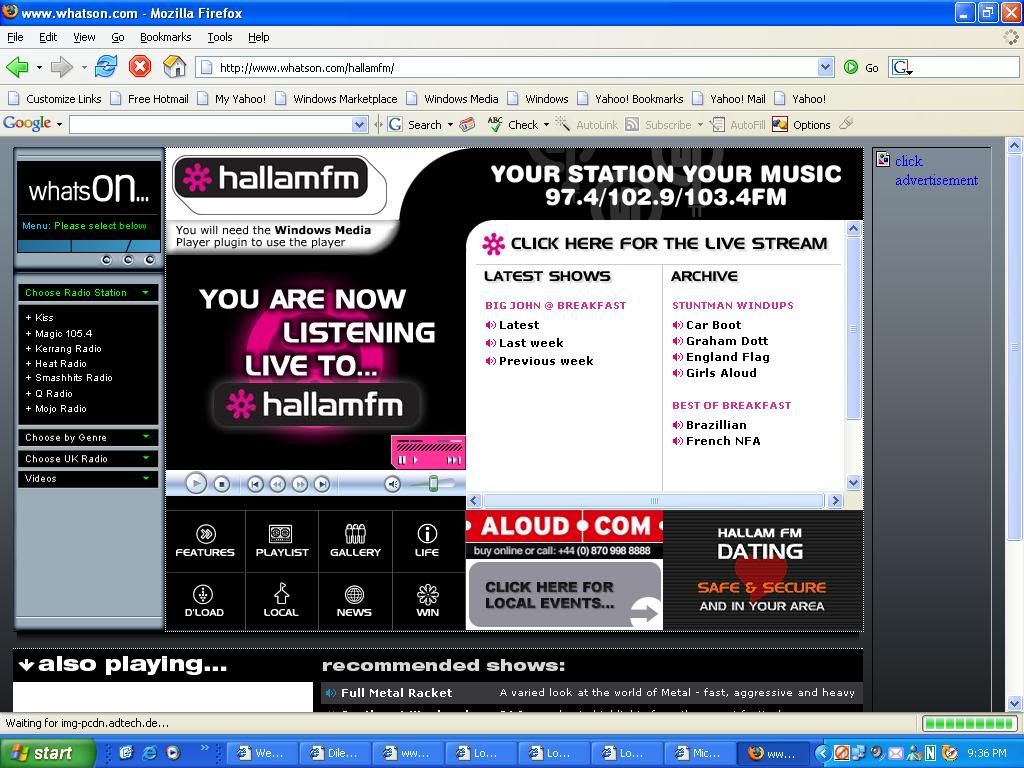
wanna ask, recently i just updated my window media player to WMP9...
then just now, when i wanted to listen to internet radio, i cliked the link, an IE pop-up, then it say you will need window media player plugs-in to play this player.
meaning i have to downloads the plugs-in?
then which plug-ins shd i download?
|
|
|
|
|
|
linkinstreet
|
Jul 10 2006, 01:17 AM
|
Red Bull Addict

|
Some more I like to add.
One of the best plugin that you can get is the TweakMP plugin. It's for WMP9 but works with 10 and 11. What it do is that it can eliminate the player control bar displaying (when in full screen mode) whenever the mouse move. The bar will only be visible when the mouse is at the topmost or bottommost of ur screen. this can solve interrupted vewing with some optical mouse that can't keep quiet.
It also can control the speed that the control bar is hidden.
|
|
|
|
|
|
TSsakuraguy
|
Jul 10 2006, 11:31 AM
|
|
|
vin_ann : check out the codec and plugins here http://www.microsoft.com/windows/windowsme.../faq/codec.mspxlinkinstreet : Thnx buddie for the source |
|
|
|
|
|
vin_ann
|
Jul 10 2006, 10:05 PM
|
|
|
 any1 got idea what plug-in shd i download and where? ? ? thanks |
|
|
|
|
|
TSsakuraguy
|
Jul 10 2006, 10:52 PM
|
|
|
uh? .. dunt tell me u dont understand wat the BOT says .. "ONLY AVAILABLE IN UK" .. There's no special plug in .. |
|
|
|
|
|
vin_ann
|
Jul 11 2006, 10:19 PM
|
|
|
QUOTE(sakuraguy @ Jul 10 2006, 10:52 PM) uh? .. dunt tell me u dont understand wat the BOT says .. "ONLY AVAILABLE IN UK" .. There's no special plug in .. BUT previously i can listen to this radio station... it's in the NET mah... so anywhere also can listen loh... so there is no plug in for this ? |
|
|
|
|
|
TSsakuraguy
|
Jul 11 2006, 10:22 PM
|
|
|
nope .. unless u find on the website itself , Microsoft has no special codec for this try browse around the site and u may find appropriate codec buddie! good luck! |
|
|
|
|
|
samurai1337
|
Jul 17 2006, 08:13 PM
|
@_@
|
Can't wait for WMP11 final release, any idea about the date?
|
|
|
|
|
|
TSsakuraguy
|
Jul 18 2006, 10:13 AM
|
|
|
Unsure ..but rumours within this year |
|
|
|
|
|
kimmiz
|
Jul 26 2006, 08:08 PM
|
Getting Started

|
I was installing and uninstalling some multimedia software and now when I play my dvd files in windows media, the size of the screen is half. The image is complete just that the size of the screen has been reduced to 50%. What should I do to restore it? The screen is fine when I play other files. It only acts up with dvd files.
//Thread merged
This post has been edited by samurai1337: Jul 26 2006, 09:05 PM
|
|
|
|
|
|
dopodplaya
|
Jul 26 2006, 08:16 PM
|
|
|
QUOTE(kimmiz @ Jul 26 2006, 08:08 PM) I was installing and uninstalling some multimedia software and now when I play my dvd files in windows media, the size of the screen is half. The image is complete just that the size of the screen has been reduced to 50%. What should I do to restore it? The screen is fine when I play other files. It only acts up with dvd files.
Your DVD decoder (ffmpeg, PowerDVD, Nero DVD decoder or some other DVD decoder), please? Since WMP uses those decoder (WMP is a DVD player, not decoder though), the settings usually come with those decoder apps. Refer to the app concerned. |
|
|
|
|
|
kimmiz
|
Jul 27 2006, 08:48 PM
|
Getting Started
|
QUOTE(dopodplaya @ Jul 26 2006, 08:16 PM) Your DVD decoder (ffmpeg, PowerDVD, Nero DVD decoder or some other DVD decoder), please? Since WMP uses those decoder (WMP is a DVD player, not decoder though), the settings usually come with those decoder apps. Refer to the app concerned. I think it's PowerDVD. |
|
|
|
|
|
samurai1337
|
Jul 27 2006, 08:58 PM
|
@_@
|
Just tested out WMP 11 public beta and it's very very buggy.
If you guys want to have a stable media player, I would suggest you to stick with WMP10 first.
|
|
|
|
|
|
samurai1337
|
Aug 2 2006, 12:26 AM
|
@_@
|
My WMP11 screenshot  I still prefer WMP10 media library concept...this one too difficult to add songs >_< |
|
|
|
|



 Quote
Quote





 0.0290sec
 0.13
0.13
 7 queries
 GZIP Disabled