Welcome Guest ( Log In | Register )

Outline · [ Standard ] · Linear+

 Your Home Theater Setup.. v2, Let's share..

views
     
siauann
post Jun 5 2014, 04:46 PM

Music-Movies-Coffee
*******
Senior Member
3,375 posts

Joined: May 2005
From: MeeRee


i dunno if this is being discuss before
can we setup a 3.1 system? a pair of front + centre + sub? or
better to setup a 2.1 system? movies more than listening to music
setup in a living room and surround installation is a problem
siauann
post Aug 20 2014, 02:08 PM

Music-Movies-Coffee
*******
Senior Member
3,375 posts

Joined: May 2005
From: MeeRee


QUOTE(breonwei @ Aug 18 2014, 09:16 AM)
Finally mounted rear speakers with BTech BT77 clamping wall mount smile.gif Bought it from ebay

user posted imageuser posted image
*
how much u bought the mounting? any links?
siauann
post Nov 21 2014, 01:02 PM

Music-Movies-Coffee
*******
Senior Member
3,375 posts

Joined: May 2005
From: MeeRee


im not sure if i suppose to post this problem in this thread or not. anyway i encounter this problem with my setup

TV: Sharp 46LE830
AVR: Onkyo TX-SR508
Bluray: Sony S380
Media Player: Asus O! Play Mini

hdmi cable connect from AVR out to TV in (ARC)
Bluray connect to AVR (HDMI 1)
Media player connect to AVR (HDMI 2)
when i turn on/off tv with tv remote control, normally the AVR will turn on/off itself too. turn on the volume with tv remote control it control the AVR volume. TV no sound. on off and volume i just use either 1 remote control.

recently i just move to new house. problem encounter now is i have to use separate remote to turn on/off AVR and TV for the volume control. did i connect something wrongly or setup anything wrongly? it seems like wont auto detect the setting.

previously when i turn on tv the avr turn on. if i on bluray player the avr automatically sets to the bluray mode which the sound will go through avr. now i have to manually set it. if i use media player and did not set to media player connection in my avr the sounds will play from bluray player

siauann
post Nov 21 2014, 03:39 PM

Music-Movies-Coffee
*******
Senior Member
3,375 posts

Joined: May 2005
From: MeeRee


QUOTE(dirtrun @ Nov 21 2014, 03:23 PM)
l dont hv issue using several remotes..

1 for pj - on n off only
1 for avr
Pwr amp no remote
1 for bdp or media player..

Did I forget anything?

I hv to 'on' evrytng to watch a flick..

D
*
dont have issues with using several remotes. but just wanna check with u guys if this is consider the ARC not functioning?
siauann
post Nov 22 2014, 12:12 PM

Music-Movies-Coffee
*******
Senior Member
3,375 posts

Joined: May 2005
From: MeeRee


QUOTE(ktek @ Nov 21 2014, 10:07 PM)
last time did you use tv for hdmi switching? looks like hdmi CEC problem not ARC.
try disable then enable again for all devices
*
erm..what is hdmi cec? noobie here blush.gif
use tv for hdmi switching means?
last time when i turn on my tv, the avr automatically turn on. when i turn bluray player the avr automatically switch to that mode
siauann
post Jan 15 2015, 03:19 PM

Music-Movies-Coffee
*******
Senior Member
3,375 posts

Joined: May 2005
From: MeeRee


QUOTE(siauann @ Nov 21 2014, 01:02 PM)
im not sure if i suppose to post this problem in this thread or not. anyway i encounter this problem with my setup

TV: Sharp 46LE830
AVR: Onkyo TX-SR508
Bluray: Sony S380
Media Player: Asus O! Play Mini

hdmi cable connect from AVR out to TV in (ARC)
Bluray connect to AVR (HDMI 1)
Media player connect to AVR (HDMI 2)
when i turn on/off tv with tv remote control, normally the AVR will turn on/off itself too. turn on the volume with tv remote control it control the AVR volume. TV no sound. on off and volume i just use either 1 remote control.

recently i just move to new house. problem encounter now is i have to use separate remote to turn on/off AVR and TV for the volume control. did i connect something wrongly or setup anything wrongly? it seems like wont auto detect the setting.

previously when i turn on tv the avr turn on. if i on bluray player the avr automatically sets to the bluray mode which the sound will go through avr. now i have to manually set it. if i use media player and did not set to media player connection in my avr the sounds will play from bluray player
*
QUOTE(ktek @ Nov 21 2014, 10:07 PM)
last time did you use tv for hdmi switching? looks like hdmi CEC problem not ARC.
try disable then enable again for all devices
*
change tv not long ago. disconnect and reconnect everything. and then the CEC is working again. turn on tv and the avr turn on. then until recently, looks like the same problem i face again like before. have to turn on each and everything again. whats wrong? avr hdmi port problem? hdmi cable problem? or my hardware problem? current connection is:
sony w600b tv connect to onkyo 508 avr.
bluray s380, minix x8h, hypptv connect to avr.
anyone can help? i try disconnect and reconnect all device but same sad.gif
siauann
post Jul 2 2021, 12:55 PM

Music-Movies-Coffee
*******
Senior Member
3,375 posts

Joined: May 2005
From: MeeRee


user posted image

hi all,
just a quick advise from sifu sifu here.
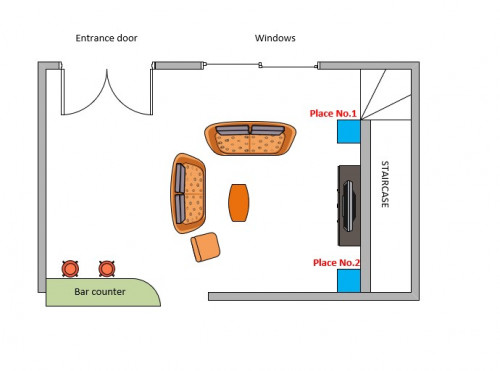
this is my living room sketch. room size is 7.2m L x 6.1m W.
i have trouble finding a sweet spot for my sub woofer. location place no. 1 (blue square) - the bass is too weak. location place no.2 (blue square) at the corner wall - the bass is too boomy.
avr used - denon x1300w.
sub - yamaha ns-sw300

any advise can be shared? newbie in this world of HT.

thanks a lot

siauann
post Jul 2 2021, 01:27 PM

Music-Movies-Coffee
*******
Senior Member
3,375 posts

Joined: May 2005
From: MeeRee


QUOTE(kevinlim001 @ Jul 2 2021, 01:20 PM)
its completely normal.. the woofer tends to get boomy if you place it at wall corner.
have you tried subwoofer crawl method?
https://www.audioholics.com/home-theater-co...oofer-placement
*
have not tried the crawl method. but i have limited placement. either 1 and 2. other location are difficult. even the middle part is diffcult as the sub is too big to go under the tv cabinet
siauann
post Jul 2 2021, 01:52 PM

Music-Movies-Coffee
*******
Senior Member
3,375 posts

Joined: May 2005
From: MeeRee


QUOTE(kevinlim001 @ Jul 2 2021, 01:38 PM)
understand.. because a lot of us may face the same issue because we
1) do not have a proper listening area with acoustic treatment
2) limited option to place subwoofer

try to pull out the subwoofer away from the wall and see if that helps.. also you can try to place it along the wall no2.. which is facing windows to see any sweet spot that you can identify

placement of subwoofer is very subjective from room to room.. i read some rare cases subwoofer sound best when its place next to sofa.
*
good idea on the wall along no.2. will try it out and see how it goes. thumbsup.gif
siauann
post Jul 2 2021, 04:04 PM

Music-Movies-Coffee
*******
Senior Member
3,375 posts

Joined: May 2005
From: MeeRee


QUOTE(SSJBen @ Jul 2 2021, 03:13 PM)
user posted image

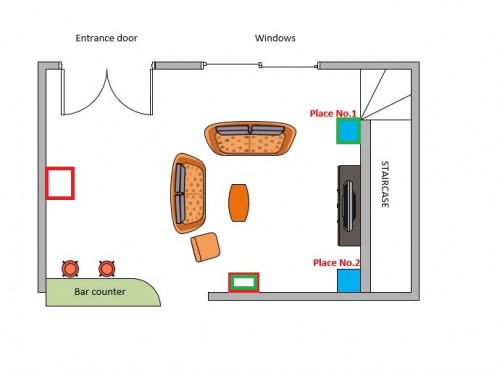
Red - try either of those placements.
Green - potential dual sub placement.

Unfortunately (well fortunate if you ask me), you actually need multi subs to cancel out the waves that is causing the nulls and peaks in your room. The real issue is the size and shape of your room, it is neither a real rectangle nor is it big.

You will also need a calibrated mic and REW to see what the actual issues are in your room.
*
thanks for the suggestion. dual sub sounds interesting. but i am not ready to do dual sub setup yet biggrin.gif
the other placement on the back seems good but its a bit of headache for me on the long woofer cabling and power socket. i will try with the other location on the wall opposite the windows first.

yes u are right. the size and shape of my room. it is actually not a dedicated room but the main living hall of the house biggrin.gif
siauann
post Jul 2 2021, 04:20 PM

Music-Movies-Coffee
*******
Senior Member
3,375 posts

Joined: May 2005
From: MeeRee


QUOTE(SSJBen @ Jul 2 2021, 04:16 PM)
My experience and opinion is that dual subs (or more) is one of the top 3 most important things to have if the room is not of a symmetrical shape and the listener has multiple seat locations (like you do). A second sub should definitely be in your next upgrade path.
*
thanks for the experience sharing. really appreciate it. at least i know in mind what will be the next step.
also for dual sub, is it necessary to have a same sub? different sub can do?


Change to:
| Lo-Fi Version
0.1488sec    0.38    7 queries    GZIP Disabled
Time is now: 2nd December 2025 - 07:31 PM