

If can, guide thru step by step!
Thanks!

Any latest Macs means iMac, Macbook, Macbook Pro with Intel Core Duo...
This post has been edited by Mike3300: Jun 27 2006, 06:55 PM
How 2 On Bluetooth on any latest Macs?, Teach Me How 2 Do It!
|
|
  Jun 27 2006, 06:53 PM, updated 20y ago Jun 27 2006, 06:53 PM, updated 20y ago
Show posts by this member only | Post
#1
|
 
Senior Member
6,866 posts Joined: Feb 2005  
|
If the Bluetooth on the Macs are turned off, how do we turn it on?
If can, guide thru step by step! Thanks! Any latest Macs means iMac, Macbook, Macbook Pro with Intel Core Duo... This post has been edited by Mike3300: Jun 27 2006, 06:55 PM |
|
|
|
|
|
Jun 27 2006, 09:29 PM
Show posts by this member only | Post
#2
|
|
Senior Member
6,866 posts Joined: Feb 2005
|
So many Mac users here and yet nobody knows how to on it?
|
|
|
Jun 27 2006, 09:30 PM
Show posts by this member only | Post
#3
|
 
VIP
12,925 posts Joined: Mar 2005 From: Kuala Lumpur
|
its sooo easy ,in the menu bar , you would see the B logo. If its grey in colour , that means its inactive , to turn it on , just click it and select Turn Bluetooth On and vola its On. To turn it off do the samething. Would you like any screenshots ?
|
|
|
Jun 27 2006, 09:33 PM
Show posts by this member only | Post
#4
|
|
Senior Member
6,866 posts Joined: Feb 2005
|
QUOTE(prasys @ Jun 27 2006, 09:30 PM) its sooo easy ,in the menu bar , you would see the B logo. If its grey in colour , that means its inactive , to turn it on , just click it and select Turn Bluetooth On and vola its On. To turn it off do the samething. Would you like any screenshots ? Moderators are the best!!   Yes! Can I have some screenshots? And all those Aqua Blue wallpapers and flurry screensaver will be always in the Macs huh? Gonna be a Mac user soon! So need you guys as the manual book  |
|
|
Jun 27 2006, 09:34 PM
Show posts by this member only | Post
#5
|

Senior Member
996 posts Joined: Jan 2003 From: Kuching, Sarawak 
|
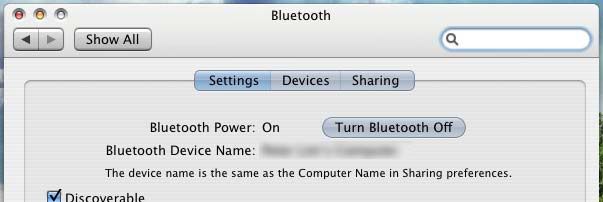 Or you can go to System Preferences... > Bluetooth > Setting then on the Bluetooth in there... Hope this can solve your problem.. |
|
|
Jun 27 2006, 09:35 PM
Show posts by this member only | Post
#6
|
|
Senior Member
6,866 posts Joined: Feb 2005
|
This can be access from the upper white long bar?
praysys, I still need ur screenshot, and if can make it the whole screen screenshot TQThis post has been edited by Mike3300: Jun 27 2006, 09:36 PM |
|
|
|
|
|
Jun 27 2006, 09:40 PM
Show posts by this member only | Post
#7
|
|
Senior Member
996 posts Joined: Jan 2003 From: Kuching, Sarawak
|
QUOTE(Mike3300 @ Jun 27 2006, 09:35 PM) This can be access from the upper white long bar? Here you go...praysys, I still need ur screenshot, and if can make it the whole screen screenshot TQ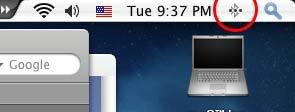 yap.. you can access from the upper screen near the spotlight there.. This post has been edited by siawgu: Jun 27 2006, 09:41 PM |
|
|
Jun 27 2006, 09:41 PM
Show posts by this member only | Post
#8
|

Senior Member
2,657 posts Joined: Jan 2003 From: In front of my computer
|
wanted to help u.....but dunno how to print screen..........hahaha......
it can be accessed from the upper white long bar...dunno what is the correct term for it also..... i just started using Mac for 1 hours..........hahha |
|
|
Jun 27 2006, 09:44 PM
Show posts by this member only | Post
#9
|
|
Senior Member
996 posts Joined: Jan 2003 From: Kuching, Sarawak
|
QUOTE(lokgotz @ Jun 27 2006, 09:41 PM) wanted to help u.....but dunno how to print screen..........hahaha...... Wah.. just 1 Hour? just bought it? Congratulation and Welcome to Mac World...it can be accessed from the upper white long bar...dunno what is the correct term for it also..... i just started using Mac for 1 hours..........hahha OFF TOPIC : To Print Screen : Press CMD + SHIFT + 3 = Entire Desktop Capture Press CMD + SHIFT + 4 = Selection Area Capture This post has been edited by siawgu: Jun 27 2006, 09:45 PM |
|
|
Jun 27 2006, 09:45 PM
|
|
Senior Member
6,866 posts Joined: Feb 2005
|
QUOTE(siawgu @ Jun 27 2006, 09:40 PM) Here you go... Wht if it's off, the Bluetooth logo sure will disappear rite?yap.. you can access from the upper screen near the spotlight there.. QUOTE(lokgotz @ Jun 27 2006, 09:41 PM) wanted to help u.....but dunno how to print screen..........hahaha...... Upper bar from the left or right? it can be accessed from the upper white long bar...dunno what is the correct term for it also..... i just started using Mac for 1 hours..........hahha Congrats! Mac user shud be proud off urself  |
|
|
Jun 27 2006, 09:55 PM
|
|
Senior Member
996 posts Joined: Jan 2003 From: Kuching, Sarawak
|
 Does this images help you? if you cannot see your bluetooth icon in the upper menu.. you can on it in System Preferences... > Bluetooth > Settings > Show Bluetooth status in the menu bar |
|
|
Jun 27 2006, 09:57 PM
|
|
Senior Member
6,866 posts Joined: Feb 2005
|
QUOTE(siawgu @ Jun 27 2006, 09:55 PM) Does this images help you? if you cannot see your bluetooth icon in the upper menu.. you can on it in System Preferences... > Bluetooth > Settings > Show Bluetooth status in the menu bar |
|
|
Jun 27 2006, 09:59 PM
|
|
Senior Member
2,657 posts Joined: Jan 2003 From: In front of my computer
|
system preferences is like control panel for windows....
can find when u click on the apple on the top left..... thanks siawgu....yeah..just got my macbook |
|
|
|
|
|
Jun 27 2006, 10:00 PM
|
|
Senior Member
996 posts Joined: Jan 2003 From: Kuching, Sarawak
|
QUOTE(Mike3300 @ Jun 27 2006, 09:57 PM) Where do I find System Preferences? the System Preferences.. located in the Apple menu on the upper left side... |
|
|
Jun 27 2006, 10:10 PM
|
|
Senior Member
6,866 posts Joined: Feb 2005
|
Is it under here?
http://img476.imageshack.us/img476/6307/imac6og.jpg Finder or ... This post has been edited by Mike3300: Jun 27 2006, 10:10 PM |
|
|
Jun 27 2006, 10:14 PM
|
|
Senior Member
996 posts Joined: Jan 2003 From: Kuching, Sarawak
|
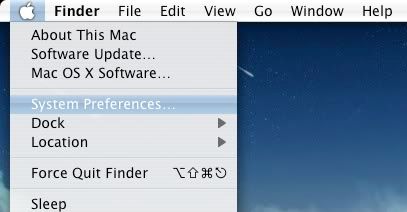 yap.. inaide the apple logo.. you will find System Preferences.. |
|
|
Jun 27 2006, 10:18 PM
|
|
Senior Member
6,866 posts Joined: Feb 2005
|
And from there got all the settings of the PC...
Thank you very much siawgu and frens here in LYN...got it! Maybe tomorrow wanna booked 1.83Ghz MacBook already... |
|
|
Jun 27 2006, 10:43 PM
|
|
Senior Member
996 posts Joined: Jan 2003 From: Kuching, Sarawak
|
QUOTE(Mike3300 @ Jun 27 2006, 10:18 PM) And from there got all the settings of the PC... no problem..Thank you very much siawgu and frens here in LYN...got it! Maybe tomorrow wanna booked 1.83Ghz MacBook already... me also thinking to change to MacBook.. but still not the time to change.. now just thinking to upgrade my processor to Intel Core Duo 2.16Ghz.. just waiting for Intel cut price..  This post has been edited by siawgu: Jun 27 2006, 10:44 PM |
|
|
Jun 28 2006, 02:03 PM
|

Senior Member
575 posts Joined: Apr 2005 From: 1 Infinite Loop, Cupertino
|
To add on the OFF TOPIC screen capture tips,
Apple + Shift + 4, then press space bar This will turn your mouse cursor into a camera icon, which allows you to take 1 piece of an opened app. or window, without having to drag an area nicely. Just try it and you'll understand. |
|
|
Jun 28 2006, 03:53 PM
|
|
Senior Member
996 posts Joined: Jan 2003 From: Kuching, Sarawak
|
QUOTE(Deadman.Inc. @ Jun 28 2006, 02:03 PM) To add on the OFF TOPIC screen capture tips, wow.. thx.. this one i dunno.. me also still newbies.. Apple + Shift + 4, then press space bar This will turn your mouse cursor into a camera icon, which allows you to take 1 piece of an opened app. or window, without having to drag an area nicely. Just try it and you'll understand. |
|
Topic ClosedOptions
|
| Change to: |  0.0154sec 0.0154sec
 0.70 0.70
 5 queries 5 queries
 GZIP Disabled GZIP Disabled
Time is now: 20th December 2025 - 09:49 AM |
 Quote
Quote