Welcome Guest ( Log In | Register )

Outline · [ Standard ] · Linear+

 Air intake for casing

views
     
TSpasarmalam
post Dec 11 2013, 06:37 PM, updated 13y ago

Getting Started
**
Junior Member
276 posts

Joined: May 2006
From: OUG/MIDVALLEY


Hi

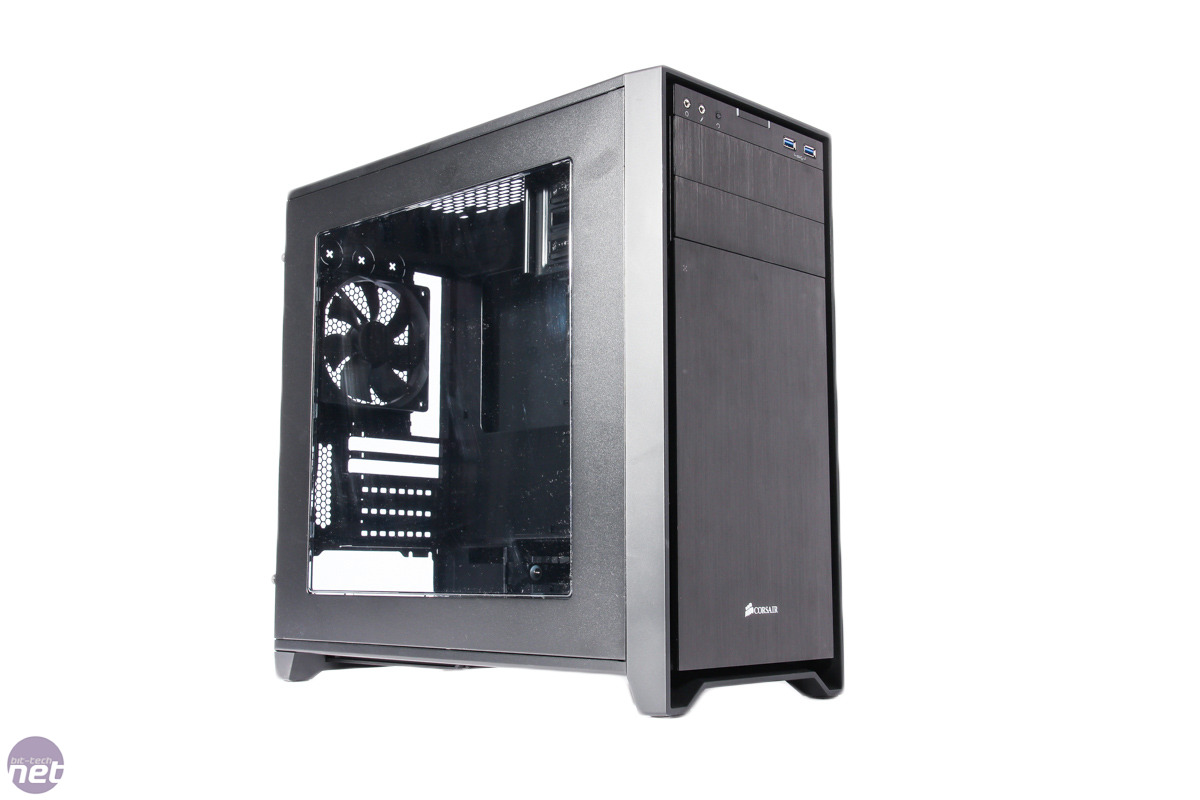
Just got a corsair 350d.

The top of the case I plan to put 2 X 140mm fans. on the top of case.

Now do I pull air in to the case or do I pull air out?Which method is better for better air flow?

I have 2 X 140mm fans in the front but the intake is limited.due the casing front.

Also have hyper 212 x cpu cooler with push pull config. and 1 exhaust fan at back.

For those who don't know this case :

user posted image .

Air flow limited due to front panel but has some intake on sides.

user posted image


Not my case tongue.gif haven't setup pc yet going to in next few days when i got time biggrin.gif

Thanks
llk
post Dec 11 2013, 10:00 PM

Look at all my stars!!
*******
Senior Member
4,158 posts

Joined: Jan 2003
From: KL
Normally fan at front suck air in, top fan pull air out.
Tuah_3
post Dec 16 2013, 01:37 PM

Getting Started
**
Junior Member
98 posts

Joined: Oct 2012
better use natural / positive air system...

natural is like, how many it goes in then the out is same... like 2 in, 2 out..
positive is more air in than out...
never do negative because dust can build up at small gap and in the case

This post has been edited by Tuah_3: Dec 16 2013, 01:38 PM
AwesomeWeng
post Dec 16 2013, 11:13 PM

Getting Started
**
Junior Member
50 posts

Joined: Sep 2010
QUOTE(Tuah_3 @ Dec 16 2013, 01:37 PM)
better use natural / positive air system...

natural is like, how many it goes in then the out is same... like 2 in, 2 out..
positive is more air in than out...
never do negative because dust can build up at small gap and in the case
*
Soo it's 2 front 1 top 1 exhaust alright?
Tuah_3
post Dec 18 2013, 03:50 PM

Getting Started
**
Junior Member
98 posts

Joined: Oct 2012
QUOTE(AwesomeWeng @ Dec 16 2013, 11:13 PM)
Soo it's 2 front 1 top 1 exhaust alright?
*
yes... 2 front air goes in and top should air goes out... smile.gif

or better, check this out...


Pacmangoku
post Dec 27 2013, 05:16 AM

lë Fantôme
*****
Senior Member
828 posts

Joined: Apr 2012
From: Edge of Tomorrow
QUOTE(pasarmalam @ Dec 11 2013, 06:37 PM)
Hi

Just got a corsair 350d.

The top of the case I plan to put 2 X 140mm fans. on the top of case.

Now do I pull air in to the case or do I pull air out?Which method is better for better air flow?

I have 2 X 140mm fans in the front but the intake is limited.due the casing front.

Also have hyper 212 x cpu cooler with push pull config. and 1 exhaust fan at back.

For those who don't know this case :

user posted image .

Air flow limited due to front panel but has some intake on sides.

user posted image
Not my case tongue.gif haven't setup pc yet going to in next few days when i got time biggrin.gif

Thanks
*
Using the same case as you. My two top radiator fans are in out configuration, two front fans are intake fans. So far so good.
xsaintzx
post Dec 30 2013, 05:07 PM

On my way
****
Senior Member
598 posts

Joined: Mar 2008
Heat rises, so the top fans should act as exhaust.
Not sure if you have slot at the bottom, the bottom panel fans can be used as intake as well.

For side fans, you may need to check your GPU fan is passive type or not, it may disrupt the airflow of your GPU, not really recommend to add side if you don't know how to configure properly.
kns003
post Aug 9 2014, 04:47 PM

Casual
***
Junior Member
443 posts

Joined: Feb 2011
From: K.l Area


for positive air system. should be like tis:-

Front -> Intake air(add air fittler for less dust)
Top -> Intake air(add air filter for less dust)
Rear-> Exhaust air =All cool air in-> Hot air Exhaust out.

ur system should be fine and cleans...And for positive air system...gpu should e go for Refrence 1,good for push /exhasut hot air.

i have try with my past - Lankool pc k62-w . its was better cool down and less dust for b4.


This post has been edited by kns003: Aug 9 2014, 04:51 PM
asunakirito
post Sep 6 2014, 09:48 PM

Regular
******
Senior Member
1,068 posts

Joined: Oct 2012
QUOTE(kns003 @ Aug 9 2014, 04:47 PM)
for positive air system. should be like tis:-

Front -> Intake air(add air fittler for less dust)
Top -> Intake air(add air filter for less dust)
Rear-> Exhaust air =All cool air in-> Hot air Exhaust out.

ur system should be fine and cleans...And for positive air system...gpu should e go for Refrence 1,good for push /exhasut hot air.

i have try with my past - Lankool pc k62-w . its was better cool down and less dust for b4.
*
I used this configuration , which works very well for me - with slight modification. brows.gif
The top of Corsair 350D can fit in 2 fans, I used 1 only, the one at the center (to cool RAM and provide fresh intake for CPU cooler)
Therefore 3 fan intake (2 front + 1 middle top), 1 exhaust (rear).
The top need to purchase dust filter to prevent dust from going in.

This post has been edited by asunakirito: Sep 6 2014, 09:49 PM
kns003
post Sep 6 2014, 09:56 PM

Casual
***
Junior Member
443 posts

Joined: Feb 2011
From: K.l Area


QUOTE(asunakirito @ Sep 6 2014, 10:48 PM)
I used this configuration , which works very well for me - with slight modification.  brows.gif
The top of Corsair 350D can fit in 2 fans, I used 1 only, the one at the center (to cool RAM and provide fresh intake for CPU cooler)
Therefore 3 fan intake (2 front + 1 middle top), 1 exhaust (rear).
The top need to purchase dust filter to prevent dust from going in.
*
rclxms.gif
Mr.Frosty
post Oct 4 2014, 01:57 AM

Getting Started
**
Junior Member
250 posts

Joined: Nov 2013
From: Kings Landing Winterfell Status: Who cares ಠ_ಠ

get watercooling biggrin.gif
SUSmeazurali89
post Oct 11 2014, 09:52 PM

Enthusiast
*****
Senior Member
908 posts

Joined: Oct 2011


QUOTE(asunakirito @ Sep 6 2014, 09:48 PM)
I used this configuration , which works very well for me - with slight modification.  brows.gif
The top of Corsair 350D can fit in 2 fans, I used 1 only, the one at the center (to cool RAM and provide fresh intake for CPU cooler)
Therefore 3 fan intake (2 front + 1 middle top), 1 exhaust (rear).
The top need to purchase dust filter to prevent dust from going in.
*
you only use 1 exhaust? hmm.gif

how your pc cooling? hmm.gif
asunakirito
post Oct 12 2014, 03:02 PM

Regular
******
Senior Member
1,068 posts

Joined: Oct 2012
QUOTE(meazurali89 @ Oct 11 2014, 09:52 PM)
you only use 1 exhaust? hmm.gif

how your pc cooling? hmm.gif
*
Previously I used 6 fans:
1) 3 x 140mm for 2 hard disks + SSD (air intake)
2) 1 x 140mm for CPU (air intake)
2) 1 x 120mm for GPU (air intake)
3) 1 x 140mm for exhaust.

and I tested it against 3 fan setup:
1) 2 x 140mm for 2 hard disks + SSD (air intake)
2) 1 x 140mm for exhaust

The difference is approximately 1-5 degree Celcius difference when gaming/10bit video-encoding.

If you use a computer case whichhas many ventilations (example: Fractal Arc Midi),
you can use less fans as the heat can be escaped easily from the roof top as its open but equipped with dust filter.
That alone can reduce heat by 2-3 degree Celcius compared to closed-roof computer cases (example: Fractal Define R4)

This post has been edited by asunakirito: Oct 12 2014, 03:03 PM
SUSmeazurali89
post Oct 12 2014, 03:05 PM

Enthusiast
*****
Senior Member
908 posts

Joined: Oct 2011


QUOTE(asunakirito @ Oct 12 2014, 03:02 PM)
Previously I used 6 fans:
1) 3 x 140mm for 2 hard disks + SSD (air intake)
2) 1 x 140mm for CPU (air intake)
2) 1 x 120mm for GPU (air intake)
3) 1 x 140mm for exhaust.

and I tested it against 3 fan setup:
1) 2 x 140mm for 2 hard disks + SSD (air intake)
2) 1 x 140mm for exhaust

The difference is approximately 1-5 degree Celcius difference when gaming/10bit video-encoding.

If you use a computer case whichhas many ventilations (example: Fractal Arc Midi),
you can use less fans as the heat can be escaped easily from the roof top as its open but equipped with dust filter.
That alone can reduce heat by 2-3 degree Celcius compared to closed-roof computer cases.
*
im planning of a rig that only have 1 exhaust and all other fans is intake,dont know if its ok for my pc.what you thought bout that? hmm.gif
asunakirito
post Oct 12 2014, 03:36 PM

Regular
******
Senior Member
1,068 posts

Joined: Oct 2012
QUOTE(meazurali89 @ Oct 12 2014, 03:05 PM)
im planning of a rig that only have 1 exhaust and all other fans is intake,dont know if its ok for my pc.what you thought bout that? hmm.gif
*
That would sound fine considering that the GPU + PSU do also exhaust hot air out of the chassis.
More intake fans is better than more exhaust fans to create a positive airflow environment within the chassis.
Usually budget computer cases (RM50-200) would only have 2-3 fan mounts.

You will need at least 1 fan air exhaust though as 3 fan air intakes isn't as good as
2 intakes with 1 exhaust based from my temperature testing experiences. icon_rolleyes.gif

This post has been edited by asunakirito: Oct 12 2014, 03:37 PM
SUSmeazurali89
post Oct 12 2014, 03:44 PM

Enthusiast
*****
Senior Member
908 posts

Joined: Oct 2011


QUOTE(asunakirito @ Oct 12 2014, 03:36 PM)
That would sound fine considering that the GPU + PSU do also exhaust hot air out of the chassis.
More intake fans is better than more exhaust fans to create a positive airflow environment within the chassis.
Usually budget computer cases (RM50-200) would only have 2-3 fan mounts.

You will need at least 1 fan air exhaust though as 3 fan air intakes isn't as good as
2 intakes with 1 exhaust based from my temperature testing experiences.  icon_rolleyes.gif
*
the only exhaust fans at the back of my case should i choose higher rpm to quickly pull the air out or just normal fans rpm is better? hmm.gif


asunakirito
post Oct 12 2014, 08:40 PM

Regular
******
Senior Member
1,068 posts

Joined: Oct 2012
QUOTE(meazurali89 @ Oct 12 2014, 03:44 PM)
the only exhaust fans at the back of my case should i choose higher rpm to quickly pull the air out or just normal fans rpm is better? hmm.gif
*
It would be best if all the fans have the same RPM so it would be easier to balance the amount of air to be intake as well.
Do take note of the noise the fans emit too. Fans above 1300 RPM makes audible noise if the case is just placed within 90-120 cm away from you.

There are 2 types of fans you will need to consider which are SP (Static Pressure) and AF (Air Flow fans).
AF are used for exhaust or areas where there target component to be cool does not have any obstacles in between.
SP are used for HDD Cages (Hard Disk Drive) and CPU Heatsink.

The fans I recommend would be either Enermax T.B. Vegas 140mm (L.E.D) and Noctua NF-A14 (140mm fan).
Both fans deliver great amount of air with sufficient static pressure compared to cheaper fans that is priced around RM30 and below.
TB Vegas cost around RM60 (flashy LED, removable blade for cleaning, 1 year warranty) and NF-A14 (saves electricity, 5 years warranty) is around RM75.

This post has been edited by asunakirito: Oct 12 2014, 08:41 PM

 

Change to:
| Lo-Fi Version
0.0251sec    0.70    5 queries    GZIP Disabled
Time is now: 20th December 2025 - 05:45 PM