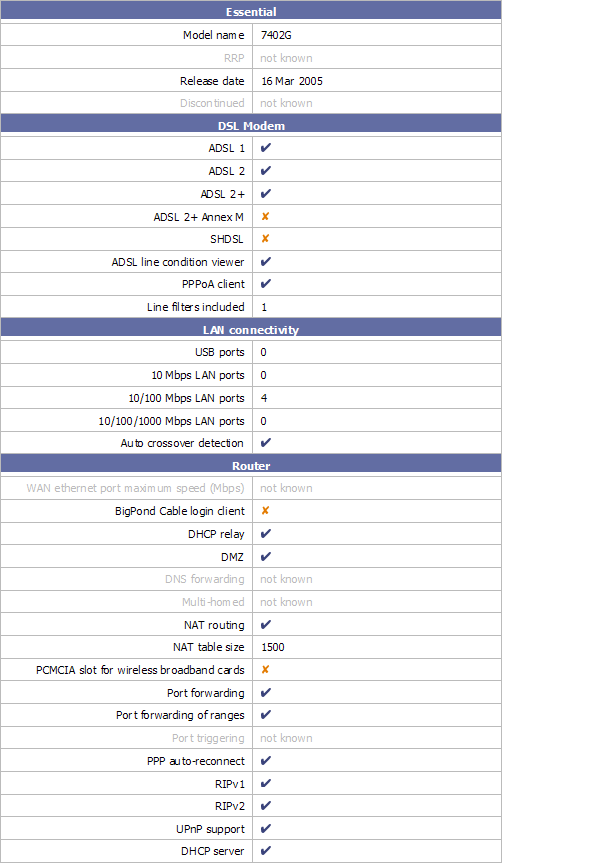
If u want get extra function (fix wireless and upnp ) , go for update Billion firmware.
BUT "void warranty" . own risk.
Router Configuration Prolink 9300G (Billion 7402GL) Users' club, V5.53 (29th of January, 2008)
Router Configuration Prolink 9300G (Billion 7402GL) Users' club, V5.53 (29th of January, 2008)
|
|
 Aug 16 2006, 01:35 AM Aug 16 2006, 01:35 AM
Return to original view | Post
#21
|
 
Senior Member
4,189 posts Joined: Jan 2003 From: Age Quod Agis   
|
If u want get extra function (fix wireless and upnp ) , go for update Billion firmware.
BUT "void warranty" . own risk. |
|
|
|
|
|
Oct 7 2006, 09:42 AM
Return to original view | Post
#22
|
|
Senior Member
4,189 posts Joined: Jan 2003 From: Age Quod Agis
|
QUOTE(kit_kit @ Oct 7 2006, 04:00 AM) here comes another 9300G user ... Prolink 9300G v5.05 firmwarecan anybody upload the original prolink firmwar?E?  http://www.live-share.com/files/55558/Prol...0Gv505.rar.html |
|
|
Oct 9 2006, 01:45 PM
Return to original view | Post
#23
|
|
Senior Member
4,189 posts Joined: Jan 2003 From: Age Quod Agis
|
QUOTE(c0c0nut @ Oct 8 2006, 11:33 PM) hi noob here....can print screen on more of your settings ? there is too much settings and i don know how to set them all....my router still get dc once in a while ....any idea ? u flash last billion 5.07 firmware ? yahoo msg and msn msg also will dc even when adsl line is ok......is it my line prob ? or wat ?...battle net lag....and out of 3 games 3 i got dc why ah ?....need help...  after flasing , please reset setting to "factory default". How about your line signal ? please check . 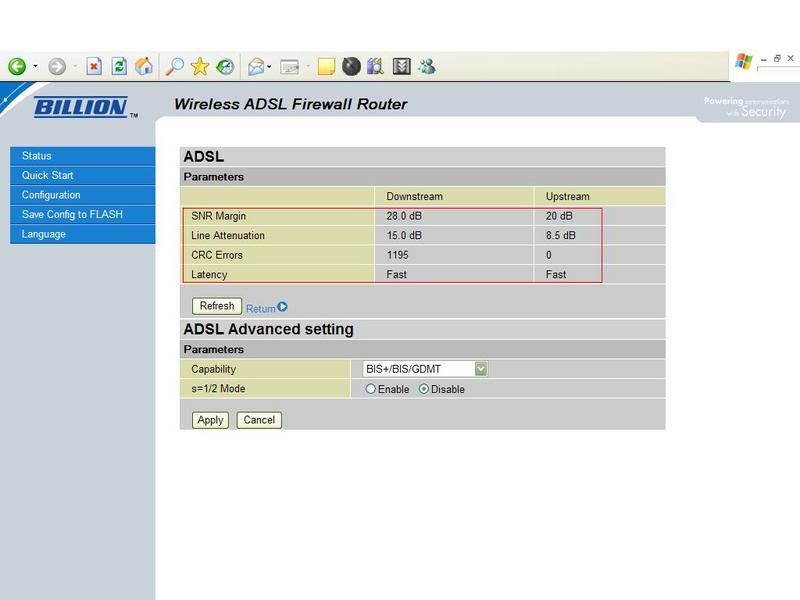 my setting Connect as PPPOA 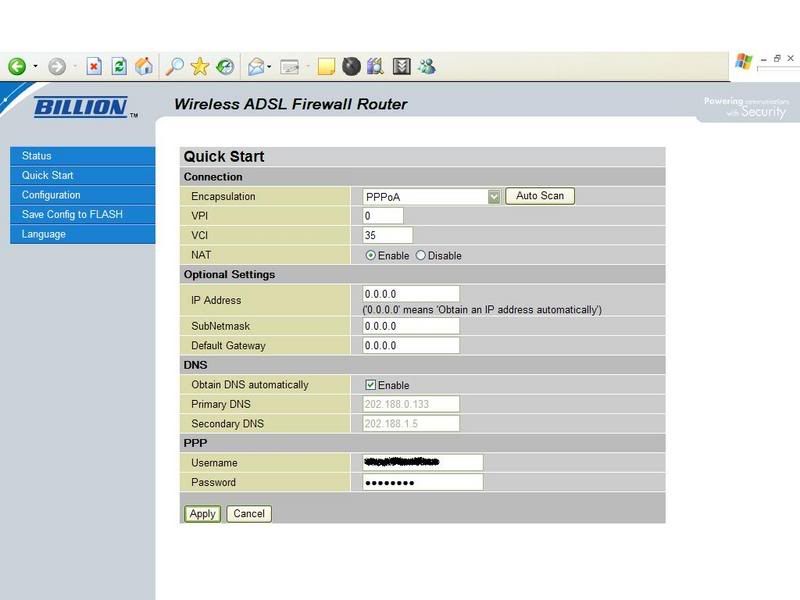 Turn off UPNP 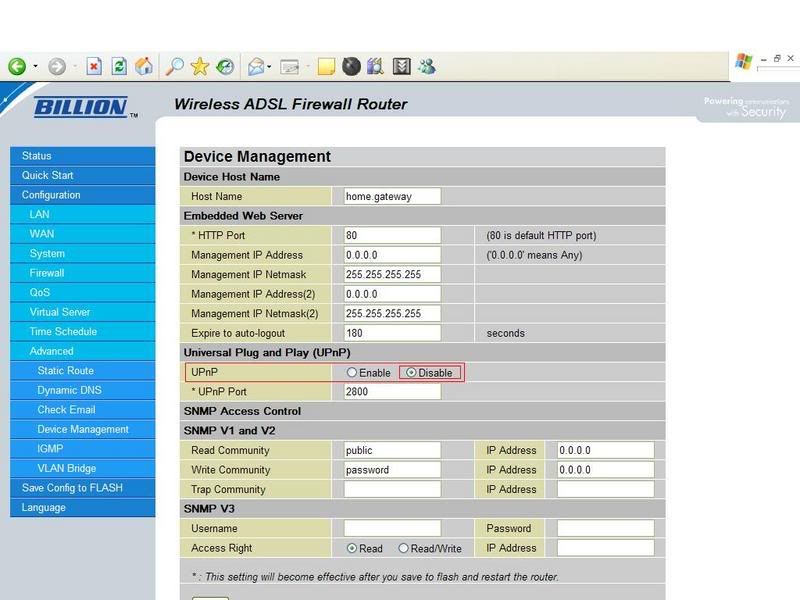 Turn off Firewall 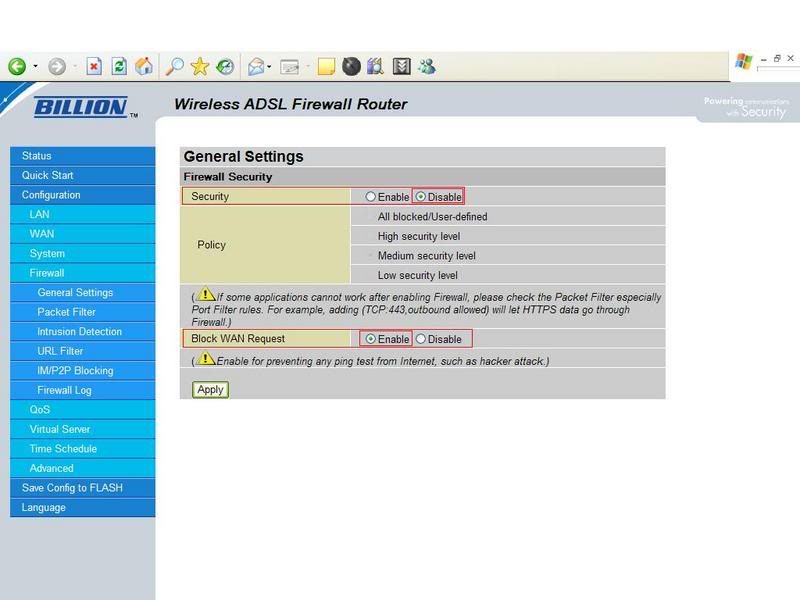 and don't turn on DMZ as portforwarding. This post has been edited by yangxi: Oct 9 2006, 01:50 PM |
|
|
Oct 9 2006, 01:51 PM
Return to original view | Post
#24
|
|
Senior Member
4,189 posts Joined: Jan 2003 From: Age Quod Agis
|
QUOTE(AtMostFear @ Oct 9 2006, 01:03 AM) everytime I try to update my firmware to 5.07 it says, whats model Prolink ? 9300g or 9300gv (vpn) ??what is wrong? help.. find correct firmware 9300G = Billion 7402G "L" before flashing , turn off firewall software . try reset to factory default . |
|
|
Oct 9 2006, 04:05 PM
Return to original view | Post
#25
|
|
Senior Member
4,189 posts Joined: Jan 2003 From: Age Quod Agis
|
L means non VPN = Prolink 9300G (most ppl buy @RM265)
|
|
|
Oct 10 2006, 06:04 PM
Return to original view | Post
#26
|
|
Senior Member
4,189 posts Joined: Jan 2003 From: Age Quod Agis
|
QUOTE(c0c0nut @ Oct 9 2006, 04:33 PM) YNAGXI Maybe different Dslam.we are not using PPPoE ? tonight try update firmware and let you know....THANKS for the help !!! why is my Latency - Interleave ..........not like yours Fast ? line prob ? My line very near to telekom exchange, <1km . |
|
|
|
|
|
Oct 24 2006, 12:46 PM
Return to original view | Post
#27
|
|
Senior Member
4,189 posts Joined: Jan 2003 From: Age Quod Agis
|
QUOTE(eric84cool @ Oct 24 2006, 12:02 PM) yangxi ...I just upgrade my firmware to billion and I do know what is s=1/2 mode for?!what should I set for the capability and the mode?? S=1/2 mode is a protocol that increases ADSL max speed to 10mbs, but is not used in Malaysia as providers here have opted for ADSL2+ instead.disable it , leave it default. *after flashing.. please reset your setting to "factory default" |
|
|
Oct 25 2006, 10:12 PM
Return to original view | Post
#28
|
|
Senior Member
4,189 posts Joined: Jan 2003 From: Age Quod Agis
|
update !!
*BETA FIRMWARE* Version: Beta v5.08a.dg8 ( October 17 , 2006) http://www.billion.com.au/forums/index.php...pe=post&id=1031 Recently seems many users complain about the ADSL line dropout issue, so Billion released a new version called 5.08a.dg4 with DSP code E67.5.42. It's for Annex A only. |
|
|
Oct 25 2006, 11:02 PM
Return to original view | Post
#29
|
|
Senior Member
4,189 posts Joined: Jan 2003 From: Age Quod Agis
|
not yet. because i don't have disconnect problem.
|
|
|
Oct 28 2006, 11:15 PM
Return to original view | Post
#30
|
|
Senior Member
4,189 posts Joined: Jan 2003 From: Age Quod Agis
|
QUOTE(eric84cool @ Oct 26 2006, 11:21 PM) yangxi.....how come I couldn't surf the net while I still can download stuff via BT?!? even if I didn't use BT also, I still can't surf the net...what's wrong with my setting?! try do auto scan first , after that set your connection to PPPOAor I need to add port for my firefox or what?!?or windows firewall block it?!impossible also...bcoz I didn't touch the setting... 
*can't surf the net ? Yes, TMNUT problem. even I download BT ~10kb/s , also can't surf net .  suggest , BT running job 1 by 1 (max 3) |
|
|
Jan 10 2007, 11:02 AM
Return to original view | Post
#31
|
|
Senior Member
4,189 posts Joined: Jan 2003 From: Age Quod Agis
|
Official PROLINK firmware:
PROLINK 9300G (no GV) http://www.prolink2u.com/downloads/drivers...07_firmware.rar |
|
|
Jan 10 2007, 07:31 PM
Return to original view | Post
#32
|
|
Senior Member
4,189 posts Joined: Jan 2003 From: Age Quod Agis
|
QUOTE(mie99 @ Jan 10 2007, 05:40 PM) Could someone here please confirm whether the 9300G (non VPN model) supports VPN pass-through? I was told that it does, but I want to be sure. I don't want to pay more for the VPN model since I just need the pass-through. support VPN pass-through.So if you've been happily using VPN through that model, please let me know here. By the way, I need to get a new one now because my 9000G suddenly lost its DSL modem function because "the main IC died so cannot be fixed" (according to Fida service center). Could it still be useful just as WiFi AP? It didn't show any other error, just couldn't detect Streamyx's DSL at all. Or perhaps I should ask: Anyone here wanna buy a 9000G without DSL?  » Click to show Spoiler - click again to hide... « |
|
|
Jan 10 2007, 10:06 PM
Return to original view | Post
#33
|
|
Senior Member
4,189 posts Joined: Jan 2003 From: Age Quod Agis
|
streamyx line problem, can't browse photobucket link


This post has been edited by yangxi: Feb 9 2007, 02:31 AM |
|
|
|
|
|
Feb 9 2007, 02:31 AM
Return to original view | Post
#34
|
|
Senior Member
4,189 posts Joined: Jan 2003 From: Age Quod Agis
|
*BILLION FIRMWARE*
~ At own risk ! , might void warranty ~ Version: V5.52d (06th of Feb, 2007) *Billion 7402GL (Prolink 9300G) http://billion.com.au/downloads/FOR_PCRange_7402GLAv552d.zip ===================================================== CHANGELOG: Version: V5.52d (06th of Feb, 2007) Improvements: . Added pre-defined rules for Game Console (Xbox 360, NDS WFC) in Firewall Packet Filter. . Added VoIP InUse item in QoS time schedule for all VoIP series. . Updated wireless AP driver version from 1.0.8.0 to 1.0.9.0. Bugs Fixed: . Fixed issue where router will crash when "Use default range" option on DHCP Server setting page is checked. . Fixed the bug where PPP/Mail LED indicates wrong state. . Fixed bug where sometimes VLAN Bridge can't be edited from web GUI. Known Issues: . Conference call will work with G.711a/u law only . Some issues may occur with T.38 using SIP Proxy servers. . Flash based upgrade will not allow downgrading to version 5.07 and earlier versions - Need to use emergency utility for downgrading. Version: V5.52c (18th of Jan, 2007) New Features: - Add ISAP (Internal Service Auto-Pass through) in the firewall module, firewall setting doesn't need to be opened manually when firewall is enabled. SNMP, SNTP, PPTP, L2TP, and DDNS are supported. - Supports up to 4 WDS, only wireless AP driver version 1.0.8.0 will support this. - Support G.723 and G.726 codec. (For VoIP series, except 7402 VoIP series.) - RFC2833 and SIP INFO (For VoIP series, except 7402 VoIP series.) - 3-way conference call (Only for VoIP calls with G.711 a/u law) (For VoIP series, except 7402 VoIP series.) - VoIP Call Log - Anonymous call - Added one more VoIP region for South Africa - Supports 4-wire and 2-wire auto fallback. (Only for SHDSL) - Added the ISDN MSN and sub address function. - IGMP Snooping supports IGMP v3. Improvement: - Changed VOIP series model to use flash based upgrade (except 7404VGO). - Changed waiting time to 100 seconds for the VoIP series when restarting. - Changed waiting time to 70 seconds for the non-VoIP series when restarting. - Change WEP key format without character "-". - Added a clear message when upgrading a wrong firmware type. - Added a clear error message when there are over 100 rules in URL Filter. - Removed CO mode option in BiPAC 8501. - Updated wireless AP driver version from 1.0.6.0 to 1.0.8.0. - Avoids sending voice while Codec Type is changing. - Tolerate Syntax error when SIP Server contains Double Quotations in Authorization field. Bugs Fixed: - Fixed WPA/WPA2 where it will not work when only ESSID is changed, but wireless security is enabled already. - Fixed issue where UPnP port doesn't change immediately when changing on the web page. - Fixed bug where VoIP calls can't be made with Internode service. (For VoIP series). - Fixed Fax pass-through issue. (For VoIP series) - Fixed bug where outbound IP throttling will throttle traffic between LAN and WLAN - Fixed the bug where router will lose default gateway after PPTP VPN established as default route. - Fixed the RIP message where it can't exchange successfully with Cisco routers. - Fixed the issue where TCP session will be disconnected automatically when both NAT and firewall are disabled. - Fixed issue where ISDN dialling does not work (Only for 7404VGD) - Fixed SIP ALG for parsing the request from BussTel software phone. - Fixed system crash issues when changing VPN PPTP password. - Fixed bug where Distinctive ring is inactivated. - Fixed bug where IPSec can not re-connect when ADSL line is down or WAN IP changed. - Fixed issue where PPPoE Pass-through can't work when VoIP is enabled. |
|
|
May 28 2007, 10:16 PM
Return to original view | Post
#35
|
|
Senior Member
4,189 posts Joined: Jan 2003 From: Age Quod Agis
|
recheck your ip address, make sure your gateway address is 192.168.1.254.
|
|
|
Jul 12 2007, 06:33 PM
Return to original view | Post
#36
|
|
Senior Member
4,189 posts Joined: Jan 2003 From: Age Quod Agis
|
new firmware up!
Version: V5.52G (12th of July, 2007) Prolink 9300G (Billion 7402GL) http://www.billion.com.au/downloads/FOR_PC...402GLAv552g.zip New Features: Improvement: . Improved logout with web page in order to close the window automatically. . Added flash checksum for firmware upgrade protection. . Support SNMP function over loopback interface. Bug Fixed: . Fixed the memory leak issue that was caused by DDNS function. . Fixed the memory leak issue when WAN interface is activated as DHCP client. . Fixed the memory leak issue when Telnetting to device many times. . Fixed the memory leak issue when device gets DHCP client request and it will lose 16 bytes per each request. . Fixed the bug whereby system will be locked when enabling multiple IPSec policies. . Fixed IPSec IKE bug: Getting wrong policy when 2 or more Road Warrior policies are created. . Fixed the bug that CPU load will be increased up to 100% when doing remote Telnet/HTTP access. . Fixed the bug that wireless channel scan can not work on IE 7. . Fixed slow DNS resolution issue on Linux system. . Fixed the bug that QoS doesn't work correctly for wireless network. . Fixed bug that system will crash when disable firewall function from web GUI. . Fixed bug that FXS port 2 doesn't work if both FXS ports are use the same account. . Fixed bug that DHCP server will cause memory lost. . Fixed bug that wireless WPA security can not set correctly by using Mac Safari browser. . Fixed bug that diagnostic function is not stable. . Fixed bug that system will jam if get DNS reply with TCP packet. . Fixed bug that response time of DNS relay function is too slow. . Fixed bug that traffic can not pass-through if the first packet is from CO to CPE on BiPAC 8501. . Added watchdog command back. Known Issues: -Flash based upgrade will not allow downgrading to version 5.07 and earlier versions, emergency utility is required for downgrading -Resetting to factory & manually re-entering settings after upgrading is a must for this version. This post has been edited by yangxi: Jul 12 2007, 06:33 PM |
|
|
Nov 14 2007, 08:32 PM
Return to original view | Post
#37
|
|
Senior Member
4,189 posts Joined: Jan 2003 From: Age Quod Agis
|
Try this setting

*I change new LINKSYS WAG200G. (Texas Inst. AR7 @ 210MHz , 16MB ram)  Previously, Bitcomet flood prolink router NAT Sessions (max 1500) , once nat connect max 1500 session, cannot browsing anymore.  This post has been edited by yangxi: Nov 15 2007, 12:08 AM |
|
|
Feb 12 2008, 02:54 AM
Return to original view | Post
#38
|
|
Senior Member
4,189 posts Joined: Jan 2003 From: Age Quod Agis
|
New firmware up!~
Version: V5.53 (29th of January, 2008) http://www.billion.com.au/downloads/FOR_PC...7402GLv5.53.zip New Features: - Added DNS Suffix support, it can be found at DHCP Server setting page Improvements: - User can check PSTN voltage without Internet connection established. - Update wireless AP driver version to 1.1.2.0. - Corrected some ADSL information on web page. - Corrected Network Busy/Congestion Tones for Spain. - Modified DHCP server's reply packets for HOSTNAME option (option 12) behaviour. - Added the capability to display local SNR Margin and Line Attenuation for 85xx. Bugs Fixed: - Fixed the bug whereby wireless WPA/WPA2 connection is not stable with Intel 4965AGN. - Fixed the bug whereby IPSec won't reconnect with RFC1483 routed mode. - Fixed the bug when doing diagnostic test, ping to www.google.com will fail sometimes. - Fixed the bug whereby user will get error message "webserver:error: vim namespace from error: invalid operation" when changing wireless security setting. - Fixed the bug whereby IPSec Preshared key is deleted when Road Warrior connection is terminated Page 3 / 16 - Fixed IPSec bug: Not include HASH in 2'nd message of Aggressive mode, if DPD is enabled. - Fixed the bug whereby DHCP Client cannot get IP address from specify DHCP Server. - Fixed the bug whereby access from remote site can pass the firewall if no NAT session table or Virtual Server rule matched. |
|
|
Feb 17 2008, 06:06 PM
Return to original view | Post
#39
|
|
Senior Member
4,189 posts Joined: Jan 2003 From: Age Quod Agis
|
have u done port forward ?
suggest turn off upnp. When first open bitcomet , router NAT table always load full 1500max. Need wait ~2min to release nat table. |
|
|
Feb 18 2008, 02:36 PM
Return to original view | Post
#40
|
|
Senior Member
4,189 posts Joined: Jan 2003 From: Age Quod Agis
|
what is your snr margin ? you adsl might not stable .
-try set back Connect Mode to "ADSL" -Encapsulation mode set to "PPOA" -after flashing , please set Factory Default Settings This post has been edited by yangxi: Feb 18 2008, 02:37 PM |
| Change to: |  0.0252sec 0.0252sec
 0.88 0.88
 7 queries 7 queries
 GZIP Disabled GZIP Disabled
Time is now: 21st December 2025 - 02:06 PM |
 Quote
Quote