I can give you a guide, which i discover and rooted my N7100 myself, i read up the XDA and internet post and hope my guide help you
Not sure whether to show the software and steps here, if is not allowed, remind me and i remove immediately
Rooting
1. Download all the files inside the Galaxy Note II
Dropbox folder
2. Open the Odin3-v1.85 as
administrator and put your GN2 into 'Download Mode'
3. In Odin3, click the 'PDA' tab and select the
CF-Auto-Root....tar.md5 file
4. Connect USB cable to the computer and click Start

5. Once successful, you see a Green 'Pass' on top of ID:COM
6. Device will reboot and download any latest SuperUser from play store
Install custom recovery and flash custom roms
1. Copy the
aosb_kk_1.3.2_n7100.zip, pa_gapps-stock-4.4.2-20140213-signed.zip and UPDATE-SuperSu-v1.93.zip into your memory card
2. Put GN2 into download mode and open Odin3
3. Select the
TWRP-2.6.3.1-t03g.img.tar on the
PDA tab
4. Connect GN2 to computer and click START on Odin3
5. After 'Pass', device will reboot into custom recovery something like this
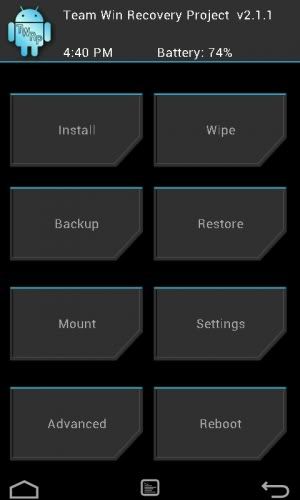
6. Click 'Backup' to backup your current TouchWiz rom
7. Click 'Wipe' and swipe the 'Factory Reset' to wipe off your current TW rom, but will keep the files, such as music in internal memory untouched
8. Back to main menu and click 'Install' and tap on the
aosb_kk_1.3.2_n7100.zip which you have copied, then Swipe to flash
9. After success flash, dont reboot yet, flash another file, which is the
pa_gapps-stock-4.4.2-20140213-signed.zip and
UPDATE-SuperSu-v1.93.zip, do it one by one
10. After both flash succeeded, wipe Cache/Dalvik then reboot the phone
11. Reboot might take like 5 minute, but be patient, then you have android 4.4.2 rom running!
regarding rooting on this thread and have some basic knowledge especially in custom recovery. Always do a BACKUP. Have fun exploring and pm me if got any problem, hope i good enough on problem solving.


 Mar 19 2014, 05:08 PM


 Quote
Quote





 0.0266sec
 0.75
0.75
 7 queries
 GZIP Disabled