Outline ·
[ Standard ] ·
Linear+
Samsung Galaxy Note II LYN's Official Thread V28, Kitkat 4.4.2 is here !! ND3
|
TSjoytest
|
 May 12 2014, 04:46 PM May 12 2014, 04:46 PM
|

|
QUOTE(pentium6 @ May 12 2014, 04:40 PM) hmmmm... yes, agreed. high probabiity here. im sorry, how to check/backup my exchange apk? thanks. really dunno. If you are rooted, get some File explorer that can access root and go to your system\app\ and backup SecEmail_J.apk and SecExchange.apk If not, you can try MyPhoneExplorer and use the Apps Backup function to copy these apks to your PC. Hmm....the apks used to be called simply Email.apk and Exchange.apk. Google and/or Samsung may have changed the way these 2 apks behave. |
|
|
|
|
|
SwarmTroll
|
May 12 2014, 06:43 PM
|
|
|
Theres nothing really much diff between 4.4 and 4.3 for note 2 is there, based on the vids on youtube. :/
|
|
|
|
|
|
pentium6
|
May 12 2014, 10:14 PM
|
Getting Started

|
QUOTE(SwarmTroll @ May 12 2014, 06:43 PM) Theres nothing really much diff between 4.4 and 4.3 for note 2 is there, based on the vids on youtube. :/ can u verify whether the stock 4.3@4.4 having both option below? 1. USE SECURE CONNECTION (SSL) and 2 ACCEPT ALL SSL CERTIFICATES |
|
|
|
|
|
Anonymous34
|
May 12 2014, 10:40 PM
|
|
|
I'm installing DN3 v5 but it seems like I'm having a little bit of trouble.
USB port trouble. Can't be detected by Odin to flash MJ5 bootloader. It is only recommended though so I went on with flashing the ROM with TWRP v2.7.0.2. will it work?
I have 4.3 bootloader
|
|
|
|
|
|
pentium6
|
May 12 2014, 11:16 PM
|
Getting Started
|
QUOTE(joytest @ May 12 2014, 04:46 PM) If you are rooted, get some File explorer that can access root and go to your system\app\ and backup SecEmail_J.apk and SecExchange.apk If not, you can try MyPhoneExplorer and use the Apps Backup function to copy these apks to your PC. Hmm....the apks used to be called simply Email.apk and Exchange.apk. Google and/or Samsung may have changed the way these 2 apks behave. i browse thru Titanium Backup and found out that only Email 4.2 available. There are no Exchange apk there. So, im guessing there should be a combination for Email and Exchange in order to ensure my official Outlook setup works, am i right? my next question is, 1. izit suffice to do Email.apk backup thru Titanium Backup? should there are any problem, can i revert back by restoring it? 2. i found another Email.apk meant for android 4.4. Can i use it without any conflicts? this site offered both Email and Exchange. its herethanks |
|
|
|
|
|
TSjoytest
|
May 12 2014, 11:33 PM
|
|
|
QUOTE(pentium6 @ May 12 2014, 11:16 PM) i browse thru Titanium Backup and found out that only Email 4.2 available. There are no Exchange apk there. So, im guessing there should be a combination for Email and Exchange in order to ensure my official Outlook setup works, am i right? my next question is, 1. izit suffice to do Email.apk backup thru Titanium Backup? should there are any problem, can i revert back by restoring it? 2. i found another Email.apk meant for android 4.4. Can i use it without any conflicts? this site offered both Email and Exchange. its herethanks So you seem to be rooted as you have Titanium. Download ES File Explorer of Ghost Commander and enable root access. Go to the directory I posted earlier and look for those APKs. You need 2 APK, one for the mail client, and one for the Exchange services, coz the mail client communicates with the Exchange services apk. The link you provided is for the AOSP mail client, which probably won't work. You need a TouchWiz compatible one IINM. It's been quite a while since I messed around with that, and unfortunately my organization does not have Exchange for mobile. |
|
|
|
|
|
pentium6
|
May 12 2014, 11:49 PM
|
Getting Started
|
QUOTE(joytest @ May 12 2014, 11:33 PM) So you seem to be rooted as you have Titanium. Download ES File Explorer of Ghost Commander and enable root access. Go to the directory I posted earlier and look for those APKs. You need 2 APK, one for the mail client, and one for the Exchange services, coz the mail client communicates with the Exchange services apk. The link you provided is for the AOSP mail client, which probably won't work. You need a TouchWiz compatible one IINM. It's been quite a while since I messed around with that, and unfortunately my organization does not have Exchange for mobile. done checking. No Exchange.apk...  need to find compatible Exchange.apk as u stated above.. can aniyody help me... any link plzz |
|
|
|
|
|
TSjoytest
|
May 12 2014, 11:53 PM
|
|
|
QUOTE(pentium6 @ May 12 2014, 11:49 PM) done checking. No Exchange.apk... need to find compatible Exchange.apk as u stated above.. can aniyody help me... any link plzz SecExchange.apk |
|
|
|
|
|
Arzwart
|
May 13 2014, 05:51 AM
|
|
|
QUOTE(Anonymous34 @ May 12 2014, 10:40 PM) I'm installing DN3 v5 but it seems like I'm having a little bit of trouble. USB port trouble. Can't be detected by Odin to flash MJ5 bootloader. It is only recommended though so I went on with flashing the ROM with TWRP v2.7.0.2. will it work? I have 4.3 bootloader Use Latest Philz Recovery 6.25 or above. It's the best choice for this rom. Btw Mr.Luong v3.6 N7100 4.4.2 KitKat with Dark Themes (can choose in aroma) Rom is quite smooth. I'm using this now until DN3 v5 is stable. |
|
|
|
|
|
pentium6
|
May 13 2014, 06:01 AM
|
Getting Started
|
QUOTE(joytest @ May 12 2014, 11:53 PM) a bit weird.. upon thorough checking, its there..  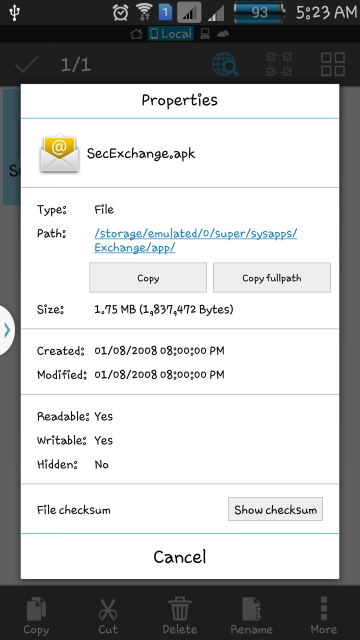 tried to install it..  but not keep stating not installed.  mind to comment on that..  searching using ur hints above lead me to THIS...now i learnt that Email & Exchange2 are for AOSP, while SecEmail & SecExchange are for TW.. ok, hope the link above are save for me to try.. # tried just now, seems it also didnt work as i cant install both of it. it keep showing same result like pic above This post has been edited by pentium6: May 13 2014, 07:23 AM |
|
|
|
|
|
aBg_rOnGak
|
May 13 2014, 08:01 AM
|
|
|
Woh, really susah regarding this mail thingy... Since i didn't use it, i remove it and use solmail. Not sure if it fit your needs though
Anybody here using ARHD 30? No frills, debloated stock rom, no extra features...
|
|
|
|
|
|
Anonymous34
|
May 13 2014, 08:55 AM
|
|
|
QUOTE(Arzwart @ May 13 2014, 05:51 AM) Use Latest Philz Recovery 6.25 or above. It's the best choice for this rom. Btw Mr.Luong v3.6 N7100 4.4.2 KitKat with Dark Themes (can choose in aroma) Rom is quite smooth. I'm using this now until DN3 v5 is stable. Yes, you were right. Recovery was the root of the problem. I went home yesterday night and flashed TWRP 2.7.0.2 and right after I flashed it it boots fine! So good so far!  Anyways the rom doesn't flash the latest ND3 bootloader right? I hope not. If it does Knox would be triggered.. Dem. Although the warranty is over I still don't want it to be triggered. |
|
|
|
|
|
Anonymous34
|
May 13 2014, 08:59 AM
|
|
|
QUOTE(pentium6 @ May 13 2014, 06:01 AM) a bit weird.. upon thorough checking, its there.. tried to install it.. but not keep stating not installed. mind to comment on that.. searching using ur hints above lead me to THIS...now i learnt that Email & Exchange2 are for AOSP, while SecEmail & SecExchange are for TW.. ok, hope the link above are save for me to try.. # tried just now, seems it also didnt work as i cant install both of it. it keep showing same result like pic above Ain't suppose to do it this way Instructions 1) Buy Root Explorer or source the lanun version. Sorry I can't provide it here or else I will be reported to Admin by joytest! 2)Copy the apk 3)Go to system/app with R/W mounted. 4)paste your apk 5)Reboot into recovery and clear cache is recommended. 6)There you go! |
|
|
|
|
|
Arzwart
|
May 13 2014, 09:00 AM
|
|
|
QUOTE(Anonymous34 @ May 13 2014, 08:55 AM) Anyways the rom doesn't flash the latest ND3 bootloader right? I hope not. No it wont. |
|
|
|
|
|
Anonymous34
|
May 13 2014, 09:05 AM
|
|
|
QUOTE(Arzwart @ May 13 2014, 09:00 AM) Thank you for replying. Btw, I didn't flash any ROM that doesn't have stock TouchWiz look. Cause this is my dad's phone and he doesn't know how to use custom ui. I will inherit all the current phones that my family members use this year end. They are upgrading Dad: N7100--->iPong 6 5.5inch Mom: Nokia C2--->Galashit Ash 5 (Named this way because of Knox) Big Sis: iPong 4--->iPong 6 4.7inch Second Sis: i9300--->HTC One M8 All my family members getting low end phones only, sorry yah! By the time I have i9300 and N7100 to play custom rom like nobody's business! This post has been edited by Anonymous34: May 13 2014, 09:06 AM |
|
|
|
|
|
Arzwart
|
May 13 2014, 11:08 AM
|
|
|
QUOTE(Anonymous34 @ May 13 2014, 09:05 AM) Thank you for replying. Btw, I didn't flash any ROM that doesn't have stock TouchWiz look. Cause this is my dad's phone and he doesn't know how to use custom ui. I will inherit all the current phones that my family members use this year end. They are upgrading Dad: N7100--->iPong 6 5.5inch Mom: Nokia C2--->Galashit Ash 5 (Named this way because of Knox) Big Sis: iPong 4--->iPong 6 4.7inch Second Sis: i9300--->HTC One M8 All my family members getting low end phones only, sorry yah! By the time I have i9300 and N7100 to play custom rom like nobody's business! Well maybe you will get iphone 6 instead after your dad use it for couple of weeks and want his note 2 back. |
|
|
|
|
|
Ronald_loulan
|
May 13 2014, 11:59 AM
|
|
|
Hi guys, my wifi and bluetooth cant turn on...
Change to stock rom oso still cant on...
Any1 have the same issue??
|
|
|
|
|
|
Anonymous34
|
May 13 2014, 02:25 PM
|
|
|
QUOTE(Arzwart @ May 13 2014, 11:08 AM) Well maybe you will get iphone 6 instead after your dad use it for couple of weeks and want his note 2 back. He likes iPhone more actually. But he said the current line up is too small for him. I rather Custom ROM like CM11 than Samsung's LagWiz or IOS |
|
|
|
|
|
TSjoytest
|
May 13 2014, 02:30 PM
|
|
|
QUOTE(Anonymous34 @ May 13 2014, 02:25 PM) He likes iPhone more actually. But he said the current line up is too small for him. I rather Custom ROM like CM11 than Samsung's LagWiz or IOS I don't know about you but the first restriction that will hit badly is the denial of sharing via any interface except their gatekeeper itunes. |
|
|
|
|
|
pentium6
|
May 13 2014, 03:08 PM
|
Getting Started
|
QUOTE(Anonymous34 @ May 13 2014, 08:59 AM) Ain't suppose to do it this way Instructions 1) Buy Root Explorer or source the lanun version. Sorry I can't provide it here or else I will be reported to Admin by joytest! 2)Copy the apk 3)Go to system/app with R/W mounted. 4)paste your apk 5)Reboot into recovery and clear cache is recommended. 6)There you go! ur method seems promising... ok my situations is... im using N7102 - It come with Chinese Version Root Explorer. Can I install another RE? i do not understand the words.. dunno whether its on r/0 or r/w  |
|
|
|
|



 Quote
Quote





 0.0349sec
 0.87
0.87
 6 queries
 GZIP Disabled