Useful stuff quote from forumer
QUOTE
FROM triple02
not a problem..
follow the guide here..
http://forum.xda-developers.com/showthread.php?t=2487940if can mod the volume as well.. much better sound from loudspeaker and during calls. biggrin.gif
http://forum.xda-developers.com/showthread.php?t=2476498QUOTE
FROM ChuanHong
i understand the article.. yes.. mainly the article is sharing about the very basic photography knowledge. can get this from any photography class. Correct - not advance version, but even DSLR ppl also need to know this basic knowledge.
inside it's had explained a lot of features in camera phone and show the different between each feature like focus point, multi-focus, low ISO - high ISO, Metering (centered, average, spot), exposure level. He got explained touch a little bit of the relationship of triangle (ISO, shutter speed and aperture). <- User must know this as well.
**P/M: personally feel normal user must know to adjust ISO, metering in different situation. Exposure level as well.
Short personal tips:
Low ISO - less noice, low shutter speed, high ISO - more noise, faster shutter speed. ISO play quite important thing here. if dont know adjust, just put auto. Some situation u can put ISO 100 in dark environment, but increase exposure to 2. hmm.. need experience by yourself in future.
Metering - Choose vary from objects. If capture landscapre, choose average. If capture like food, 1 item as main object, choose centered metering. If capture night mode with some lighting surrounding, choose spot metering and spot the center point to lighting part, surrounding will become darker. half press to focus and get this metering, back to object and capture.
Important part is the lighting and capture structure. Better lighting, better quality. but need to know where the light enter into your camera. with different light enter angles, different feeling and result will came out. example here, dont try to think can get capture the face of people with backlight situation. this will darker ur object only.
structure here is depend on user art/photography sense. i think if without a best object background and simply capture, of course wont create the nice feeling/quality of photo.
Example: 1. Capture the macro photo (flower with a bee). You have a good object to focus, nice flower as background, result came out better feelings.
2. Take tissue box on your table, put there and capture. Even though u got a object to capture, but hardly to create a correct feeling to people. With indoor lighting, bad background, object (ok).
Must have a well planning and creative idea to get a good photo. Outdoor are always a good background and good lighting condition for us capture better quality and nice feeling to people. After these fulfill, then depend on user photography sense and skills ady..
QUOTE
FROM ZeneticX
several tips need to be added
a guide to photography from a chinese forum, only for those who understand chinese very well
http://bbs.gfan.com/android-6782382-1-1.htmland a simple translation from ChuanHong
https://forum.lowyat.net/index.php?showtopi...post&p=64203536mod to unlock phone with focus key instead of power button
http://forum.xda-developers.com/showthread.php?t=2487940mod to increase internal, external and microphone volume
http://forum.xda-developers.com/showthread.php?t=2476498if the original file is too loud causing the speaker to produce static noise or cracking, download this file instead
http://d-h.st/VZGQUOTE
FROM ckchan
How to flash Xperia Z1 14.1.G.2.257 ftf using Flash Tool Manually?
http://www.xperiaguide.com/2013/10/17/flas...-tool-manually/QUOTE
FROM imns238
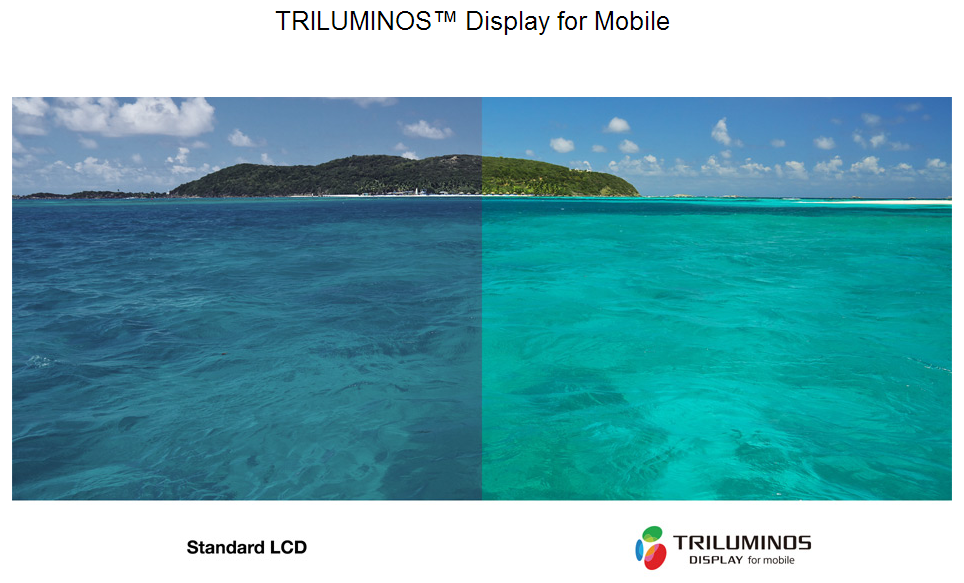
I did some research, and seems like only certain batch affected by the yellow tint issue,
Please refer to the link below for the original post,
http://www.xperiaguide.com/2013/09/29/xper...splay-solution/Here's a summary of batched affected,
An acute observation from the XDA member WouterNLD quotes that below Xperia Z1 serial numbers are having the Yellow Hue Tint issue on Xperia Z1.
Clear white, no yellow hue (serial starts with)
BH902A***
BH902****
BH908****
Clear white, after using screen adjuster (serial starts with)
(2x) BH903****
Yellow hue (serial starts with)
(2x) BH904****
BH905****
BH909****
The link below shown my z1 screen compare to my cousin z1 screen with same display setting, mine one obviously indicating yellowish tint issue,
https://plus.google.com/photos/113363641522...=CKGGwfmyhta8UQRespond from sony differ through out the world (I assume they din't response officially yet),
i hope they can investigate on this method and offer a proper solution
QUOTE
FROM ckchan
this is the general step to root z1 at the moment. your phone have to be on fw .534 in order to root. if your phone is already on fw .257, u'll have to manually flash it back to fw .534, root and then OTA update back to fw .257
Flashing fw 534:
1. download the flashtool and install it in your pc
2. open the flashtool/driver folder to install the driver for Z1 and flash mode.
3. download the fw 534. Z1 FTF Mega Collection
4. open flashtool, click the "thunder" button, select the 534 fw, de-select the wipe data option
5. after the program run, it'll ask u to coonect your z1. then switch off your z1, while holding vol down button, connect it to your pc via usb cable.
Rooting:
1. download vroot / kingo root and install in your pc
2. make sure USB debugging mode is ticked in your z1.
3. run vroot/kingo root, connect your phone to pc and click the root button
OTA update back to fw 257:
1. make sure you have data connection on your phone, wifi will be better
2. if you have not receive the notification for fw257 update, run the update centre app. then just click refresh and update
This post has been edited by Andrew_1980: Dec 16 2013, 04:34 PM 

 Nov 18 2013, 04:49 PM, updated 12y ago


 Quote
Quote















 0.0276sec
 0.58
0.58
 6 queries
 GZIP Disabled