

QUOTE(joytest @ Nov 12 2013, 12:36 PM)
Yes depending on cable and power draw. You probably need to supply power separately to the hdd.

How's your phone running now bro? Everything smooth? Any significant different that you can observed?Samsung Galaxy Note 3 - Official v10, Mobile Odin and Knox 0x0 !!!
|
|
 Nov 12 2013, 12:39 PM Nov 12 2013, 12:39 PM
|
 
Senior Member
4,554 posts Joined: Dec 2006  
|
QUOTE(joytest @ Nov 12 2013, 12:36 PM) Yes depending on cable and power draw. You probably need to supply power separately to the hdd. How's your phone running now bro? Everything smooth? Any significant different that you can observed? |
|
|
|
|
|
Nov 12 2013, 12:44 PM
|

All Stars
13,188 posts Joined: Dec 2011 From: 127.0.0.1
|
QUOTE(WiLyi @ Nov 12 2013, 12:39 PM) How's your phone running now bro? Everything smooth? Any significant different that you can observed? Smooth so far haven't done anything fancy. |
|
|
Nov 12 2013, 02:17 PM
|

Junior Member
114 posts Joined: Nov 2008 From: Kelate
|
I'm totally new with android, and just now i try to open chrome on my N3 it says Your phone is infected with The Rogue Worms X virus. What should i do ?
|
|
|
Nov 12 2013, 02:21 PM
|

Senior Member
3,432 posts Joined: Apr 2010 
|
QUOTE(malaysianbest @ Nov 12 2013, 02:17 PM) I'm totally new with android, and just now i try to open chrome on my N3 it says Your phone is infected with The Rogue Worms X virus. What should i do ? show us a screenshot, you're not really infected, it is very hard for android to be infected, most probably you install some shady apps and they are creating that pop up to show you |
|
|
Nov 12 2013, 02:22 PM
|
|
Senior Member
4,554 posts Joined: Dec 2006
|
QUOTE(malaysianbest @ Nov 12 2013, 02:17 PM) I'm totally new with android, and just now i try to open chrome on my N3 it says Your phone is infected with The Rogue Worms X virus. What should i do ? Can you show us a screenshot? It is very rare that Android will get affect by virus. And which website you are trying to access? |
|
|
Nov 12 2013, 02:43 PM
|

Senior Member
2,921 posts Joined: Oct 2007 
|
QUOTE(waveweaver @ Nov 12 2013, 09:34 AM) For me..it not worth to repair as a lot of things need to be open up. Try use it for a month or two and see if the button level up or not. If the problem getting worse then maybe you can go to service centre for warranty. Yes. They will open up almost everything. I hv replaced my screen at pandan indah sc last week and after that having problem with charging sensor phone just cant charge , after fix that s view sensor cant work lol. Then change for another whole screen again luckily they have another pretty good part or else need to wait for part arrival. If minor issue like little gap or moving home button I suggest just live with it because you may getting alot more problem than before when you claim it. Parts which will be problematic after the bezel replacement are 1. Charging sensor 2. S view sensor 3. Dead pixel if unlucky 4. S Pen sensor do check that if you still insist to change. |
|
|
|
|
|
Nov 12 2013, 02:50 PM
|

Senior Member
1,252 posts Joined: Jul 2010 From: between govtnopp
|
QUOTE(Reventon @ Nov 12 2013, 02:43 PM) Yes. They will open up almost everything. Yours white or black? Went there last two weeks, all black replacement parts got gap issue. They ask me to come another 3 months lolI hv replaced my screen at pandan indah sc last week and after that having problem with charging sensor phone just cant charge , after fix that s view sensor cant work lol. Then change for another whole screen again luckily they have another pretty good part or else need to wait for part arrival. If minor issue like little gap or moving home button I suggest just live with it because you may getting alot more problem than before when you claim it. Parts which will be problematic after the bezel replacement are 1. Charging sensor 2. S view sensor 3. Dead pixel if unlucky 4. S Pen sensor do check that if you still insist to change. |
|
|
Nov 12 2013, 03:11 PM
|
|
Senior Member
2,921 posts Joined: Oct 2007
|
QUOTE(eszol @ Nov 12 2013, 02:50 PM) Yours white or black? Went there last two weeks, all black replacement parts got gap issue. They ask me to come another 3 months lol Mine black. That day happen to around pandan indah so go to see. Not worth to take the risk. |
|
|
Nov 12 2013, 03:26 PM
|

All Stars
29,771 posts Joined: Jan 2009 From: Johor, Malaysia.
|
joytest, Hi, I think you can change header already, can safely update to UK MJ7 now using method provide by WiLyi.
 where KNOX won't get trigger. where KNOX won't get trigger.This post has been edited by Andrewtst: Nov 12 2013, 03:26 PM |
|
|
Nov 12 2013, 03:34 PM
|

Senior Member
1,452 posts Joined: Mar 2008
|
QUOTE(Andrewtst @ Nov 12 2013, 03:26 PM) joytest, Hi, I think you can change header already, can safely update to UK MJ7 now using method provide by WiLyi. U guyz made me itchy again. Btw, can any1 list the improvement btw local M'sia fw and MJ7? where KNOX won't get trigger. |
|
|
Nov 12 2013, 03:39 PM
|

All Stars
13,192 posts Joined: Jul 2011 From: Middle of Avalon
|
For those who still unfamiliar about MobileOdin Pro (MOP)..here the steps when updating your rooted stock phone with new stock firmware.
- download the new stock firmware from Sammobile.com. - put the zip files in internal or external sdcard. - open MOP and press 'open files' in partitions section. - select your new firmware zip files. - MOP will ask whether you want to extract the zip files. - let MOP extract the zip files into .tar.md5 files. - once extraction finish..press 'open files' again. - select your new .tar.md5 files and MOP will auto fill all the necessary partitions. - make sure your Everroot section are ticked (all should already ticked by default) to preserve your root..superSU..MOP. - flash the new firmware. - MOP will ask whether you want to check the .tar.md5 files. - let MOP check the .tar.md5 files and proceed the flashing. - the phone will auto reboot after finished flashing. This post has been edited by waveweaver: Nov 12 2013, 03:48 PM |
|
|
Nov 12 2013, 03:41 PM
|
|
All Stars
29,771 posts Joined: Jan 2009 From: Johor, Malaysia.
|
QUOTE(lch36 @ Nov 12 2013, 03:34 PM) U guyz made me itchy again. Btw, can any1 list the improvement btw local M'sia fw and MJ7? What I found so far for latest UK MJ7 v/s Malaysia MJ1:
This post has been edited by Andrewtst: Nov 12 2013, 03:42 PM |
|
|
Nov 12 2013, 03:41 PM
|

All Stars
10,873 posts Joined: Apr 2009
|
Design Gear has reopened URDLV thread with something new. Wonder what is he offering.
 |
|
|
|
|
|
Nov 12 2013, 03:44 PM
|
|
Senior Member
4,554 posts Joined: Dec 2006
|
QUOTE(waveweaver @ Nov 12 2013, 03:39 PM) For those who still unfamiliar about MobileOdin Pro (MOP)..here the steps when updating your rooted stock phone with new stock firmware. Oh, never know MOP can extract the zip file directly. I extracted via pc and transfer the tar.md5 manually - download the new stock firmware from Sammobile.com. - put the zip files in internal or external sdcard. - open MOP and press 'open files' in partitions section. - select your new firmware zip files. - MOP will ask whether you want to extract the zip files. - let MOP extract the zip files into .tar.md5 files. - once extraction finish..press 'open files' again. - select your new .tar.md5 files and MOP will auto fill all the necessary partitions. - make sure your Everroot section are ticked (all should already ticked by default) to preserve your root..superSU..MOP. - flash the new firmware. - the phone will auto reboot after finished flashing.  |
|
|
Nov 12 2013, 03:50 PM
|

Senior Member
4,874 posts Joined: Sep 2011
|
QUOTE(waveweaver @ Nov 12 2013, 03:39 PM) For those who still unfamiliar about MobileOdin Pro (MOP)..here the steps when updating your rooted stock phone with new stock firmware. This is really convenient & easy method. - download the new stock firmware from Sammobile.com. - put the zip files in internal or external sdcard. - open MOP and press 'open files' in partitions section. - select your new firmware zip files. - MOP will ask whether you want to extract the zip files. - let MOP extract the zip files into .tar.md5 files. - once extraction finish..press 'open files' again. - select your new .tar.md5 files and MOP will auto fill all the necessary partitions. - make sure your Everroot section are ticked (all should already ticked by default) to preserve your root..superSU..MOP. - flash the new firmware. - MOP will ask whether you want to check the .tar.md5 files. - let MOP check the .tar.md5 files and proceed the flashing. - the phone will auto reboot after finished flashing.  |
|
|
Nov 12 2013, 03:52 PM
|
|
All Stars
13,192 posts Joined: Jul 2011 From: Middle of Avalon
|
QUOTE(WiLyi @ Nov 12 2013, 03:44 PM) Oh, never know MOP can extract the zip file directly. I extracted via pc and transfer the tar.md5 manually New features...you can also flash almost all flashable zip files including custom rom. No need CWM.Only weakness is MOP cannot do backup like CWM...lolz. This post has been edited by waveweaver: Nov 12 2013, 03:53 PM |
|
|
Nov 12 2013, 03:54 PM
|
|
Senior Member
1,452 posts Joined: Mar 2008
|
QUOTE(waveweaver @ Nov 12 2013, 03:52 PM) New features...you can also flash almost all flashable zip files including custom rom. No need CWM. if flash flashable zip using MOP wont trip KNOX?Only weakness is MOP cannot do backup like CWM...lolz. |
|
|
Nov 12 2013, 04:02 PM
|
|
All Stars
13,192 posts Joined: Jul 2011 From: Middle of Avalon
|
QUOTE(lch36 @ Nov 12 2013, 03:54 PM) if flash flashable zip using MOP wont trip KNOX? Don't try flash any custom rom..kernel..recovery..etc..etc with MOP as it will trip your Knox |
|
|
Nov 12 2013, 04:03 PM
|

Junior Member
220 posts Joined: Apr 2010 From: Malaysia
|
QUOTE(Andrewtst @ Nov 12 2013, 03:41 PM) What I found so far for latest UK MJ7 v/s Malaysia MJ1: and a minor tweak for the sview window too..
now sview window have 2 more option which is random color change for the sview window every day and 1 more is use currently sview window color for all setting (incoming call,music,alarm and text) This post has been edited by mervin8706: Nov 12 2013, 04:04 PM Attached thumbnail(s) 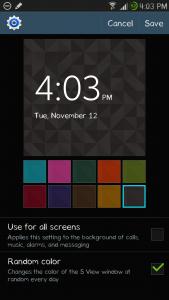
|
|
|
Nov 12 2013, 04:06 PM
|
|
Senior Member
4,554 posts Joined: Dec 2006
|
QUOTE(waveweaver @ Nov 12 2013, 04:02 PM) Don't try flash any custom rom..kernel..recovery..etc..etc with MOP as it will trip your Knox Have you flashed to FH 1.1?QUOTE(mervin8706 @ Nov 12 2013, 04:03 PM) and a minor tweak for the sview window too.. Nice find bro. Didn't use my S View now so didn't notice this.now sview window have 2 more option which is random color change for the sview window every day and 1 more is use currently sview window color for all setting (incoming call,music,alarm and text) |
|
Topic ClosedOptions
|
| Change to: |  0.0343sec 0.0343sec
 0.48 0.48
 6 queries 6 queries
 GZIP Disabled GZIP Disabled
Time is now: 10th December 2025 - 06:48 AM |
 Quote
Quote