Outline ·
[ Standard ] ·
Linear+
Google Nexus 7 (2013) FHD Official Thread v2, Android 5.0.2 has released for deb.
|
antichrist
|
 Nov 2 2013, 11:31 PM Nov 2 2013, 11:31 PM
|
Getting Started


|
Does anyone knows how to set up nexus7 email (Microsoft Exchange) into auto show picture?it doesn't auto show until I have to go to attachments and select myself, which unlike other brands official email app like, Sony's. I've been trying every corner in email settings, but couldn't find any solution, any idea?
eg: screenshots/print screen, signature thumbnails doesn't auto show.
Been looking to fix this
|
|
|
|
|
|
antichrist
|
Nov 3 2013, 06:33 PM
|
Getting Started
|
Does anyone knows how to search the previous emails from stock Email app?not gmail.
|
|
|
|
|
|
antichrist
|
Nov 3 2013, 08:10 PM
|
Getting Started
|
QUOTE(terence_nwb @ Nov 3 2013, 08:07 PM) Press show image in the email? Not really understand what you are asking. Restart tablet might help sometimes. Press the search button on top right, it works for me. 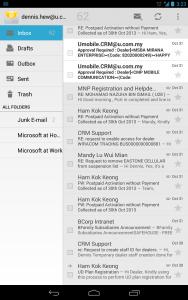
Hi Terence, couldn't find the search button that you are taking about. Not talking about Gmail though, it's stock android's email application. This post has been edited by antichrist: Nov 3 2013, 08:13 PM |
|
|
|
|
|
antichrist
|
Nov 3 2013, 09:59 PM
|
Getting Started
|
QUOTE(terence_nwb @ Nov 3 2013, 08:21 PM) Yea, I am using stock Email client though. » Click to show Spoiler - click again to hide... « Omg !@@! I'm using 4.3.1, or is there any solution for this? This stock email is the perfect speed for my MS Exchange mail. |
|
|
|
|
|
antichrist
|
Nov 4 2013, 02:34 PM
|
Getting Started
|
QUOTE(+Newbie+ @ Nov 4 2013, 10:36 AM) Terence is right. There should be a "show all images" button in the email. Else, if you want it to auto load the images without you clicking it, you can consider setting the email default download size to a larger size that can accommodate the average size of your images. You notice the 3 dots on the top right? Have you checked whether your search option is inside there? 
Find no search button over here, I've went to Asus service center, they can't help me also. *sigh* |
|
|
|
|
|
antichrist
|
Nov 22 2013, 11:49 PM
|
Getting Started
|
guys, our tablets should get this, nexus 5 home screen and google now. http://www.youtube.com/watch?v=THnJ8exsxCM |
|
|
|
|



 Quote
Quote


 0.0390sec
 0.22
0.22
 7 queries
 GZIP Disabled