Welcome Guest ( Log In | Register )

Bump Topic Topic Closed RSS Feed

Outline · [ Standard ] · Linear+

 AMD Radeon™ Discussion V9, Latest - 13.11 Beta 9.5 | WHQL - 13.10

views
     
stephen0606
post Nov 10 2013, 07:38 PM

Getting Started
**
Junior Member
56 posts

Joined: Apr 2008
From: Penang/JB


QUOTE(Naraw @ Nov 10 2013, 06:50 PM)
Heaven is low too but 3dmark is fine.

[attachmentid=3714984]
[attachmentid=3714985]
*
possible because of driver? hmm.gif i've tried on my previous 7950 (1125/1450) two weeks ago using driver v13.9
user posted imageuser posted image

This post has been edited by stephen0606: Nov 10 2013, 07:44 PM
stephen0606
post Nov 17 2013, 10:33 PM

Getting Started
**
Junior Member
56 posts

Joined: Apr 2008
From: Penang/JB


just got my R9 290 today, LOL, running Valley with custom fan profile, max 79c in Valley

user posted imageuser posted imageuser posted image
stephen0606
post Nov 17 2013, 11:12 PM

Getting Started
**
Junior Member
56 posts

Joined: Apr 2008
From: Penang/JB


QUOTE(llk @ Nov 17 2013, 10:44 PM)
Nice, but can try run in ExtremeHD mode & your resolution quite weird (1920 x 1064)  hmm.gif
*
Coz i using custom, running window mode just to have my AB hardware monitor on top. but other setting is extreme except the fullscreen tongue.gif

this one running heaven:

» Click to show Spoiler - click again to hide... «


this one is playing BF4 ultra for half hour:

» Click to show Spoiler - click again to hide... «

stephen0606
post Nov 17 2013, 11:15 PM

Getting Started
**
Junior Member
56 posts

Joined: Apr 2008
From: Penang/JB


QUOTE(llk @ Nov 17 2013, 11:14 PM)
Your score quite similar to mine  biggrin.gif
*
yeah, guess is ref card afterall, but just to try the custom fan profile to get acceptable temp + noise, LOL biggrin.gif
stephen0606
post Nov 18 2013, 02:06 AM

Getting Started
**
Junior Member
56 posts

Joined: Apr 2008
From: Penang/JB


QUOTE(Unseen83 @ Nov 18 2013, 01:09 AM)
nice/Good score.. smile.gif under RM1.5K, where you get your G,cards ?  oh here my score
x

[attachmentid=3727629]
*
act is SG set, bought it from drivenheat, a very nice seller frm JB Pasir Gudang, biggrin.gif
stephen0606
post Nov 21 2013, 07:30 PM

Getting Started
**
Junior Member
56 posts

Joined: Apr 2008
From: Penang/JB


QUOTE(gxthelord @ Nov 20 2013, 09:57 PM)
hi guys would like to hear from R9 290 users, is adjusting the fans speed to 50% neccessary? smile.gif And also does setting the target temp to 85C instead of 95C would hurt alot in terms of performance?
*
erm, so far for my sapphire r9 290, fan speed did give some impact in my case, didn't use overdrive since first day, but i tried on overdrive just now, set the temp target to 80c, and try run valley:
» Click to show Spoiler - click again to hide... «


However, my current setting is using custom fan profile from AB, temp max at 76c with no throttling
» Click to show Spoiler - click again to hide... «


i even tried to OC to 1077/1350 with custom fan profile, temp max at 76c with no throttling
» Click to show Spoiler - click again to hide... «


but i end up with 70%+++ fan speed which is super loud, cheers laugh.gif

This post has been edited by stephen0606: Nov 21 2013, 07:32 PM

stephen0606
post Nov 21 2013, 07:41 PM

Getting Started
**
Junior Member
56 posts

Joined: Apr 2008
From: Penang/JB


QUOTE(alexei @ Nov 21 2013, 01:49 PM)
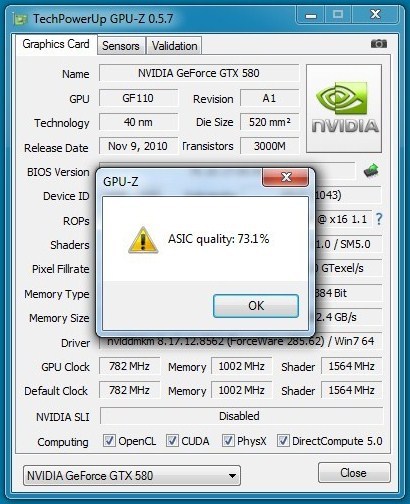
For R9-290 and R9-290X users, any ASIC values to report here?
user posted image
user posted image
*
ASIC for my r290
user posted image
stephen0606
post Nov 21 2013, 07:46 PM

Getting Started
**
Junior Member
56 posts

Joined: Apr 2008
From: Penang/JB


QUOTE(Unseen83 @ Nov 21 2013, 07:39 PM)
type Casing you use ?  u hear CM silencio ?  does it have good Sound Dampening and Good Air flow ?  just wondering if use Casing that  silence noise will help and is this type casing have good AAIR flow hmm.gif
*
i'm using Xigmatek Asgard 382W, LOL, but i head bout Silencio, haha, i think that case should isolate lot of noise, coz my friend using silencio 550, dunno details on its air flow tongue.gif
stephen0606
post Nov 21 2013, 08:32 PM

Getting Started
**
Junior Member
56 posts

Joined: Apr 2008
From: Penang/JB


QUOTE(Unseen83 @ Nov 21 2013, 08:00 PM)
hmm.gif  i see  i thinking to get that casing but notice no Side window and the casing is surrounded with  sound damping, and i worried about air flow to..  as i know  spec/detail on my R9 290x going to be loud and generate heat...
x
don't get me wrong don't bother me.. just try to look improve method to reduce Noise and Heat... lols  can't wwait Geil Custom cooler be available... then POOF!  noise heat be last month worried..
*
haha, thinking to get that custom cooler as well brows.gif

QUOTE(Unseen83 @ Nov 21 2013, 08:02 PM)
hmm.gif  can u explain what this % mean...  i am not EXP with this number.. but  by Google Research i no it related with OC, and higher % better chance it to be OC and lower the % lower chance card to be OC... (pls correct me if i am wrong)
*
act i also not really expert in this number, but sifu-sifu here should know better, hahaha biggrin.gif

This post has been edited by stephen0606: Nov 21 2013, 08:37 PM
stephen0606
post Nov 21 2013, 09:09 PM

Getting Started
**
Junior Member
56 posts

Joined: Apr 2008
From: Penang/JB


QUOTE(gxthelord @ Nov 21 2013, 09:04 PM)
thanks alot for sharing. Just tested it with BF4 max out settings. Temps are hovering around 90++ but the sound level is not as loud as I thought. Initially I did try setting it up to 100% and damn it sure sounds like a jet. I'll test with your config soon and see hows it. smile.gif thx again bro ^^
no problem bro, enjoy! biggrin.gif
stephen0606
post Nov 22 2013, 10:32 PM

Getting Started
**
Junior Member
56 posts

Joined: Apr 2008
From: Penang/JB


QUOTE(llk @ Nov 22 2013, 10:17 PM)
Mind to tell where u download the msi afterburner? I saw your voltage can be adjusted but mine cant
*
sure, i downloaded from Guru3D.com. smile.gif smile.gif
link : http://www.guru3d.com/files_details/msi_af...a_download.html

edit: u might try go to setting there and tick the unlock voltage control. smile.gif

This post has been edited by stephen0606: Nov 22 2013, 10:35 PM
stephen0606
post Nov 22 2013, 10:47 PM

Getting Started
**
Junior Member
56 posts

Joined: Apr 2008
From: Penang/JB


QUOTE(llk @ Nov 22 2013, 10:42 PM)
Thanks, i just discover it. Btw, do u try to flash 290X bios see whether your card can be unlocked as 290x, i have try mine, no luck  sad.gif
*
LOL, nvr tried flash one before blush.gif , but so far see owners feedback on other forums, sapphire's r9 290 seems no luck to be unlocked as well sad.gif

but i still happy with the performance, hehe smile.gif
stephen0606
post Dec 20 2013, 01:45 PM

Getting Started
**
Junior Member
56 posts

Joined: Apr 2008
From: Penang/JB


QUOTE(norazwan79 @ Dec 20 2013, 12:27 PM)
Sorry for the large image... sweat.gif

Sapphire R9 290 + Arctic Hybrid @stock
Furmark setting : 1920x1080, 8X MSAA, 5 min burn in test...

user posted image
*
nice, any info regard the VRMs temp??
stephen0606
post Dec 20 2013, 02:22 PM

Getting Started
**
Junior Member
56 posts

Joined: Apr 2008
From: Penang/JB


QUOTE(norazwan79 @ Dec 20 2013, 02:09 PM)
Based on the burn in test, VRAM TEMP1(max) = 76C, VRAM TEMP2(max) = 70C. Is it ok?
*
it commonly be within 70-80c i think, coz i just set up Gelid Icy Vision r2 on my r9 290 last night, haven stress test it yet, but after running firestrike, vrm1 max at 72c, vrm2 max at 70c.

i think will try to stress test it tonight and see smile.gif
stephen0606
post Dec 20 2013, 02:40 PM

Getting Started
**
Junior Member
56 posts

Joined: Apr 2008
From: Penang/JB


QUOTE(norazwan79 @ Dec 20 2013, 02:32 PM)
How much u bought? Online?
*
yeah. bought from storm88, rm179 + RM10 pos, LOL
stephen0606
post Dec 20 2013, 08:54 PM

Getting Started
**
Junior Member
56 posts

Joined: Apr 2008
From: Penang/JB


just ran furmark for 15mins++ vrm1 max at 79c vrm2 max at 63c, card temp max at 64c hmm.gif
Attached Image
stephen0606
post Dec 27 2013, 10:24 AM

Getting Started
**
Junior Member
56 posts

Joined: Apr 2008
From: Penang/JB


QUOTE(Enigmatic @ Dec 27 2013, 10:15 AM)
norazwan79, could you try turning off any form of anti aliasing and run the test?

Interestingly on my system, with AA off, power usage jumps up drastically running furmark (which is very counter-intuitive actually lol). Could you see if you could recreate the same issue? Thanks.
*
yeah, i found thats true for my system also, with AA off, the temp + power usage jumps more crazily. VDDC around 200W

Topic ClosedOptions
 

Change to:
| Lo-Fi Version
0.0466sec    0.43    7 queries    GZIP Disabled
Time is now: 13th December 2025 - 04:42 AM